
NFTs / Art
How to Prepare a Rarity Table for a Generative NFT Art Programmer
Because you’ll want some rare items in your generative set, right?

I’ve been meaning to post this for some time, as a companion piece to my articles: (1) “Information Regarding Generative NFT Coding Services” and (2) “How to Prepare Artwork for a Generative NFT Programmer,” and (3) “At What Pixel Dimensions Are Most Generative NFT Art Projects Built?”
The information in this article is also an essential piece of the generational art programming puzzle for producing large NFT sets of 1,000, 5,000, 10,000 (or even more) randomly generated / unique graphics. So, let’s get into this!
Okay, if you’re reading this, then you likely know what generational NFT sets are. If you don’t, a good starting point that shows off a lot of the top ones (as of this writing) is my article on pixel dimensions, as that surveys around 20 top projects.
To begin, let’s imagine that we have a base character that’s going to appear in all 10,000 images. Let’s say it’s a body, of indistinct gender, and we will be dressing up that body with all sorts of things. We can refer to these as traits — things like backgrounds, shoes, pants, shirts, jackets, hair, eyes, etc.
Before I get into rarity tables, just imagine that our character can have 10 different backgrounds. So, if we’re generating our 10k graphics, and we don’t instruct the computer on how to choose the background (and thus just let it randomly pick one out of 10), then we will wind up with a fairly even distribution of backgrounds. That is to say, each background will show up roughly 10% of the time. (Because of how randomness works, there will be a small variance, usually, but it’ll also usually work out to something very close to 10%.)
And, that approach is fine for some things. Sometimes you just want whatever the trait is to have an equal distribution from a pool of choices allowed.
Other times, however (actually, most of the time), clients want to control the distribution of traits; they want some items to be more rare than others. But how?
Enter the Rarity Table
And so what we do is to create a rarity table. When I talk with generative programming clients, I always suggest that they use a spreadsheet like Excel or a Google sheet (the latter being preferable as it can be shared and the entire team can see it).
Let me show you a sample one that I’ve just whipped up for the purposes of this article. I’ll then discuss some particulars below:
[[[ UPDATE: After doing several of these projects for clients, I’ve come up with a hugely handy tip: Within each of the columns, arrange your traits alphabetically (e.g., in the Background section below, it would read Amusement Park, Burger Joint, Cityscape, etc.). And similarly, arrange your traits within folders in your artwork alphabetically. This makes it easy for me to do a visual spot-check to ensure accuracy. (See my article on preparing artwork.) ]]]
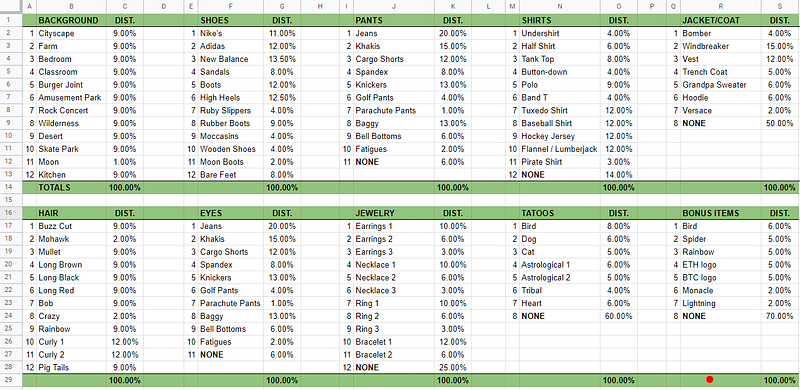
Hopefully, about 99% of the important information here can be readily inferred via a quick examination of that graphic.
Basically, each property or trait here has 3 columns:
- The first is just a number, and is really there as a convenience. (Please note that, while my example shows a max of 12 variations for each area, you might well have 5 or 15 or 20 or ??? … That’s up to you!)
- Next is a list of names for the property / trait / asset (whatever you want to call it), and the name atop the column. (For example, the “Background” property has 12 possible outcomes ranging from “Cityscape” through “Kitchen”; the “Shoes” one has 12 also, ranging from “Nike’s” to “Bare Feet,” and so on.
- And last is a distribution column. Looking at the PANTS area, for example, we can see that we want Jeans to show up about 20% of the time, but the Parachute Pants should only show up 1% of the time.
And thus, this is how we create rarities — by declaring what the distribution goals are for each trait listed. Note that you can get about as granular as you like here. With those Parachute Pants being set at 1% distribution, that means that, out of a 10,000 set of randomly generated graphics, we would expect to see about 100 graphics that have these pants.
BTW, you could also set that even lower — e.g., set it down to 0.1% if you want to see around 10 show up, etc. (Or, in some cases, a client might want to see exactly 1 of something, in which case we might not use pure randomness in the code, as the selection may not take place. But, there are of course other more deterministic approaches we can use in cases like that.)
Benefits of Doing This
Primarily, the benefit, as stated, is taking control over the distribution of traits and ensuring that there is a controlled variety in most things that will show up. I suspect that a nice mix of traits also helps outside services (like Rarity Sniper, for example) put together the kinds of hierarchical rarity analysis shown when you query that bot to see your NFT’s rarity. (They take all of the various rarity %s from your NFT and create an overall rarity score for your individual NFT, which they then use to rank your NFT overall within a given generative set.) I’ll cover that end of things another time, as I’ll likely write more articles on the whole “rarity game” of NFTs.
Also, doing this exercise gives clients a chance to put some thought into the names of each trait. For example, my sample rarity table has Backgrounds named “Cityscape,” “Farm,” “Bedroom,” “Classroom,” etc. But you could also get much more creative with these names. It won’t affect the rarity, but better names may have an effect on marketing during secondary market sales, as people might be drawn to a certain trait name as much as the trait itself.
Once the client solidifies the percentages and names, then the programmer can translate all of the percentages into code for the generation of the graphics, and all of the names can be incorporated into the meta data for each NFT. So, this whole exercise is a useful and necessary part of a generational art programming project, for sure. I hope you pursue one and, when you do, please let me know! Here’s how:


