
How to mine Monero on the Raspberry Pi
The Raspberry Pi can be used to mine cryptocurrencies. But how profitable can it be?
The Raspberry Pi can be used to mine cryptocurrencies, but how profitable can mining on the Pi be?
In the last article, I tried mining Duino-Coin and the result is that in about a year I can buy a coffee (but not at Starbucks):
This time we will try to mine Monero and see how good can our profitability be with my old Raspberry Pi 3:
I used Ubuntu Server 20.04.3 LTS (which supports RPI 3,4,400 on the 64-bit version) and an old Raspberry Pi 3 Model B Rev 1.2 that I had lying around.
Installation
Installing Ubuntu on the Raspberry Pi is a very straightforward process, you can find detailed documentation on the Ubuntu website:
After the installation and boot of the Raspberry Pi, we can log in with SSH and should be presented with the beautiful and familiar Ubuntu server start screen:
Welcome to Ubuntu 20.04.3 LTS (GNU/Linux 5.4.0-1042-raspi aarch64)* Documentation:  https://help.ubuntu.com
* Management:     https://landscape.canonical.com
* Support:        https://ubuntu.com/advantageSystem information as of Mon Dec  6 13:23:09 UTC 2021System load:  1.2                Temperature:           45.1 C
Usage of /:   13.8% of 13.93GB   Processes:             137
Memory usage: 28%                Users logged in:       0
Swap usage:   0%                 IPv4 address for eth0: xxxxxxxxx
A small detail, we can even see the temperature of the Raspberry Pi, mine seems to be at 45 degrees Celcius just after boot.
Setup Monero
To mine Monero on the Raspberry Pi, we are going to need to:
- Create a Monero wallet address (if you don’t have one already)
- Mining software, we are going to use xmrig
- Join a pool, we are going to join MoneroOcean
To create a wallet address we can download and install the Monero GUI Wallet, which makes our life easier:
Be aware that some antiviruses and firewalls may flag the Monero executables and archives as malware, as long as you have downloaded them from the official website, they are safe.
After installing the GUI Wallet and running the setup, we can choose the Simple Mode (be sure to backup your wallet seed), we can have access to our wallet:
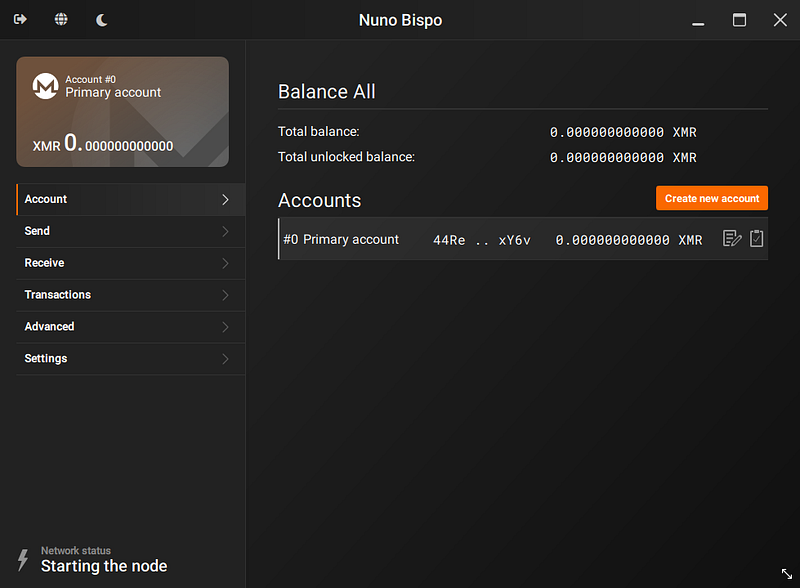
We can copy our wallet address with the clipboard icon, we will need the address later.
We can now setup the Monero miner from Monero Ocean:
To do that we need to run a series of simple commands, first we start by getting the necessary dependencies:
### Update package repositories and install dependencies ###
$ sudo apt update
$ sudo apt install git build-essential cmake libuv1-dev libssl-dev libhwloc-dev -y
Now we can clone the repository and build xmrig from the source:
### Clone xmrig repository ###
$ git clone https://github.com/MoneroOcean/xmrig
Cloning into 'xmrig'...remote: Enumerating objects: 30399, done.
remote: Counting objects: 100% (2225/2225), done.
remote: Compressing objects: 100% (890/890), done.
remote: Total 30399 (delta 1487), reused 1920 (delta 1329), pack-reused 28174
Receiving objects: 100% (30399/30399), 13.99 MiB | 2.81 MiB/s, done.
Resolving deltas: 100% (22450/22450), done.
Updating files: 100% (1052/1052), done.
### Build xmrig ###
$ cd xmrig/
$ mkdir build
$ cd build/
$ cmake ..
-- The C compiler identification is GNU 9.3.0
-- The CXX compiler identification is GNU 9.3.0
-- Check for working C compiler: /usr/bin/cc
-- Check for working C compiler: /usr/bin/cc -- works
-- Detecting C compiler ABI info
-- Detecting C compiler ABI info - done
-- Detecting C compile features
-- Detecting C compile features - done
-- Check for working CXX compiler: /usr/bin/c++
-- Check for working CXX compiler: /usr/bin/c++ -- works
-- Detecting CXX compiler ABI info
-- Detecting CXX compiler ABI info - done
-- Detecting CXX compile features
-- Detecting CXX compile features - done
-- Performing Test VAES_SUPPORTED
-- Performing Test VAES_SUPPORTED - Failed
-- Use ARM_TARGET=8 (aarch64)
-- Performing Test XMRIG_ARM_CRYPTO
-- Performing Test XMRIG_ARM_CRYPTO - Success
-- Looking for syslog.h
-- Looking for syslog.h - found
-- Found HWLOC: /usr/lib/aarch64-linux-gnu/libhwloc.so
-- Found UV: /usr/lib/aarch64-linux-gnu/libuv.a
-- Looking for __builtin___clear_cache
-- Looking for __builtin___clear_cache - found
-- WITH_MSR=OFF
-- Found OpenSSL: /usr/lib/aarch64-linux-gnu/libcrypto.so (found version "1.1.1f")
-- Configuring done
-- Generating done
-- Build files have been written to: /home/ubuntu/xmrig/build$ make
Scanning dependencies of target ethash
[ 1%] Building C object src/3rdparty/libethash/CMakeFiles/ethash.dir/ethash_internal.c.o
[ 1%] Building C object src/3rdparty/libethash/CMakeFiles/ethash.dir/keccakf800.c.o
[ 1%] Linking C static library libethash.a
[ 1%] Built target ethash
Scanning dependencies of target ghostrider
[ 2%] Building C object src/crypto/ghostrider/CMakeFiles/ghostrider.dir/sph_blake.c.o
..............
[ 98%] Building CXX object CMakeFiles/xmrig.dir/src/base/net/tls/TlsContext.cpp.o
[ 98%] Building CXX object CMakeFiles/xmrig.dir/src/base/net/tls/TlsGen.cpp.o
[ 98%] Building CXX object CMakeFiles/xmrig.dir/src/base/net/https/HttpsClient.cpp.o
[ 99%] Building CXX object CMakeFiles/xmrig.dir/src/base/net/https/HttpsContext.cpp.o
[ 99%] Building CXX object CMakeFiles/xmrig.dir/src/base/net/https/HttpsServer.cpp.o
[100%] Linking CXX executable xmrig
[100%] Built target xmrigWe have now built our mining software, so we can start mining to our Monero Ocean pool.
Mining Monero
To start mining, we just need to run the following command:
### Running xmrig (be sure to run the command on the build dir) ###
$ ./xmrig -o gulf.moneroocean.stream:10128 -u 44Re4jXRmGMEcoJKQBBYdaRRVSYLurjZA5M6GBojh1r8TkMnoYVACX8fJ7yYUB7kMigTiAwodaP8T3m8NHrjiRSANtgxY6v -p PI3 -t 4 * ABOUT XMRig/6.16.2-mo2 gcc/9.3.0
* LIBS libuv/1.34.2 OpenSSL/1.1.1f hwloc/2.1.0
* HUGE PAGES supported
* 1GB PAGES unavailable
* CPU ARM Cortex-A53 (1) 64-bit -AES
L2:0.0 MB L3:0.0 MB 4C/4T NUMA:1
* MEMORY 0.8/0.9 GB (94%)
* DONATE 0%
* POOL #1 gulf.moneroocean.stream:10128 algo auto
* COMMANDS hashrate, pause, resume, results, connection
* OPENCL disabled
* CUDA disabled[2021-12-27 13:20:39.869] benchmk STARTING ALGO PERFORMANCE CALIBRATION (with 10 seconds round)
[2021-12-27 13:20:39.870] benchmk Algo ghostrider Preparation
[2021-12-27 13:20:39.877] cpu use profile * (4 threads) scratchpad 2048 KB
[2021-12-27 13:20:48.039] cpu GhostRider algo 1: cn/dark (512 KB)
[2021-12-27 13:20:48.039] cpu GhostRider algo 2: cn/fast (2 MB)
[2021-12-27 13:20:48.039] cpu GhostRider algo 3: cn/turtle (256 KB)
[2021-12-27 13:20:48.273] cpu READY threads 4/4 (32) huge pages 0% 0/32 memory 65536 KB (8397 ms)
[2021-12-27 13:21:15.457] benchmk Algo ghostrider Starting test
[2021-12-27 13:21:39.796] miner speed 10s/60s/15m 6.73 n/a n/a H/s max 10.10 H/s avg 5.91 H/s
[2021-12-27 13:22:39.851] miner speed 10s/60s/15m 6.73 6.99 n/a H/s max 10.10 H/s avg 6.42 H/s
[2021-12-27 13:23:39.909] miner speed 10s/60s/15m 6.73 6.98 n/a H/s max 10.10 H/s avg 6.59 H/s
[2021-12-27 13:24:05.007] benchmk Algo ghostrider hashrate: 6.985726
[2021-12-27 13:24:05.007] benchmk Algo cn/r Preparation
[2021-12-27 13:24:09.385] cpu stopped (4377 ms)
[2021-12-27 13:24:09.385] cpu use profile * (4 threads) scratchpad 2048 KB
[2021-12-27 13:24:34.231] cpu READY threads 8/8 (4) huge pages 0% 0/4 memory 8192 KB (24847 ms)
[2021-12-27 13:24:36.901] benchmk Algo cn/r Starting test
[2021-12-27 13:24:43.913] miner speed 10s/60s/15m 3.00 n/a n/a H/s max 3.00 H/s
[2021-12-27 13:24:49.062] benchmk Algo cn/r hashrate: 2.945198
......
[2021-12-27 14:54:07.663] cpu accepted (8/0) diff 391 (302 ms)
[2021-12-27 14:54:10.213] cpu accepted (9/0) diff 391 (476 ms)
[2021-12-27 14:54:11.338] net new job from gulf.moneroocean.stream:10128 diff 391 algo astrobwt height 6458770
[2021-12-27 14:54:27.297] net new job from gulf.moneroocean.stream:10128 diff 391 algo astrobwt height 6458771
[2021-12-27 14:54:29.455] cpu accepted (10/0) diff 391 (305 ms)
[2021-12-27 14:54:39.636] miner speed 10s/60s/15m 17.03 17.17 n/a H/s max 18.93 H/s
[2021-12-27 14:54:40.540] cpu accepted (11/0) diff 391 (304 ms)
[2021-12-27 14:54:53.420] net new job from gulf.moneroocean.stream:10128 diff 461 algo astrobwt height 6458772
[2021-12-27 14:54:53.770] cpu accepted (12/0) diff 391 (478 ms)
[2021-12-27 14:55:12.598] cpu accepted (13/0) diff 461 (288 ms)The miner will start benchmarking several algorithms and after a while, it will start mining.
The options used are:
- -o, Mining poll URL;
- -u, Monero wallet address, make sure to use yours from the previous step;
- -p, Miner name to see on the stats page of Monero Ocean;
- -t, Number of threads, my Pi has 4 cores, so I choose 4 threads (you might need to adjust for your Pi);
When the miner is running we can press ‘h’ to view hash rates:
|    CPU # | AFFINITY | 10s H/s | 60s H/s | 15m H/s |
|        0 |       -1 |    4.52 |    4.20 |     n/a |
|        1 |       -1 |    4.63 |    4.31 |     n/a |
|        2 |       -1 |    4.42 |    4.42 |     n/a |
|        3 |       -1 |    4.52 |    4.33 |     n/a |
|        - |        - |   18.08 |   17.26 |     n/a |
[2021-12-27 14:55:32.045]  miner    speed 10s/60s/15m 18.08 17.26 n/a H/s max 18.93 H/s
Or press ‘s’ to see stats:
- RESULTS
 * accepted         15 (100.0%)
 * pool-side hashes 9751 avg 650
 * difficulty       554
 * avg result time  37.5s
 - TOP 10
  # | DIFFICULTY | EFFORT % |
  1 |      20729 |    47.04 |
  2 |       7956 |   122.56 |
  3 |       3960 |   246.24 |
  4 |       2462 |   396.06 |
  5 |       1195 |   815.98 |
  6 |       1110 |   878.47 |
  7 |        970 |  1005.26 |
  8 |        961 |  1014.67 |
  9 |        613 |  1590.70 |
 10 |        534 |  1826.03 |
Our miner is up and running, but how is it performing?
Results
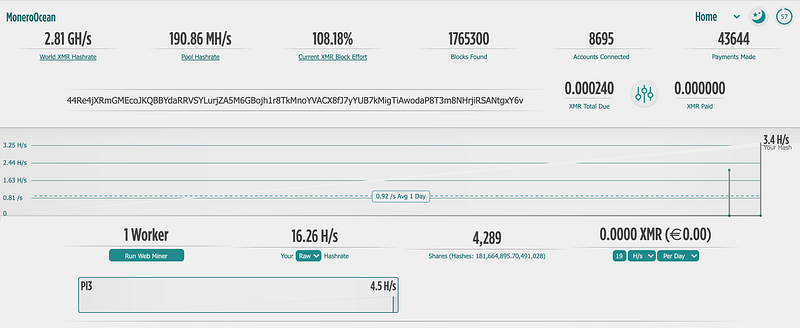
The hash rate that my Raspberry Pi 3 produces is about 19H/s and we can see also our performance in the Monero Ocean Dashboard:
Checking Monero profitability:
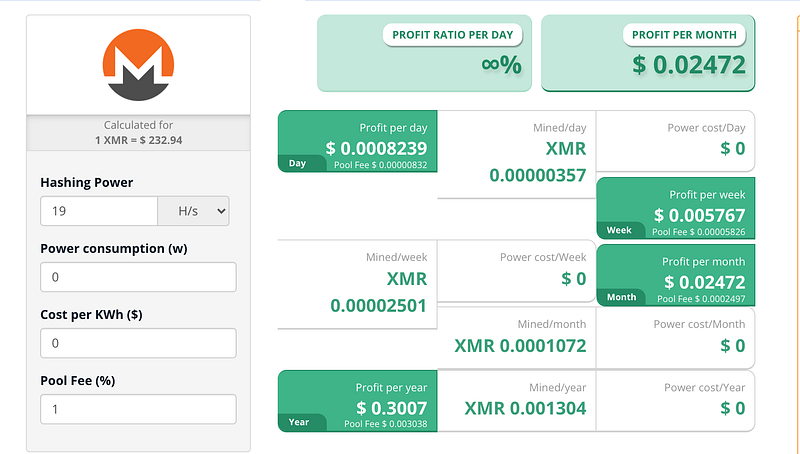
In an ideal world and not counting any power costs, I could be making $0.02 per month with my old Raspberry Pi 3.
But keep in mind that this is an old Raspberry Pi 3, new models like the 4b can produce up to 10x more than this.
I might not get rich but considering that it took me less than 5 minutes to set up the Raspberry Pi and started mining with an extra unused Pi then it is a nice, but very slow-growing side income with zero effort.
Conclusion
The world of cryptocurrency is quickly becoming the new gold rush, and with good reason.
With Bitcoin at an all-time high (and quite possibly here to stay), there are more opportunities than ever for making money off this market!
One way you can get started? Try your hand at crypto mining with one simple gadget: The Raspberry Pi.
This credit card-sized computer offers a low-cost alternative that doesn’t require any technical expertise whatsoever — allowing even beginners who don’t know how code or programmable logic might be able to contribute something valuable towards improving their investment potentials.
While it’s not as powerful or efficient compared to other solutions out there, you can still make money by running your own miner on this device.
Follow me on Twitter: https://twitter.com/DevAsService
Check out my website at: https://developer-service.io/
Check out other articles that might interest you:
If you enjoyed reading this article and found it useful, you can support me by signing up for a Medium membership (if you are not a member). It will only cost you $5 a month — this will give you access to all stories on Medium! (and I will receive a small commission)
Besides that, if you want to stay updated when I post a new article, you can signup for my free newsletter!


