
How to download your data, and manage your Followers, your privacy & those you are Following on Medium
At the moment of writing this, I have more Medium readers following me, than the number of people who I am following. I am following (or am a Follower of) 197 members and am followed by 208.
A Medium member is someone who pays a monthly membership fee to have access to member only Stories on Medium.
A Medium reader can be someone who has signed up or registered with Medium and has logged into Medium (and who is either a member who pays $5 USD per month or is not a member but has signed into Medium), or a passing reader (passerby) who has not signed into Medium.
PASSERBY READERS AND PRIVACY
Update at June 2020
Medium keeps changing things. Anyone who comes across the Medium homepage will see a page with what I call M&M colored topic buttons, OR not (as Medium keeps changing its Landing page). If you do see the Topic buttons looking like M&Ms that means no passerby will be able to see any Story Titles. The fancy round Topic names are supposed to entice visitors to register with Medium.
The visitor may have to register or sign-up, in order to read 2 free stories per month. It depends upon whether Medium is showing or using the M&M homepage with Topic names only (which shows NO story titles at all), OR if they are using a sensible homepage which shows some story titles, so the passerby can browse (at least 2 stories free) without registering.
If a visitor or passerby wants to read more (regardless of whether she/he has to actually register to read 2 stories free), she/he will have to become a paying member, at $5 USD per month. She/he can pay up-front with a small discount for paying for 12 months.
The passerby, and the non-Member whom is signed in, can read 2 full “member only” Stories per month, as a courtesy thing by Medium, which may tempt them into paying a membership.
Keep in mind that, with the Medium homepage showing a selection of enticing Story Titles to visitors, that both a person who has signed up with Medium (but is not a paying member) and a Passerby (who has not signed up with or joined Medium via using their Google or Facebook or Twitter account or Email) can do the following.
They can read your Medium bio information if they come across one of your Story titles or across a Response you have made on an un-locked Story, because they are able to hover their mouse over your name and will thus see your short bio, and furthermore will be able to click on your name to go to your Medium Profile page.
They will see all your Story titles on your Medium Profile page, but won’t be able to read any locked Stories.
Note that a person who hasn’t signed up with Medium (as well as someone whom has signed into Medium to read and create Stories) can read unlocked Stories that you have published on Medium.
If a passerby accesses your Medium Profile, he/she will be able to click on the ’“Followers” link and see who your followers are
UPDATES: October 2020 and April 2021
Medium removed the ability or function to look at someone else’s responses, claps, and highlights, on the web (PC) version of Medium, and the ability to look at who someone is following.
Since April 2021 when Blogrolls were introduced, the links to the “Following” lists of Medium writers were restored!
HOWEVER, after October 2020, noone at all can see someone else’s Responses /Claps / Highlights on the desktop version of Medium!
See this article here — ->
When I joined Medium I thought that I would have a safe and fairly private place on Medium with only signed in readers having access to my bio and my Stories, and furthermore, with my “locking” my Stories, only paying members could read my locked Stories (apart from the free quota that Medium allows).
Bear in mind that I am introverted and when face to face I don’t like being in the limelight. If you are extroverted or even if you are not, you may be happy that a passerby may come across your Story titles and activity on Medium.
Well, consider the happy discovery of introverted Me that it dawned upon me that the only way that a passerby could find my bio (or my Story titles) would be if either one of my Stories was Featured on the Medium Home page OR if the reader did a Search on Medium and found one of my Stories, or if they found a Story by someone else, which I had responded to.
Well, if any of my Medium Stories are featured on the Home page for the passerby and all to see, I will “eat my hat” and do a hula-hoop dance on the table in the bar where I don’t drink.
That leaves searches and once I thought about it, if a passerby, either by entering my name into the Search field or by incidentally finding a Story that I have posted on Medium, comes across my bio and Story titles; well, all credit to them (plus you might think wouldn’t I be happy with the publicity, unless I was a cautious wall-flower).
Of course, a passerby would have to become a paying member in order to read my locked Stories (or at least, to read the locked Story that they found if they have run out of free Story “credits”).
The fact that a passerby could “lurk” and pick up information related to me (as aforementioned) is, I guess, a “price paid by me” for my being on Medium. In other words, I choose to allow it, albeit via Medium’s settings.
Upon reflection, the idea of the possibility of close to zilch passerby readers coming across my bio or Stories is not so disturbing to me as it was when I initially discovered who could see what.
To be perfectly frank, one reason why I lock my Stories is because I actually want to limit my readership (because I’m one of those cautious wallflowers).
It cheers me that the information that I have shared above may actually be pleasing to some Medium writers, thinking that their bio and Stories may be getting exposure outside of the signed in readership on Medium.
LOCKED STORIES & THE MEDIUM PARTNERSHIP PROGRAM
Member only Stories are referred to as “locked Stories” and people who have signed into Medium (whether they are paying Members or not) can (if they have access to the Stripe payment processor) join the Medium Partnership Program and can “lock” a Story (any or all or some of their own Stories) or “put it behind the pay-wall”.
Paying Medium Members will have a green circle shape around their Avatar or Profile picture, and people who have signed up with Medium, but are not paying monthly fees, won’t have any green color circling their round Profile picture.
Remember that if you “lock” a Story, the non-paying members won’t be able to read your locked Stories.
In my case, I lock 99% of my Stories and the reason why is not because I am mean & stingy, blocking people who can’t pay for a membership, but there are 2 reasons. One obscure reason has already been mentioned.
The other reason is because I am 55 years old and I have unendingly contributed to “society” including many written pieces, i.e. Guidelines and Notes on this and that, all of which I have given free.
Now is the time for me to use the Medium Partnership program to see if I can get at least get $5 USD per month, to pay my Membership fees — and keep in mind that I pay more than $5 because the Australian dollar is not equal to the US dollar.
I would expect all or nearly all of my Followers to be paying members of Medium, because sorry, non-paying members won’t be able to read my locked Stories (apart from 2 a month). A non-paying Medium “account holder” (signed into Medium) can’t read my locked Stories so why would she/he follow me?

FOLLOWERS AND WHO YOU ARE FOLLOWING
On your Medium Profile page, you will find under your short bio at the top, the words Following and Followers.
Click on the word “Followers” and you will see an un-ordered list of people following you. These may include paying members (green circle) and non-paying members.
If you click on Following you will find an un-ordered list of Medium Profile names of people who have an “account” with Medium in terms of they have signed up with Medium, who you are following.
Now if you are like me, you will wonder how on earth these lists are added to or displayed, because it sure doesn’t list the latest Follower or latest person you are Following at the top of the list, or list them in alphabetical order.
You can click on the words “New from your Network” on the right-hand side of your Medium home page, then filter your search by clicking on People or Publications, to view the Titles of new Stories.
Even if you just search upon People, if you are following one thousand (or even 198) people on Medium, there will be a wheel-barrow or a cruiser ship full of new Stories just for one day !
Every second day at least, I will go to my “New from my Network” and I will scan the titles of Stories created by people and the Stories appearing under Publications, then pick those Story titles and writers whom I’m especially interested in, to read their Stories.
I got to wishing that I could have a list of those whom I am following, in alphabetical order. I desired this because I am an avid reader and want to be able to scroll through my ever expanding alphabetical list and quickly find my favorite writers, which I can do so at amazing speed by going through an alphabetically ordered list (rather than list my favorite writers separately in a Word document or bookmark them in my browser).
At first I tried using Microsoft Excel and Word, but they didn’t work out.
Then I discovered the Export function of Medium!
DOWNLOAD OR SAVE (EXPORT) YOUR MEDIUM INFORMATION
You can download (save) your information on Medium to your computer, and the following page on Medium gives instructions on how to do this.
Your information will come in a Zip file which compresses the information, but once downloaded, you can extract the files within, if you have enough memory and storage capacity on your computer; or just open the Zip file and navigate from there. I use WinRAR to extract the files.
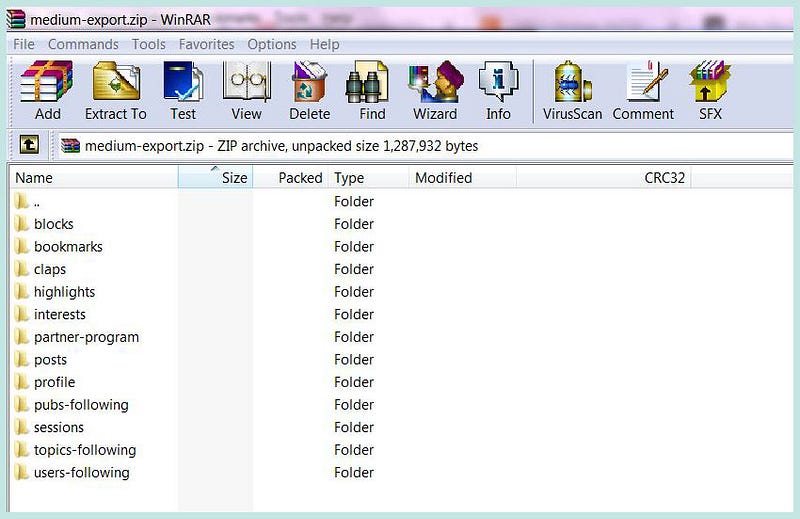
Here are some of the components of the downloaded information, that I find useful.
BOOKMARKS
A list of Stories which you have saved to your Medium reading list for later reading. Clicking on a Story title in this list will bring up the full Story in HTML (web page format).
Note, to bookmark a Story for reading later, click on the little icon or picture of the “flag” underneath the Clap symbol on the left of a story, or at the bottom of a Story under the tags and next to the 3 little dots. The “flag” or ribbon will go black or solid after you click on it.
Your Reading List is at the top right-hand corner of your Medium home page. Look for the icon/picture of the little flag between the magnifying glass (Search function) and the bell (the Notification function). You can also access your Reading List from the drop-down menu by clicking on your Avatar at the top right corner of your Medium homepage.
CLAPS
A list of other writers’ “Stories” that you have clapped or applauded.
These include Comments or Responses that you have clapped, such as when you clap someone’s nice response to your own Story. You can click on a Story / Comment title to open up the content in HTML
This list comes in handy if you want to remind yourself what Stories or Responses that you have applauded or clapped.
PARTNER PROGRAM POSTS
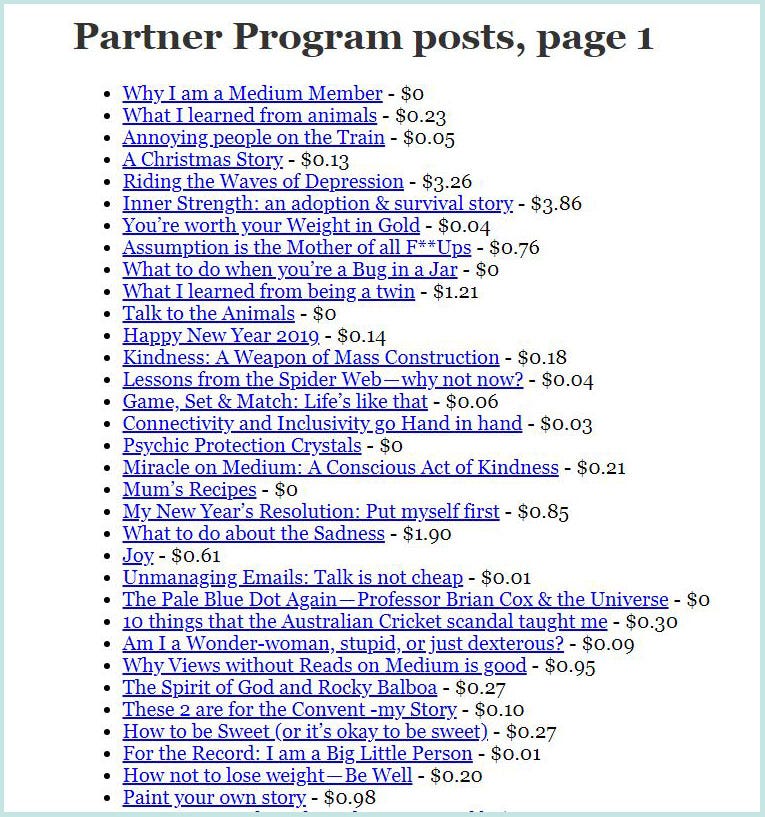
A list of all the Stories that you have written and locked, along with their earnings, if any. This is really handy because it gives a no-nonsense straightforward list of titles in text only. It includes all your Stories from your first until the date that you download the Zip file of your Medium content.
POSTS — A list of your “Stories” published OR in draft form, noting that Stories include your Responses on other Stories or on your own Stories. This is handy to provide a quick snapshot of all that you have published and drafted.
I am delighted with this list because I can click on any Title and that Story will open up in full in HTML. Download your data & try it out for yourself. You should be able to distinguish Posts from Responses in the list, because you wrote them.
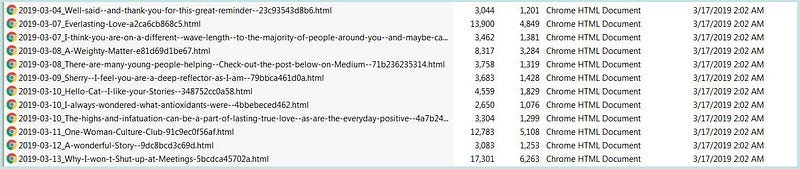
3,044 shows the size of the File in bytes, unpacked & 1,201 the size compressed or packed, referring to the first line in the screenshot below.
USERS-FOLLOWING
This is a list of the Medium writers whom you are following.
Note it is not a list of your Followers, but whom you are following.
Important note: a list of your Followers is not included in the download!
If you want a list of names of your Followers, perhaps copy and paste them from Medium into a text or spreadsheet document. Your list on Medium of your Followers will show Follow buttons next to any writer who is your follower, but whom you are not following. This is to help you easily Follow back if you so desire.
Note, that if you copy your list of Followers from Medium, that the Follow button or information does not carry over, meaning that the names copied into your Word list won’t show who are you not following (or for that matter who you are following).
If you have the time and inclination, you can cross-reference your list of Followers with your list of those you are Following, and can highlight in your Word document of Followers, those who you aren’t following.
Anyhow, my idea is to export / download my zipped Medium information at the end of each month, at which time I will delete the old Zip file, to replace it with the new Zip file which has cumulative data up until that point of time.
HOW TO ALPHABETICALLY ORDER YOUR LIST OF WHO YOU ARE FOLLOWING
Download your data from Medium and click on Users-Following
Copy the information from every page into a word processed document, and save your document with the date at the start of the document title, e.g. 29032019 Medium Followers.
The date will tell you the date up until when the list was current.
Personally, I am not interested in alphabetically sorting the list of my Followers (although that would be nice if Medium provided that ability) because, astonishingly to some, it is not my Followers that I am most interested in!
I have done some analysis, to find out that from all of my up to 198 Followers currently, only up to 20 percent of them have interacted with some (not all) of my Stories (in terms of clapping and / or commenting).
A lot of people follow others on Medium because they are “passing by” or have seen a Story title or even glanced at a Story content (but not clapped it) and they quickly “bookmark” the writer’s Profile page by clicking on the FOLLOW button.
They do this “just in case” they want to look at that person’s Stories sometime, which is okay of course, but does not mean that they will ever read a single Story written by the person whom they are following.
Some people follow others in the hopes that the followed will follow them back, and some Medium writers advocate this as a strategy for any Medium writer, to try to increase claps & responses for them.
I have followed others in passing, but I don’t follow others only to get them to follow me back.
It is those who I am Following that I am keen to focus upon as I am following them in order to read their Stories and interact with their Stories, time permitting.
You can copy and paste all of your User-Following lists into a Word document and then sort the names alphabetically by first names.
Note, the HTML lists from the downloaded Zip files give the Medium writer’s “Medium Profile Name” which may not always match their everyday legal name, but in most cases will.
This Profile name is what appears after the Medium information in the web address or URL, e.g.
I converted my list in Word to a Table and removed the bullet points, then added 2 columns, one for the everyday name or full name (usually found when you go to the person’s profile page) and one for comments to remind myself why I’m following that person.
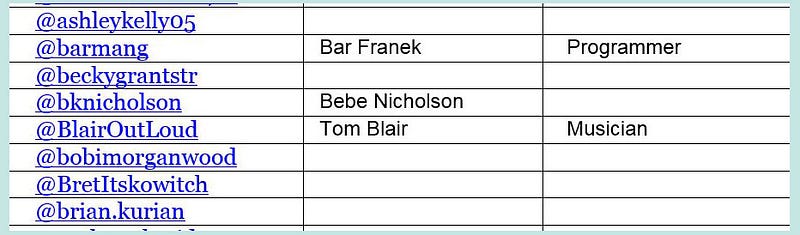
I can use this list to scroll through my list of people whom I am following, in order to click on and visit selected Profile pages. I can manually add to this list whenever I follow a new person.
I know that the above is a bit of work and that I can just type a writer’s name into the Search field or Bookmark their name, but consider that I can’t remember the names of all the writers whom I like to follow (sorry) and that if I whizz through an alphabetical list, when I see a particular name, it will jog my memory in an “aha” moment.
Eventually that “aha moment” will be replaced by me adding a name mentally to my already long list of Medium writers that I can remember, and then when it’s time for me to do some reading on Medium, scrolling through my Word list to find the name and clicking on it, to go to the person’s Profile page.
This is how I prefer to work with those I am following. This is me.
BLOCKING A PERSON
Last but not least you can’t remove a Follower per se, in case you wanted to know if you could, but you can block a person who is following you and you can block someone who is not following you from following you.
Go to the user’s profile page. Click on the 3 little dots next to the Follow button. Click Block this user. Blocked people will not be able to see your past or future Stories and if you block someone who is not following you, he / she will not be able to start following you.
If a blocked user visits your profile page, he or she will see a message that they’ve been blocked. Also if you block a Follower, your name will disappear from the list of Medium writers whom they are following.
Hopefully they will not notice that your name disappeared from their list and won’t remember your name so won’t go to your Profile page. Don’t worry because blocking a person means that you won’t see their new stories in your Newsfeed and vice versa. The Medium article below explains fully.
To see who you have blocked (if you have) or to un-block someone, click on your Avatar or round Profile picture, then click on Settings in the drop-down menu. Scroll right down the Settings page until you see “Manage Blocked Users” and click on the button for managing blocked users.
That’s all for now, but hey, if you liked this Story, you may be interested in the following Stories!
If you are thinking about creating your own Medium Publication, you may be interested in my comprehensive guidelines on how to create a publication, at the page below.
https://medium.com/lockdown-peaceful-space-live-love-learn/medium-tips/home


