avatarGrace Mary Power

Free AI web copilot to create summaries, insights and extended knowledge, download it at here

2055

Abstract

style="background-image: url(https://miro.readmedium.com/v2/resize:fit:320/1*Ep6VUdN7wqLd4VrFK7kgOg.jpeg)"></div> </div> </div> </a> </div><p id="ba37">Not all Publications have such an “information block” on their Publication sites.</p><h2 id="e90d">Method Two — redundant / obsolete at April 2021</h2><p id="99ec">Find a Publication that you are interested in (via a search of a topic of interest or by reading other Writers’ Stories, etc.) then go to a recent Story.</p><p id="bea1">If you are brand new to Medium, to run a search on Medium, click on the picture of the magnifying glass shown below, then type in your search term(s). You can then pick as an overriding Search Category, one from a number of different Tags or Stories or People or Publications, using your entered search term.</p><figure id="0736"><img src="https://cdn-images-1.readmedium.com/v2/resize:fit:800/1*NzssK_Kw3iHJ1iK35jO2KQ.jpeg"><figcaption></figcaption></figure><p id="506f">Once you have identified a Publication of interest, click on the title of a Story that was published 2 days ago or more.</p><p id="8df2">Scroll to the bottom of the Story and select the <b>most unique Tag </b>that you can find and <b>click on it</b>.</p><p id="3932">On the resultant page, make sure that “Latest stories” is selected and find the Story title for the Story you just found. A story titles <a href="https://readmedium.com/searching-on-medium-the-medium-search-function-3186cef4effd">may not show up in the Search result</a> until 2 days after the story is published!</p><p id="a51b">In this example, I went to the publication “Journal of Journeys” and the latest Story had a tag called “Ambition.”</p><p id="d83a">After I clicked on the tag “Ambition” at the bottom of the latest Story, then clicked on “Latest stories” it brought up the screen below.</p><p id="9e65">Hover your mouse over the Publication’s name and you will see “<b>Followed by x y z people</b>” where xyz is of course the number of Followers of that publication.</p><fig

Options

ure id="d74e"><img src="https://cdn-images-1.readmedium.com/v2/resize:fit:800/1*QvIwUPKPdT2uhCMpNylzew.jpeg"><figcaption></figcaption></figure><p id="85c3">Note: choosing the most unique tag just makes it easier to find the Story title when you run the search upon that Tag.</p><p id="5414">The search results upon searching a particular Tag will, of course, include Stories from all Publications as well as from those not in Pubs, which have the Tag you are searching upon.</p><p id="545e"><b>Method Three</b></p><p id="aca4">A <b>third way</b> is to scroll to the bottom of the homepage and click on “<b>Archive</b>”. This will take you to a page with some stories listed (<b>top 10 by default)</b>.</p><p id="7b3d"><b>Click on ANY tag name</b> on the right and hey presto, you will be taken to a list of stories in the Publication with that tag. <b>Look to the left</b> and you will see the number of Followers of the Publication!</p><p id="4285">If there is, annoyingly, an infinite number of stories on the homepage, just open up the address bar and type /archive at the end of the URL, e.g.</p><p id="a6df"><a href="https://medium.com/curation-matters/archive">https://medium.com/curation-matters/archive</a></p><p id="66c6">If you are thinking about creating your own Medium Publication, you may be interested in my comprehensive guidelines on how to create a publication, at the page below.</p><div id="d591" class="link-block"> <a href="https://medium.com/lockdown-peaceful-space-live-love-learn"> <div> <div> <h2>Lockdown Peaceful Space - Live, Love, Learn</h2> <div><h3>Positive experiences and ideas are shared in Lock-down which matter out of isolation too</h3></div> <div><p>medium.com</p></div> </div> <div> <div style="background-image: url(https://miro.readmedium.com/v2/resize:fit:320/1*TajWXMafQZFNGE5AuD7HOQ.jpeg)"></div> </div> </div> </a> </div></article></body>

How to Find the Number of Followers of a Medium Publication

From Little Things, Big Things Grow

Image from Creative Commons

Here are 3 ways to find out the number of Followers of a Medium Publication without having to look it up on Smedian (which lists a huge number of Medium publications).

Method One

Click on “Latest Stories” at the bottom right of the home page of a Medium Publication on a desktop screen. The number of Followers will be shown there. The home page may be set up with too many stories showing on it so that you never get to the end to be able to click on “Latest Stories”. In that case, type in forward slash plus the word “latest” into the web address for the Publication. That is, type in: /latest as shown in the example below.

https://medium.com/thirty-over-fifty/latest ← the URL or web address for the homepage only includes the Pub name, but the Latest Stories page includes the word “latest” in the web address. 😃

The publication creator may also have configured her/his Pub so that an “Information Block” appears somewhere on the Home page, which will display the current number of Followers.

You will see an example of this on my own Publication “Thirty over Fifty”.

Not all Publications have such an “information block” on their Publication sites.

Method Two — redundant / obsolete at April 2021

Find a Publication that you are interested in (via a search of a topic of interest or by reading other Writers’ Stories, etc.) then go to a recent Story.

If you are brand new to Medium, to run a search on Medium, click on the picture of the magnifying glass shown below, then type in your search term(s). You can then pick as an overriding Search Category, one from a number of different Tags or Stories or People or Publications, using your entered search term.

Once you have identified a Publication of interest, click on the title of a Story that was published 2 days ago or more.

Scroll to the bottom of the Story and select the most unique Tag that you can find and click on it.

On the resultant page, make sure that “Latest stories” is selected and find the Story title for the Story you just found. A story titles may not show up in the Search result until 2 days after the story is published!

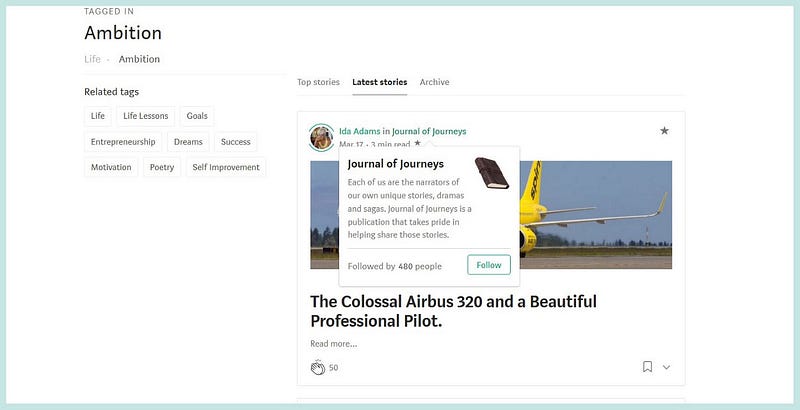
In this example, I went to the publication “Journal of Journeys” and the latest Story had a tag called “Ambition.”

After I clicked on the tag “Ambition” at the bottom of the latest Story, then clicked on “Latest stories” it brought up the screen below.

Hover your mouse over the Publication’s name and you will see “Followed by x y z people” where xyz is of course the number of Followers of that publication.
Note: choosing the most unique tag just makes it easier to find the Story title when you run the search upon that Tag.

The search results upon searching a particular Tag will, of course, include Stories from all Publications as well as from those not in Pubs, which have the Tag you are searching upon.

Method Three

A third way is to scroll to the bottom of the homepage and click on “Archive”. This will take you to a page with some stories listed (top 10 by default).

Click on ANY tag name on the right and hey presto, you will be taken to a list of stories in the Publication with that tag. Look to the left and you will see the number of Followers of the Publication!

If there is, annoyingly, an infinite number of stories on the homepage, just open up the address bar and type /archive at the end of the URL, e.g.

https://medium.com/curation-matters/archive

If you are thinking about creating your own Medium Publication, you may be interested in my comprehensive guidelines on how to create a publication, at the page below.

Medium
Medium Publications
Followers
Publishing
Writing
Recommended from ReadMedium