
How To Log NestJS Applications in a Distributed System — Part 1: winston
Let us take a look into winston logging, integrate it in a NestJS application and create centralized logging with Loki and Grafana
Nowadays it is important to log your applications for better monitoring, debugging and failure handling (for example, in a Kubernetes cluster), and to ensure centralized logging for a better overview of a distributed system.
There are numerous applications and frameworks that make this possible. But in this series I want to focus on NestJS, winston, and the Loki Stack combined with Grafana.
A Distributed System of Microservices
On many platforms we can see how a system of dependent microservices is developed to satisfy the customer (e.g. Ebay TECH, Facebook). The biggest challenge is to ensure that all microservices can reached each other and thus to provide fail-safety to keep the customer happy. If a service is not available (e.g. network problems) or even failed, a responsible person would have to get notified and the service would have to restart itself if necessary. For this the applications need to be monitored. To read more about this, check out the guide on How To Monitor a Distributed System with a NestJS Application
Besides application monitoring it is also important to log all information or exceptions of applications in a centralized logging system to have a maximum overview on what happens in a distributed system.
A Principle of Centralized Logging (Fluentbit and Loki)
There are many principles for how to create centralized logging in a distributed system. In this series I want to focus on fluentbit and the Loki-Stack with Grafana. In Kubernetes fluentbit is deployed as DaemonSet and runs on every node to monitor the log files, which are stored in /var/log/containers/… . These logs are sent via events to our data storages like Splunk, Elasticsearch, OpenSearch, Kafka, and more.
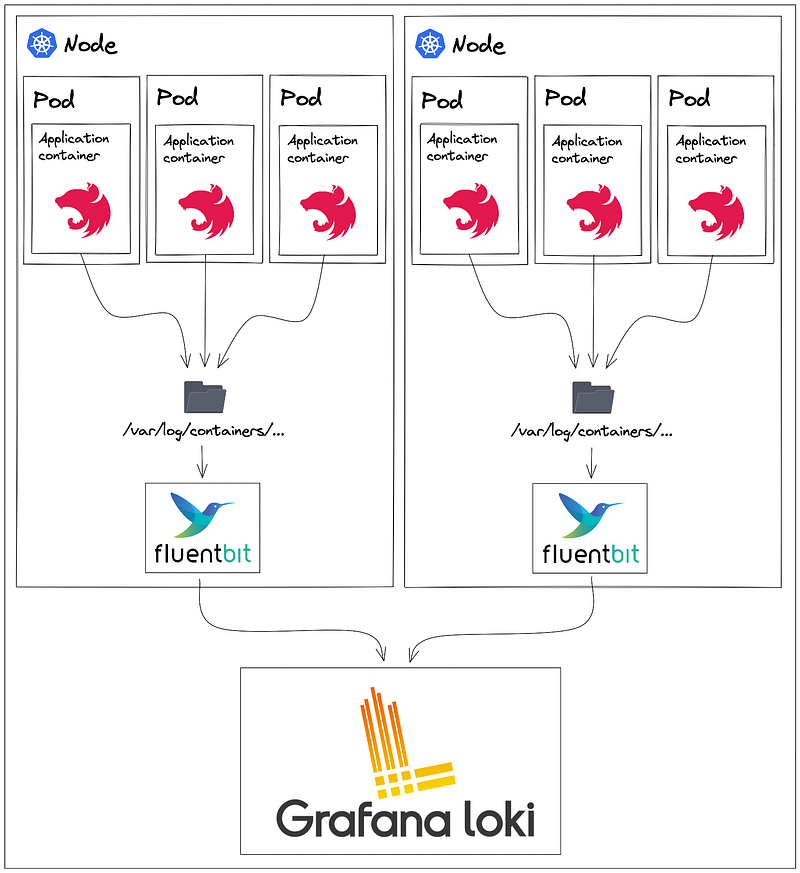
In this series all fluentbit logs get stored in Loki.
Loki is a horizontally scalable, highly available, multi-tenant log aggregation system inspired by Prometheus. It is designed to be very cost effective and easy to operate. It does not index the contents of the logs, but rather a set of labels for each log stream. [Loki Homepage]
Some advantages of Loki:
- It’s really easy to get started
- 100% persistence to object storage
- Builds metrics and generates alerts
- No ingestion log formatting requirements
- Tails your logs in realtime
- Natively integrates with Prometheus, Grafana, and K8s
For me, the main advantage is that it can be easily integrated into a Kubernetes cluster via helm.
The Software Developer Part: Getting Started With Integration of Winston Into a NestJS Application
winston is designed to be a simple and universal logging library with support for multiple transports. A transport is essentially a storage device for your logs. Eachwinstonlogger can have multiple transports (see: Transports) configured at different levels (see: Logging levels). For example, one may want error logs to be stored in a persistent remote location (like a database), but all logs output to the console or a local file.
NestJS has a performant logger out of the box.
In addition, winston also logs information, errors, exceptions, and rejections as a file. Such features are helpful in connection with centralised logging.
npm install winston
We always prefer decoupled and isolated implementations, so in general, we can also build a simple initialisation function initWinston(…) for the winston logger. There are log levels, formats, default meta, and different handlers, e.g. for exception or rejections, with storage paths defined.
As a parameter, we enter a service/api name, which will be visible in the logs. This can then be used as a Singleton in our application. A Singleton is more of an anti-pattern in today’s generation. We could also build a NestJS service by creating the instance of the winston logger in the constructor and making the log function available via Dependency Injection in each individual NestJS module.

We can create the instance of the logger at the top in the bootstrap function:
async function bootstrap() {
  initWinston(loadApiConfiguration().apiTitle);
  ...
}
In the end, we can log various things everywhere in our application. And the logs are also saved as file in the environment.
Here is an example for a controller:
Conclusion
In this series I show how to create a centralized logging system with NestJS, fluentbit and the Loki Stack. In the first part I described the background of the architecture with fluentbit and Loki, and introduced the application logging with winston.
In the next part I will show you how to create a local Kubernetes cluster with kind, and how to deploy the Loki Stack via Helm charts in it. Also, I show the use case for a Sidecar container to collect custom logs.
Thanks for reading! Follow me on Medium, or Twitter, or subscribe here on Medium to read more about DevOps, Agile & Development Principles, Angular, and other useful stuff. Happy Coding! :)
Github Project
You can find the practical part of this series on GitHub.


