avatarCryptoInfo ⓧ ⚛️

Free AI web copilot to create summaries, insights and extended knowledge, download it at here

2467

Abstract

faa"><img src="https://cdn-images-1.readmedium.com/v2/resize:fit:800/1*o7JeYnPz0bB-l8kkpqU2Ug.png"><figcaption></figcaption></figure><p id="0d12">4> Go to <a href="https://thirdweb.com/zksync-era/0xa5dd0c4B23DE33dEb65757F233e7bE465B0f60c1/claim-conditions">zkSync Era Smart Contract</a> to set up Claim Conditions</p><figure id="16f0"><img src="https://cdn-images-1.readmedium.com/v2/resize:fit:800/1*PqQ9C9TBdXL_V026iDgDiQ.png"><figcaption></figcaption></figure><p id="c54e">5> Save Phases and confirm on your wallet</p><figure id="3cfa"><img src="https://cdn-images-1.readmedium.com/v2/resize:fit:800/1*zOF4OJfVryDdyV9NukffHQ.png"><figcaption></figcaption></figure><figure id="8a91"><img src="https://cdn-images-1.readmedium.com/v2/resize:fit:800/1*CxEZ-f4Xhh0H9EfMyjoaCQ.png"><figcaption></figcaption></figure><p id="6378">6> Mint an NFT from the drop 6-a> Visit <a href="https://github.com/saminacodes/tw-demo-assets/blob/main/Shapes/shape_properties1.json">HERE </a>to download .json file</p><figure id="f26e"><img src="https://cdn-images-1.readmedium.com/v2/resize:fit:800/1*M5fMTgKt74DwzdNoPefHpQ.png"><figcaption></figcaption></figure><p id="f384">6-b> Go Back to <a href="https://thirdweb.com/zksync-era/0xa5dd0c4B23DE33dEb65757F233e7bE465B0f60c1/nfts">NFT tab</a> and click on Batch Upload</p><figure id="157b"><img src="https://cdn-images-1.readmedium.com/v2/resize:fit:800/1*EScbiJQ6viJKJ7V0LOONfA.png"><figcaption></figcaption></figure><p id="c8c2">6-c> Upload saved .json file 6-d> Scroll down “Upload your NFTs” page, then click on NEXT</p><figure id="1dd3"><img src="https://cdn-images-1.readmedium.com/v2/resize:fit:800/1*KWr5JXF9OiyI24UgLLoI_w.png"><figcaption></figcaption></figure><p id="4340">6-e> Select “Reveal upon mint” , then click on “Upload 30 NFTs” and Confirm the transaction on your wallet</p><figure id="81f3"><img src="https://cdn-images-1.readmedium.com/v2/resize:fit:800/1*YjRFAy8E8_N337Rgc0YXVQ.png"><figcaption></figcaption></figure><h2 id="d1be">3️⃣ Claim NFT</h2><p id="2ae9">1> Go Back to <a href="https://thirdweb.com/zksync-era/0xa5dd0c4B23DE33dEb65757F233e7bE465B0f60c1/nfts">NFT tab</a> again, and lick on “Claim” to mint our first NFT ➡️ Confirm the transaction on your wallet, gas fees: $0.2, less than displayed one.</p><figure id="760c"><img src="https://cdn-images-1.readmedium.com/v2/resize:fit:800/1*nN9somC_e9Jt0r5cklYouw.png"><figcaption></figcaption></figure><figure id="5406"><img src

Options

="https://cdn-images-1.readmedium.com/v2/resize:fit:800/1*697gtdA-55NjPABI_SCBzQ.png"><figcaption></figcaption></figure><p id="97f3">2> Claim another 29 Unclaimed NFTs, it will be qualified 29 (total 30) transactions on zkSync Era Mainnet.</p><p id="e75d">➡️ <b>Tips:</b> Claim 2–3 NFTs simultaneously and Repeat every few fays to avoid being marked as a Bot (Sybil).</p><figure id="2770"><img src="https://cdn-images-1.readmedium.com/v2/resize:fit:800/1*9zZJEzNxw3PmHptgfhHeeQ.png"><figcaption></figcaption></figure><p id="1fda">➡️ <b>Conclusion:</b> by implementing this airdrop strategy, you can qualify for 30 transactions on the zkSync Era Mainnet, all for just 6 in gas fees.</p><p id="8b50">That’s it for today’s tutorial, you’re done!</p><p id="6b98">⚠️<i>We have no partnership with any projects.</i> <i>The information provided in this article is for educational and informational purposes only. NFA, DYOR. <b>If you found this tutorial helpful, please give claps and share! Thank you!</b>😄</i></p><h1 id="dc46">📌Recommended Reading:</h1><p id="bb55">👉 <a href="https://readmedium.com/tools-for-zksync-x-metamask-x-layerzero-airdrop-hunters-f44248848ff4">Tools for [zkSync x MetaMask x LayerZero] Airdrop Hunters </a> 👉 <a href="https://readmedium.com/metamask-potential-airdrop-guide-888ddc4817b5">MetaMask Potential Airdrop Guide</a> 👉 <a href="https://readmedium.com/debank-confirmed-airdrop-guide-85fabda6cb9">DeBank — Confirmed Airdrop Guide</a> 👉 <a href="https://readmedium.com/claim-your-25-worldcoin-wld-worth-50-d5a4a0d4a3f7">Claim Your 25 Worldcoin (WLD) Worth 50</a> 👉 LayerZero, zkSync & Polygon zkEVM Airdrop with One Bridge- <a href="https://readmedium.com/3-in-1-layerzero-zksync-polygon-zkevm-airdrops-guide-part-3-53a0fec00226"><b>Part 3</b></a><b>, <a href="https://readmedium.com/unlock-airdrops-layerzero-zksync-polygon-zkevm-with-one-bridge-part-2-afc8eb8665e3">Part 2</a>, <a href="https://readmedium.com/unlock-airdrops-layerzero-zksync-polygon-zkevm-with-one-bridge-970246b3b6b7">Part 1</a></b> 👉 <a href="https://readmedium.com/zksync-x-dmail-double-airdrop-guide-4db5e0ae3d2a">zkSync x Dmail Double Airdrop Guide</a></p><p id="e78b"><b>Please follow me on <a href="https://twitter.com/vaninvestor">☂️Twitter </a>and <a href="https://medium.com/@crypto666">📚Medium</a>, turn on </b>🔔<b> as well,</b> <b>you can stay informed and be among the first to receive my latest shares and updates.</b></p></article></body>

🪂· zkSync Airdrop Strategy: Deploy a Smart Contract
This guide will demonstrate how to deploy a smart contract on the zkSync Era Mmainnet. By implementing this airdrop strategy, you will qualify for 30 transactions on the zkSync Era, all for just $6 in gas fees.

Let’s get started!

Task

1> Create a smart contract on zkSync 2> Create a NFT Drop Contract 3> Claim 30 NFTs

1️⃣Create a smart contract on zkSync

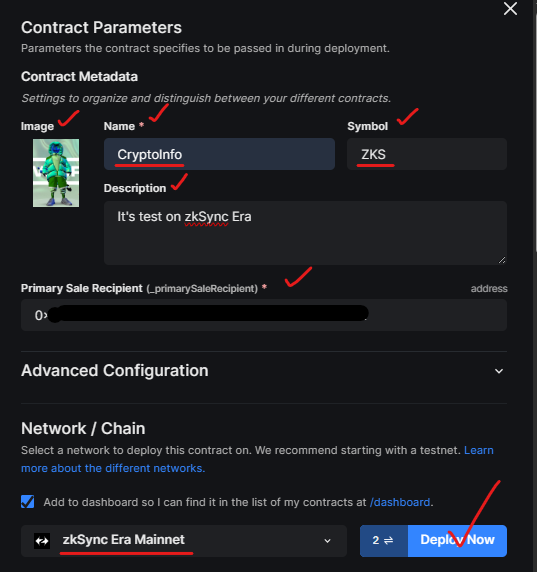
1> Go to thirdweb’s Token contract and connect your wallet 2> Click on “DEPLOY NOW”, ensure your wallet is on zkSync Era network

3> Enter the necessary details like name, symbol, description & wallet address, then click “DEPLOY NOW” and sign on your wallet.
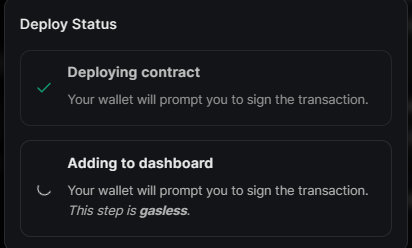
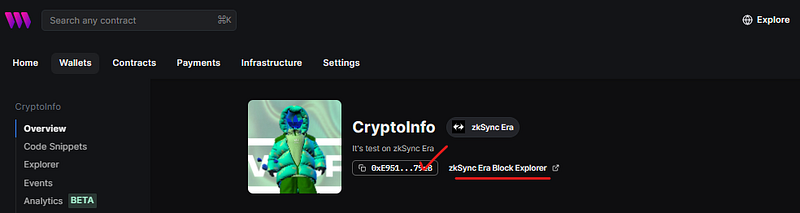
➡️ View and copy your contract address
2️⃣Create a NFT Drop Contract

1> Go to thirdweb NFT Drop, and connect your wallet 2> Click on “DEPLOY NOW” , ensure your wallet is on zkSync Era network

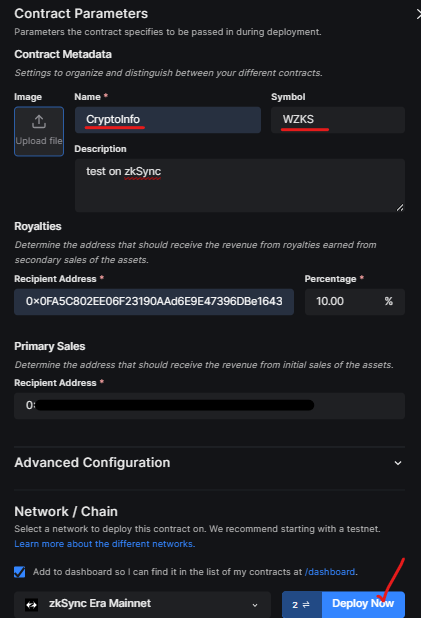
3> Enter the necessary details like name, symbol, description & wallet address, then click “DEPLOY NOW” and sign on your wallet
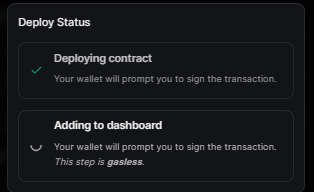
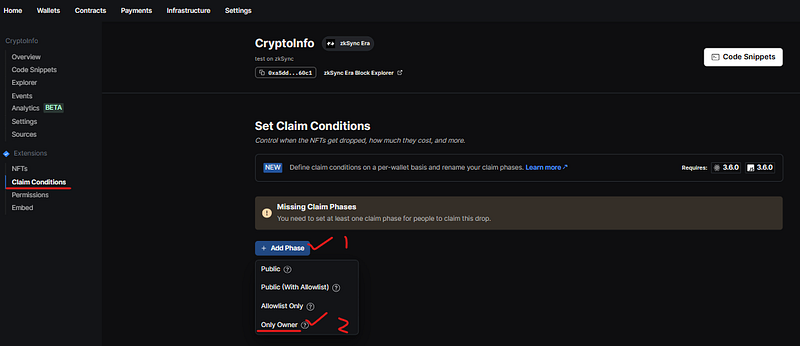
4> Go to zkSync Era Smart Contract to set up Claim Conditions
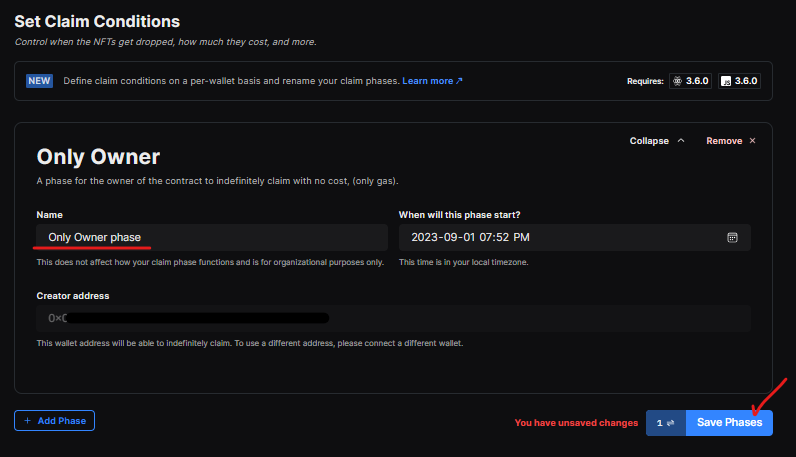
5> Save Phases and confirm on your wallet

6> Mint an NFT from the drop 6-a> Visit HERE to download .json file

6-b> Go Back to NFT tab and click on Batch Upload

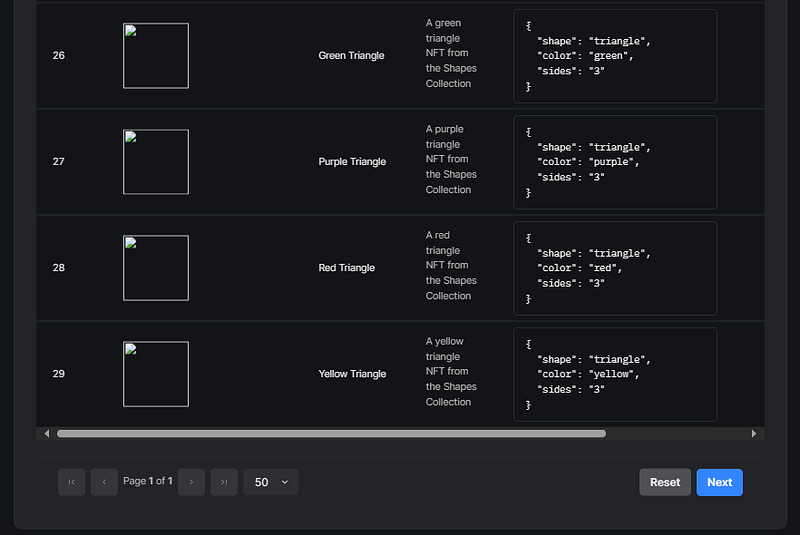
6-c> Upload saved .json file 6-d> Scroll down “Upload your NFTs” page, then click on NEXT
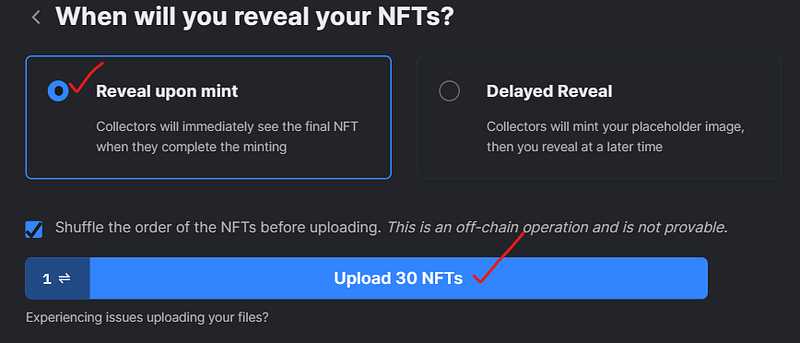
6-e> Select “Reveal upon mint” , then click on “Upload 30 NFTs” and Confirm the transaction on your wallet
3️⃣ Claim NFT

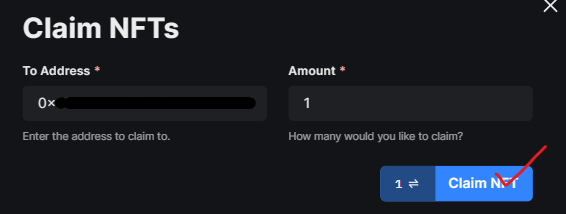
1> Go Back to NFT tab again, and lick on “Claim” to mint our first NFT ➡️ Confirm the transaction on your wallet, gas fees: $0.2, less than displayed one.

2> Claim another 29 Unclaimed NFTs, it will be qualified 29 (total 30) transactions on zkSync Era Mainnet.

➡️ Tips: Claim 2–3 NFTs simultaneously and Repeat every few fays to avoid being marked as a Bot (Sybil).

➡️ Conclusion: by implementing this airdrop strategy, you can qualify for 30 transactions on the zkSync Era Mainnet, all for just $6 in gas fees.

That’s it for today’s tutorial, you’re done!

⚠️We have no partnership with any projects. The information provided in this article is for educational and informational purposes only. NFA, DYOR. If you found this tutorial helpful, please give claps and share! Thank you!😄

📌Recommended Reading:

👉 Tools for [zkSync x MetaMask x LayerZero] Airdrop Hunters 👉 MetaMask Potential Airdrop Guide 👉 DeBank — Confirmed Airdrop Guide 👉 Claim Your 25 Worldcoin (WLD) Worth $50 👉 LayerZero, zkSync & Polygon zkEVM Airdrop with One Bridge- Part 3, Part 2, Part 1 👉 zkSync x Dmail Double Airdrop Guide

Please follow me on ☂️Twitter and 📚Medium, turn on 🔔 as well, you can stay informed and be among the first to receive my latest shares and updates.

Zksync
Zksync Era
Smart Contracts
Airdrops Alert
Recommended from ReadMedium