avatarKnowledgeCollective

Free AI web copilot to create summaries, insights and extended knowledge, download it at here

5012

Abstract

tly…</h3></div> <div><p>knowledgecollective.medium.com</p></div> </div> <div> <div style="background-image: url(https://miro.readmedium.com/v2/resize:fit:320/0*qWB2L_XQ2JAlB1Tb)"></div> </div> </div> </a> </div><p id="949b"><b>If a paying member reads my story / interacts with it, i get a small part of the $5 they pay every month!</b> I love this concept, as it encourages quality contents, instead of paid advertisement all over the website.</p><h1 id="3049">How to post your first story:</h1><p id="e2d6"><b>Here is a simple guide:</b></p><h2 id="ca30">Step 1: Create an account on Medium</h2><p id="e905">Click the top right corner of <a href="https://medium.com/">this page</a> and sign up with your email address or Google / Facebook account. You will be sent a confirmation email immediately after signing up.</p><figure id="97ba"><img src="https://cdn-images-1.readmedium.com/v2/resize:fit:800/1*FMTB4P9kKVFdBt64P4ijPA.png"><figcaption><b>Get Started on medium.com by first creating an account</b></figcaption></figure><h2 id="f936">Step 2: Write a story</h2><p id="bb17"><b>Now you can either click on the left button or on the “write a story” button. </b>If you are on the mobile app of medium, you can start a story simply by clicking on the green + button in the app.</p><figure id="49f3"><img src="https://cdn-images-1.readmedium.com/v2/resize:fit:800/1*mu1BkyWSjzP3B_xRktj5JA.png"><figcaption></figcaption></figure><h2 id="6ede">Step 3: Edit your story</h2><p id="e8ce">Now that you are in the medium story editor, you just need an idea for a story!</p><p id="79b0">You can write about pretty much anything you want, just remember to try things out and keep it about something you are passionate about.</p><p id="794f"><b>Editing Tip 1: Add a kicker and subtitle to your title! </b>When you put some keywords above the title and make format them to a subtitle, they will become a kicker, which can act as additional information about the story topics. When you format a sentence under the title to a subtitle, it will become a subtitle for the main title. This is also nice if you want to bring some order in your articles.</p><figure id="3245"><img src="https://cdn-images-1.readmedium.com/v2/resize:fit:800/1*5Jl9m8O4WU6fUiBtAMiC8Q.png"><figcaption></figcaption></figure><p id="eb2f">As I did in this article, you can just make titles and subtitles by selecting them and picking the big or small T symbol.</p><p id="985a"><b>Editing Tip 2: Add some visual elements! </b>I use canva premium for my medium images, which help a lot to make the articles more beautiful and understandable.</p><figure id="faf7"><img src="https://cdn-images-1.readmedium.com/v2/resize:fit:800/0*3kZBDKpUh1LF1za5.png"><figcaption><a href="https://partner.canva.com/KC">https://partner.canva.com/KC</a></figcaption></figure><p id="a12f"><i>Get Canva Premium <a href="https://partner.canva.com/KC">here</a> (Affiliate Link): <a href="https://partner.canva.com/KC"></a></i><a href="https://partner.canva.com/KC">https://partner.canva.com/KC</a></p><div id="6d52" class="link-block"> <a href="https://readmedium.com/how-to-design-beautiful-blog-images-4c84262d0d3f"> <div> <div> <h2>How to Design Beautiful Blog Images</h2> <div><h3>In this article, you will learn tips and tricks on how to design beautiful blog images.</h3></div> <div><p>medium.com</p></div> </div> <div> <div style="background-image: url(https://miro.readmedium.com/v2/resize:fit:320/1*yHqVB6oeF-7BRAjMTur8Pg.png)"></div> </div> </div> </a> </div><p id="6966"><b>Editing Tip 3: Be Creative!</b> Try out new things, change things and watch how the readers react. Medium is like a playground where you can do whatever you want but the most important thing is to try out new stuff!</p><p id="b43f"><b>How long should your story be?</b> There is no exact answer to this question, you can write as many words as you want! I usually shoot for around 500–1700 words.</p><p id="4e8a">You can even just put in a few sentences to say something about what you are working on. This could be about your life, your attitude or anything that inspires/motivates people.</p><h2 id="5a3c">Step 4: Publish your story</h2><p id="0a1b">If you got accepted by a publication, you can submit the story now to a publication by clicking on the three dots and then “add to publication”:</p><figure id="16f9"><img src="https://cdn-images-1.readmedium.com/v2/resize:fit:800/1*HXsWI-da5I27hPb3exT3MQ.png"><figcaption></figcaption></figure><p id="f685">After you have put some work in your first story, you can now publish it by clicking on “<b>Publish</b>” at the top right.</p><p id="f2e6">Search for some general keywords which fit the topic you are writing about, and click on “<b>Publish and send now</b

Options

” or “<b>Schedule for Later</b>” if you want to set a date when the story should get automatically published.</p><figure id="5939"><img src="https://cdn-images-1.readmedium.com/v2/resize:fit:800/1*pxNeIHJVJLYzgXNrvKe_vA.png"><figcaption></figcaption></figure><p id="c2c4">Thats it! I hope you find this tutorial helpful in getting started on Medium. If you need more help, check out the <a href="https://help.medium.com/hc/en-us"><b>Medium Help Center</b>!</a> You can also ask me in the comments:)</p><p id="d4c5">If you’re interested in <b>Philosophy, Spirituality, Science or general content that expands your mind</b>, then follow and <a href="https://knowledgecollective.medium.com/subscribe/@knowledgecollective">sign up for the mailing list</a> to get the newest articles.</p><blockquote id="b637"><p><b>For</b> <b>only 5 a month</b>, you get a <b>wealth of knowledge</b> with a medium membership!<i>📚</i> Join by clicking on <a href="https://knowledgecollective.medium.com/membership"><b><i>this affiliate link</i></b></a><b> </b>(Which only works in a browser)! You can even earn money by writing on your own.💸</p></blockquote><div id="b555" class="link-block"> <a href="https://knowledgecollective.medium.com/membership"> <div> <div> <h2>Join Medium with my referral link - KnowledgeCollective</h2> <div><h3>Read every story from KnowledgeCollective (and thousands of other writers on Medium). Your membership fee directly…</h3></div> <div><p>knowledgecollective.medium.com</p></div> </div> <div> <div style="background-image: url(https://miro.readmedium.com/v2/resize:fit:320/0*qWB2L_XQ2JAlB1Tb)"></div> </div> </div> </a> </div><p id="18ea"><i>Also, check out my new <a href="https://www.etsy.com/shop/KnowledgeCollective">Etsy Phone Wallpaper Sets</a> to <b>Support me through Art:)</b></i></p><figure id="7e35"><img src="https://cdn-images-1.readmedium.com/v2/resize:fit:800/0*0X_PcQjj0WmcOpAZ.png"><figcaption><a href="https://www.etsy.com/listing/1296683276/psychedelic-nature-phone-wallpaper-set"><b>Psychedelic Backrounds Set</b></a> | <a href="https://www.etsy.com/listing/1300483604/spirituality-wallpaper-phone-set?click_key=a89b94da8fd8bebd5574a9b7bbdf4f479604905e%3A1300483604&amp;click_sum=b750cd51&amp;ref=shop_home_recs_7"><b>Spiritality Backgrounds Set</b></a> | <a href="https://www.etsy.com/listing/1297994900/fall-wallpaper-phone-set-download?click_key=9bc7c4ab90fb01a251aefb989459497151579d49%3A1297994900&amp;click_sum=686d3095&amp;ref=shop_home_feat_3"><b>Fall Backgrounds Set</b></a></figcaption></figure><p id="538b"><b>Other pages:<i> <a href="https://www.knowledgecollective.net/"></a></i></b><a href="https://www.knowledgecollective.net/">Website</a>, <a href="https://www.youtube.com/c/KnowledgeCollectiveOfficial">YouTube</a>, <a href="https://www.instagram.com/knowledge_collective/">Instagram</a>, <a href="https://www.etsy.com/shop/KnowledgeCollective?ref=profile_header">Etsy</a>, <a href="https://www.patreon.com/KnowledgeCollective">Patreon</a>, <a href="https://www.tiktok.com/@knowledgecollective">Tiktok</a>, <a href="https://twitter.com/Wisdom4_all">Twitter</a></p><blockquote id="8e84"><p><a href="https://knowledgecollective.medium.com/subscribe/@knowledgecollective"><b>Click here</b></a> to get a Mail whenever I publish a new Story! <a href="https://knowledgecollective.medium.com/subscribe/@knowledgecollective"><i>📩</i></a></p></blockquote><h2 id="9243">P.S. If you liked this article, you might also enjoy:</h2><div id="1c07" class="link-block"> <a href="https://readmedium.com/i-made-216-67-in-september-with-medium-thoughts-and-lessons-learned-26ccdbaca6df"> <div> <div> <h2>I Made 216.67 In September With Medium! Thoughts and Lessons Learned</h2> <div><h3>If you like writing, attract attention to your articles and build a following — go for it!</h3></div> <div><p>medium.com</p></div> </div> <div> <div style="background-image: url(https://miro.readmedium.com/v2/resize:fit:320/1*uCd-ZmpKa0_b87AY6MWMAA.png)"></div> </div> </div> </a> </div><div id="60b1" class="link-block"> <a href="https://readmedium.com/how-to-design-beautiful-blog-images-4c84262d0d3f"> <div> <div> <h2>How to Design Beautiful Blog Images</h2> <div><h3>In this article, you will learn tips and tricks on how to design beautiful blog images.</h3></div> <div><p>medium.com</p></div> </div> <div> <div style="background-image: url(https://miro.readmedium.com/v2/resize:fit:320/1*yHqVB6oeF-7BRAjMTur8Pg.png)"></div> </div> </div> </a> </div></article></body>

Blogging, Content Writing, Stories, Medium

How to Create Medium Stories — A Simple Tutorial With Tips

A guide for beginners and people without experience on Medium.

Here is a simple guide to start writing on Medium. These simple steps can help you get started in a few minutes.
Cover Image made with Canva Gallery

How does Medium work?

Medium is a platform for people to share their thoughts, feelings, experiences and anything else you could write about.

The content is written by writers from around the world. You can follow your favorite writers and discover interesting topics.
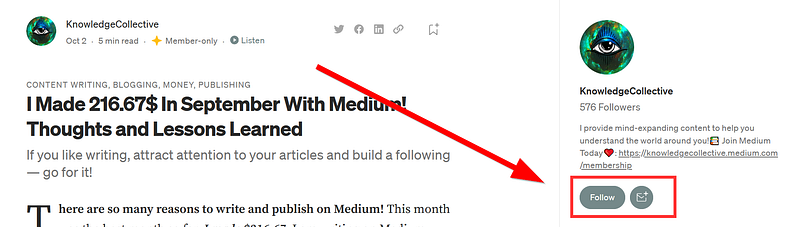
You can follow someone in a story right under the profile name

When you find content on Medium that you like, you can “Clap” up to 50 times to give them support!
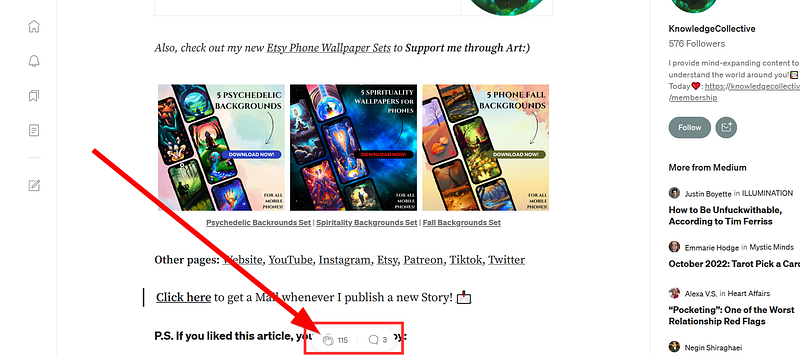
You can clap for a story at the bottom of the screen.

There are writers and publications on medium. Writers are the individuals who post the articles / stories. Publications are like “newspaper publishers”, where many writers can write for one publication, like for example ILLUMINATION.
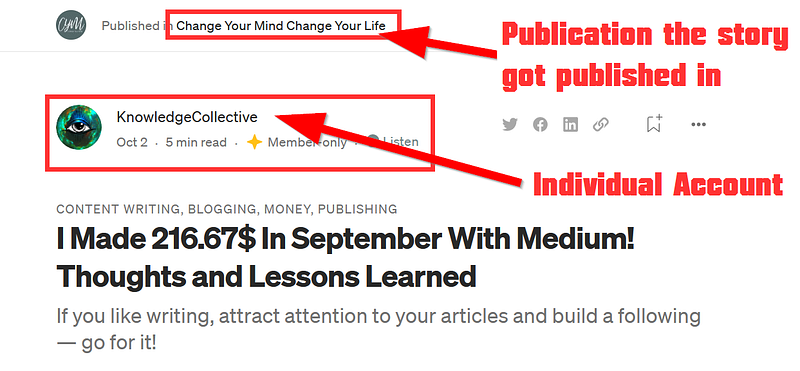
If a story got published in a publication, you can see the publication name above it.

Writers benefit from the followers and reach of the publication.

You can become a writer for a publication if you search for more information on how to become one on the publications home-page.

Every writer can make their own publication. For example, I made the publication “create now.”

For instance, I stated here how one could write for this publication:

How do the writers and medium earn money?

Medium has found a great way to keep their website free from general advertisement.

Medium has created the Medium Partner Program, where you can apply to when you have 100 Followers and published at least one story on medium. You also have to be 18+ and in one of the countries listed here:

Listed Countries: Australia, Austria, Belgium, Canada, Czech Republic, Denmark, Estonia, Finland, France, Germany, Greece, Hong Kong, Ireland, Italy, Japan, Latvia, Lithuania, Luxembourg, Mexico, Netherlands, New Zealand, Norway, Poland, Portugal, Romania, Singapore, Slovakia, Slovenia, Spain, Sweden, Switzerland, United Kingdom, United States

As soon as you get accepted, you have the option to “Meter your story”, which allows it to earn money with the engagement from Medium members, as well as users they convert to become Medium members.
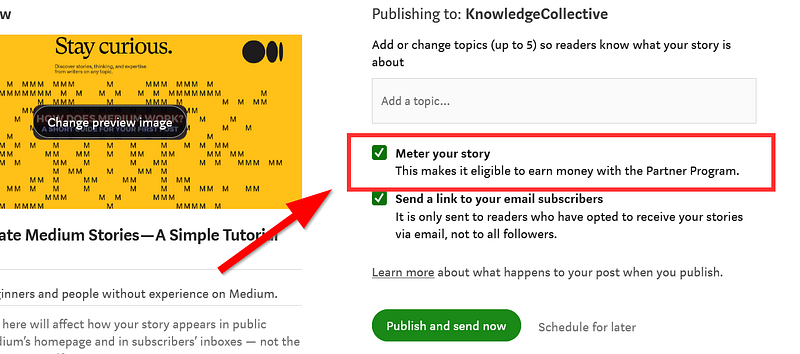
Metering a story to earn money from it

Medium gets financed by its members, who pay $5 every month, so they have access to the wealth of knowledge medium offers. If you join with my affiliate link, I get $2.50 of your subscription, without you paying more!

If a paying member reads my story / interacts with it, i get a small part of the $5 they pay every month! I love this concept, as it encourages quality contents, instead of paid advertisement all over the website.

How to post your first story:

Here is a simple guide:

Step 1: Create an account on Medium

Click the top right corner of this page and sign up with your email address or Google / Facebook account. You will be sent a confirmation email immediately after signing up.
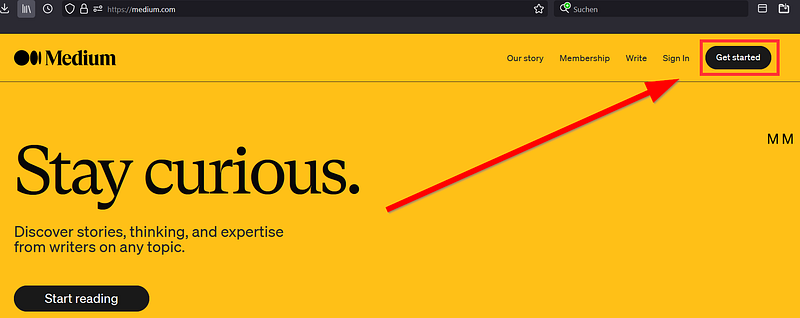
Get Started on medium.com by first creating an account

Step 2: Write a story

Now you can either click on the left button or on the “write a story” button. If you are on the mobile app of medium, you can start a story simply by clicking on the green + button in the app.
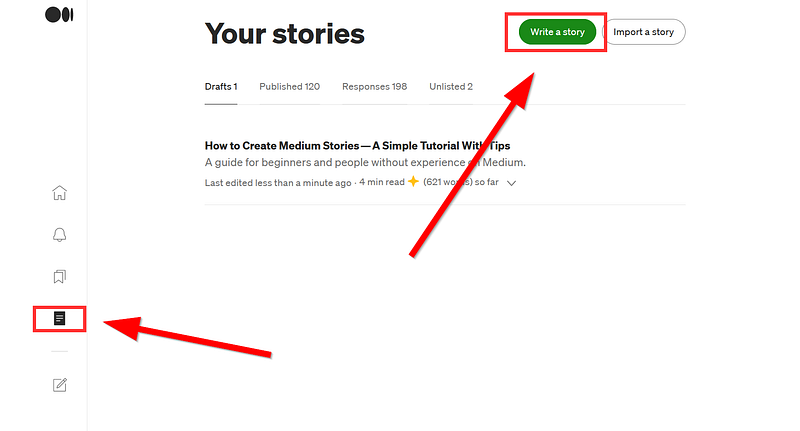
Step 3: Edit your story

Now that you are in the medium story editor, you just need an idea for a story!

You can write about pretty much anything you want, just remember to try things out and keep it about something you are passionate about.

Editing Tip 1: Add a kicker and subtitle to your title! When you put some keywords above the title and make format them to a subtitle, they will become a kicker, which can act as additional information about the story topics. When you format a sentence under the title to a subtitle, it will become a subtitle for the main title. This is also nice if you want to bring some order in your articles.
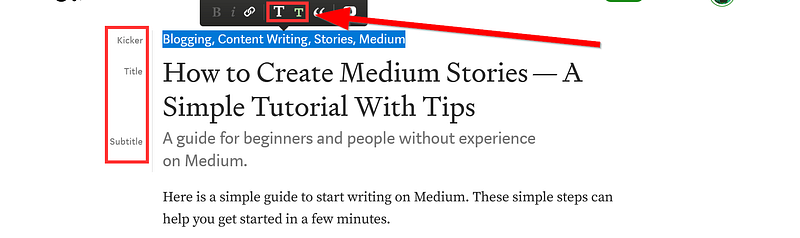
As I did in this article, you can just make titles and subtitles by selecting them and picking the big or small T symbol.

Editing Tip 2: Add some visual elements! I use canva premium for my medium images, which help a lot to make the articles more beautiful and understandable.
https://partner.canva.com/KC

Get Canva Premium here (Affiliate Link): https://partner.canva.com/KC

Editing Tip 3: Be Creative! Try out new things, change things and watch how the readers react. Medium is like a playground where you can do whatever you want but the most important thing is to try out new stuff!

How long should your story be? There is no exact answer to this question, you can write as many words as you want! I usually shoot for around 500–1700 words.

You can even just put in a few sentences to say something about what you are working on. This could be about your life, your attitude or anything that inspires/motivates people.

Step 4: Publish your story

If you got accepted by a publication, you can submit the story now to a publication by clicking on the three dots and then “add to publication”:
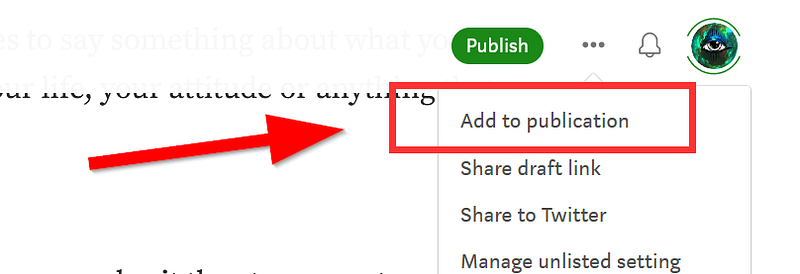
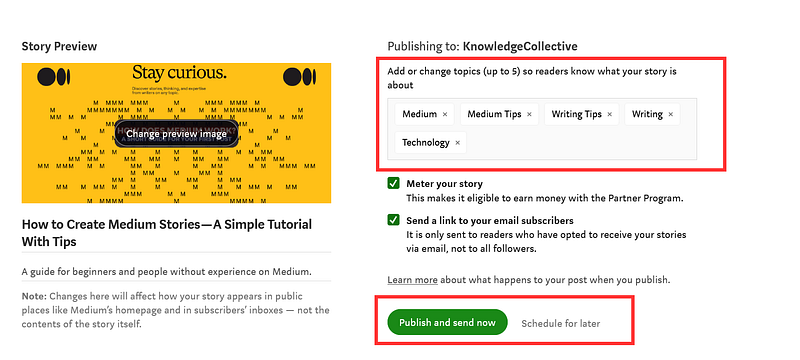
After you have put some work in your first story, you can now publish it by clicking on “Publish” at the top right.

Search for some general keywords which fit the topic you are writing about, and click on “Publish and send now” or “Schedule for Later” if you want to set a date when the story should get automatically published.
Thats it! I hope you find this tutorial helpful in getting started on Medium. If you need more help, check out the Medium Help Center! You can also ask me in the comments:)

If you’re interested in Philosophy, Spirituality, Science or general content that expands your mind, then follow and sign up for the mailing list to get the newest articles.

For only 5$ a month, you get a wealth of knowledge with a medium membership!📚 Join by clicking on this affiliate link (Which only works in a browser)! You can even earn money by writing on your own.💸

Also, check out my new Etsy Phone Wallpaper Sets to Support me through Art:)
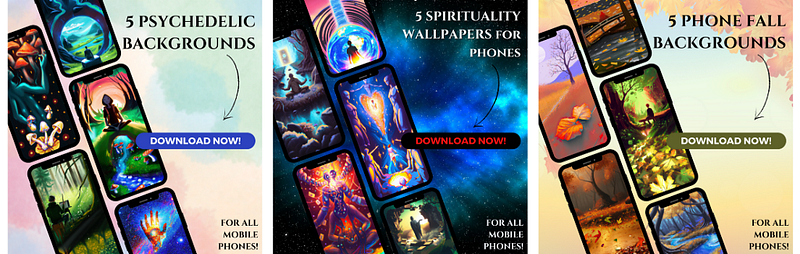
Psychedelic Backrounds Set | Spiritality Backgrounds Set | Fall Backgrounds Set

Other pages: Website, YouTube, Instagram, Etsy, Patreon, Tiktok, Twitter

Click here to get a Mail whenever I publish a new Story! 📩

P.S. If you liked this article, you might also enjoy:

Medium
Medium Tips
Writing Tips
Writing
Technology
Recommended from ReadMedium