
How to Clone Yourself with ChatGPT
From Texting to Blogging: Making AI Your Personal Ghostwriter

Hey there, savvy writers and tech enthusiasts! Ever wished you had a ghostwriter who actually wrote just like you?
Well, you’re in the right place. I’ve just trained AI to streamline my blogging about AI Tools, today we’re diving into how you clone yourself in five steps and train ChatGPT to write in your own unique voice.

My mind is blown as I’m editing this article! This is as exciting as the time I first got my famous chili recipe perfected. It has become a family favorite. A bowl of that on a cold autumn day feels like a hug that nourishes your body and soul.
Stick around, and I’ll reveal why this ChatGPT Tip has been a game-changer for my writing on Medium and a big boost for my passive income too!
The Nitty-Gritty: Why You Should Even Bother
Before we jump into the how-to, let’s talk about the why. Why would you want an AI to write like you? Simple. It’s all about scaling your efforts.
Not just doing more with less time.
Imagine being able to produce better quality content in half the time.
It’s like having a twin who does all the difficult parts of the day’s work for you but doesn’t eat any of your snacks. Win-win, right?
Step 1: Training The AI
First things first, ChatGPT has to know your own writing style. We want your articles to sound like you, not some generic AI, right?
I'd like you to help me write articles for my productivity blog.
First, I want you to understand my writing style based on the
examples that I give you.
You'll save my writing style under 'MY_STYLE'.
After that, I'll tell you when to write the article using MY_STYLE.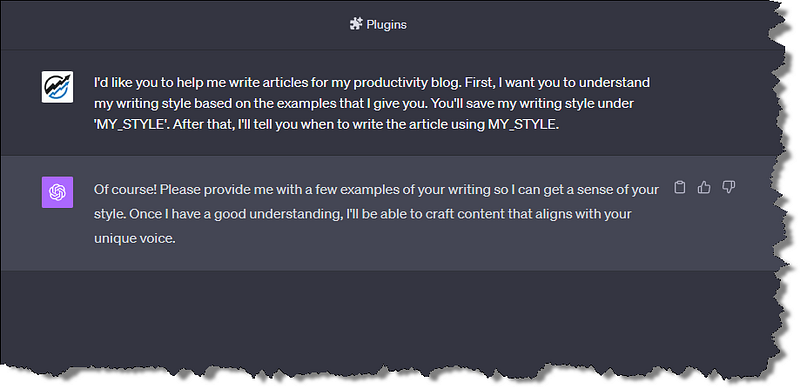
Step 2: Gather Samples
Take some time to gather your best writing examples so the ai can look for patterns, tone, and common phrases you use.
Being YOU is the new goldmine, folks.
In order for ChatGPT to get a good grasp of your style, gather some writing samples. These could be blog posts, emails, or even your grocery lists if they’re related to the content you are planning to create. The more data you have, the better ChatGPT can mimic you.
Step 3: The AI Training Ground
Now, here comes the fun part. Using ChatGPT, start by feeding it your writing samples.
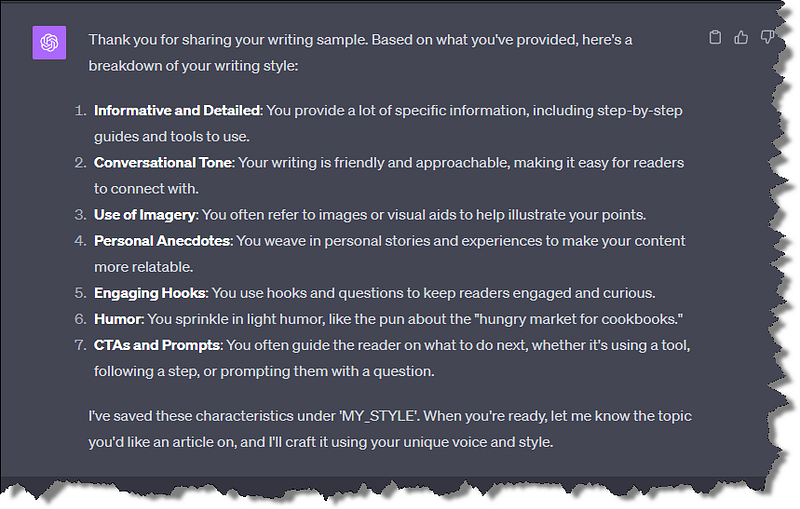
After I added some articles, here is what ChatGPT replied:
Thank you for sharing your writing sample. Based on what you’ve provided, here’s a breakdown of your writing style:
Informative and Detailed: You provide a lot of specific information, including step-by-step guides and tools to use.
Conversational Tone: Your writing is friendly and approachable, making it easy for readers to connect with.
Use of Imagery: You often refer to images or visual aids to help illustrate your points.
Personal Anecdotes: You weave in personal stories and experiences to make your content more relatable.
Engaging Hooks: You use hooks and questions to keep readers engaged and curious.
Humor: You sprinkle in light humor, like the pun about the “hungry market for cookbooks.”
CTAs and Prompts: You often guide the reader on what to do next, whether it’s using a tool, following a step, or prompting them with a question.
I’ve saved these characteristics under ‘MY_STYLE’. When you’re ready, let me know the topic you’d like an article on, and I’ll craft it using your unique voice and style.
Step 4: Put It To Work
After you’ve trained ChatGPT, test it out. Write a prompt and see how closely the AI’s response matches your own writing style.
(I created this article with a tiny prompt and about 20 minutes of editing.)

Is the finished article not quite there? No worries. All the heavy lifting has already been done and it just takes a few minutes of editing.
Just like I had to tweak my famous chili recipe to get it just right, you’ll likely need to make some adjustments to the text that is generated.
I’m pretty blown away by this article already, but I can keep feeding it more samples of my writing style and refine the ‘MY_STYLE’ brand of writing until I’m even more satisfied.
Step 5: Unleash the AI
Once you’re happy with how ChatGPT mimics your style, it’s time to put it to work. Now I can use it to draft emails and create replies to blog posts, and I even used it to write the very tutorial post you are reading.
The Secret Sauce: Advanced AI Tools
For those of you who are tech-savvy, there are more advanced methods to fine-tune ChatGPT using APIs and coding. But that’s a tutorial for another exciting day. (follow ai-businessplans.com if you are curious)
I Like My Clone. He Works Hard.

Remember that famous chili recipe I mentioned earlier? Well, the reason it was a game-changer for me was that it taught me the value of perfecting something until it’s just right.
And that’s exactly what you’ll be doing with your ghostwriting ChatGPT.
With a bit of patience and fine-tuning, you’ll have an AI Tool that not only writes like you but might even write better than you. (Don’t worry, I won’t tell anyone.)
So, there you have it, folks! A step-by-step guide to making ChatGPT your personal writing assistant. Now, go forth and write — or should I say, let your AI do the writing!
Feel free to share your experiences and questions in the comments below. And if you found this guide helpful, don’t forget to share it with your friends and fellow writers. Happy writing!
☛ This article was summarized from the YouTube transcript, assisted by ChatGPT, Writsonic, and other Artificial Intelligence Tools. (follow my AI publication for case studies)
⫷
I Value Your Comments
I reply to all comments and as my thank you I’ll also follow, clap, highlight, and comment where it fits on your content. So leave your thoughts, questions, or success stories too! I love to read them!
Connect on Twitter and Linkedin
Be safe and make small steps forward every day.
Doug
Read Next -
🛆 Investment Disclaimer: You should not invest money into a paid tool until you have maximized the benefits of the free features. Nothing in our training products are a promise or guarantee of earnings.👈
☄ This article contains referral links for some of my absolute favorite AI business tools for content creators and GenAI enthusiasts.
If you purchase one of my favorite software and AI tools, I will receive a small commission at no additional charge to you.


