avatarElvie Lins

Free AI web copilot to create summaries, insights and extended knowledge, download it at here

3036

Abstract

png"><figcaption></figcaption></figure><figure id="8c75"><img src="https://cdn-images-1.readmedium.com/v2/resize:fit:800/1*kam3sUdSc0vF9kn-yvsc0w.png"><figcaption>Screenshots by Elvie Lins</figcaption></figure><p id="ce87"><b>2.</b> Open the website Opensea.io. Click CREATE. You will use Metamask to sign up for an account.</p><p id="d8cc"><b>3.</b> Create your first art. Follow accordingly. List your art as you do in other non NFT platforms. I avoided other details. What’s Important is the name of your art, brief description, and tag.</p><figure id="dd15"><img src="https://cdn-images-1.readmedium.com/v2/resize:fit:800/1*fF9ak-7HW-T1c2Sel9iFWQ.png"><figcaption>screenshot by Elvie Lins</figcaption></figure><p id="c2c4"><b>4.</b> Remember when you created a Metamask account, you added a polygon coin wallet address? You will be able to select the polygon under the Blockchain drop-down menu.</p><figure id="715e"><img src="https://cdn-images-1.readmedium.com/v2/resize:fit:800/1*dLxBWNCYtOyByVjpa9SM5A.png"><figcaption>Screenshot by Elvie Lins</figcaption></figure><p id="4e30">It is so important that you select polygon and not ethereum. When you select Ethereum, you will have to pay high gas fees when you want to sell your art.</p><p id="74da"><b>5.</b> Once you are done with all details about your art, you see the blue button below the page Create, click on that. It will pop up that you have listed your art.</p><p id="ff41"><b>6.</b> You will then click on Sell. You can put up a price for your art. My art ranges from 0.001 to 1 Ethereum.</p><figure id="b3db"><img src="https://cdn-images-1.readmedium.com/v2/resize:fit:800/1*k74nScXVSIMwSxNkjNqztg.png"><figcaption>Screenshot by Elvie Lins</figcaption></figure><figure id="eea6"><img src="https://cdn-images-1.readmedium.com/v2/resize:fit:800/1*A-Ew9_9xfJFny-gsfa1eUA.png"><figcaption>Screenshot by Elvie Lins</figcaption></figure><p id="a9e9">You will see a popup page that your NFT is now listed.</p><p id="9a27">Please check out my account at <a href="https://opensea.io/MinisterofPictures">https://opensea.io/MinisterofPictures</a></p><p id="8e0f"><i>I hope this information can help you. If you have any questions or needed some help, do let me know by leaving a comment. Please do not forget to clap this article.</i></p><p id="fcd0"><i>Thanks for reading.</i></p><p id="a768"><i>In this article, I like to give a shoutout to <a href="undefined">Walter Pop Matthews IV</a> for sharing the article about my recent success on Unsplash. He writes very personal life experienced stories worth reading. Just like this one below. Thank you, Walter.</i></p><div id="ac5f" class="link-block"> <a href="https://readmedium.com/you-have-be-fearless-and-feel-worthy-to-love-again-c69587358f73"> <div> <div> <h2>You Have Be Fearless and Feel Worthy To Love Again</h2> <div><h3>These are two very important things you’ll need if you want to move forward to a new relationship.</h3></div> <di

Options

v><p>medium.com</p></div> </div> <div> <div style="background-image: url(https://miro.readmedium.com/v2/resize:fit:320/0*lz_fgtf2cL2hmXEe)"></div> </div> </div> </a> </div><div id="aad2" class="link-block"> <a href="https://elvielins.medium.com/membership"> <div> <div> <h2>Join Medium with my referral link - Elvie Lins</h2> <div><h3>As a Medium member, a portion of your membership fee goes to writers you read, and you get full access to every story…</h3></div> <div><p>elvielins.medium.com</p></div> </div> <div> <div style="background-image: url(https://miro.readmedium.com/v2/resize:fit:320/0*wpVIGWSTBc_sXnHV)"></div> </div> </div> </a> </div><h1 id="9529">More…</h1><div id="3781" class="link-block"> <a href="https://readmedium.com/2-ways-of-passive-income-for-photographers-videographers-digital-artists-2c63ed284fbf"> <div> <div> <h2>2 Ways of Passive Income for Photographers Videographers & Digital Artists</h2> <div><h3>I called this ‘passive income’ because you only need to set it up once.</h3></div> <div><p>medium.com</p></div> </div> <div> <div style="background-image: url(https://miro.readmedium.com/v2/resize:fit:320/1*mvvOTAh0bCxhh4AjmrQ6kg.jpeg)"></div> </div> </div> </a> </div><div id="a066" class="link-block"> <a href="https://readmedium.com/how-to-give-your-customers-a-payment-option-with-cryptocurrency-in-2021-8b99c9b3c57a"> <div> <div> <h2>How To Give Your Customers A Payment Option With Cryptocurrency In 2021</h2> <div><h3>Simple step by step with images to install payment with cryptocurrency to your woo-commerce so that you can start…</h3></div> <div><p>medium.com</p></div> </div> <div> <div style="background-image: url(https://miro.readmedium.com/v2/resize:fit:320/1*FUAufS9RkYDUtJzBkFLELQ.png)"></div> </div> </div> </a> </div><div id="62f4" class="link-block"> <a href="https://readmedium.com/why-i-gave-up-on-affiliate-marketing-and-you-should-not-8d8bb97a41db"> <div> <div> <h2>Why I gave up on Affiliate Marketing and you should not?</h2> <div><h3>If you are willing to dedicate time and invest some money</h3></div> <div><p>medium.com</p></div> </div> <div> <div style="background-image: url(https://miro.readmedium.com/v2/resize:fit:320/0*4yJ2NPlwDlL7afu8)"></div> </div> </div> </a> </div></article></body>

How To Avoid Gas Fees When Selling Art on NFT Marketplace?

Calling all artists, musicians, photographers, Videographers, this is our moment to shine! This article can save you a few hundred gas fees to sell your art.

Image by Elvie Lins

I got curious about NFT for photographers. I have been reading about Non-Fungible Token the recent months. I did not really pay attention to it until I’ve heard from one of the YouTuber that the image have been sold for $69 Million.

What? I almost spit my food while eating at that time. Holy cow! 69 Million Dollars! Not Philippine Peso.

What is NFT?

NFT’s are pieces of digital content linked to the blockchain. The digital database under spinning cryptocurrencies such as bitcoin and ethereum. Unlike NFT’s those assets are fungible, meaning they can be replaced or exchanged with another identical one of the same values. Source

So, I learn about NFT and how I can join to sell my collections of images. As you guys know, I am a photographer and somehow, my art is my bread and butter.

But I found out that gas fees were so high when I want to start to sell my art at opensea.io. (though it is only a one-time fee).

There are many websites you can sell with NFT but the Opensea.io is the largest and most commonly introduced by many YouTubers when doing my search.

It ranges from $300 to $400 USD using ethereum at the time of writing this article. It could be more as the Ethereum price goes up. (I am not sure if this is correlated though).

How To Avoid Gas Fees When Selling your art at NFT marketplace?

I use Opensea.io as the platform for opening an account.

Try not to missed out any words below

  1. First thing first, you need to have a cryptocurrency wallet.

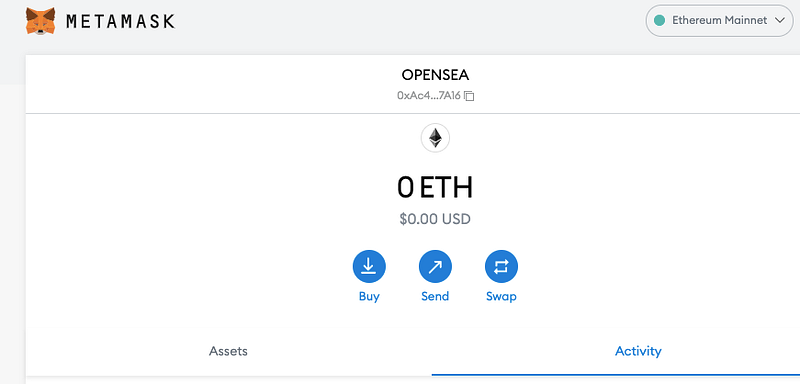
Go to Chrome browser. Download the chrome extension called Metamask. You will be guided as you create your first account. If you already have one, then you just log in to Metamask.

When you are on your Metamask account, usually, ethereum coin is set already there. Add another coin called POLYGON. Click on the 3 dots to the right. (see image below).

Click on Expand View. You will see the assets icon on the left. You can type in Polygon.
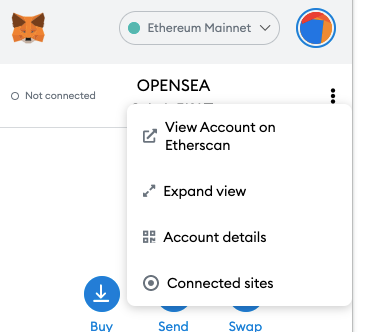
Screenshots by Elvie Lins

2. Open the website Opensea.io. Click CREATE. You will use Metamask to sign up for an account.

3. Create your first art. Follow accordingly. List your art as you do in other non NFT platforms. I avoided other details. What’s Important is the name of your art, brief description, and tag.
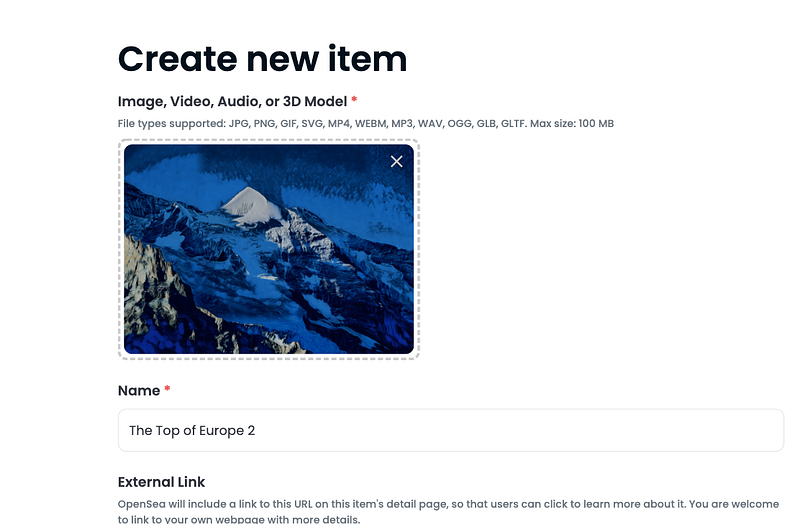
screenshot by Elvie Lins

4. Remember when you created a Metamask account, you added a polygon coin wallet address? You will be able to select the polygon under the Blockchain drop-down menu.
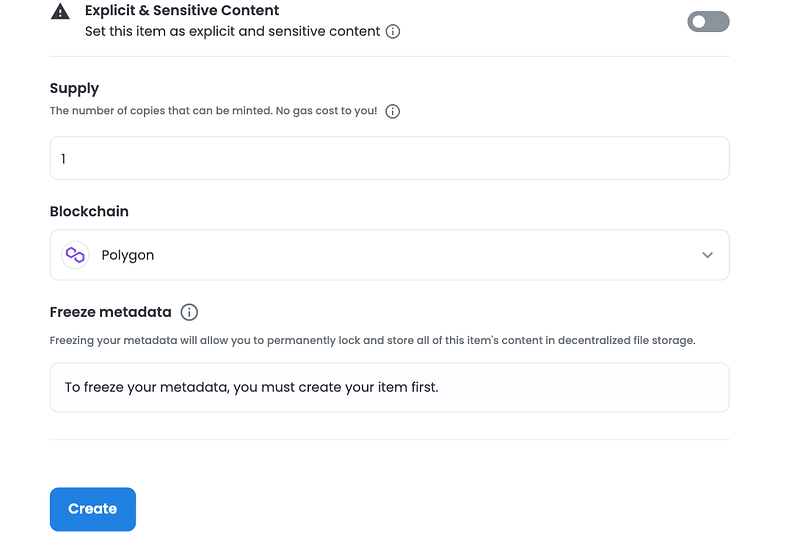
Screenshot by Elvie Lins

It is so important that you select polygon and not ethereum. When you select Ethereum, you will have to pay high gas fees when you want to sell your art.

5. Once you are done with all details about your art, you see the blue button below the page Create, click on that. It will pop up that you have listed your art.

6. You will then click on Sell. You can put up a price for your art. My art ranges from 0.001 to 1 Ethereum.
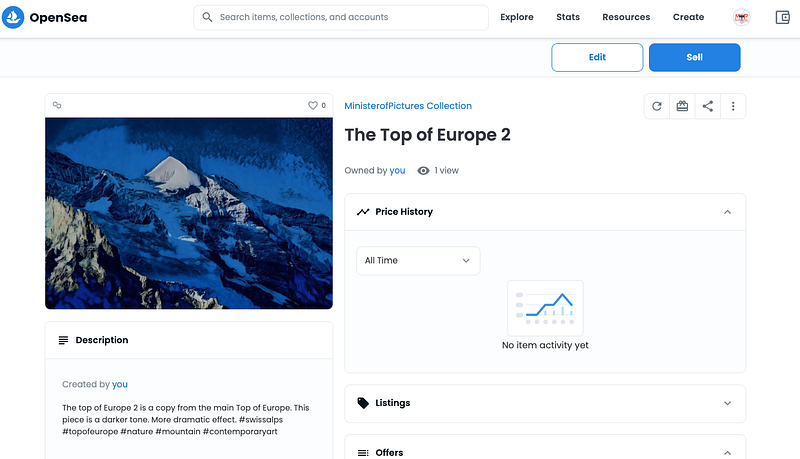
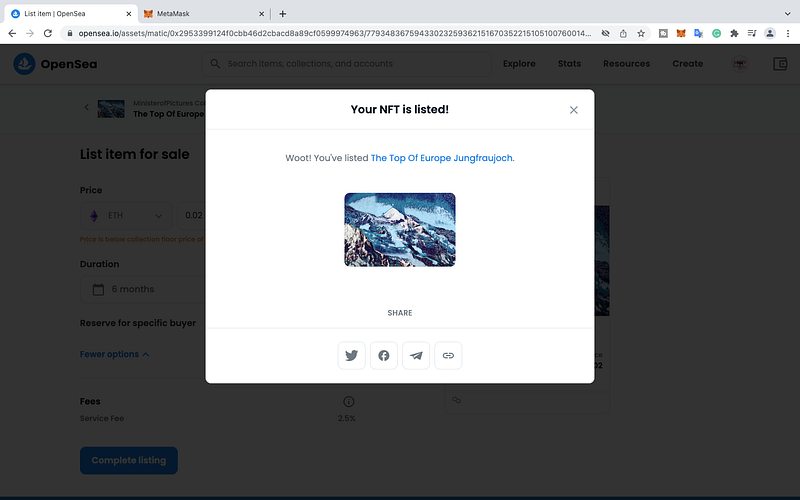
Screenshot by Elvie Lins

You will see a popup page that your NFT is now listed.

Please check out my account at https://opensea.io/MinisterofPictures

I hope this information can help you. If you have any questions or needed some help, do let me know by leaving a comment. Please do not forget to clap this article.

Thanks for reading.

In this article, I like to give a shoutout to Walter Pop Matthews IV for sharing the article about my recent success on Unsplash. He writes very personal life experienced stories worth reading. Just like this one below. Thank you, Walter.

More…

Nft
Photography Tips
Cryptocurrency
Ethereum Blockchain
Databulls
Recommended from ReadMedium