
How to Assign a role to the user based on the LDAP group - Laravel LDAP authentication
Laravel LDAP authentication with an example — part 3
Last part we completed the LDAP login using the Adldap2-Laravel package. In this part, we going to add the roles to users based on the LDAP group.
Part 1: Laravel LDAP authentication — Laravel Docker install OpenLDAP and phpLDAPadmin Part 2: Laravel LDAP authentication — Laravel login with Open LDAP
Before we start the implementation we need to understand the basic concept of Events & Listeners.
Events & Listeners
Laravel’s events are a simple observer pattern, it allowing you to subscribe and listen for various events that occur within your application. The App\Providers\EventServiceProvider provides a convenient place to register all of your application's event listeners.
Generating Events & Listeners
The event:generate Artisan command is used to create a new Laravel event. Also, we can create Events & Listeners manually by creating files else add listeners and events to your EventServiceProvider
Alternatively, you may use the make:event and make:listener Artisan commands to generate individual events and listeners:
php artisan make:event PodcastProcessed
php artisan make:listener SendPodcastNotification --event=PodcastProcessed
List all Events
The event:list command is used to display a list of all events and listeners registered by your application.
./vendor/bin/sail artisan event:list


OutPut:

  Adldap\Laravel\Events\Authenticated ....................................................................................
  ⇂ Adldap\Laravel\Listeners\LogAuthenticated
  Adldap\Laravel\Events\AuthenticatedModelTrashed ........................................................................
  ⇂ Adldap\Laravel\Listeners\LogTrashedModel
  Adldap\Laravel\Events\AuthenticatedWithWindows .........................................................................
  ⇂ Adldap\Laravel\Listeners\LogWindowsAuth
  Adldap\Laravel\Events\Authenticating ...................................................................................
  ⇂ Adldap\Laravel\Listeners\LogAuthentication
  Adldap\Laravel\Events\AuthenticationFailed .............................................................................
  ⇂ Adldap\Laravel\Listeners\LogAuthenticationFailure
  Adldap\Laravel\Events\AuthenticationRejected ...........................................................................
  ⇂ Adldap\Laravel\Listeners\LogAuthenticationRejection
  Adldap\Laravel\Events\AuthenticationSuccessful .........................................................................
  ⇂ Adldap\Laravel\Listeners\LogAuthenticationSuccess
  Adldap\Laravel\Events\DiscoveredWithCredentials ........................................................................
  ⇂ Adldap\Laravel\Listeners\LogDiscovery
  Adldap\Laravel\Events\Importing ........................................................................................
  ⇂ Adldap\Laravel\Listeners\LogImport
  Adldap\Laravel\Events\Synchronized .....................................................................................
  ⇂ Adldap\Laravel\Listeners\LogSynchronized
  Adldap\Laravel\Events\Synchronizing ....................................................................................
  ⇂ Adldap\Laravel\Listeners\LogSynchronizing
  Illuminate\Auth\Events\Authenticated ...................................................................................
  ⇂ Adldap\Laravel\Listeners\BindsLdapUserModel
  Illuminate\Auth\Events\Login ...........................................................................................
  ⇂ Adldap\Laravel\Listeners\BindsLdapUserModel
  Illuminate\Auth\Events\Registered ......................................................................................
  ⇂ Illuminate\Auth\Listeners\SendEmailVerificationNotification
  Illuminate\Database\Events\QueryExecuted ...............................................................................
  ⇂ Spatie\LaravelIgnition\Recorders\QueryRecorder\QueryRecorder@record
  Illuminate\Foundation\Events\LocaleUpdated .............................................................................
  ⇂ Closure at: /vendor/nesbot/carbon/src/Carbon/Laravel/ServiceProvider.php:55
  Illuminate\Log\Events\MessageLogged ....................................................................................
  ⇂ Spatie\LaravelIgnition\Recorders\LogRecorder\LogRecorder@record
  Illuminate\Queue\Events\JobExceptionOccurred ...........................................................................
  ⇂ Spatie\LaravelIgnition\Recorders\JobRecorder\JobRecorder@record
  Illuminate\Queue\Events\JobProcessed ...................................................................................
  ⇂ Closure at: /vendor/spatie/laravel-ignition/src/IgnitionServiceProvider.php:273
  Illuminate\Queue\Events\JobProcessing ..................................................................................
  ⇂ Closure at: /vendor/spatie/laravel-ignition/src/IgnitionServiceProvider.php:268
The above event:list output is listed all the Adldap\Laravel\Events.
So, we going to listen to one of the Adldap2-Laravel events. This event listener will save or update the user roles based on the LDAP group.
Create Event Listener for sync Role
We going to create the listener with the name AdldapSyncRoles by using the make:listener artisan command.
./vendor/bin/sail artisan make:listener AdldapSyncRoles
Open the app/Listeners/AdldapSyncRoles.php file and replace it with the below Role syncing-related changes. We going to listen to the Adldap AuthenticationSuccessful event. This event will trigger after the user is successfully authenticated with LDAP.
<?php

namespace App\Listeners;

use App\Models\Role;
use Adldap\Laravel\Events\AuthenticationSuccessful;
use Adldap\Laravel\Facades\Adldap;

class AdldapSyncRoles
{
    /**
     * Handle the event.
     *
     * @param AuthenticationSuccessful $event
     *
     * @return void
     */
    public function handle(AuthenticationSuccessful $event)
    {
        $assigned = [];
        $user_group = [];
        $uid = $event->user->getAttribute('uid')[0];
        $roles = Role::all();
        $groups = Adldap::search()->where('objectClass', 'posixGroup')->get();

        foreach ($groups as $group) {
            if(in_array($uid, $group->getAttribute('memberuid'))) {
                $user_group[] = $group->getAttribute('cn')[0];
            }
        }

        foreach ($roles as $role) {
            if (in_array($role->name, $user_group)) {
                $assigned[] = $role->id;
            }
        }

        $event->model->syncRoles($assigned);
    }
}
We using OpenLDAP, so we cannot use the $event->user->inGroup() method. So we manually fetched the groups and assigned the user group to the new array.
If you using any other Active Directory means (for Example Windows) use the below code
<?php

namespace App\Listeners;

use App\Users\Role;
use Adldap\Laravel\Events\AuthenticationSuccessful;

class SuccessfulLDAPLoginListener
{
    /**
     * Handle the event.
     *
     * @param AuthenticationSuccessful $event
     *
     * @return void
     */
    public function handle(AuthenticationSuccessful $event)
    {
        $assigned = [];
        $roles = Role::all();
        foreach ($roles as $role) {
            if ($event->user->inGroup($role->name)) {
                $assigned[] = $role->role_id;
            }
        }

        $event->model->syncRoles($assigned);
    }
}
Next step we going to check our role synching changes by adding a new user in PHP LDAP admin.
Registering new Listeners
Open the EventServiceProvider and add register our event and listener
app\Providers\EventServiceProvider.php
<?php

namespace App\Providers;

use Illuminate\Auth\Events\Registered;
use Illuminate\Auth\Listeners\SendEmailVerificationNotification;
use Adldap\Laravel\Events\AuthenticationSuccessful;
use App\Listeners\AdldapSyncRoles;
use Illuminate\Foundation\Support\Providers\EventServiceProvider as ServiceProvider;
use Illuminate\Support\Facades\Event;

class EventServiceProvider extends ServiceProvider
{
    /**
     * The event listener mappings for the application.
     *
     * @var array<class-string, array<int, class-string>>
     */
    protected $listen = [
        Registered::class => [
            SendEmailVerificationNotification::class,
        ],
        AuthenticationSuccessful::class => [
            AdldapSyncRoles::class,
        ],
    ];

    /**
     * Register any events for your application.
     *
     * @return void
     */
    public function boot()
    {
        //
    }
}
Add a new LDAP user
Open the PHP LDAP admin on http://localhost:8080/ path and login with admin DN and password.
Login DN: cn=admin,dc=example,dc=org Password: admin
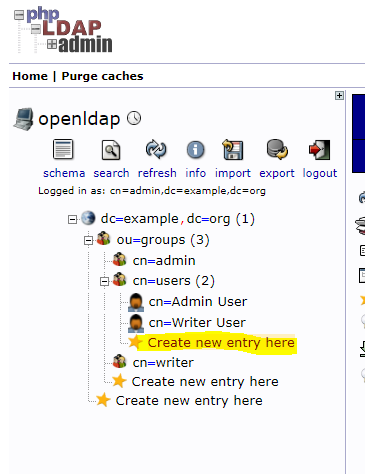
After login, click the “Create new entry here” under the cn=users
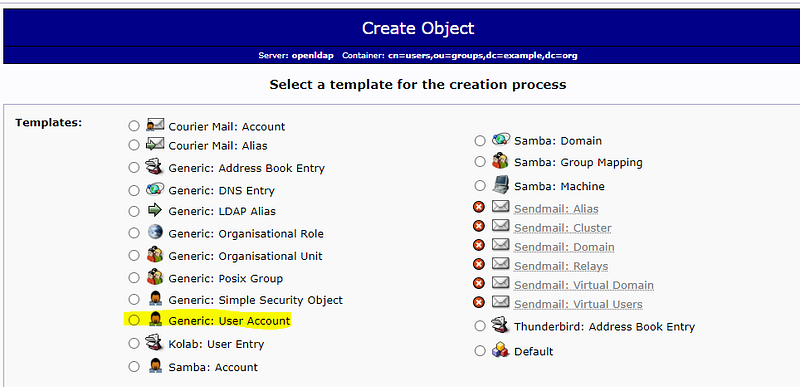
On create object screen click the “Generic: User Account”
Create a new user and commit the changes.
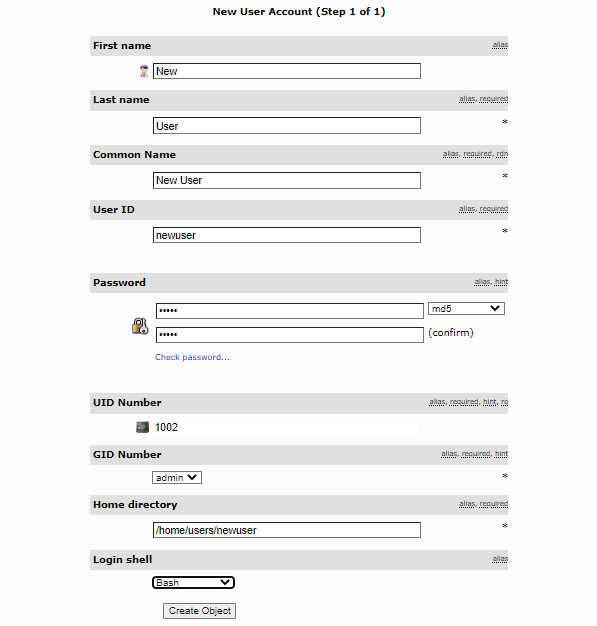
After that “Add new attribute” and add the Email address for the user.
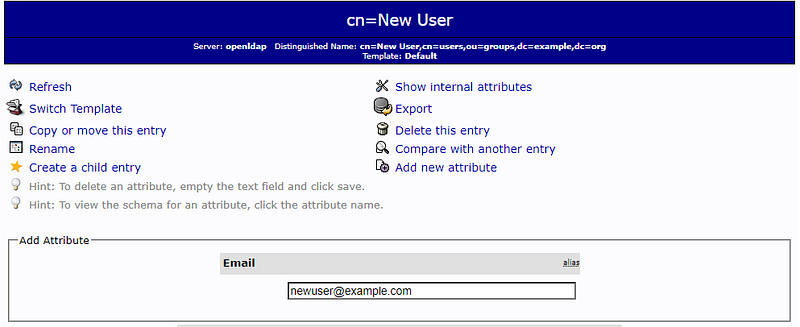
Now add this user to all the groups, by following the below step.
Click the “cn=users” on the sidebar menu and add the “newuser” by clicking the “add value” on memberUid.

similarly, add the “newuser” to the admin and writer group.
Login with a new user
Login with the newly created LDAP user. After login verifies the user roles on the user edit page.
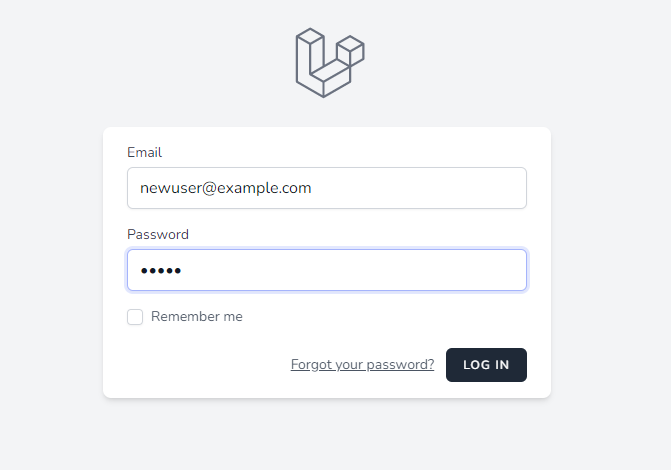
The new user was created with admin and writer roles.
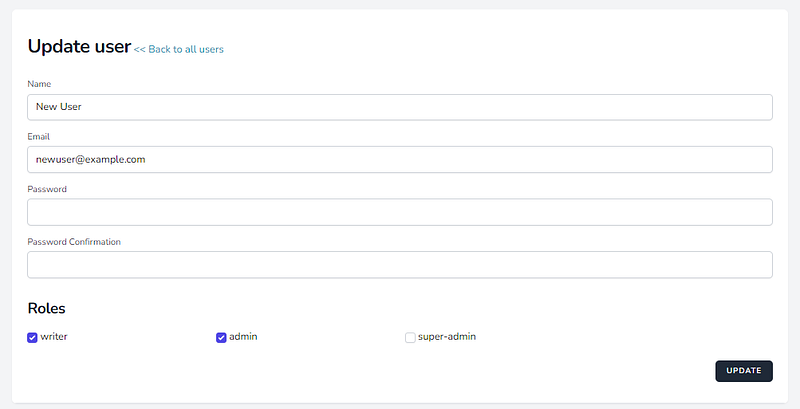
Login Fallback
The login fallback option allows you to login as a user located in the local database if active directory authentication fails.
This login fallback is only applicable to the DatabaseUserProvider.
Set the “LDAP_LOGIN_FALLBACK” value to true in env to enable the login fallback.
Thank you for reading.
Stay tuned for more!
Follow me at balajidharma.medium.com.