avatarKirti K

Free AI web copilot to create summaries, insights and extended knowledge, download it at here

5002

Abstract

qyp9uLWw.png"><figcaption></figcaption></figure><div id="c5d1"><pre><span class="hljs-keyword">Open</span> the <span class="hljs-keyword">App</span>.<span class="hljs-keyword">test</span>.js - The content will appear like below </pre></div><figure id="2830"><img src="https://cdn-images-1.readmedium.com/v2/resize:fit:800/1*1aE_C9P0sCs4Wly6c4FD5w.png"><figcaption></figcaption></figure><h1 id="2b28">4) Verify the Test are running with yarn test command</h1><p id="054f">run below command in a separate terminal</p><div id="ddbc"><pre>yarn <span class="hljs-built_in">test</span></pre></div><figure id="afa8"><img src="https://cdn-images-1.readmedium.com/v2/resize:fit:800/1*Lj9jVqp0vKxeKriupkZ2_A.png"><figcaption></figcaption></figure><p id="cf54"><b>Tests are running fine :)</b></p><h1 id="0547">Getting started with Docker Setup</h1><blockquote id="daab"><p><b>Now we will set up the docker to build our dev and for our unit test CRA</b></p></blockquote><blockquote id="b15e"><p><b>Please follow below steps</b></p></blockquote><h1 id="dbed">3) Creating a docker file in your project directory</h1><p id="949c">Create a new Docker file with:</p><p id="0d78"><code>touch Dockerfile</code></p><p id="899d"><b>6) Copy and paste the below content as per the node latest version</b></p><div id="627d"><pre><span class="hljs-attribute">FROM</span> node:<span class="hljs-number">12</span>.<span class="hljs-number">18</span>.<span class="hljs-number">3</span></pre></div><div id="6aa1"><pre><span class="hljs-keyword">LABEL</span> <span class="hljs-keyword">version</span>=<span class="hljs-string">"1.0"</span></pre></div><div id="cc6f"><pre><span class="hljs-type">LABEL</span> description=<span class="hljs-comment">"This is the base docker image for the react app "</span></pre></div><div id="6779"><pre><span class="hljs-attribute">LABEL</span> maintainer = [<span class="hljs-string">"kirtikau<span class="hljs-variable">@gmail</span>.com"</span>]</pre></div><div id="e42a"><pre><span class="hljs-keyword">RUN</span><span class="language-bash"> <span class="hljs-built_in">mkdir</span> /srv/example</span></pre></div><div id="6ed9"><pre><span class="hljs-keyword">WORKDIR</span><span class="language-bash"> /srv/example</span></pre></div><div id="d27b"><pre><span class="hljs-keyword">COPY</span> package.json yarn.<span class="hljs-keyword">lock</span> ./</pre></div><div id="6bd5"><pre><span class="hljs-built_in">RUN</span> yarn && yarn cache clean</pre></div><div id="60a1"><pre><span class="hljs-keyword">COPY</span><span class="language-bash"> . .</span></pre></div><figure id="0351"><img src="https://cdn-images-1.readmedium.com/v2/resize:fit:800/1*kpmhfcrrxPQ-2XhVcIJvTg.png"><figcaption></figcaption></figure><p id="acfc"><b>7) Create a new file</b> <b>docker-compose.yml </b>with the below content</p><h2 id="bf5c">Add below code for react test in docker-compose.yml</h2><p id="404f"><b>Here you will see two services</b></p><p id="4048"><b>a) dev — to run and build the dev environment</b></p><p id="0efc"><b>b) test — to run the test cases</b></p><div id="2466"><pre><span class="hljs-symbol">version:</span> <span class="hljs-string">'3'</span></pre></div><div id="7dee"><pre><span class="hljs-symbol">services:</span></pre></div><div id="f585"><pre><span class="hljs-symbol">dev:</span></pre></div><div id="4b53"><pre><span class="hljs-symbol">build:</span></pre></div><div id="5189"><pre><span class="hljs-symbol">context:</span> .</pre></div><div id="d243"><pre><span class="hljs-symbol">ports:</span></pre></div><div id="9c52"><pre><span class="hljs-bullet">- </span>3000:3000</pre></div><div id="5f0e"><pre><span class="hljs-symbol">command:</span> yarn start</pre></div><div id="4a4e"><pre><span class="hljs-symbol">volumes:</span></pre></div><div id="598e"><pre>- <span class="hljs-string">"./src:/srv/example/src"</span></pre></div><div id="eeb7"><pre><span class="hljs-symbol">test:</span></pre></div><div id="498b"><pre><span class="hljs-symbol">build:</span></pre></div><div id="ea00"><pre><span class="hljs-symbol">context:</span> .</pre></div><div id="bc6b"><pre><span class="hljs-symbol">environment:</span></pre></div><div id="9f89"><pre>- <span class="hljs-attribute">CI</span>=<span class="hljs-literal">true</span></pre></div><div id="97a6"><pre><span class="hljs-built_in">command</span>: yarn <span class="hljs-built_in">test</span></pre></div><figure id="2f15"><img src="https://cdn-images-1.readmedium.com/v2/resize:fit:800/1*XZB2xV8rGDVncfTby-Tuzg.png"><figcaption></figcaption></figure><p id="cd2c">The following commands will now build our image, as well as execute yarn test or npm test</p><h2 id="e97c">8) Final Step</h2><blockquote id="ede0"><p><b>a) Build Command</b></p></blockquote><blockquote id="ccbd"><p><b>run below command in a separate terminal</b></p></blockquote><div id="f81c"><pre><span class="hljs-attribute">docker-compose build dev</span></pre></div><figure id="9104"><img src="https://cdn-images-1.readmedium.com/v2/resize:fit:800/1

Options

*8q68BOtL3CDu9LFDRth1gQ.png"><figcaption></figcaption></figure><blockquote id="8a1d"><p><b>Test Command</b></p></blockquote><div id="8b75"><pre>docker-compose <span class="hljs-keyword">run</span><span class="language-bash"> <span class="hljs-built_in">test</span></span></pre></div><figure id="cde6"><img src="https://cdn-images-1.readmedium.com/v2/resize:fit:800/1*WGBgQvnJsCe0WOShCMKgNA.png"><figcaption></figcaption></figure><blockquote id="6ec7"><p><b>Dev run Command</b></p></blockquote><div id="9c0b"><pre><span class="hljs-attribute">docker-compose up dev</span></pre></div><figure id="9d34"><img src="https://cdn-images-1.readmedium.com/v2/resize:fit:800/1*4VeUhoD6zBGtHet7p36mwQ.png"><figcaption></figcaption></figure><figure id="23d9"><img src="https://cdn-images-1.readmedium.com/v2/resize:fit:800/1*FgvXDUSbYKInhxu5aUuFwg.png"><figcaption></figcaption></figure><p id="405e">Github links to download code —</p><blockquote id="0670"><p><a href="https://github.com/kirti/create-react-app-docker-unit-test"><b>GitHub Code</b></a></p></blockquote><h1 id="b8d7">Official links for Docker for more details</h1><blockquote id="855f"><p><a href="https://docs.docker.com/get-started/overview/">https://docs.docker.com/get-started/overview/</a></p></blockquote><p id="bd05"><b>Conclusion:</b></p><p id="110f">This is the explanatory medium story of <b>How to add Docker with create react app(CRA) + run unit tests </b>if you have any doubts, please mail me at [email protected]</p><p id="9d47">Happy learning :)</p><div id="9cf0" class="link-block"> <a href="https://levelup.gitconnected.com/how-to-add-swagger-ui-to-existing-node-js-and-express-js-project-2c8bad9364ce"> <div> <div> <h2>How to add Swagger UI to an existing Node.js and Express.js project</h2> <div><h3>In this tutorial, we’ll be learning how to add swagger to existing Node Js and Express.js. As we already learned in…</h3></div> <div><p>levelup.gitconnected.com</p></div> </div> <div> <div style="background-image: url(https://miro.readmedium.com/v2/resize:fit:320/1*2tKCzmIJSz5xCiBCWYwTWA.png)"></div> </div> </div> </a> </div><div id="29e6" class="link-block"> <a href="https://kirtikau.medium.com/tools-screen-readers-browser-extension-color-contract-tools-for-website-accessibility-1f09480c5f4"> <div> <div> <h2>Tools: Screen Readers, Browser Extension, Color Contract tools for Website Accessibility</h2> <div><h3>Tools for Website Accessibility -</h3></div> <div><p>kirtikau.medium.com</p></div> </div> <div> <div style="background-image: url(https://miro.readmedium.com/v2/resize:fit:320/1*Xq0vvlN7H3V_iKGueXh4bQ.png)"></div> </div> </div> </a> </div><div id="361b" class="link-block"> <a href="https://readmedium.com/how-to-create-a-rest-api-with-express-js-and-node-js-3de5c5f9691c"> <div> <div> <h2>How to create a REST API with Express.js and Node.js</h2> <div><h3>In this tutorial, we’ll be learning how to build a Rest API in Node.js and Express.js by building a simple crud user…</h3></div> <div><p>medium.com</p></div> </div> <div> <div style="background-image: url(https://miro.readmedium.com/v2/resize:fit:320/1*EvMSXAxkt3-7V6BB2jYwgA.png)"></div> </div> </div> </a> </div><div id="1538" class="link-block"> <a href="https://readmedium.com/quickest-five-way-to-center-div-with-css-5529788d3a2c"> <div> <div> <h2>Quickest Five Way to Center Div with CSS</h2> <div><h3>In this tutorial, we’ll be learning how to Center div with CSS :)</h3></div> <div><p>medium.com</p></div> </div> <div> <div style="background-image: url(https://miro.readmedium.com/v2/resize:fit:320/1*LLOlHax9QGtyHz1OZotBtA.png)"></div> </div> </div> </a> </div><div id="307e" class="link-block"> <a href="https://levelup.gitconnected.com/android-react-native-window-setup-how-to-setup-android-environment-for-react-native-app-588aaa13c3a6"> <div> <div> <h2>Android React Native Window Setup</h2> <div><h3>How to Setup Android Environment for React Native App</h3></div> <div><p>levelup.gitconnected.com</p></div> </div> <div> <div style="background-image: url(https://miro.readmedium.com/v2/resize:fit:320/1*Ir97Hdkj_4irGmwSjj7dUw.png)"></div> </div> </div> </a> </div></article></body>

How to Add Docker to Create React App(CRA) + Run Unit Tests

In this tutorial, we’ll be learning how to add a docker to Create-React App and run the unit tests.
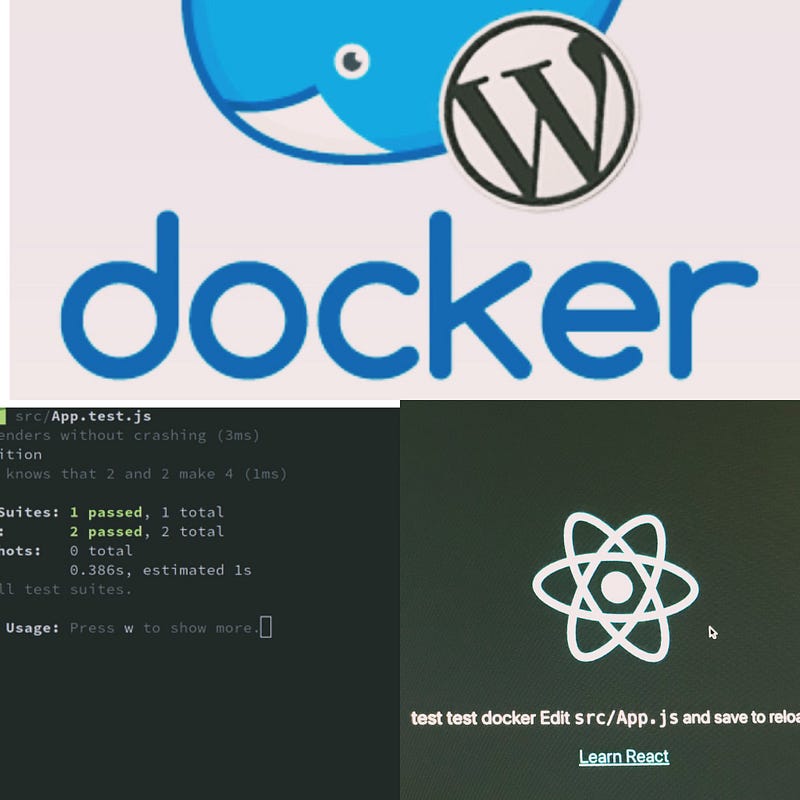
Before we start please find below important technologies definitions.

1. Docker —

Docker is a popular open-source project written in go and developed by Dotcloud (A PaaS Company).

It is basically a container engine that uses the Linux Kernel features like namespaces and control groups to create containers on top of an operating system.

Docker is an open platform for developing, shipping, and running applications.

Docker enables you to separate your applications from your infrastructure so you can deliver software quickly.

With Docker, you can manage your infrastructure in the same ways you manage your applications

Official links for Docker

https://docs.docker.com/get-started/overview/

2. What is Kubernetes vs Docker?

A fundamental difference between Kubernetes and Docker is that Kubernetes is meant to run across a cluster while Docker runs on a single node.

Kubernetes is more extensive than Docker Swarm and is meant to coordinate clusters of nodes at scale in production in an efficient manner.

3. What is the difference between VM and Docker?

Docker is container-based technology and containers are just the user space of the operating system.

In Docker, the containers running share the host OS kernel.

A Virtual Machine, on the other hand, is not based on container technology. They are made up of user space plus kernel space of an operating system.

Prerequisites :

Download software’s

  1. Node.js (Version 8 or newer)https://nodejs.org/en/download/
  2. Chromehttps://www.google.com/chrome/
  3. Visual Studio Code (you can use any other editor or IDE)
  4. Docker — Please see the latest install steps at https://docs.docker.com/get-docker/

After installing all software’s

Getting Started

Verify Docker has been installed

After installing Docker, run the following command in your terminal to verify Docker has been installed.

docker --version
Docker version 20.10.6, build 370c289

Set up a React App

1 ) Create a new React Application running the following commands in your command terminal

Check out https://create-react-app.dev/docs/getting-started/ if need more info for the below commands

npx create-react-app create-react-app-docker-unit-test
cd create-react-app-docker-unit-test
yarn start

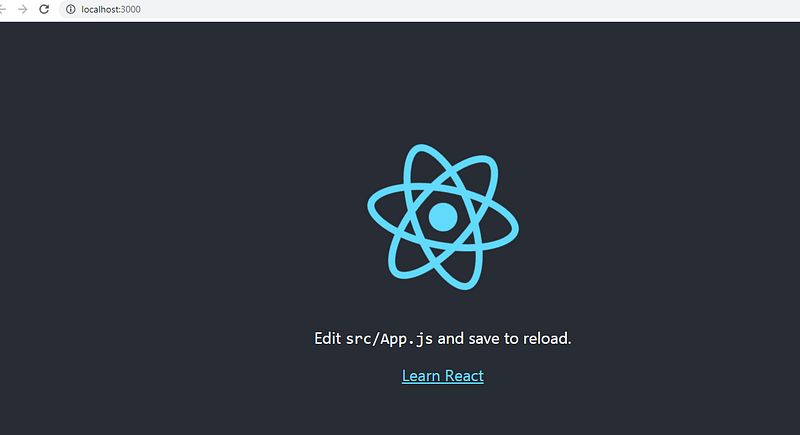
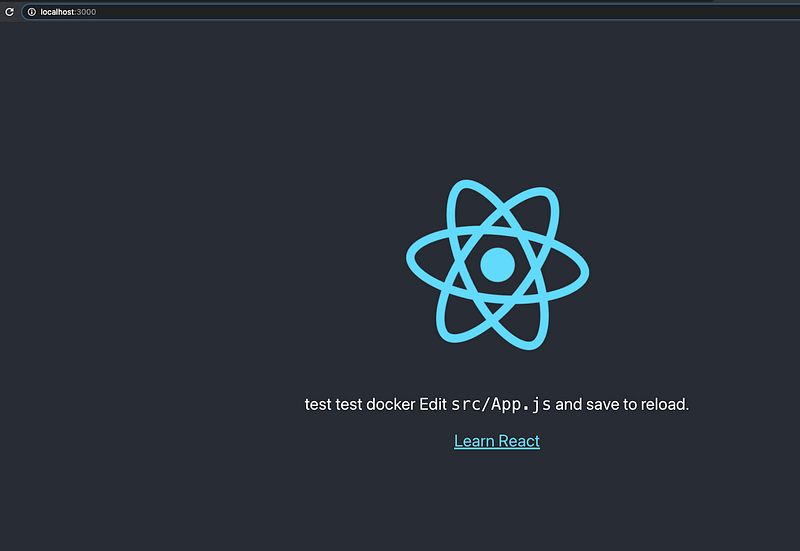
Then open http://localhost:3000/ to see your app and you will see the app in the browser as below

2) Once the application is created, You should have an App.test.js file already generated inside the src/ folder
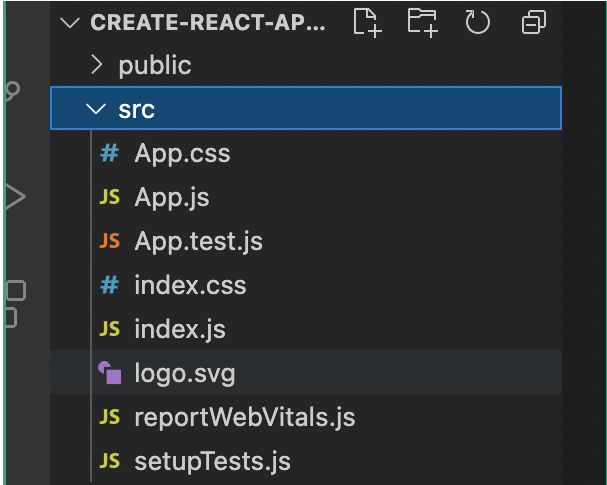
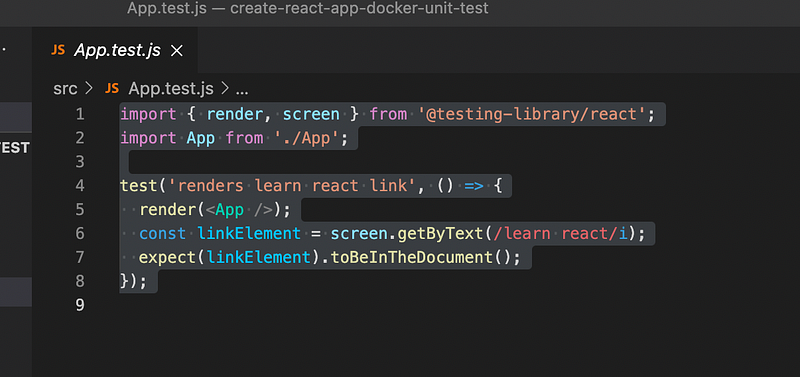
Open the App.test.js - The content will appear like below 
4) Verify the Test are running with yarn test command

run below command in a separate terminal

yarn test
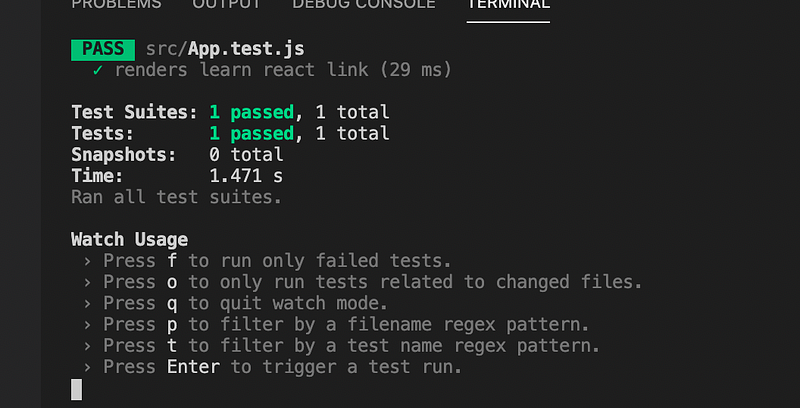
Tests are running fine :)

Getting started with Docker Setup

Now we will set up the docker to build our dev and for our unit test CRA

Please follow below steps

3) Creating a docker file in your project directory

Create a new Docker file with:

touch Dockerfile

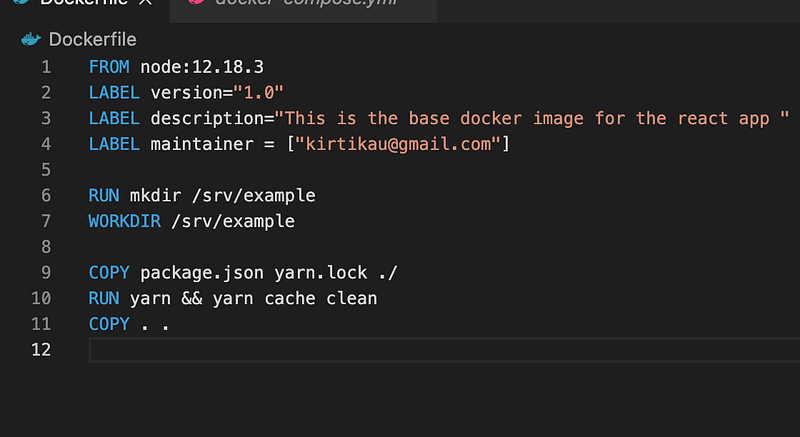
6) Copy and paste the below content as per the node latest version

FROM node:12.18.3
LABEL version="1.0"
LABEL description="This is the base docker image for the react app "
LABEL maintainer = ["kirtikau@gmail.com"]
RUN mkdir /srv/example
WORKDIR /srv/example
COPY package.json yarn.lock ./
RUN yarn && yarn cache clean
COPY . .

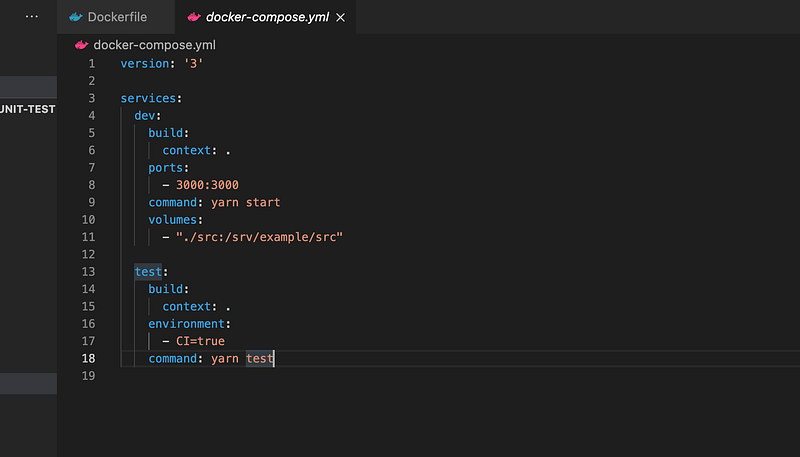
7) Create a new file docker-compose.yml with the below content

Add below code for react test in docker-compose.yml

Here you will see two services

a) dev — to run and build the dev environment

b) test — to run the test cases

version: '3'
services:
dev:
build:
context: .
ports:
- 3000:3000
command: yarn start
volumes:
- "./src:/srv/example/src"
test:
build:
context: .
environment:
- CI=true
command: yarn test

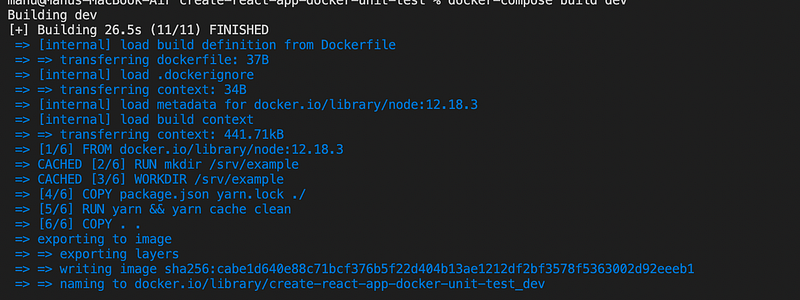
The following commands will now build our image, as well as execute yarn test or npm test

8) Final Step

a) Build Command

run below command in a separate terminal

docker-compose build dev
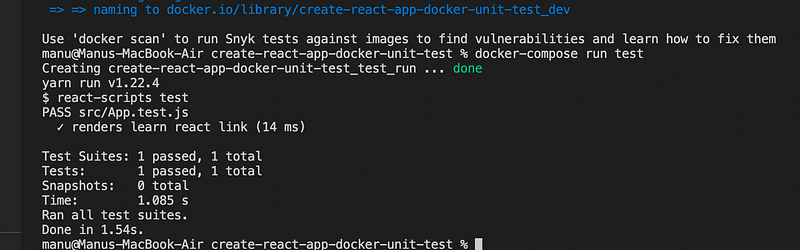
Test Command

docker-compose run test
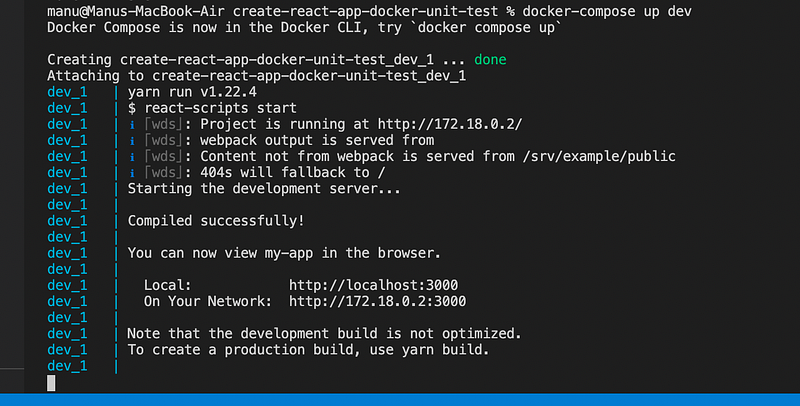
Dev run Command

docker-compose up dev
Github links to download code —

GitHub Code

Official links for Docker for more details

https://docs.docker.com/get-started/overview/

Conclusion:

This is the explanatory medium story of How to add Docker with create react app(CRA) + run unit tests if you have any doubts, please mail me at [email protected]

Happy learning :)

Docker
Create React App
Unit Testing
Docker Compose
Reactjs
Recommended from ReadMedium