avatarPaul DelSignore

Free AI web copilot to create summaries, insights and extended knowledge, download it at here

2551

Abstract

it:800/1*NjQqPMfqqqUiLz9WUeaO5w.png"><figcaption></figcaption></figure><p id="7685">But now with GPTs, I can use the power of conversation to guide a user to generate a properly structured image prompt.</p><h2 id="b40e">AI Photo Prompt Builder</h2><p id="dbd6">The <b><i>AI Photo Prompt Builder</i></b> GPT will ask you a series of questions, and then based on your answers, will build an efficient prompt for you to use to generate a photographic image.</p><p id="45ba">What makes it powerful is you can respond to the questions with very simple responses, like this:</p><figure id="57d7"><img src="https://cdn-images-1.readmedium.com/v2/resize:fit:800/1*IeliWBQCvPPMgRriLldAVw.png"><figcaption></figcaption></figure><p id="ff77">And the questions will also include examples for you to choose from, like this…</p><figure id="ec3d"><img src="https://cdn-images-1.readmedium.com/v2/resize:fit:800/1*pDPc2iGebiVn_gp5H3Qftw.png"><figcaption></figcaption></figure><p id="4118">After you answer all seven questions, the GPT will then compile your answers and create an elaborate prompt for you. It will then ask you if you would like the image to be generated (via DALLE).</p><figure id="dbe1"><img src="https://cdn-images-1.readmedium.com/v2/resize:fit:800/1*irocBJSC9cg9VWL4swdb1A.png"><figcaption></figcaption></figure><p id="4853">Of course, you can still take the prompt to your favorite image generator as well (like Midjourney), but it’s great that you can do it all while using the GPT.</p><p id="ff3d">If you would like to use the <b>AI Photo Prompt Builder</b> and test it out yourself, here it is:</p><div id="fa18" class="link-block"> <a href="https://chat.openai.com/g/g-ois5FM2lq-ai-photo-prompt-builder"> <div> <div> <h2>ChatGPT - AI Photo Prompt Builder</h2> <div><h3>I help craft detailed AI photo prompts and generate images</h3></div> <div><p>chat.openai.com</p></div> </div> <div> <div style="background-image: url(https://miro.readmedium.com/v2/resize:fit:320/0*J35ZpOC9D6ibbaqY)"></div> </div> </div> </a> </div><p id="f980">My friend <a href="undefined">Jody Gajic</a> used it to generate an image in <a href="https://readmedium.com/the-vanishing-interface-the-best-ui-is-no-ui-885231e66979">his latest medium article.</a></p><h2 id="5ba1">AI Text Prompt Builder</h2><p id="1587">But just like writing image prompts, writing text prompts can also be challenging

Options

.</p><p id="72b1">I believe a good text prompt structure has six components — persona or role, action, context, examples, format, and tone.</p><p id="ac5c">This is Brie Kirbyson’s prompt formula which is similar (she has constraints for the formatting instructions) but I would just prefer to state it as <i>formatting</i> and also include tone.</p><figure id="e580"><img src="https://cdn-images-1.readmedium.com/v2/resize:fit:800/1*kM_MMwJsHf0_cfuhU5Nz4Q.png"><figcaption>source: <a href="https://www.youtube.com/watch?v=e7d4HMPs2fs">youtube</a></figcaption></figure><p id="0b47">So when using the AI text prompt builder GPT, it will ask you a series of questions, and then based on your answers, will build an efficient prompt for you to use.</p><p id="f613">While this type of Q&A might take longer than just writing a prompt by scratch, the power behind this is that it walks you through the process. It helps you to really think about your prompt.</p><figure id="612f"><img src="https://cdn-images-1.readmedium.com/v2/resize:fit:800/1*DQJr2UwnFZPHqU7Qd0-SAQ.png"><figcaption></figcaption></figure><p id="a1dd">Once you have completed the questions, the GPT will then generate the prompt, and then ask you if you want to proceed with responding to the prompt:</p><figure id="6194"><img src="https://cdn-images-1.readmedium.com/v2/resize:fit:800/1*OvkARua5Eg6QL5RxaveAWg.png"><figcaption></figcaption></figure><p id="cc84">If you would like to use the AI Text Prompt Builder and test it out yourself, here it is:</p><div id="cbbb" class="link-block"> <a href="https://chat.openai.com/g/g-8KuKjkFPh-ai-text-prompt-builder"> <div> <div> <h2>ChatGPT - AI Text Prompt Builder</h2> <div><h3>I help craft detailed AI text prompts</h3></div> <div><p>chat.openai.com</p></div> </div> <div> <div style="background-image: url(https://miro.readmedium.com/v2/resize:fit:320/0*0lprP7BxT7RYWiq1)"></div> </div> </div> </a> </div><h2 id="b381">Final Thoughts</h2><p id="1540">These are the first GPTs that I created and I am super excited to share them.</p><p id="21ba">Honestly, even though I am already experienced in writing good prompts, I will be using these GPTs myself from now on.</p><p id="4913"><i>If you liked this article, throw out some Medium love… clap, comment, and be sure to follow. Medium values engagement as a form of recognition for writers.</i></p></article></body>

How GPTs Can Enhance Your Prompt Writing Skills

A Conversational Guide To Effective Prompt Writing
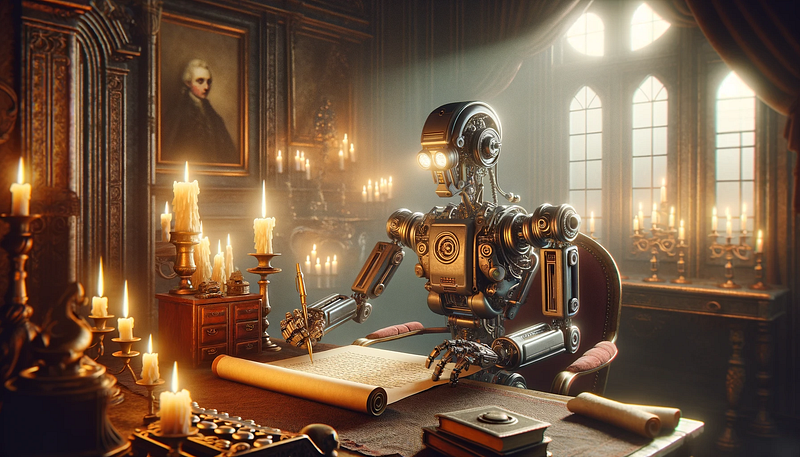
created using the AI Photo Prompt Builder GPT with DALLE

OpenAI’s release of custom GPTs is revolutionary by making it easy to create and use personalized targeted chat experiences.

Unlike character AI bots which seem gimmicky, custom GPTs can be rich in data and they can execute actions. Most importantly, they are accessible for anyone to build because you don’t have to know how to code to create them.

While OpenAI’s plugins have the potential to deliver custom-targeted use cases, they lack the simplicity and proper user experience. GPTs on the other hand, are community-driven and have a lot more potential to scale.

Currently, the limitation is that building and using GPTs is exclusive to ChatGPT+ users. I really hope that OpenAI will extend this by making GPTs shareable to a broader audience.

GPT Use Cases

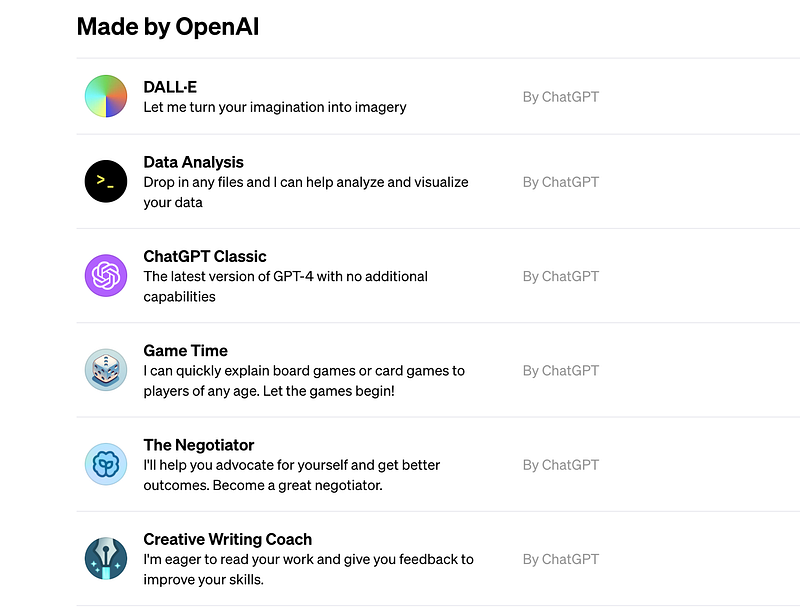
Having gotten access to GPTs, I started to think about the many different possible use cases. And by clicking on the ‘explore’ tab, OpenAI provides around 15 default GPTs that are available to use, which also serve to provide you with some ideas:
As I was thinking about use cases, it occurred to me that for many people I know, writing good prompts can be challenging.

For example, when writing prompts for images and art, I often notice that people might use very simple phrases (like you would when doing a Google search).

And while it is true that writing something simple like ‘create an image of a cat by a window’ will still likely generate a good image, if you want consistency and the ability to improve your output, you really should learn how AI responds to language patterns.

This is the reason that I wrote ‘The Anatomy Of An AI Art Prompt’ as a guide to understand how to structure an efficient prompt for generating images and illustrations.
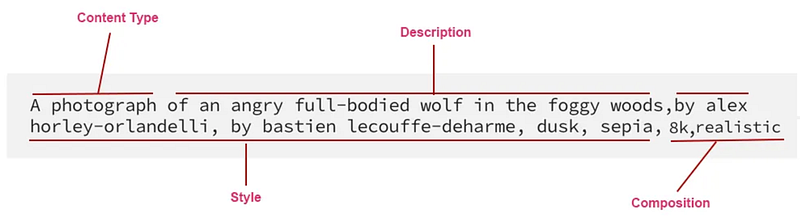
But now with GPTs, I can use the power of conversation to guide a user to generate a properly structured image prompt.

AI Photo Prompt Builder

The AI Photo Prompt Builder GPT will ask you a series of questions, and then based on your answers, will build an efficient prompt for you to use to generate a photographic image.

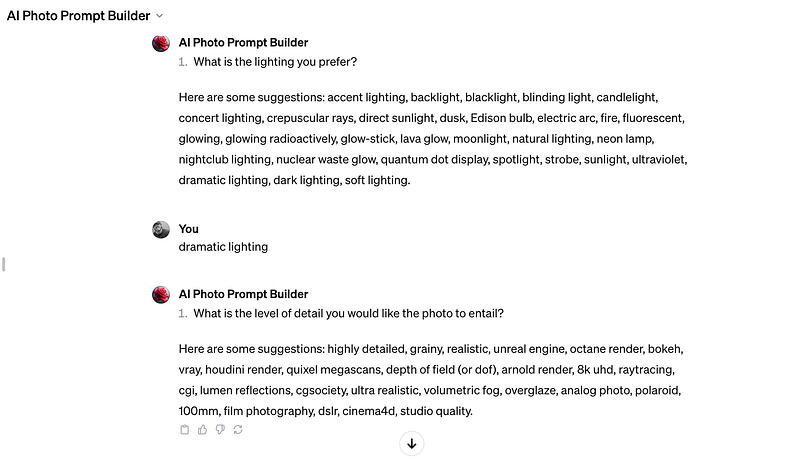
What makes it powerful is you can respond to the questions with very simple responses, like this:
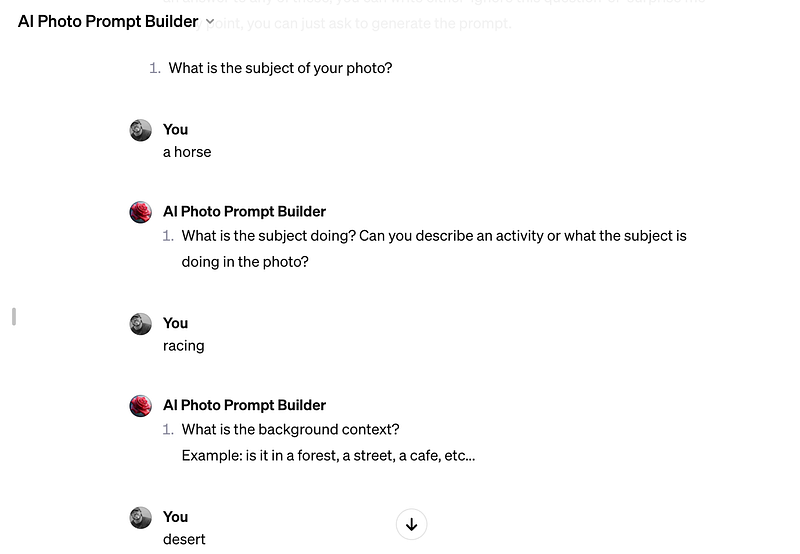
And the questions will also include examples for you to choose from, like this…
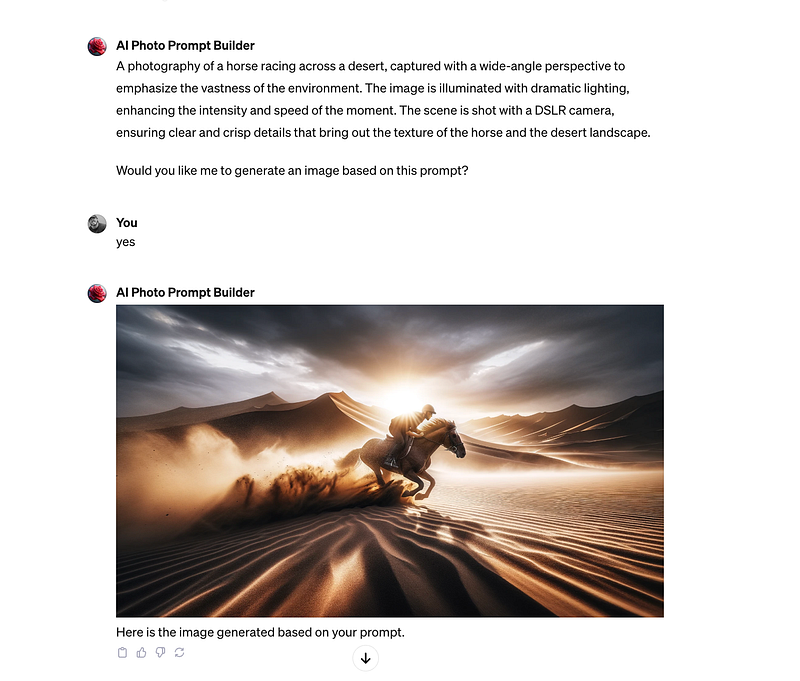
After you answer all seven questions, the GPT will then compile your answers and create an elaborate prompt for you. It will then ask you if you would like the image to be generated (via DALLE).
Of course, you can still take the prompt to your favorite image generator as well (like Midjourney), but it’s great that you can do it all while using the GPT.

If you would like to use the AI Photo Prompt Builder and test it out yourself, here it is:

My friend Jody Gajic used it to generate an image in his latest medium article.

AI Text Prompt Builder

But just like writing image prompts, writing text prompts can also be challenging.

I believe a good text prompt structure has six components — persona or role, action, context, examples, format, and tone.

This is Brie Kirbyson’s prompt formula which is similar (she has constraints for the formatting instructions) but I would just prefer to state it as formatting and also include tone.
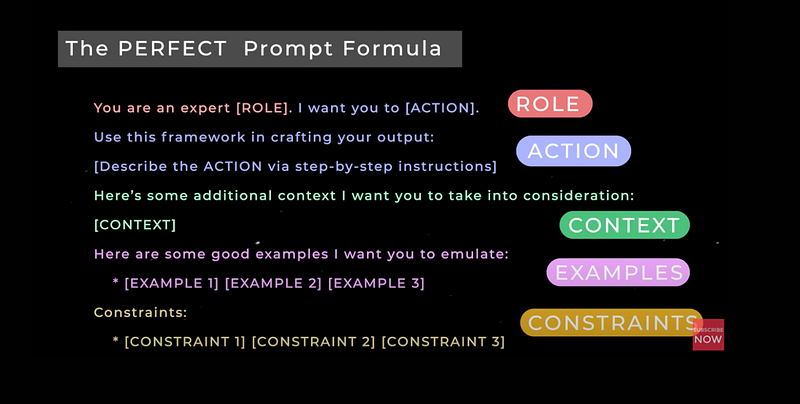
source: youtube

So when using the AI text prompt builder GPT, it will ask you a series of questions, and then based on your answers, will build an efficient prompt for you to use.

While this type of Q&A might take longer than just writing a prompt by scratch, the power behind this is that it walks you through the process. It helps you to really think about your prompt.
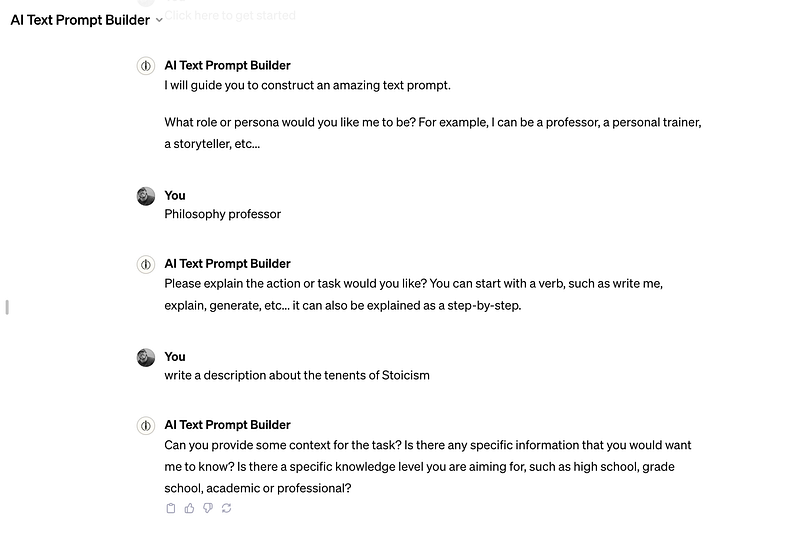
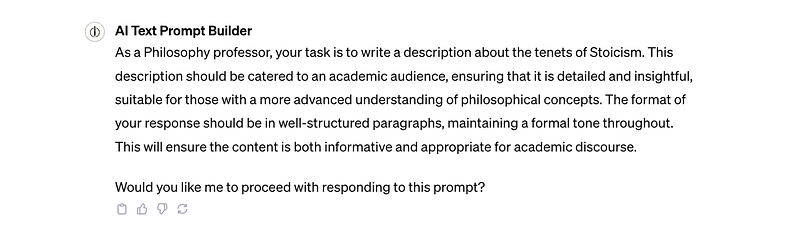
Once you have completed the questions, the GPT will then generate the prompt, and then ask you if you want to proceed with responding to the prompt:
If you would like to use the AI Text Prompt Builder and test it out yourself, here it is:

Final Thoughts

These are the first GPTs that I created and I am super excited to share them.

Honestly, even though I am already experienced in writing good prompts, I will be using these GPTs myself from now on.

If you liked this article, throw out some Medium love… clap, comment, and be sure to follow. Medium values engagement as a form of recognition for writers.

ChatGPT
OpenAI
Artificial Intelligence
Technology
Prompt
Recommended from ReadMedium
