
How Do I Find The Medium Owned Publications?
Where did they go?
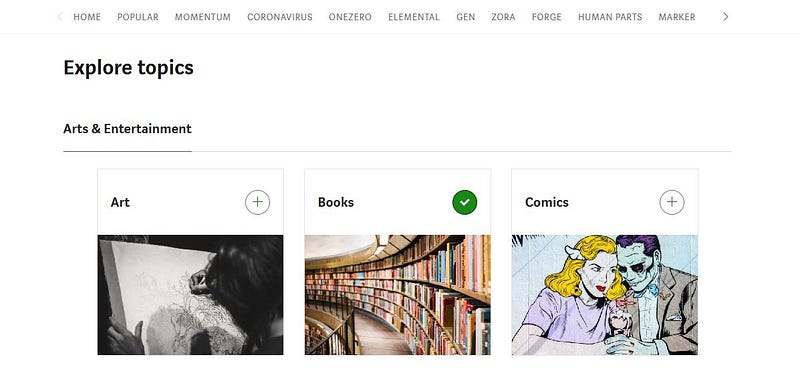
In November 2018 I became a paying member of Medium, so that I could read the magazines and Medium-run (or Medium owned) Publications, like OneZero and Human Parts. At that time, there were links to them at the top of the Medium homepage.
Sometime in 2020 the links were removed, to my surprise. I am one of those who really like the Medium-run Publications, though I would love them (rather than “really like them”) if only one of them would publish one of my stories!
Imagine my delight when today, I know not how, I stumbled across a Topics page where I found the links to these Publications at the top!
Hopefully, you can go directly to that page by clicking on the link below, if you like. 😸
Curiously, if you click on your Avatar, then on “Control your recommendations” the same Topics page cannot be accessed.
It looks like the “Control your recommendations” function is just for a person to review who and what she is following, i.e. Topics, People, and Publications.
And the TOPICS page accessed via “Control your recommendations” is not the same as the “Explore Topics” page!
Previously, under one’s Avatar, there was a function/link titled “Customise your interests” and there was no “Control your recommendations” function!
I think that when a person previously clicked on “Customise your interests” it would take you to the “Explore topics” page, BUT back then it did not have links to the Medium-owned Publications at the top. 😆
The point is that the “Explore topics” page is different to the Topics page that you see under “Control your recommendations.”
Currently there is no link to the “Explore Topics” page on the Medium homepage, but if I was a betting person, I’d bet that Medium will restore a link there.
When the homepage was recently changed, there were 2 links that were removed.
- The link to “All from Following” which took you to the page with the tiles or graphic images that went with the story titles of People or Publications you were following.
2. The link to the Topics Page which lists the categories and names of Topics.
The homepage now has Recommended Topics, but no link to all topics.
If you scroll through the Topic names at the top of your homepage next to “Your topics” by clicking on the right-angle bracket (the >) well then, you can of course click on a topic you are interested in right then and then.
If you scroll to the end until you can scroll no more, the last item that you can click on will take you to the Topics page which is accessed under “Control your recommendations”.
However in my opinion, it would be great if the programmers put a link to the Explore Topics Page on the homepage. Then we could go to the Topics Page easy-peasy, lemon squeazy. 😄 We could customise our Topics interests from there without going to “Control your recommendations.”
I get it that Medium wanted to make customised Topics prominent on the homepage. This is so a person can easily go to a Topics page of interest.
Looking into my crystal ball, me-thinks that they will put a link to this shiny, new Explore Topics page (which has links to the Medium-run Publications) on the homepage~~~or who knows where, soon!!
I hope so.
Thanks for reading. You may be interested in the following stories.