
How To Find Your Own Medium Stories Fast
How do I quickly find a Medium story or Medium stories

Have you ever wanted to find one of your own stories on Medium, but not bookmarked it, or you’ve forgotten exactly what it was titled?
Here is a quick way which may help you find it, without having to rummage through the Folders on your computer for the exact file title, if you’ve saved your story to your PC, and without having to do a usual Search of keywords on Medium (via the search field accessed by clicking on the magnifying glass at the top of your homepage).
Go to your Profile page.

Type a word or a few words that your story contains, into the Search field, as shown in the example below.

I have written several articles about being under-weight and knew that my favourite story had the word “skinny” in the Title, so I searched upon that word.
The story title popped up and then I just had to click on the Title, “The Surprising Truth of Skinny Weight Loss”, to go to the story.
If there is more than one story containing the word(s) you will see more than one story title.
If you see more than one story title drop down, you may want to press the Return key after typing in your search word(s), as that will result in the story titles for all stories containing the search word(s) popping up.
Note: if you only wrote one story containing the search word(s) and press Return, you will be taken to a search of all stories across Medium, containing the word(s) that you’re searching upon. It is equivalent to clicking on the green link “Search all of Medium”, so don’t hit Return if you see only one story drop-down. Click on that story title instead.
Interestingly, if you leave the Search field blank and click in the Search field on your Profile page, then hit the Return key, I think that a few of your most viewed stories pop up!
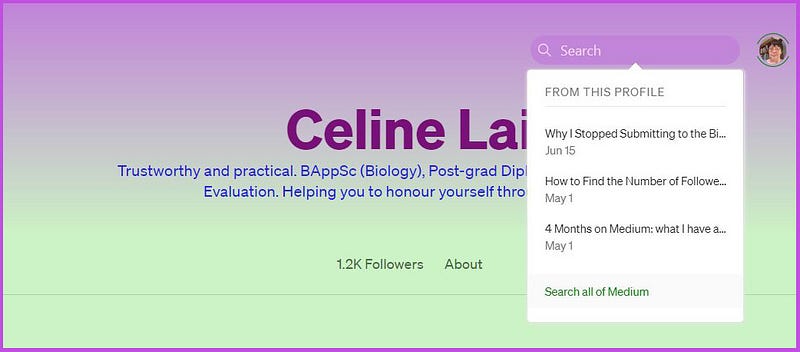
You can also search all of Medium for stories containing your search word or words, by clicking on the green “Search all of Medium.”
What’s more, you can go to another person’s Profile page and look up a story that they wrote, using a direct search on their Profile page.

If you leave the Search field blank, and hit the Return button, 3 stories will be displayed, perhaps being their top viewed or recently viewed stories, who knows?
Anyhow, I find this process a great way to search quickly for some of my own stories, rather than laboriously scrolling down forever until I find a story that I’m looking for! Then I can navigate to the Stats for that story or pin the story, or do what I want to do, by clicking on the 3 little dots.
Also, you can try this out to search for specific articles written by certain people. For example, I wondered if the famous Tom Kuegler has written about Medium’s new bonus scheme. Indeed he has, as shown below.

The search results also show Responses (Comments) which contain the search word(s). Hey Tom, how do we get 51,000 followers? 😆 😄 😅
You can also go to a Publication’s homepage and type in some words from someone’s story (from the Title or body of the person’s story) and the writer’s name, to search quickly for a specific writer’s content.
Entering your own name will pull up your own stories in that Publication. You can save the search results page to your computer or bookmark it for easy reference or to share it, and/or for “posterity.”
Searching on Medium is great now!
Claps for this article will be really appreciated, if you got use from this! Thank you.
Last but not least, you may be interested in the following articles that I have written about searching for Medium-run Publications, and about using the main search options on Medium.


