
How Do APIs Work, and When Should You Use One: What Every Product Manager Needs To Know
Technical Knowledge for Product Managers
Welcome to part four of a series of articles covering the technical knowledge that every Product Manager ought to know. Today I’m going to give an introduction to APIs.
If you’d like to learn why I think this knowledge is important, then head back to my article where I discussed WHY it’s important to work on technical skills in Product Management.
And don’t forget to subscribe to email updates if you want to be notified when the next article is published!
What is an API?
An API (Application Programming Interface) is a set of rules and tools that helps different software applications communicate with each other.
It’s like a waiter in a restaurant who takes your order, sends it to the kitchen, and brings your food back to you. In the same way, an API acts as a middleman between different software applications, taking requests and sending responses back and forth so they can work together to do what you want them to do.

What are the business cases for APIs?
There are three main use cases here, all of which I will cover in the following article.
- Integrating with a third party API
- Building and exposing an API as a service for your customers
- Building an API for internal use
Benefits of using an API
Scaleability — APIs allow you to scale quickly by adding new features or functionalities to an application without having to build everything from scratch.
Integration — APIs allow different software applications to integrate and work together seamlessly. This integration is critical for delivering a seamless user experience, especially in cases where users need to switch between different applications to complete a task.
Security — APIs provide a secure way for applications to share data and perform task, so that sensitive data remains secure, and users can access only the data they are authorized to access.
Innovation — building on top of existing APIs can lead to the development of new and innovative products.
Well-known APIs in use
Here are some popular usecases to illustrate how ubiquitous APIs are:
Social media APIs — Social media platforms such as Facebook, Twitter, and Instagram have APIs that allow developers to integrate their applications with these platforms. If somebody integrates their instagram post into a blog post, the blog service provider is probably using an Instagram API.
Payment APIs — Payment gateways such as PayPal and Stripe have APIs that allow developers to integrate payment processing into their applications. Every time you buy something online with Paypal, or I get paid by Medium, a payment API is in use.
Mapping APIs — Mapping services such as Google Maps and Mapbox have APIs that allow developers to embed maps and location data into their applications. Whenever you visit a search tool based on geography for a product (looking for a hotel room? checking out apartments for rent?), it probably uses the Google Maps API.

OK, now we understand why we want to use APIs, let’s get a bit deeper into the details of how APIs work.
Types of APIs
The most common types of APIs are:
REST APIs
REST (Representational State Transfer) APIs are one of the most popular types of APIs. They use HTTP requests to retrieve and manipulate data and can be accessed using any programming language. REST APIs typically use JSON or XML to exchange data.
SOAP APIs
SOAP (Simple Object Access Protocol) APIs are an older type of API that uses XML to exchange data. They are still used by some legacy systems but are less common than REST APIs.
Some specific products that may use SOAP APIs include enterprise resource planning (ERP) software, customer relationship management (CRM) software, supply chain management software, and healthcare or financial systems. One of the key reasons that SOAP APIs are used in these environments is because they provide a high level of reliability and security.
GraphQL APIs
GraphQL is a newer type of API developed by Facebook to provide a more efficient way to query data, and address some of the limitations of REST APIs. It allows clients to specify exactly what data they need and eliminates the need for multiple API calls.
Content management systems, such as WordPress and Drupal, use GraphQL APIs to allow developers to query and manipulate data (like pages, posts and content). Gaming platforms like Steam also use GraphQL APIs to provide real-time data and communication between players and game servers. It works well for use cases that need fast and efficient data retrieval and manipulation.

Who can access an API?
APIs can also have different levels of access control, depending on the security requirements of the application. For example, some APIs require clients to authenticate themselves before they can access data, while others allow anonymous access.
Open APIs, known as public APIs, are available to the general public. Open APIs are often used to promote innovation and collaboration by enabling third-party developers to build on top of existing platforms or services. Remember the earlier example of the Google Maps API on airbnb?
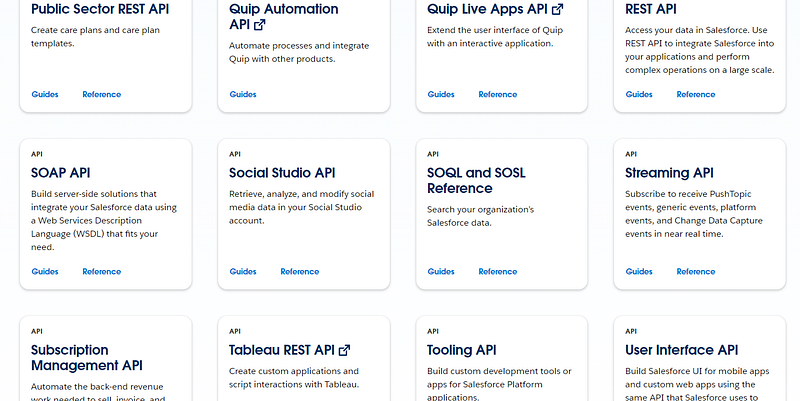
Partner APIs are available to specified partners, often supporting business-to-business (B2B) partnerships. Think AWS, Salesforce or Shopify.
Internal APIs are only used internally by a company and not exposed to the outside world. One use case could be to communicate between front-end and back-end.
How do APIs work?
APIs work by exposing a set of endpoints, or URLs, that clients can use to access data or perform tasks. These endpoints are typically based on a specific set of rules, known as a protocol or specification, that defines how clients can communicate with the API. When a client makes a request to the API, the API acts as an intermediary between the client and the application, handling requests and returning data in a standardized format.
So, using the example we gave earlier, where the waiter is an API, the a la carte menu is the protocol. You can’t just request anything — you need to first know what is on the menu.
How to find out what is on the menu? That is where documentation comes in handy…
API documentation
Documentation is critical in helping developers to understand the functionality of a third-party API.
If you’re considering working with another business and using their API, the development team might ask you to get access to. It’s also a great place to familiarise yourself with what the API actually does.
Good documentation usually covers the following:
- A brief introduction to the API, including what it does, how it works, and the use cases.
- Authentication information, including credentials, tokens, or keys.
- A list of available endpoints or methods to access the API. The endpoint is a location where the API connects with a software program. For example, for Spotify, if you want to get a specific album, the endpoint would be https://api.spotify.com/v1/albums/{id} where id is the album id.
- Request parameters- A description of the parameters that can be used in requests to the API, including the data types and possible values.
- Responses- Information on the possible responses that can be returned by the API, including HTTP status codes and error messages. If you want to familiarise yourself with the most common errors, check out the extended reading list below.
- Examples/code snippets/sample requests and responses
- Limitations/quotas
- Best practices for using the API
- Versioning so that you can check which changes or updates have been made
- Support channels and contact information
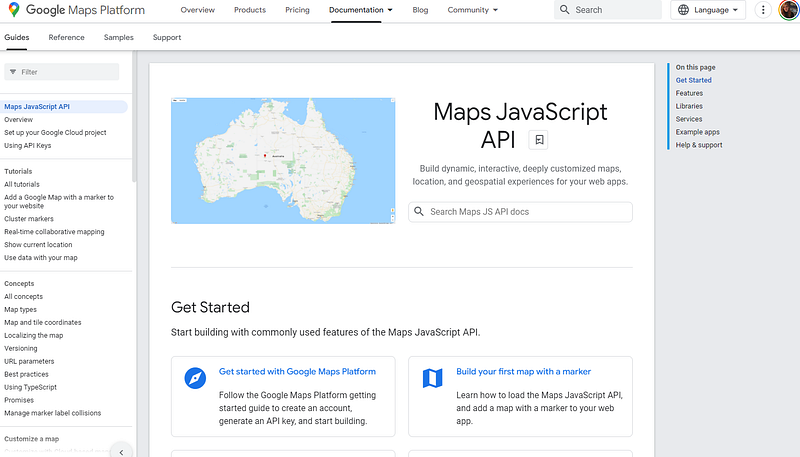
For example, check out this Google Maps Javascript API Documentation at https://developers.google.com/maps/documentation/javascript. You’d be surprised at how accessible it is, even for a less technical reader.
Deciding whether to integrate with a third-party API
Deciding whether to use a third-party API has business as well as technical considerations. Put your Product Manager hat back on to consider the following:
Risks — How likely is it that this external business will continue to support the API long-term? What if they go out of business down line (a real risk with startups)? Has your team assessed the security risks with this API?
Costs — What is the pricing like for use of the API? Is it fixed, or is it likely to increase over time?
Dependencies — Do you want this feature to be dependent on an external business? What happens when the API is unavailable? What if performance is poor?
Support + Documentation — Will your developers be supported in use of the API? Do you have a reliable point of contact? How good is documentation for the API? Will this API require the developers to be proactive in staying on top of changes with the API?
There is still a lot more to be said on the topic of APIs, but if you’re interested in learning more, you can check out the extended reading list below.
Want to improve your technical knowledge? I’ll be sharing articles every week. Here are the ones published so far:
- What Is The Internet?
- Tech Stacks and Programming Languages
- Cloud Computing
- APIs ← You are here
- Up Next: Databases
And don’t forget to subscribe for email notifications to be updated when the next article in the series goes live!
Further reading
- API — wikipedia post
- What Every Product Manager Should Know about APIs — by Henrique Maltez (article)
- What is an API and How Do You Design It? — by Gaurav Sen (youtube)
- What is an API? — by IBM (article)
- What is an API Endpoint and Why are they so important? —by Hubspot (blog post)
- Data Structures (JSON) — by Albert Wenger (blog post)
- What is RESTful API? — by Amazon AWS 8article)
- What is a REST API? — by sitepoint.com (article)
- Types of APIs — by stoplight.io (article)
- Web Services vs API — by Hubspot (blog post)
- APIs Explained for Product Managers — by Department of Product (blog post)
- 11 Common API Error Codes — by Hubspot (blog post)


