
What Is The Internet, Actually?
Technical Knowledge for Product Managers
Welcome to part one of a series of articles covering the most helpful technical knowledge for a career in Product Management. Today in the first ‘TPM 101’ article I’m going to cover the basics that every Product Manager should be able to explain about how the internet works.
If you’d like to learn why I think this knowledge is important for Product Management, then head back to my article where I discussed WHY I wanted to improve my own technical knowhow.
And don’t forget to subscribe to email updates if you want to be notified when the next article is published!
Basic terminology
Internet
The internet is a network of networks, linking billions of devices together around the globe.
Domain name
The domain name is the part of what is known as a url. If the url is ‘http://medium.com’ then ‘medium.com’ is the domain name. Domain names must be unique.
DNS or Domain Name System
The domain name system is like a ‘phone book’ which associates names with the corresponding IP address. Your computer uses DNS to look up domain names and get the associated IP address.
IP address
All devices on the internet have distinct addresses to identify them. The IP address is the series of numbers identifying any device on a network. It’s like the postal address for a destination. Here is a really excellent YouTube video for visual learners, that also explains the transition from traditional IP addresses (IPv4) to a newer version called IPv6.
HTTP
The Hyper Text Transfer Protocol standard describes how a browser makes a request to the web server. This is how data and information is transferred, and it is the foundation of the World Wide Web.
It is based on a request/response dialog between browser client and server. When a user visits a URL in their browser, the browser sends an HTTP request to the server hosting the website. The server then replies with an HTTP response, which includes the requested data, such as a web page or other resources, or may respond with an error code if the requested resource does not exist or the client is not authorised.
See how this relates to the other parts of the process below.
What actually happens when you visit a website?
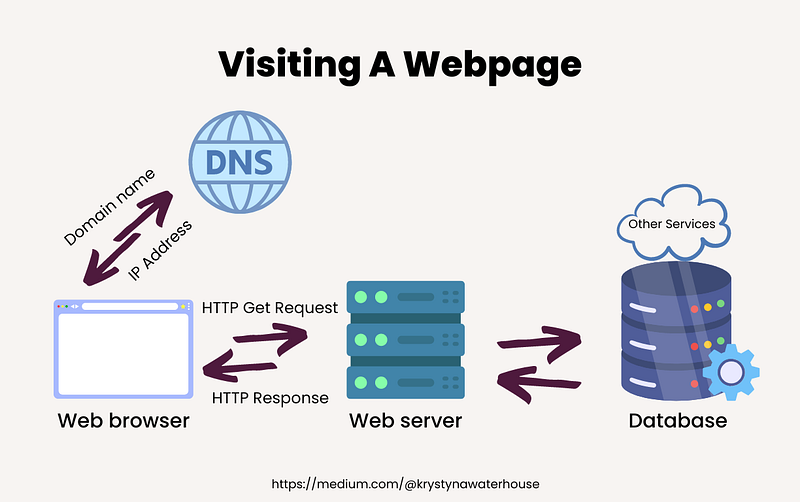
- When you visit a website, your browser uses the domain name to get the IP Address from the Domain Name System.
- When your browser has the IP address, it requests the content from that IP address. This is sent in the form of a HTTP GET request
- The web server receives the incoming GET request.
- The web server processes the request and sends back the data.
- The browser receives the content in a HTTP response, and needs to parse it to figure out what to do next. Usually this prompts additional requests by the browser to retrieve content and understand references from the initial response (ie images or scripts used on the page). Each additional request involves repeating the GET requests.
- Whilst this is going on, the browser starts to figure out how to render content on your screen. We’ll go more into those front-end programming languages in the next article.
Any questions I didn’t answer above? What do you want to learn more about next? Check out the extended reading list below if you want to dig a bit more into this particular topic.
In a few days I’ll be back with the next article about Tech Stacks and Programming Languages. Don’t forget to subscribe for email notifications if you don’t want to miss it!
Further Reading
- The Internet: IP Addresses & DNS — by code.org (video)
- How the Web Works — by Stanford CS101 (lecture notes)
- How the Web Works — by Albert Wenger (blog post)
- DNS — by Albert Wenger (blog post)
- Anatomy of a URL — by Albert Wenger (blog post)
- The OSI Model — The 7 Layers of Networking Explained in Plain English — by freecodecamp.org (article)
Also would like to thank my friends Phil Martin for the proofreading on this one!


