avatarTeri Radichel

Free AI web copilot to create summaries, insights and extended knowledge, download it at here

6587

Abstract

perly recorded prior to the start of the next day. That end of day processing ran as batch jobs. My latest work involves transforming inputs into a common format for processing.</p><p id="b27d"><b>Background processing: </b>Batch jobs execute without human interaction. They are tested to execute properly and are kicked off through automated events or scheduling to perform their task. Lack of human interaction, a well-tested process, and secure implementation can help prevent security errors and tampering.</p><p id="2acf"><b>Single purpose: </b>The beauty of a batch job is that it is scheduled to run at a certain time of day to process a specific chunk of data and produce a specific result. Each batch job has a single purpose and can be tested and run separately from every other batch job. Organizations can buy third-party tools to manage batch jobs that report on their success or failure so any problems can be quickly identified and resolved.</p><p id="a4f1"><b>Discrete steps: </b>One other thing I did with batch jobs was to separate processes into phases. Instead of trying to run a whole complex process at once (such as the processing performed by that tax system producing the large monthly discrepancy) you can run individual processes leading up to the final result. That allows you to independently test each step of a process and find errors along the way. It’s easier to pinpoint problems.</p><p id="5741"><b>Simplify testing:</b> Breaking a batch job into steps makes it less time consuming to build and test each subsequent step. You don’t have to run the first two steps in the process every time you want to test the third step. You capture the output of the second step and then use that as input when you test the third step. You’ll just need to have validation in place to ensure the steps are always run in order and nothing is skipped.</p><p id="c207"><b>Re-runnable: </b>One key point about batch jobs is that they must be re-runnable, or idempotent. If you run the batch job over and over on the same data they should produce the same result. Ideally they do not have to roll back all the results if the job failed halfway through in order to start from the beginning. The batch job should pick up where it left off. That’s a problem I had with a security tool I was using recently. When I converted to a batch job I had to add in functionality to make it re-runnable. I’ll probably explain that further in upcoming posts.</p><p id="e48c"><b>Event-Driven Security: </b>Another big benefit of batch jobs in the cloud is that you can trigger a batch job to run when a certain action occurs. One example is that when I’m performing penetration tests, I drop files into a bucket and that triggers processing files used to generate my final report. I explained event-driven security automation in this SANS white paper back in 2016:</p><p id="fa9b"><a href="https://sansorg.egnyte.com/dl/jGi3ihhmSy"><i>Balancing Security and Innovation With Event Driven Automation</i></a></p><p id="8eee"><b>Easier in the cloud: </b>Although my work with batch jobs began years before I became heavily involved in cloud and you can definitely make use of them on-premises, I find it to be easier in cloud environments. The cloud is perfect for batch jobs as it natively supports triggering jobs based on events and scheduling. Each cloud provider has a service for batch jobs, creatively called “Batch” in each case:</p><div id="36f1" class="link-block"> <a href="https://aws.amazon.com/batch/"> <div> <div> <h2>AWS Batch - Easy and Efficient Batch Computing Capabilities - AWS</h2> <div><h3>Fully managed batch processing at any scale AWS Batch enables developers, scientists, and engineers to easily and…</h3></div> <div><p>aws.amazon.com</p></div> </div> <div> <div style="background-image: url(https://miro.readmedium.com/v2/resize:fit:320/0*EjwlWJUJ5sjSpVP3)"></div> </div> </div> </a> </div><div id="8ecb" class="link-block"> <a href="https://azure.microsoft.com/en-us/services/batch/"> <div> <div> <h2>Batch - Compute job scheduling service | Microsoft Azure</h2> <div><h3>Run your rendering jobs in the cloud using Batch. Avoid the complexities of managing resources and reduce the time…</h3></div> <div><p>azure.microsoft.com</p></div> </div> <div> <div style="background-image: url(https://miro.readmedium.com/v2/resize:fit:320/0*Q51AfECCRXiWmsIu)"></div> </div> </div> </a> </div><div id="4bd4" class="link-block"> <a href="https://cloud.google.com/batch"> <div> <div> <h2>Batch: Simplicity for Batch Computing | Google Cloud</h2> <div><h3>Provisions and autoscales capacity while eliminating the need to manage third-party solutions Natively integrated with…</h3></div> <div><p>cloud.google.com</p></div> </div> <div> <div style="background-image: url(https://miro.readmedium.com/v2/resize:fit:320/0*YfvK2sf3iTZK4Xp1)"></div> </div> </div> </a> </div><p id="fbf2">Ironically, GCP announced their “Batch” service on July 13, 2022, about 13 days after my last blog post stating that I was going to be writing more about batch jobs and 5 days ago. Nice!</p><div id="fdb5" class="link-block"> <a href="https://readmedium.com/creating-an-aws-batch-job-that-requires-mfa-23061658975d"> <div> <div> <h2>Creating an AWS Batch Job That Requires MFA</h2> <div><h3>Series on my attempt to create an AWS Batch job that requires MFA</h3></div> <div><p>medium.com</p></div> </div> <div> <div style="background-image: url(https://miro.readmedium.com/v2/resize:fit:320/1*Am5uABy5JLcIrapuRy_o2g.png)"></div> </div> </div> </a> </div><p id="8f34"><b>Save money (potentially): </b>One of the benefits of using AWS Batch Jobs is that you can run them with <b>spot instances</b>. With spot instances, you can bid on how much you are willing to spend and your job will run whenever AWS has extra capacity and is willing to lower the cost to your target price point. A batch job is something th

Options

at can run in the background. Sometimes it doesn’t matter when it’s run — like when you’re parsing through a bunch of logs for research purposes. Other times it will matter — like when you need to run end of day investment processing before the market opens in the morning. If you don’t need your batch job to run at a specific time or within a specific time period, you can potentially save some money processing large amounts of data.</p><p id="a560"><b>Cybersecurity Batch Jobs: </b>What can you use a batch job for in cybersecurity? So many things I couldn’t list them all here but here are some of the things I’m working on:</p><ul><li>Parse data for cybersecurity metrics reports.</li><li>Generate penetration testing reports.</li><li>Kick off penetration testing processes.</li><li>Kick off setup of a new penetration environment including creating a new account as I did in this prior blog post:</li></ul><div id="a6a0" class="link-block"> <a href="https://readmedium.com/automate-aws-account-creation-ec2e639ef088"> <div> <div> <h2>Automate AWS Account Creation</h2> <div><h3>Better governance through a secure baseline and automated account provisioning with Control Tower and Account Factory</h3></div> <div><p>medium.com</p></div> </div> <div> <div style="background-image: url(https://miro.readmedium.com/v2/resize:fit:320/1*0zt0ULPcYbkJVEdsMp7MAA.png)"></div> </div> </div> </a> </div><p id="7156">If you work in incident response and threat hunting perhaps you could use a batch job for the following:</p><ul><li>Run automated incident response processes to capture incident data.</li><li>Process and weed out false positives from incident findings, preserving the original data but narrowing it down to a smaller set of data for review.</li><li>Automated remediation of findings in cloud accounts.</li><li>Automated review of policy violations to send emails to offenders to fix their non-compliant resources and reports to their managers.</li><li>Automated threat hunting to search for anomalies in logs.</li></ul><p id="b70c">If you wanted to process data using the methods in the book I mentioned at the start of this article, AWS has an example of using AWS Batch for Monte Carlo Simulations:</p><div id="5f34" class="link-block"> <a href="https://aws.amazon.com/blogs/hpc/optimizing-monte-carlo-simulations-using-aws-batch/"> <div> <div> <h2>Optimize your Monte Carlo simulations using AWS Batch | Amazon Web Services</h2> <div><h3>Introduction Monte Carlo methods are a class of methods based on the idea of sampling to study mathematical problems…</h3></div> <div><p>aws.amazon.com</p></div> </div> <div> <div style="background-image: url(https://miro.readmedium.com/v2/resize:fit:320/0*YoESOoSnCD6wgG_c)"></div> </div> </div> </a> </div><p id="9aa6">There are so many ways you could use a batch job that you could probably think of a multitude of other use cases.</p><p id="d0fb"><b>Fits and starts</b></p><p id="9f3a">As I embarked on my journey to move batch jobs to the cloud, I hit a few issues and still resolving some of them. There’s the process of writing the code that you want to run, testing it, and then secure implementation of the batch job and storing the data securely. As it turns out, all of that is a bit complicated, especially when you try to introduce segregation of duties in the manner in which I am attempting to do so. I’m still investigating issues I found such as not being able to find cross-account KMS key logging. It must be there somewhere I just need to find it and will update this post when I do.</p><div id="7777" class="link-block"> <a href="https://readmedium.com/no-kms-cross-account-logs-6970398502fa"> <div> <div> <h2>No KMS Cross-Account Logs?</h2> <div><h3>Testing access to a bucket with a cross-account KMS key.</h3></div> <div><p>medium.com</p></div> </div> <div> <div style="background-image: url(https://miro.readmedium.com/v2/resize:fit:320/1*4oxP4LXk8l8c3mpRvO7ejg.png)"></div> </div> </div> </a> </div><p id="3dd6">It doesn’t seem logical to use MFA with a batch job since they are run without human interaction but that doesn’t mean I don’t want to do it. :) Maybe I want to know if and when sensitive operations get executed or I am required to use <b>MFA</b> with a particular role. I’m working on a number of related items right now — and I still want to get back to my home networking blog posts and secure code book. It’s all related. Stay tuned if you’re interested.</p><p id="18e0">Follow for updates.</p><p id="4a3a">Teri Radichel | <i>© <a href="https://2ndsightlab.com/?source=post_page---------------------------">2nd Sight Lab</a> 2022</i></p><div id="8b5f"><pre><span class="hljs-section">About Teri Radichel:

⭐️ Author: Cybersecurity Books
⭐️ Presentations: Presentations by Teri Radichel
⭐️ Recognition: SANS Award, AWS Security Hero, IANS Faculty
⭐️ Certifications: SANS ~ GSE 240
⭐️ Education: BA Business, Master of Software Engineering, Master of Infosec
⭐️ Company: Penetration Tests, Assessments, Phone Consulting ~ 2nd Sight Lab</pre></div><div id="caae"><pre><span class="hljs-section">Need Help With Cybersecurity, Cloud, or Application Security?
~~~~~~~~~~~~~~~~~~~~~~~~~~~~~~~~~~~~~~~~~~~~~~~~~~~~~~~~~~~~~</span>
🔒 Request a penetration test or security assessment
🔒 Schedule a consulting call
🔒 Cybersecurity Speaker for Presentation</pre></div><div id="5a42"><pre>Follow <span class="hljs-keyword">for</span> more stories like <span class="hljs-keyword">this</span>:

❤️ Sign Up my Medium Email List ❤️ Twitter: <span class="hljs-meta">@teriradichel</span> ❤️ LinkedIn: https:<span class="hljs-comment">//www.linkedin.com/in/teriradichel</span> ❤️ Mastodon: <span class="hljs-meta">@teriradichel</span><span class="hljs-meta">@infosec</span>.exchange ❤️ Facebook: 2nd Sight Lab ❤️ YouTube: @2ndsightlab</pre></div><figure id="faf5"><img src="https://cdn-images-1.readmedium.com/v2/resize:fit:800/0*H9Ew1KCl-29nZiPR.jpeg"><figcaption></figcaption></figure></article></body>

How Batch Jobs Can Help Cybersecurity

ACM.4 Batch jobs for penetration testing, security metrics, incident response, and more

~~~~~~~~~~~~~~~~~~~~~~~~~~~~~~~~~~~~~~~~~~~~~~~~~~~~~~~~~~~

⚙️ Check out my series on Automating Cybersecurity Metrics. The Code.

🔒 Related Stories: Automating Cybersecurity Metrics | Batch Jobs

💻 Free Content on Jobs in Cybersecurity | ✉️ Sign up for the Email List

~~~~~~~~~~~~~~~~~~~~~~~~~~~~~~~~~~~~~~~~~~~~~~~~~~~~~~~~~~~
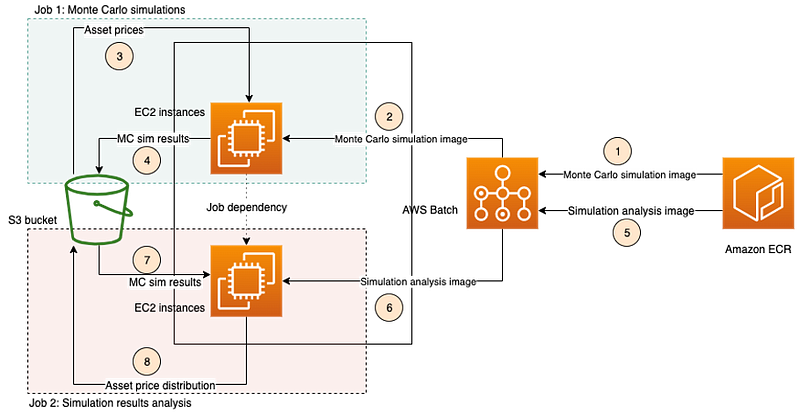
Image from AWS Post on Monte Carlo Simulations. (Not necessarily recommended, but possible.)

In my first three posts in this series we looked at different approaches to quantifying cybersecurity risk. I ended with this post on value-based cybersecurity metrics:

If we are going to take a value-based approach to cybersecurity metrics then we need to be able to measure our risk in some kind of concrete fashion. That’s what I hope to help you achieve in this series, but it’s going to be a long haul looking at all the things we need to set up an how we secure it. Brace yourselves.

There’s no easy button for cloud security as I explained recently at an IANS conference. But we can make it easier by leveraging automation and a well thought out architecture.

Much of the work and research I’m doing right now revolves around the concept of cybersecurity metrics. How do we capture them? How do we prevent errors more holistically to reduce risk? 2nd Sight Lab’s work as a penetration testing and security assessment company falls into this realm.

Often cybersecurity guidance talks about the “what” you should do and not the “how to do it”. In my last book I proposed some ideas around cybersecurity metrics and the data you might want to capture. I talked about automating processes. But what do I mean exactly? How do you do that?

I want to provide more concrete examples of how you might capture and process some data and turn it into a report. That’s exactly what I do with my penetration tests, but you could do it with any type of data from any system or log and write whatever type of report serves your purpose.

I would recommend striving to capture data about security problems that could facilitate a data breach or increase the impact, should one occur. After you’ve done that, move on to auto-remediation, enforcement, detection, predictive risk calculations, and threat hunting. That would be my priority order if I had limited time and budget. If you can work on it all at once, even better.

How batch jobs can help

I’ve worked in a myriad of industries during my career from oil and gas to retail, security and technology companies, healthcare, fishing, food and beverage, real estate, venture capital, games, music, advertising, public relations, publishing and printing. But if I had to tell you where most of my experience exists, it would be in the financial sector.

Part of that was working for a bank on back office systems involving data processing for billions of dollars of assets under management and tax systems for one of the largest banks in the US. I worked in a similar capacity for a fortune 500 US retail company on a project to migrate a tax system off by $300,000 per month to our initial release which was off by $23 — and I quickly figured out why and fixed it. In both those environments we made use of batch jobs.

Financial System Examples: Batch jobs are used frequently in financial systems to process a batch of data on a regular basis. Examples, most of which I worked on personally:

  • Process tax records and cost basis at specific points in time to prepare data for reporting.
  • Dividends processing to calculate and put dividend payments in investor accounts.
  • Implement a new sweep account that calculated interest on a daily basis for cash in an investment account.
  • Process transfers of money into the company from external investing companies.
  • Process trades, mutual fund investments, and 401K activity.
  • Store live chat records in accordance with financial industry regulations.

Inputs and outputs: Typically these batch jobs had a feed that was often a flat file (typically a CVS file back then) passed over from an internal or external system to a location on the network. The batch job would read and process the file and enter the data into a database in the proper format or transform the file into another file. In my latest example I’m taking inputs from two security products in XML and JSON.

Transformations: Sometimes the batch job would run database queries to transform the data in the process. For example, banking systems have reconciliation processes run at the end of a day to ensure all the transactions in the system add up (literally called “End of Day”) and are properly recorded prior to the start of the next day. That end of day processing ran as batch jobs. My latest work involves transforming inputs into a common format for processing.

Background processing: Batch jobs execute without human interaction. They are tested to execute properly and are kicked off through automated events or scheduling to perform their task. Lack of human interaction, a well-tested process, and secure implementation can help prevent security errors and tampering.

Single purpose: The beauty of a batch job is that it is scheduled to run at a certain time of day to process a specific chunk of data and produce a specific result. Each batch job has a single purpose and can be tested and run separately from every other batch job. Organizations can buy third-party tools to manage batch jobs that report on their success or failure so any problems can be quickly identified and resolved.

Discrete steps: One other thing I did with batch jobs was to separate processes into phases. Instead of trying to run a whole complex process at once (such as the processing performed by that tax system producing the large monthly discrepancy) you can run individual processes leading up to the final result. That allows you to independently test each step of a process and find errors along the way. It’s easier to pinpoint problems.

Simplify testing: Breaking a batch job into steps makes it less time consuming to build and test each subsequent step. You don’t have to run the first two steps in the process every time you want to test the third step. You capture the output of the second step and then use that as input when you test the third step. You’ll just need to have validation in place to ensure the steps are always run in order and nothing is skipped.

Re-runnable: One key point about batch jobs is that they must be re-runnable, or idempotent. If you run the batch job over and over on the same data they should produce the same result. Ideally they do not have to roll back all the results if the job failed halfway through in order to start from the beginning. The batch job should pick up where it left off. That’s a problem I had with a security tool I was using recently. When I converted to a batch job I had to add in functionality to make it re-runnable. I’ll probably explain that further in upcoming posts.

Event-Driven Security: Another big benefit of batch jobs in the cloud is that you can trigger a batch job to run when a certain action occurs. One example is that when I’m performing penetration tests, I drop files into a bucket and that triggers processing files used to generate my final report. I explained event-driven security automation in this SANS white paper back in 2016:

Balancing Security and Innovation With Event Driven Automation

Easier in the cloud: Although my work with batch jobs began years before I became heavily involved in cloud and you can definitely make use of them on-premises, I find it to be easier in cloud environments. The cloud is perfect for batch jobs as it natively supports triggering jobs based on events and scheduling. Each cloud provider has a service for batch jobs, creatively called “Batch” in each case:

Ironically, GCP announced their “Batch” service on July 13, 2022, about 13 days after my last blog post stating that I was going to be writing more about batch jobs and 5 days ago. Nice!

Save money (potentially): One of the benefits of using AWS Batch Jobs is that you can run them with spot instances. With spot instances, you can bid on how much you are willing to spend and your job will run whenever AWS has extra capacity and is willing to lower the cost to your target price point. A batch job is something that can run in the background. Sometimes it doesn’t matter when it’s run — like when you’re parsing through a bunch of logs for research purposes. Other times it will matter — like when you need to run end of day investment processing before the market opens in the morning. If you don’t need your batch job to run at a specific time or within a specific time period, you can potentially save some money processing large amounts of data.

Cybersecurity Batch Jobs: What can you use a batch job for in cybersecurity? So many things I couldn’t list them all here but here are some of the things I’m working on:

  • Parse data for cybersecurity metrics reports.
  • Generate penetration testing reports.
  • Kick off penetration testing processes.
  • Kick off setup of a new penetration environment including creating a new account as I did in this prior blog post:

If you work in incident response and threat hunting perhaps you could use a batch job for the following:

  • Run automated incident response processes to capture incident data.
  • Process and weed out false positives from incident findings, preserving the original data but narrowing it down to a smaller set of data for review.
  • Automated remediation of findings in cloud accounts.
  • Automated review of policy violations to send emails to offenders to fix their non-compliant resources and reports to their managers.
  • Automated threat hunting to search for anomalies in logs.

If you wanted to process data using the methods in the book I mentioned at the start of this article, AWS has an example of using AWS Batch for Monte Carlo Simulations:

There are so many ways you could use a batch job that you could probably think of a multitude of other use cases.

Fits and starts

As I embarked on my journey to move batch jobs to the cloud, I hit a few issues and still resolving some of them. There’s the process of writing the code that you want to run, testing it, and then secure implementation of the batch job and storing the data securely. As it turns out, all of that is a bit complicated, especially when you try to introduce segregation of duties in the manner in which I am attempting to do so. I’m still investigating issues I found such as not being able to find cross-account KMS key logging. It must be there somewhere I just need to find it and will update this post when I do.

It doesn’t seem logical to use MFA with a batch job since they are run without human interaction but that doesn’t mean I don’t want to do it. :) Maybe I want to know if and when sensitive operations get executed or I am required to use MFA with a particular role. I’m working on a number of related items right now — and I still want to get back to my home networking blog posts and secure code book. It’s all related. Stay tuned if you’re interested.

Follow for updates.

Teri Radichel | © 2nd Sight Lab 2022

About Teri Radichel:
~~~~~~~~~~~~~~~~~~~~
⭐️ Author: Cybersecurity Books
⭐️ Presentations: Presentations by Teri Radichel
⭐️ Recognition: SANS Award, AWS Security Hero, IANS Faculty
⭐️ Certifications: SANS ~ GSE 240
⭐️ Education: BA Business, Master of Software Engineering, Master of Infosec
⭐️ Company: Penetration Tests, Assessments, Phone Consulting ~ 2nd Sight Lab
Need Help With Cybersecurity, Cloud, or Application Security?
~~~~~~~~~~~~~~~~~~~~~~~~~~~~~~~~~~~~~~~~~~~~~~~~~~~~~~~~~~~~~
🔒 Request a penetration test or security assessment
🔒 Schedule a consulting call
🔒 Cybersecurity Speaker for Presentation
Follow for more stories like this:
~~~~~~~~~~~~~~~~~~~~~~~~~~~~~~~~~~~~~~~~~~~~~~~~~~~~~~~~~~~~~ 
❤️ Sign Up my Medium Email List
❤️ Twitter: @teriradichel
❤️ LinkedIn: https://www.linkedin.com/in/teriradichel
❤️ Mastodon: @teriradichel@infosec.exchange
❤️ Facebook: 2nd Sight Lab
❤️ YouTube: @2ndsightlab

Cybersecurity
Batch Jobs
Cloud Security
Security Metrics
Security Events
Recommended from ReadMedium