
How are you reading this blog? A Packets Tale
The story of the last two seconds.

I’m going to take you on a journey. In fact … I already have. This blog details the fascinating story of the last two seconds. A Packets tale of how you’re reading this blog post right now. Starting from the click of a link to this text appearing on your screen.
Every great story has its chapters; How did we conquer the DNS records and find an IP address? A great thriller of opening network sockets and bringing back this post from the depths of the medium servers.
Okay. I’ll admit it isn’t as heroic or action-packed as the latest novel from your favourite fantasy writer, but hopefully, we can learn a thing or two.

Getting the IP address
After clicking the link to this post, the first thing your device needs to do is to find out where to send its request. After all, to you and I, medium.com makes perfect sense. But for a computer to send a request, it needs the IP address for whatever server we are requesting from, not this human-readable domain name.
Unfortunately, the human brain isn’t particularly good at remembering long sequences of numbers used for IP addresses that our servers need. On the other hand, computers are fantastic at it. Enter DNS.
DNS (Domain Name System) is an internet protocol we use to get IP addresses from a domain name.
There are three main kinds of DNS Server:
- Authoritative— An Authorative server only supplies records for queries in its zone. It will not respond to any recursive queries. This means whilst the server doesn’t respond to all requests, the ones it does respond to are extremely fast.
- Recursive Resolver — Recursive servers may not know where to find the record but will connect to another DNS server to continue the search.
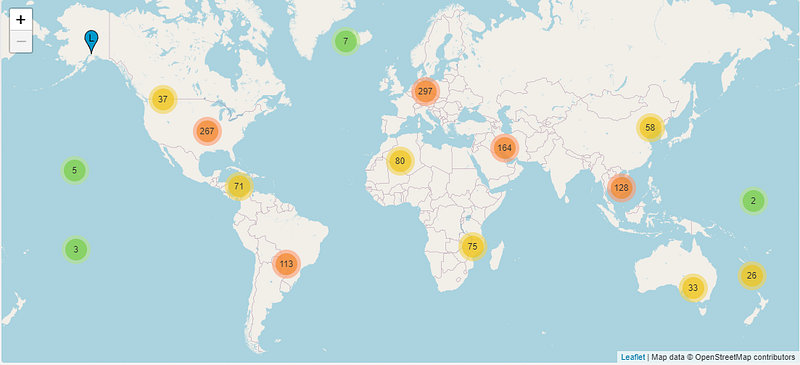
- Root servers — Root servers are often the first port of call for your request. These will either answer queries directly or refer to appropriate name servers. These Root servers are particularly interesting as they act as the backbone of the internet; there are only 13 IPs dedicated to these root servers located worldwide.
Tools
Dig — Gathers DNS information and allows you to query information about DNS records. Often used as a troubleshooting tool for DNS problems.
$ dig [server] [name] [type]# If we wanted to find the IP address for Medium.com we could use dig to find the answer:
$ dig medium.comTraceroute — Outputs the route the packet takes to reach a given host. This allows you to see all the hops and redirections a packet takes.
$ traceroute [options] host_Address [pathlength]# We can take a look at how many hops it takes for our packets to reach medium servers
$ traceroute medium.comOpen the Socket & TCP Connection
Now that we’ve got our IP address, we need to open a socket. In networking terms, a socket is defined as the following:
A socket is one endpoint of a two-way communication link between two programs running on the network. - Geeks for Geeks
Essentially, they are endpoints for sending and receiving data and come in three different types. Stream sockets communicate with TCP, Datagram sockets allow processes to use UDP, and Raw Sockets provide access to ICMP.
To get this blog post, we are using TCP and, therefore, a Stream Socket.
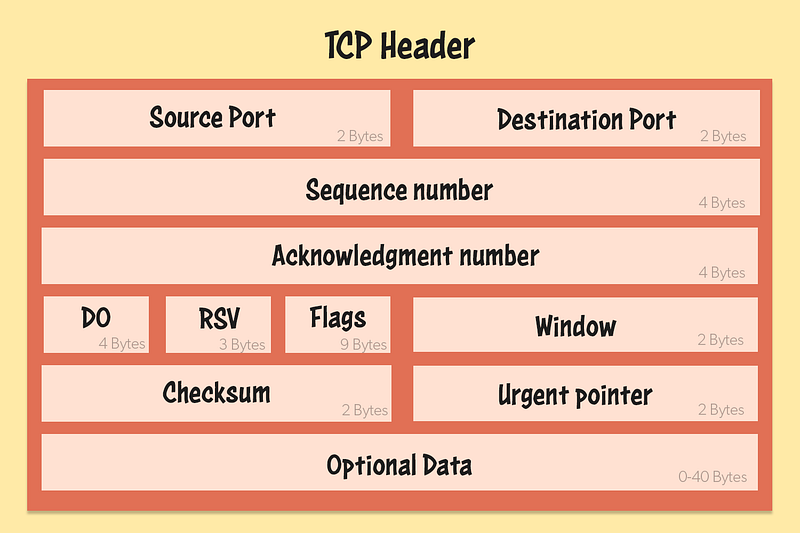
Sometimes when packets are sent across the internet, they can get lost. We really don’t want that; otherwise, we might lose vital parts of this nifty post! Luckily, TCP has a reliable way to ensure our data makes its way to you intact.
TCP lets you reliably send a stream of data even if packets get lost or sent in the wrong order. This is because it forces the receiver to acknowledge receiving the packet. If Medium servers don’t get an acknowledgement that you’ve received a packet, they’ll just send it again.
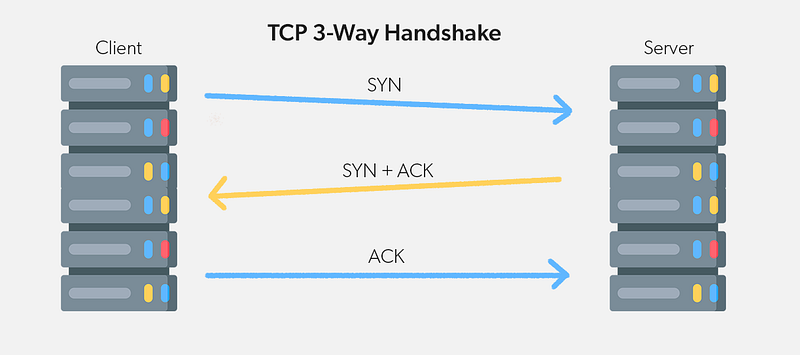
Every packet contains a sequence number. This informs us which order the packet goes in.
Request the blog
Time to make the request for our awesome blog. For this, we’re going to use the most widely used protocol on the internet — HTTP. Every time you’re looking at a webpage, you’re using HTTP. It’s a pretty straightforward plaintext protocol and is human-readable; it allows us to send and receive requests with relative ease.
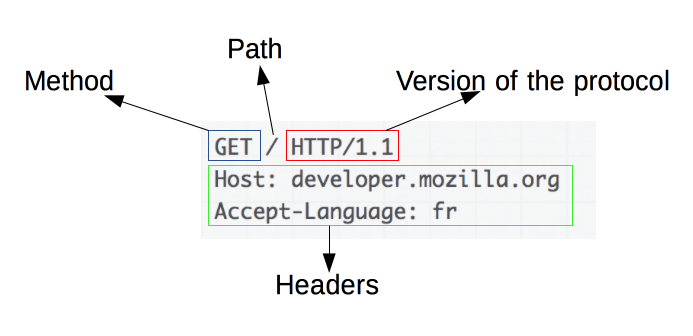
Each request consists of the following elements:
- Method — Defines how the event will be handled e.g POST, GET
- Path — Path of the resource on the server. This one is pretty self-explanatory and is just the location for the request.
- Headers — Additional information for the servers to handle your request.
- Body — What we want to send to the server as a request.
HTTP is entirely stateless, there is no link between any two requests being carried out on the same connection. You might ask yourself … But what if we have a user wanting to interact with their profile after logging in? How can HTTP remember who I am if it doesn’t keep state? This is where cookies come in. Cookies allow session creation and ensure each HTTP request can share the same context as any other.
Let’s continue our example and show you what the HTTP request might have looked like for this blog:
curl 'https://readmedium.com/how-are-you-reading-this-blog-a-packets-tale-454d5df0aa39' \
  -H 'authority: medium.com' \
  -H 'accept: text/html \
  -H 'accept-language: en-US,en;q=0.9' \
  -H 'cookie: Our_Cookie_data_for_our_user' \
  -H 'user-agent: Device_and_web_browser' \
  --compressed
Tools
Netcat
Netcat or
ncis primarily used for port scanning but is actually a great utility networking tool for system administrators to have in their back pocket for any task. Netcat can support portscanning, file copying, port forwarding, proxy servers, and hosting servers … safe to say, it’s incredibly versatile.
- From my Blog on Linux Command Line tools you have to know.
# Example Usage:
$ nc -vz <host> <port> # Checks the connection between two hosts on a given port
$ nc -l 8080 | nc <host> 80 # Creating a proxy server
Receive the blog
Our blog post comes through the HTTP protocol in a standard format, is received on our devices, and contains our HTML, CSS and Javascript that your web browser can use to display the page and hurray! We have our blog post!
Now I guess the only thing left to do is start this process all again and send a clap to the Medium servers on this post. See if you can see what the HTTP request looks like using your developer tools on your web browser. What JSON variables are sent to identify a clap?
Thanks for reading all, hope you’ve enjoyed. Check out my other articles below: