
Learning Android Development
How Android Access View Item: The Past to the Future
The evolution Android Development on accessing view

Do you know, how old your code is, can be deduced by looking at how it accesses the view? Over the decade, the way Android code access the view has changed.
In the beginning (2008–2017): findViewById with casting
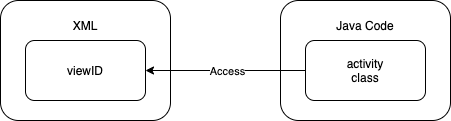
In Android development since it starts, the View has always been a separate XML file from the actual code.
For the Java code to
TextView textView =
     (TextView) view.findViewById(R.id.textViewTitle);
textView.text = "SomethingThe developer has to tell the Java code the ID and the type (i.e. TextView) by casting it.
There is no guarantee you will find the view with the ID nor it is a TextView during compile time. It could crash during runtime.
3rd part AutoGenerate Binding (2014–2019): ButterKnife
Jake Wharton who is allergic to boilerplate code, came up with ButterKnife. This library since then became the defacto of how Android developers access View Item.
lass ExampleActivity extends Activity {
  @BindView(R.id.textViewTitle) TextView textView;
@Override public void onCreate(Bundle savedInstanceState) {
super.onCreate(savedInstanceState);
setContentView(R.layout.simple_activity);
ButterKnife.bind(this); textView.text = "Something"
}
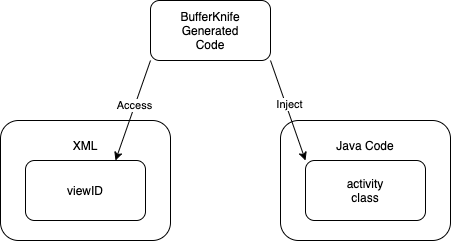
}The nice bit about ButterKnife is, it is using Annotation to auto-generate code behind, so all the views can be injected into the class after we use ButterKnife.bind(this).
No more typing findViewById, or casting it to the type we need.
Still then, underlying it is using the original findViewById, and hence the issue of wrong type and null crash still possible during runtime.
Additional nice to know facts, there are cases one need to include a non-final view ID (e.g. from another module library), ButterFork library was introduce for that.
Move modal into XML (2015 — current): Data Binding
Accessing the View Item from the code seems to cause a lot of problem like no guarantee of Type conformance and null issue, Google introduce Data Binding.
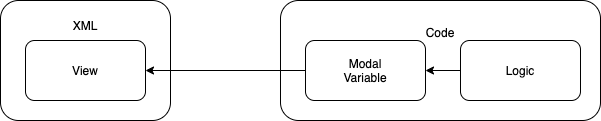
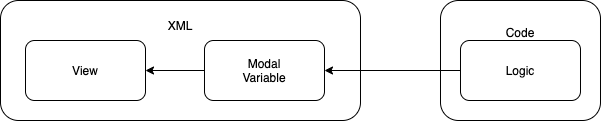
From here you’ll see that the shift is to move the Modal Variable into the XML.
<?xml version="1.0" encoding="utf-8"?>
 <layout xmlns:android="http://schemas.android.com/apk/res/android">

     <data>
         <variable
             name="myTextModal"
             type="String" />
     </data>

     <TextView
         android:layout_width="match_parent"
         android:layout_height="match_parent"
         android:text="@{myTextModal}" />

 </layout>
In order to add the modal into the XML, an additional layer of layout is required to wrap around the data and the root view.
On the code side, one just need to access the modal directly
private lateinit var binding: ActivityMainBindingoverride
fun onCreate(savedInstanceState: Bundle?) {
    super.onCreate(savedInstanceState)
    binding = DataBindingUtil.setContentView(
          this, R.layout.activity_main)

    binding.myTextModal = getTextFromLogic()
}So with that, no more type or null issue. It is more secured.
However, due to it’s boilerplate needed, it is still not very much adopted.
No more casting (2017–current): Generic findViewById
After 9 years of having
@Nullable
public final View findViewById(@IdRes int id) {
    if (id < 0) {
        return null;
    }
    return findViewTraversal(id);
}
In 2017, SDK API 26, Google finally use generic to make casting not needed.
@Nullable
public final <T extends View> T findViewById(@IdRes int id) {
    if (id == NO_ID) {
        return null;
    }
    return findViewTraversal(id);
}
Reference of source from https://github.com/AndroidSDKSources
With that, one can call findViewById without need to cast.
TextView textView = view.findViewById(R.id.textViewTitle);
textView.text = "Something"
Nicer code but still lose out to ButterKnife.
Kotlin Android Extension (2017–2020): Kotlin Synthetic
Kotlin was made the first-class citizen of Android Development in 2017 by Google. That’s the time Kotlin Android Extension (not to mix up with KTX) was also introduced.
To use it, just need to add the plugin, and that’s it.
apply plugin: 'com.android.application'
apply plugin: 'kotlin-android'
apply plugin: 'kotlin-android-extensions'
In your code,
- no binding needed like what ButterKnife needed.
- no
findViewById, and no casting needed
You just need to type
text_view.text = "Something"And the below will automatically imported!
import kotlinx.android.synthetic.main.view_layout.*Underlying, the Kotlin Android Extension plugin will convert the code automatically in JVM to find the view. A little explanation here.
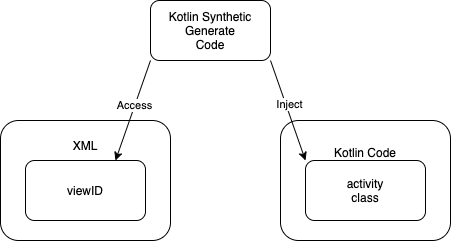
The automatic code conversion does solve the type issue. However, this doesn’t really fully solve the null-pointer issue. One can still accidentally provide a wrong ID (same View ID name but in a different layout) and causes the crash.
With View Binding coming up, the Kotlin Synthetics approach is deprecating.
The today preferred method (2019 — current): View Binding
In view of the imperfection of various approaches above, Google continues its quest to introduce a better way. View Binding is introduced.
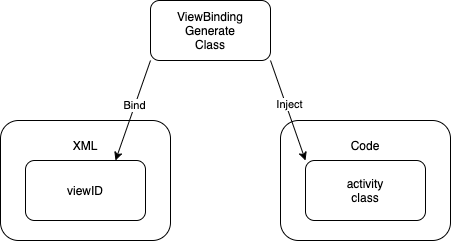
In this approach, one bind a layout by accessing the generated layout class e.g.
private lateinit var binding: ActivityMainBindingoverride fun onCreate(savedInstanceState: Bundle?) {
super.onCreate(savedInstanceState)
binding = ActivityMainBinding.inflate(layoutInflater)
setContentView(binding.root)
binding.textView.text = "Something"
}- No more need to cast or define the type anymore.
- Everything is given and ensure correct during compile time.
- No extra boilerplate code in layout.xml as well.
Compare to Kotlin Synthetics, a little boilerplate of getting the binding. Other than that, one can safely access the View Item.
Hence with this introduction, both Kotlin Synthetics and ButterKnife consider themselves deprecated.
The future approach (2021 and beyond): Jetpack Compose
Of recent, Jetpack Compose, is in the horizon. It is based on react framework of UI update, and eliminate the need of XML.
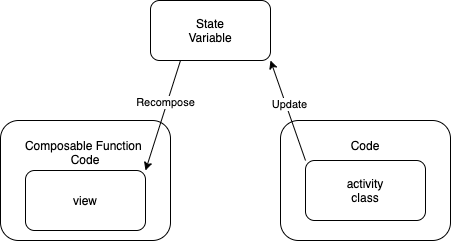
The UI is made from Composable Function, which is in Kotlin code. There is no need of separate layer of XML to define the UI.
Even with this approach, the activity code doesn’t interact with the Composable Function code directly. Instead it goes through and intermediate state variable. The change happens to the State Variable will automatically recompose the view (reactive nature).
e.g. in the code
val textState = mutableStateOf("")fun changeText(value: String) {
textState.value = value // changing the state
}As shown in the code above, just changing the textState.value, the below Composable function will recompose (redraw) itself.
@Composable
fun MyComposableText(textState: MutableStateOf<String>) {
    Text(text = textState.value) // will recompose when value change
}
To understand the recomposable function work, you can refer to the below blog
With the above, there are many benefits
- No more concern of need to find ID
- No more issue of getting null crash due to wrong ID
- No more type casting or wrong casting crash
- UI Logic can reside within composable function
- Logic code doesn’t interact directly with UI Logic code, but go through state variable.
I strongly belive Jetpack Compose will be the future of how Android App interact with the UI.
For better illustration the conventional XML view with Jetpack Compose, check the below article out.
In summary, the below is a diagram of timeline.
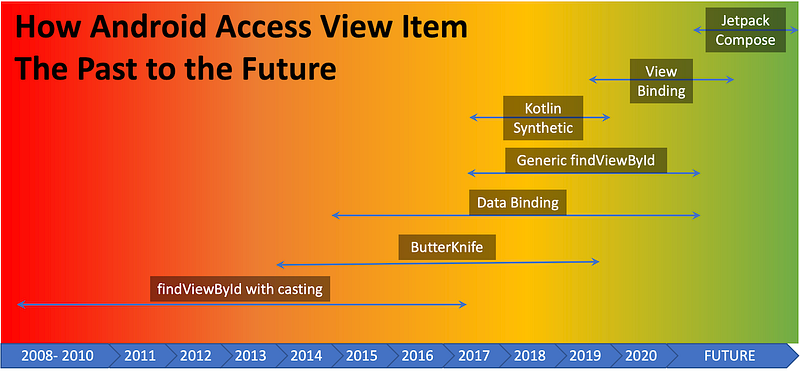
There’s another great article on how the findViewById evolved by Wajahat Karim on. It provide a great table of how they differ from one method with another one.
If you like this article, the below might suite you as well.


