
Learning Android Development
Android Data-Binding Made Simple
Assigning Data and get UI Updated Automatically

Data Binding in Android has been introduced since 2015. However, due to it’s boilerplate, it is not as commonly used as one desired. Nonetheless, still good to know how it works.
To know how Data Binding is different from the conventional way, let’s look at the conventional way a little
Conventional View Update
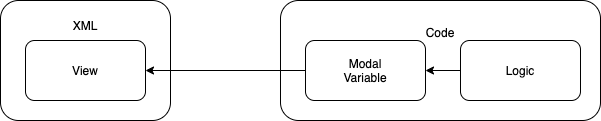
We have an XML
<TextView
    android:id="@+id/text_id"
    android:layout_width="match_parent"
    android:layout_height="match_parent" />
And in the code, we’ll have to access to the text_id and update it.
val myTextModal = getTextFromLogic()val textView = findViewById(R.id.text_id)
textView.text = myTextModalNote here, we have myTextModal is instantiated in the code instead of XML.
Data Binding View Update
To enable DataBinding, first, we’ll need to turn it on using the below in the app’s build.gradle file.
buildFeatures {
    dataBinding = true
}
The XML side
Instead of instantiating the modal in the code, the modal is instantiated in the XML instead.
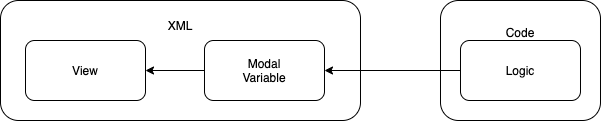
<?xml version="1.0" encoding="utf-8"?>
<layout xmlns:android="http://schemas.android.com/apk/res/android">

    <data>
        <variable
            name="myTextModal"
            type="String" />
    </data>

    <TextView
        android:layout_width="match_parent"
        android:layout_height="match_parent"
        android:text="@{myTextModal}" />

</layout>
To do so, we’ll have to
- Define an outer layer
layoutover the entire XML code. - Then followed by
datawrapping around the modal. - Then update the
TextViewby referring to the modal using@{myTextModal}
The Code Side
Here, it is simplified without the need to access the View Item anymore.
But it will need to access the Modal in the XML, and also have a different way to inflate the layout.
private lateinit var binding: ActivityMainBindingoverride fun onCreate(savedInstanceState: Bundle?) {
super.onCreate(savedInstanceState)
binding = DataBindingUtil.setContentView(
this, R.layout.activity_main)
binding.myTextModal = getTextFromLogic()
}In short, it is moving the modal into the XML, which make the code doesn’t need to access the View Item anymore.
XML Communicate back to Code
Sometimes other than having assign variable from the code to the XML, we need the XML to respond back.
To demonstrate that, I’m getting the same design here to illustrate this. The design is to provide some image URL to be loaded into the ImageView.
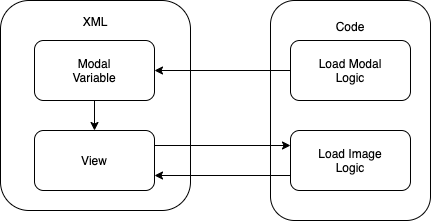
In the XML
Here we define the usual Modal and the View
<?xml version="1.0" encoding="utf-8"?>
<layout xmlns:android="http://schemas.android.com/apk/res/android">

    <data>
        <variable
            name="imageUrl"
            type="com.elyeproj.demoglide.ImageUrl" />
    </data>

    <ImageView
        android:id="@+id/my_image_view"
        android:layout_width="match_parent"
        android:layout_height="match_parent"
        android:src="@{imageUrl}" />

</layout>
Notice we are sending the ImageUrl over to the ImageView.
So what is ImageUrl? It is just
data class ImageUrl(
    val fastLoadUrl: String,
    val fullImageUrl: String,
    val listener: MyImageRequestListener.Callback
)
So how could that be an image loaded?
In the code
Before we look into that, we look into how it is setup
class MainActivity : AppCompatActivity(),
    MyImageRequestListener.Callback {
    private lateinit var binding: ActivityMainBinding

    override fun onFailure(message: String?) {
        // Do something on failure
    }

    override fun onSuccess(dataSource: String) {
        // Do something on success
    }

    override fun onCreate(savedInstanceState: Bundle?) {
        super.onCreate(savedInstanceState)
        binding = DataBindingUtil.setContentView(
            this, R.layout.activity_main)

        binding.imageUrl = ImageUrl(
            "https://theFastLoadUrl~",
            "https://theFullImageUrl~",
            this
        )
    }
}
That’s the part that send ImageUrl over to the XML.
Upon receiving the ImageURL, the XML will be able to connect back to load the image using the below code
@BindingAdapter("android:src")
fun setImageUrl(view: ImageView, imageUrl: ImageUrl?) {
    imageUrl?.let {
                val requestOption = RequestOptions()
                .placeholder(R.drawable.placeholder).centerCrop()

        Glide.with(view.context).load(it.fullImageUrl)
                .transition(
                    DrawableTransitionOptions.withCrossFade())
                .thumbnail(Glide.with(view.context)
                    .load(it.fastLoadUrl)
                    .apply(requestOption))
                .apply(requestOption)
                .listener(MyImageRequestListener(it.listener))
                .into(view)
    }
}
Notice that it @BindingAdaptor to android:src, so that when the ImageView get data within the android:src, it will call this function and provide the view for use.
Do note that the setImageUrl need to be a static function or a global function accessible by the XML directly.
You can get the code here.
While you notice there’s no direct need to access the View using ViewID from the code, we’ll need to add codes in the XML for the Data Binding to happens. This is one main limitation of Data Binding.
With Jetpack Compose, such a need is not there anymore.