
Host-based Firewall to Validate Network Firewall
Another way to watch the watchers and understand potential supply chain attacks
This post is part of a series on an adventure to connect a PFSense firewall and a Ubiquiti Dream Machine Pro. See the bottom of the post for all the posts in this series. This is one of my posts on Network Security.
Free Content on Jobs in Cybersecurity | Sign up for the Email List
I mentioned in the previous post on first impressions using a Ubiquiti UDM Pro, that I got to the location setting and the page just spun, and nothing ever showed up. I speculated it was because the UI was trying to reach out to some third-party domain that was not allowed by my firewall configuration, which is specifically set up to only allow the UDM Pro to reach out to domains I’ve added in the configuration.
I explained how I reverse-engineered what domains the device contacts in a prior post. I also explained how I set up an alias in PFSense to only allow the domains I had specifically investigated and allowed. Apparently, the location page reaches out to something other than what I had already allowed so it’s just spinning and what I presume should be a map never shows up.
I could have determined which domain the UI was using the same way I did in my last post. I also could have looked at the browser development tools settings to see what domain was failing.
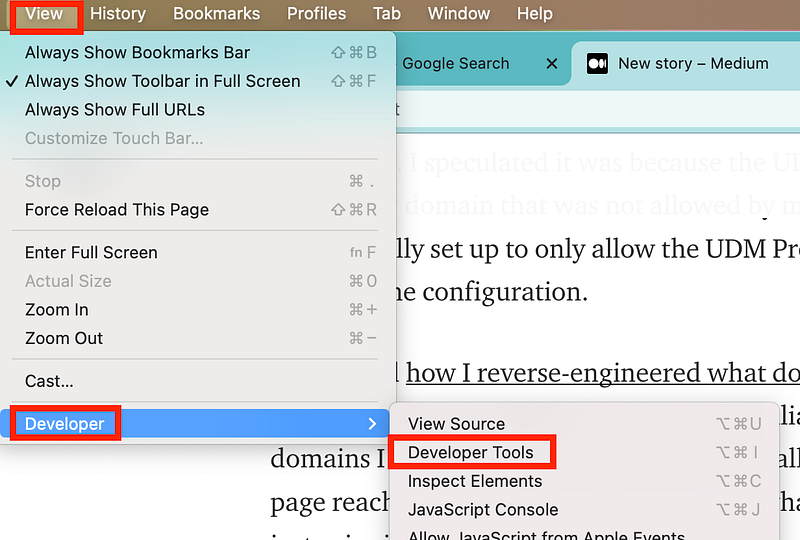
From there click on Console and you can see what is getting blocked. In this particular case, it appears that Medium is blocking a domain it’s trying to load in its content security policy (Google Analytics). There’s also a failure to load another URL on csp.medium.com with a 522 HTTP error. I’m not blocking either of those things. It looks Medium has a few misconfigurations they might want to look into. However, if I was blocking something, it would also show up here with a failure to connect.

Those mechanisms will detect after the fact when a domain name is blocked. They won’t block an unexpected domain name or allow you to review and allow or disallow it as a page opens or a connection is made. It could be quite annoying to inspect every connection but if you are a security researcher geek like me that’s just something you like to do. I like to see what’s connecting to what.
One way to make sure your network-based firewall is working is to run a host-based firewall on top of that. A host-based firewall will allow you to inspect connections your machine makes. I was running my host-based firewall when the locations page on the Ubiquiti Dream Machine Pro failed to load, and this connection popped up. Now I know that the UI is trying to get to api.mapbox.com. Even if I allowed this API connection here on my host, the connection would later be blocked when it reaches the PFSense.
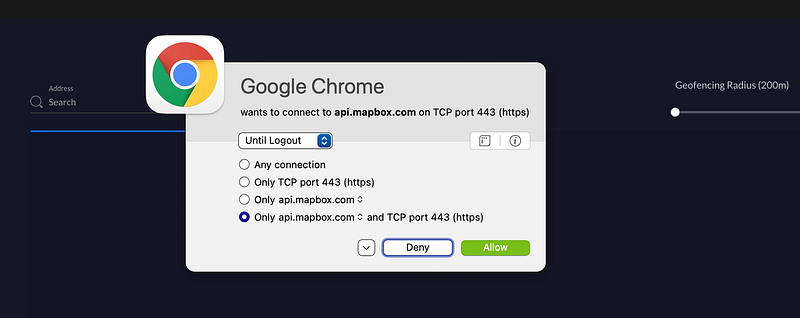
As I mentioned in my last post, all connections are allowed by default in the Ubiquiti device, so that wouldn’t have blocked anything. I haven’t tried out the firewall to see if and how that would behave in regards to connections required for the UI to function properly.
If you are using a MAC OS, you can Little Snitch to monitor your network connections.
If you are running a Windows machine, you can use Windows Defender Firewall.
If you are on Linux, use IP Tables.
I will need to research this API a bit more and some others I’ve found while using the product. However, as I mentioned, dynamically including third-party code in a production environment can be dangerous. I explained in this post how including components and code on your own systems whenever possible is safer in this blog post and why.
Now, not only do you need to worry about a security problem at Ubiquiti, you’ll have to monitor for security problems at Mapbox. That is known as a supply chain attack, where a third-party component used to build a product has a security problem. Something to be aware of whenever you are using code and products and especially network appliances.
Follow for updates.
Teri Radichel | © 2nd Sight Lab 2022
About Teri Radichel:
~~~~~~~~~~~~~~~~~~~~
⭐️ Author: Cybersecurity Books
⭐️ Presentations: Presentations by Teri Radichel
⭐️ Recognition: SANS Award, AWS Security Hero, IANS Faculty
⭐️ Certifications: SANS ~ GSE 240
⭐️ Education: BA Business, Master of Software Engineering, Master of Infosec
⭐️ Company: Penetration Tests, Assessments, Phone Consulting ~ 2nd Sight Lab
Need Help With Cybersecurity, Cloud, or Application Security?
~~~~~~~~~~~~~~~~~~~~~~~~~~~~~~~~~~~~~~~~~~~~~~~~~~~~~~~~~~~~~
🔒 Request a penetration test or security assessment
🔒 Schedule a consulting call
🔒 Cybersecurity Speaker for PresentationFollow for more stories like this:
~~~~~~~~~~~~~~~~~~~~~~~~~~~~~~~~~~~~~~~~~~~~~~~~~~~~~~~~~~~~~
❤️ Sign Up my Medium Email List
❤️ Twitter: @teriradichel
❤️ LinkedIn: https://www.linkedin.com/in/teriradichel
❤️ Mastodon: @teriradichel@infosec.exchange
❤️ Facebook: 2nd Sight Lab
❤️ YouTube: @2ndsightlab