
Hexadecimal To Binary To Decimal
CM.4 Conversion without exponentials
~~~~~~~~~~~~~~~~~~~~~~~~~~~~~~~~~~~~~~~~~~~~~~~~~~~~~~~~~~~
⚙️ Part of my series on Automating Cybersecurity Metrics. The Code.
🔒 Related Stories: Cybersecurity Math | Cybersecurity
💻 Free Content on Jobs in Cybersecurity | ✉️ Sign up for the Email List
~~~~~~~~~~~~~~~~~~~~~~~~~~~~~~~~~~~~~~~~~~~~~~~~~~~~~~~~~~~
Please read the following posts first unless you are already familiar with these concepts:
- Why binary and hexadecimal are used with computers.
- Why that matters for cybersecurity.
- The relationship between binary, decimal, and hexadecimal
- How to count in binary
- How to count in hexadecimal
In this post I’ll explain how to convert larger binary numbers to decimal and hexadecimal using a trick I learned off a video. Unfortunately, I didn’t save the link. At the time I first learned this concept I only found one video that showed this method. Now there are others. It was a kind of hyper speaker very excited and talking about how calculators are bad and not allowed on tests from sometime around 2012 or 2013 or maybe even prior to that. If you see a speaker calmly explaining this concept in a video — that’s not the one. :-)
And, as always, I’m adding my own little twist to it with a few graphics. What we will not be using, are exponentials. I find this method to be simpler for my brain to deal with for whatever reason.
Converting binary to decimal
First, we need to assign each digit in our binary number a value.
Let’s say we had 5 digits in our binary number.
- Start with one.
- Double the number and add the result to the left.
- Repeat the last step until you have the required number of values.
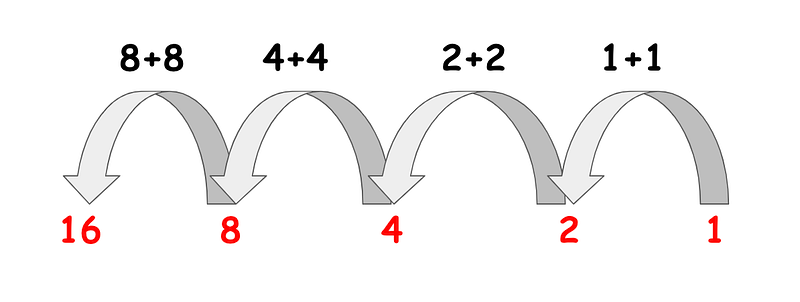
Now let’s say we want to convert the binary 1010 to decimal.
Repeat the concept above for each digit.
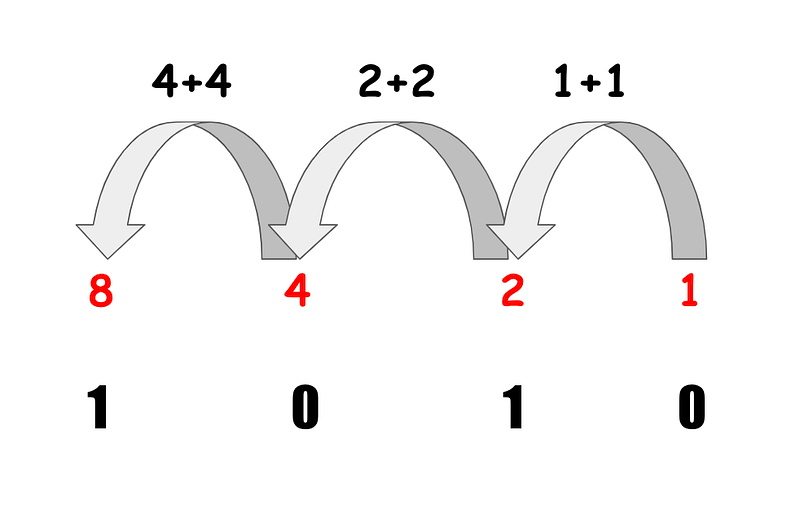
The zero’s are “off” as explained in a prior post. The one’s are “on”.
Add up the value of the numbers that are “on.”
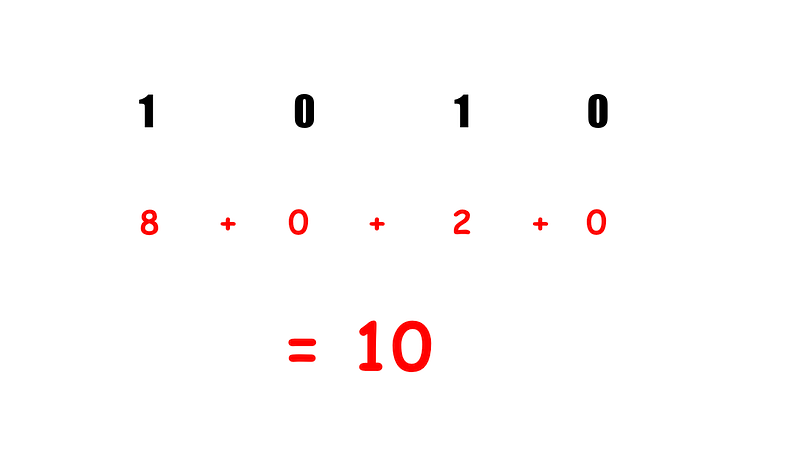
That’s it. Now you can convert any binary number to decimal.
Let’s try a bigger number.
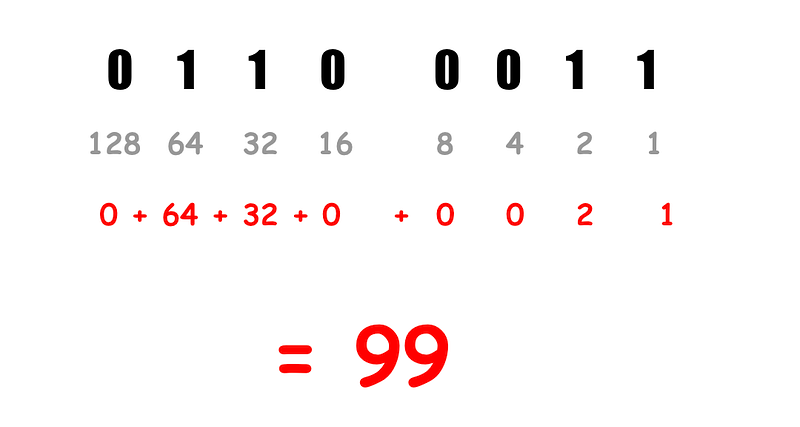
You can do this with any length of binary digits. I’ll show you an even longer calculation below.
Convert a hexadecimal number to binary
Now let’s say we want to convert the above binary number to hexadecimal.
Here’s the important point:
Each four binary digits in a binary number represents one hexadecimal digit.
As I explained before the size of each binary digit is one bit, so the size of a hexadecimal number is 4 bits.
Recall our earlier chart that I recommended you might want to memorize:
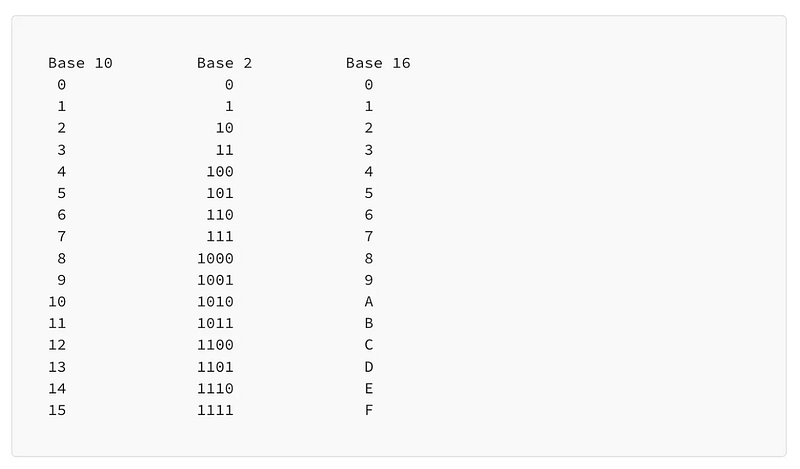
Now lets translate this hexadecimal value to binary: AE06
If you have memorized this chart as I recommended it would be easy to write out the four digits for each hexadecimal number like this:
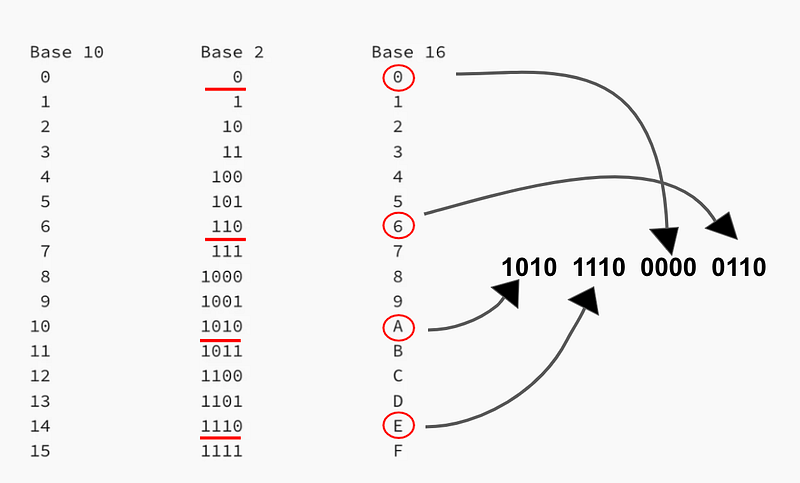
Note that I dropped the leading 0’s in the middle column above. Pad each binary number with zeros so it becomes a 4 bit number. In other words, 0 = 0000 and 110 = 0110.
To come up with a binary number, I simply replaced each digit in AE06 with the corresponding binary digits in the image above.
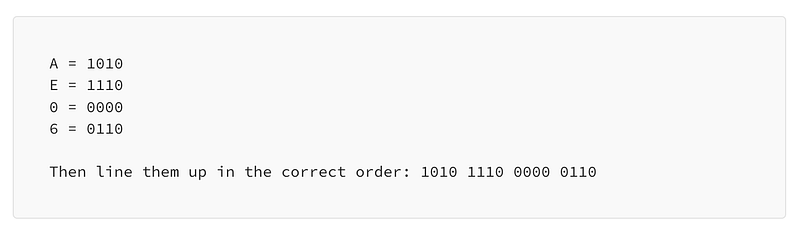
If you haven’t memorized the numbers above you can look them up in a chart like the one above. If you don’t have a chart handy, calculate them using the methods I showed in the prior two posts.
Convert a hexadecimal number to decimal
Now let’s say you want to know the decimal value of AE06.
Now that we know the binary number, you can use the method I showed you at the top of the post to calculate the decimal value. Figure out the value of each position of your binary number. Add up the values where the digit is “on” or 1.
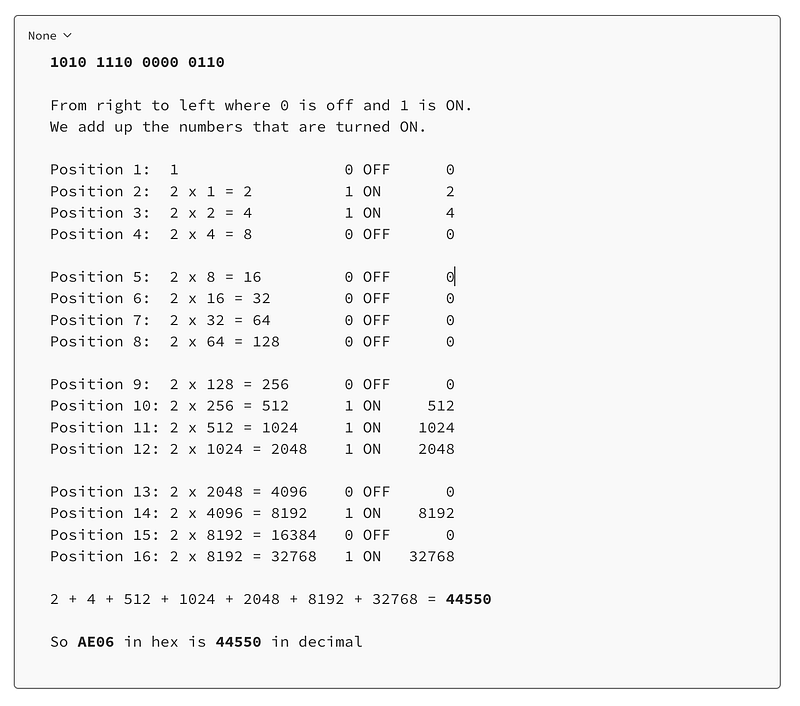
You can check your work using an online conversion site like the one included in my prior posts, or a calculator that will do the conversion for you. On a Mac check your work by typing the number into the calculator:
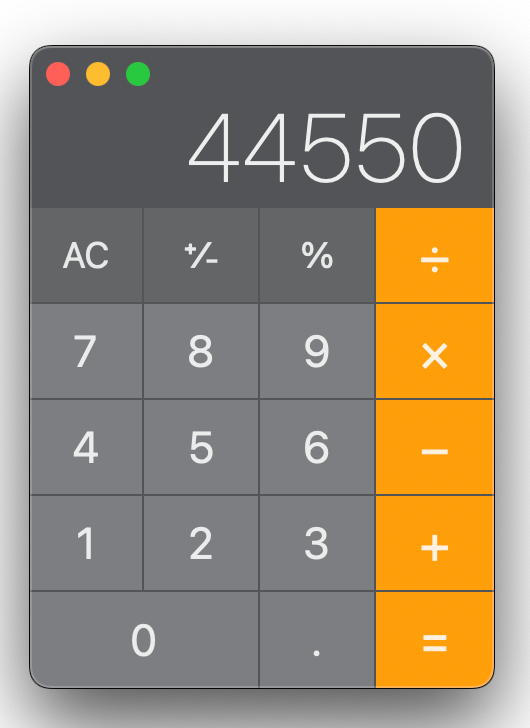
Then choose programmer from the view menu.
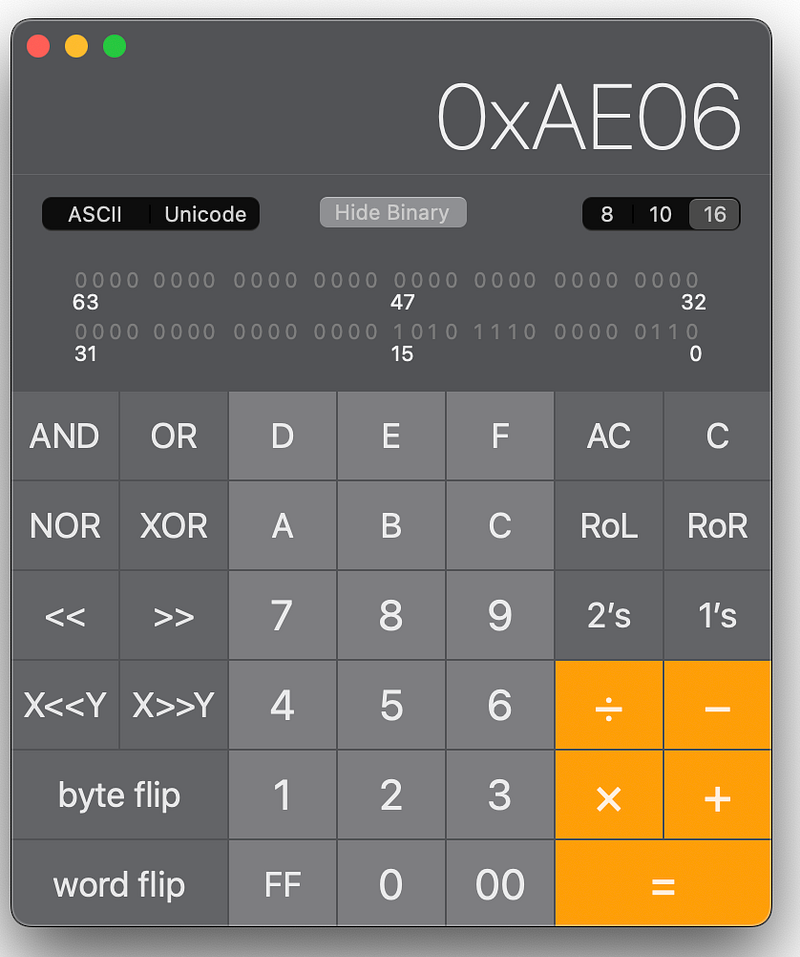
Woot! Our value matches.
This method might get cumbersome for very large numbers but I presume at that point you likely have a calculator available to you or some type of programming language to speed up the process. But it works nicely for most smaller hexadecimal values such as those commonly found in network packet headers, for example. It also works if you need to validate that a program is properly converting values from hexadecimal to binary to decimal.
Follow for updates.
Teri Radichel | © 2nd Sight Lab 2023
About Teri Radichel:
~~~~~~~~~~~~~~~~~~~~
⭐️ Author: Cybersecurity Books
⭐️ Presentations: Presentations by Teri Radichel
⭐️ Recognition: SANS Award, AWS Security Hero, IANS Faculty
⭐️ Certifications: SANS ~ GSE 240
⭐️ Education: BA Business, Master of Software Engineering, Master of Infosec
⭐️ Company: Penetration Tests, Assessments, Phone Consulting ~ 2nd Sight Lab
Need Help With Cybersecurity, Cloud, or Application Security?
~~~~~~~~~~~~~~~~~~~~~~~~~~~~~~~~~~~~~~~~~~~~~~~~~~~~~~~~~~~~~
🔒 Request a penetration test or security assessment
🔒 Schedule a consulting call
🔒 Cybersecurity Speaker for PresentationFollow for more stories like this:
~~~~~~~~~~~~~~~~~~~~~~~~~~~~~~~~~~~~~~~~~~~~~~~~~~~~~~~~~~~~~
❤️ Sign Up my Medium Email List
❤️ Twitter: @teriradichel
❤️ LinkedIn: https://www.linkedin.com/in/teriradichel
❤️ Mastodon: @teriradichel@infosec.exchange
❤️ Facebook: 2nd Sight Lab
❤️ YouTube: @2ndsightlab


