
Google’s Bard: A Step-by-Step Guide to Using the Unofficial Bard API
Using Google’s latest AI chatbot right from your code, thanks to a reverse-engineered Bard API

Bard seems to be all the rage right now (although in some cases it’s not as useful as ChatGPT). But if you haven’t tried Google’s latest AI chatbot yet, you definitely should. Interestingly, you can now do this via a reverse-engineered Bard API.
In this article, I’ll show you how that works.
[Please note that you may need to set up a VPN to access Google Bard from countries or regions that are geofenced due to regulatory issues. There are many reliable VPN providers out there, so choose one that suits your needs (ExpressVPN, for example, is a good option)]
What’s the Bard API?
To use Google’s Bard, you typically need to navigate to bard.google.com and interact through the chatbot interface. Whenever you enter a question or instruction, the website sends it to an AI model that responds to your input. This is called “inference,” meaning you ask an AI model to perform a task with your input.
However, if you preferred to perform inference directly from your Python code or a Google Colab instead of using the Bard website, you couldn’t until recently because Google doesn’t currently provide an API endpoint for Bard.
That’s why developers have reverse-engineered a Bard API by examining how inferences are initialized on the Bard website.
With the unofficial BardAPI, you can access Bard from anywhere with just a few lines of code.
So let’s try that.
Using Bard API
When using the Bard interface, the website stores an authentication token to make sure that you are a legitimate Google account holder. This authentication token is necessary in order to interact with the AI model.
And here’s how to get it:
- Navigate to bard.google.com and log in with your Google account (if you’re not already logged in).
- In Chrome or Firefox, right-click on the page and choose “Inspect” from the context menu. For Safari, you need to enable “Show Develop menu in menu bar” in the Advanced section of Preferences.
- From the Inspect window, select “Application” and navigate to “Storage”. Here, you’ll find all the data that the website uses to function correctly, including the “__Secure-1PSID” token. Once you’ve found it, copy its value — a lengthy sequence of letters and numbers.
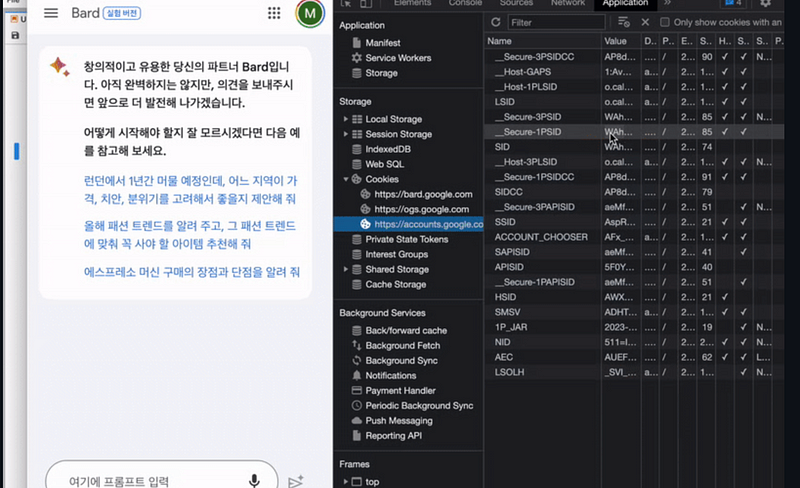
Remember, the authentication token is your personal key to Google Bard, so keep it confidential.
Now that we have the necessary token, we can use it with the reverse-engineered Bard API (replace ‘ENTER YOUR AUTH TOKEN HERE’ with your auth token and modify the question to whatever you’d like Bard to do for you):
from bardapi import Bard
import os

os.environ['_BARD_API_KEY']="ENTER YOUR AUTH TOKEN HERE"

answer = Bard().get_answer("What is ChatGPT?")['content']
print(answer)
You can try it online using this Google Colab: https://colab.research.google.com/drive/1zzzlTIh0kt2MdjLzvXRby1rWbHzmog8t?usp=sharing
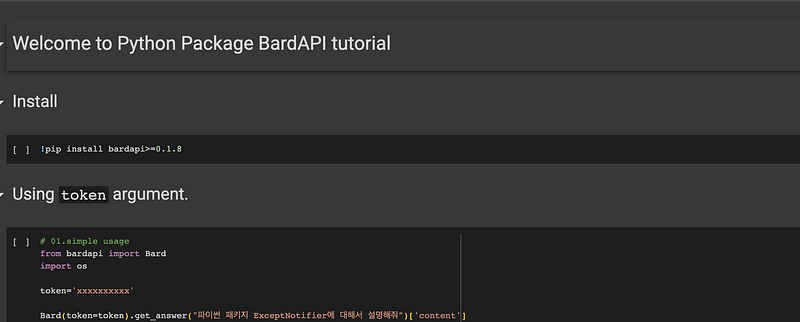
Again, replace the xxxxxxxxxx with your auth token and change the question to whatever you like.
In both cases, if you get a timeout error, try passing the timeout parameter to the Bard object to give BardAPI more time to wait for a result. In this example: “timeout=30” to wait up to 20 seconds
from bardapi import Bard
import os

os.environ['_BARD_API_KEY']="ENTER YOUR AUTH TOKEN HERE"

answer = Bard(timeout=30).get_answer("What is ChatGPT?")['content']
print(answer)
For further information check out the Bard API Github repo: https://github.com/dsdanielpark/Bard-API
➡️ For more information about AI & Creativity, follow me on Twitter or Medium (use my referral link to get full access to all my articles and those of thousands of other writers).
➡️ If you like my content, why not leave a “clap” at the end of this article, so more people can see it?
Stay updated with the latest news and updates in the creative AI space — follow the Generative AI publication.


