
LangChain’s New Tool: LangSmith for ChatBots and Web Apps
Extract the “under-the-hood” information while running large language models (LLMs) with LangChain AI and Streamlit Web Apps
👨🏾💻 GitHub ⭐️| 🐦 Twitter | 📹 YouTube | ☕️ BuyMeaCoffee | Ko-fi💜
Introduction
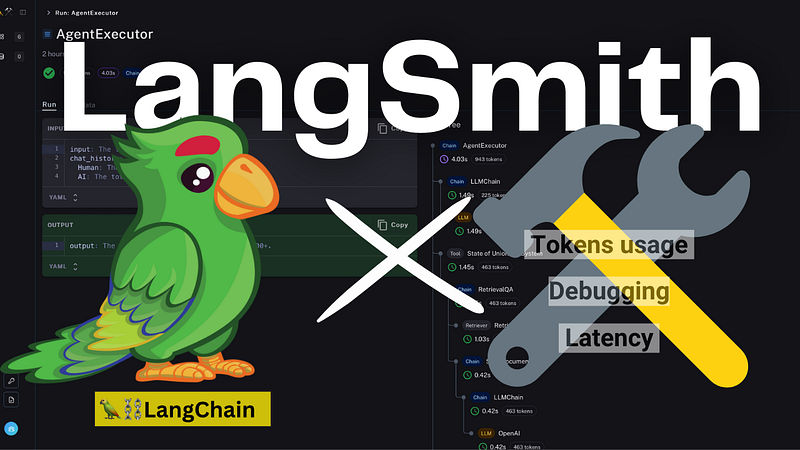
LangSmith is a recently launched platform that assists in working with large language model-powered web applications, offering valuable insights into LangChain AI’s abstraction methods. LangSmith empowers developers to navigate the complexities and challenges associated with utilizing LangChain AI.
While developers recognize the impressive capabilities of LangChain AI, they are no strangers to its significant drawbacks, including debugging difficulties arising from the intricate abstraction process, higher latency periods, and substantial token consumption. Though not all of these challenges can be entirely eliminated, LangSmith comes to the rescue, providing a comprehensive approach to building LLM-powered applications. At its core, LangSmith equips developers with a deep understanding of the underlying abstraction methods and unexpected outcomes, ensuring thorough testing and preparation of applications for production while mitigating potential hurdles.
Let’s explore the key features LangSmith has to offer:
- Quick Debugging: Effortlessly debug new chains, agents, or sets of tools to enhance efficiency and performance.
- Visualize Components: Gain insightful visualizations of how components such as chains, llms, and retrievers relate and are utilized within the application.
- Evaluate Prompts and LLMs: Fine-tune and optimize individual components by evaluating different prompts and language models.
- Quality Assurance: Rigorously test given chains over datasets to ensure consistent quality standards are met.
- Usage Traces and Insights: Capture usage traces and utilize LLMs or analytics pipelines to generate invaluable insights.
Please take a look at the official blog post from the LangChain team announcing the release of LangSmith, here!
Using LangSmith to monitor LangChain powered Web Apps
Setting up the LangSmith Environment
Before we can integrate LangSmith into our web apps, we must first gain access to LangSmith APIs and endpoints.
To get started, we need to sign up with LangSmith. Keep in mind that LangSmith is currently in a closed beta state, with limited user access. In order to get access, we must sign up on their website and join the waitlist.
Once we’ve logged in with our LangSmith account, we’ll find a user-friendly UI divided into “Projects” and “Datasets & Testing” sections.
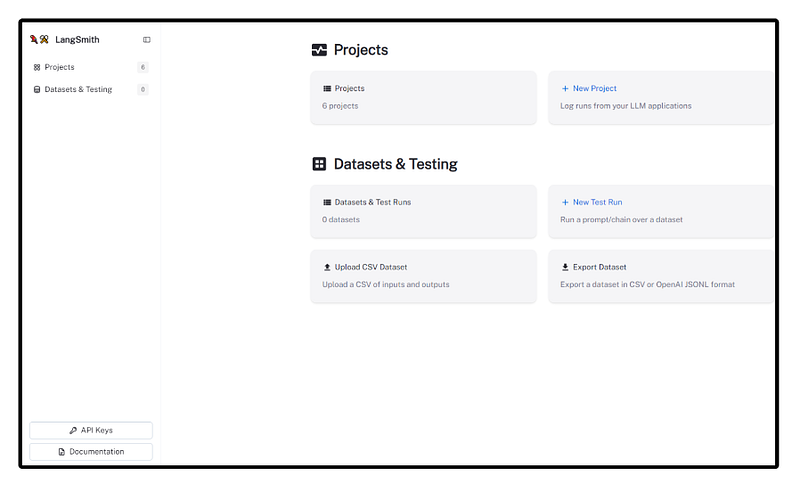
Our next step involves creating API keys in the bottom left corner. These keys will grant our web apps access to the LangSmith platform. It’s important to copy and save the API key immediately for future use. To begin, we can create a new project by clicking the “New Project” icon and naming it accordingly. This will lead us to the Setup tab of our newly created project, which provides essential information about the environments required to connect to LangSmith.
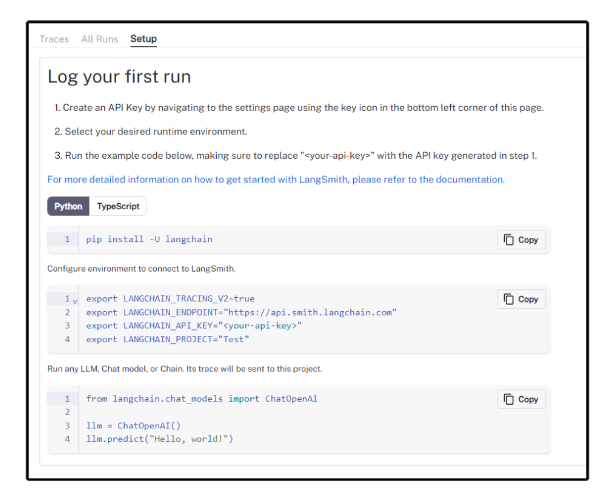
We’ll then copy the environment variable information and paste it into our web app’s code. Please note that during this initial step, the “Traces” and “All Runs” tabs will be empty, as we have just begun our journey with LangSmith.
Integrating LangSmith into our Web App
To seamlessly integrate LangSmith into our web applications, we will be using two of our previously built web apps. If you need a quick refresher, you can follow the blog posts for each app:
- Using LangChain AI’s Simple Sequential Chain in action — Link to the blog post.
- Personal Bot with Memory — Link to the blog post.
For each of these use cases, we will create a new project in LangSmith and then copy the corresponding environment variables into the app’s code at the beginning. The following code snippet demonstrates how to use these variables:
import os

# Usually, these values will be the same for both projects
os.environ["LANGCHAIN_TRACING_V2"] = "true"
os.environ["LANGCHAIN_ENDPOINT"] = "https://api.smith.langchain.com"
# Replace "YOUR API KEY" with the API key you created
os.environ["LANGCHAIN_API_KEY"] = "YOUR API KEY"
# Make sure to use the correct project name
os.environ["LANGCHAIN_PROJECT"] = "Sequential-Chain"
Simply refer to the specific code block for each use case mentioned in the blog posts. With this integration, our web apps will be all set to leverage the power of LangSmith effectively!
Monitoring the Run Traces
As we run our web apps, we’ll notice real-time updates on the “Traces” or “All Run” tabs specific to each project. To gain a broader perspective, make sure to navigate to the corresponding projects. These traces are thoughtfully color-coded and intuitive, providing various attributes such as time-stamps, latency, and tokens usage (among many other key parameters).
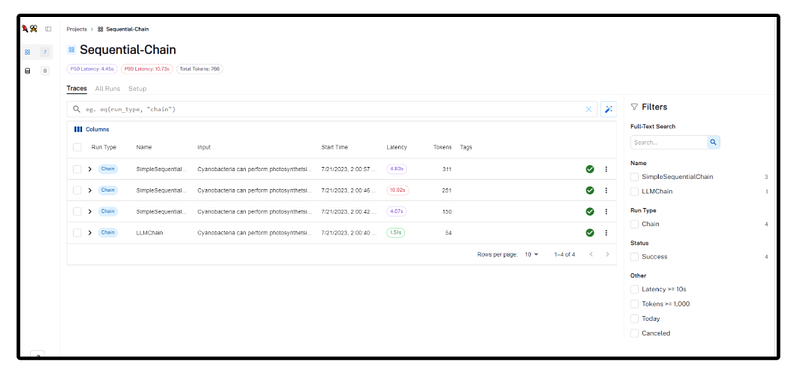
Exploring the different features available is essential as they allow us to delve into the intricate details of the abstraction methods utilized by LangChain Chain under the hood. Additionally, we can focus on specific “Run Types” to narrow down to individual run traces.
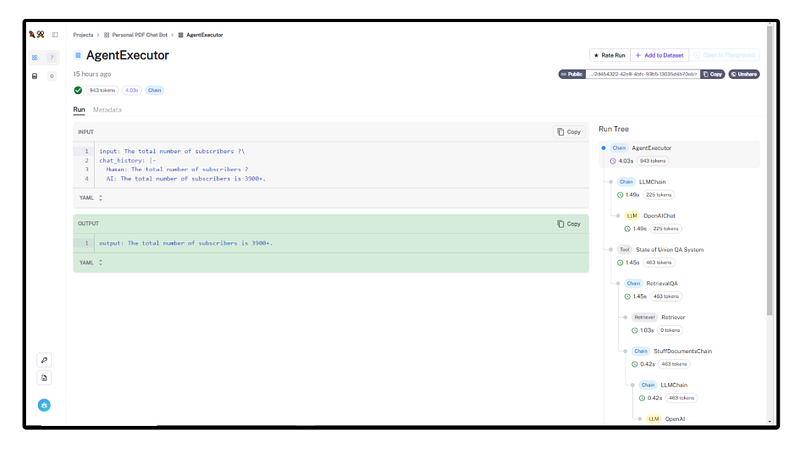
The “Run Tree” presents a node-like feature with key parameters for evaluation, such as the chains used, time taken to run, and the number of tokens used. Make sure to check on-to the “Metadata” tabs to observe a concise “Run Stats”.
This information is invaluable for developers to experiment with and brainstorm better possibilities for enhancing performance and reducing the cost of our web applications. With these insights at our disposal, we can make informed decisions to optimize the overall performance of our web apps powered by LangSmith. Moreover, LangSmith facilitates seamless collaboration among co-workers by enabling the sharing of selected run traces through a public link, readily available at the top-right corner of the platform.
Conclusion
In this blog post, we demonstrated the integration of LangSmith into our previous web apps built using LangChain AI and Databutton. Despite being in its early stages, LangSmith has already shown its potential in developing cost-effective and robust language model-powered web apps, empowering developers to optimize performance and enhance efficiency. We are excited to witness the future advancements and possibilities that LangSmith will bring to us!
👨🏾💻 GitHub ⭐️| 🐦 Twitter | 📹 YouTube | ☕️ BuyMeaCoffee | Ko-fi💜
Hi there ! I’m always on the lookout for sponsorship, affiliate links and writing/coding gigs to keep broadening my online contents. Any support, feedback and suggestions is very much appreciated ! Interested ? Drop an email here : [email protected]
Related Blogs
- Sequential Chain Blog — https://readmedium.com/getting-started-with-langchain-a-powerful-tool-for-working-with-large-language-models-286419ba0842
- Personal PDF Chat Bot Blog — https://readmedium.com/how-to-build-a-personalized-pdf-chat-bot-with-conversational-memory-965280c160f8
- LangSmith Blog — https://blog.langchain.dev/announcing-langsmith/
- LangSmith Docs — https://docs.smith.langchain.com
Thank you ! See you in the next blog , stay tuned 🤖
In Plain English
Thank you for being a part of our community! Before you go:
- Be sure to clap and follow the writer! 👏
- You can find even more content at PlainEnglish.io 🚀
- Sign up for our free weekly newsletter. 🗞️
- Follow us on Twitter, LinkedIn, YouTube, and Discord.


