
Getting started with LangChain — A powerful tool for working with Large Language Models
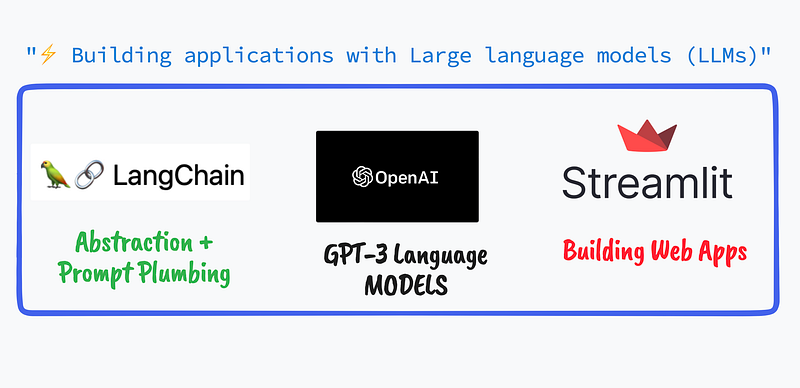
Building a Web Application using OpenAI GPT3 Language model and LangChain’s SimpleSequentialChain within a Streamlit front-end
👨🏾💻 GitHub ⭐️| 🐦 Twitter | 📹 YouTube | ☕️ BuyMeaCoffee | Ko-fi💜
Not a medium member ? Use this friend link to read this article for free!
You can refer to the video as well, which will walk you through step-by-step,
Bonus : The tutorial video also showcases how we can build this entire web application within a single platform called Databutton (No! They aren’t sponsoring me , just loved using their product …) — where you don’t even need to push to GitHub or set up your own environment to work with .
Introduction
What is LangChain?
LangChain is a powerful tool that can be used to work with Large Language Models (LLMs). LLMs are very general in nature, which means that while they can perform many tasks effectively, they may not be able to provide specific answers to questions or tasks that require deep domain knowledge or expertise. For example, imagine you want to use an LLM to answer questions about a specific field, like medicine or law. While the LLM may be able to answer general questions about the field, it may not be able to provide more detailed or nuanced answers that require specialized knowledge or expertise.
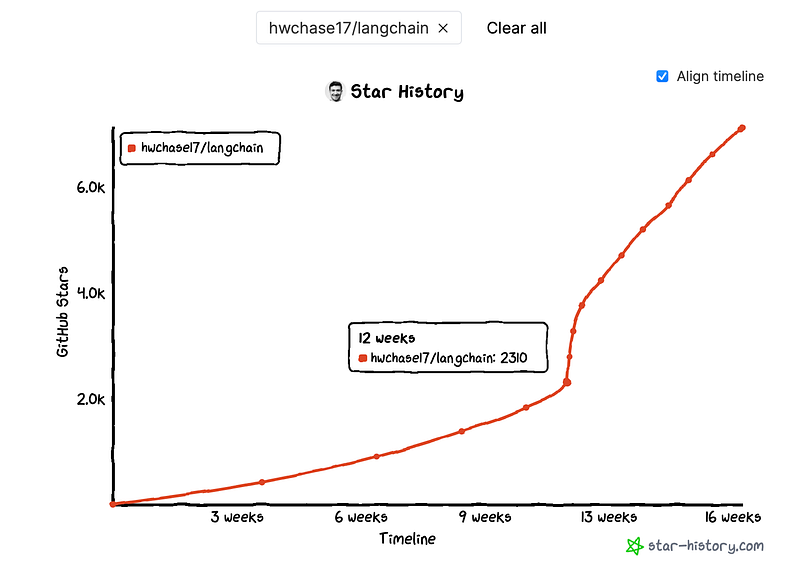
Why we need LangChain?
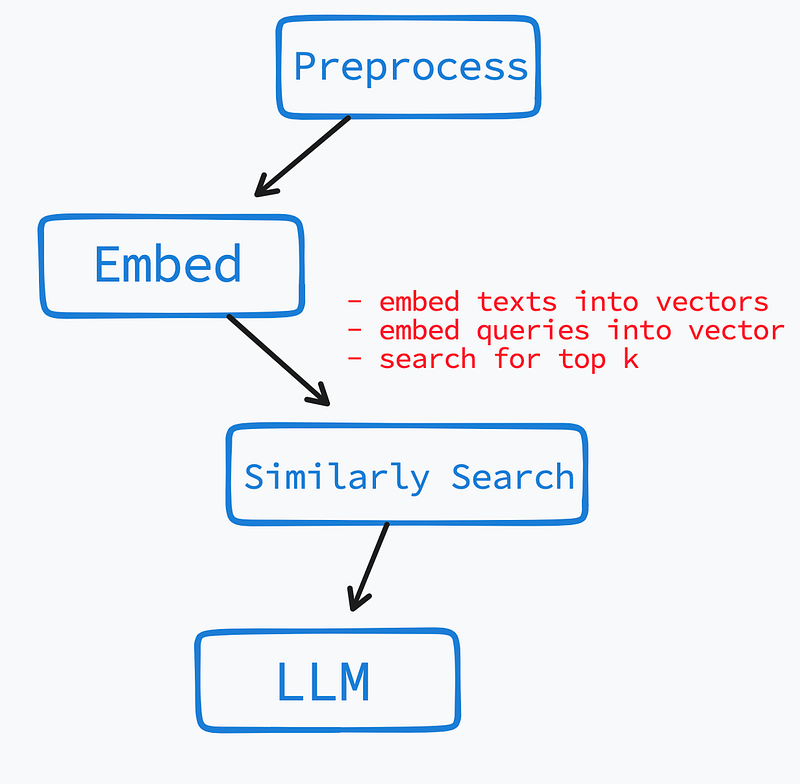
To work around this limitation, LangChain offers a useful approach where the corpus of text is preprocessed by breaking it down into chunks or summaries, embedding them in a vector space, and searching for similar chunks when a question is asked. This pattern of preprocessing, real-time collecting, and interaction with the LLM is common and can be used in other scenarios as well, such as code and semantic search. LangChain provides an abstraction that simplifies the process of composing these pieces. This “prompt plumbing” is crucial and will become increasingly important as LLMs become more powerful and require more data to be provided at prompt time.
You can read more about general use-cases of LangChain over their documentation or their GitHub repo. Highly recommended to have broader perspective about this package.
Attributes of LangChain (related to this blog post)
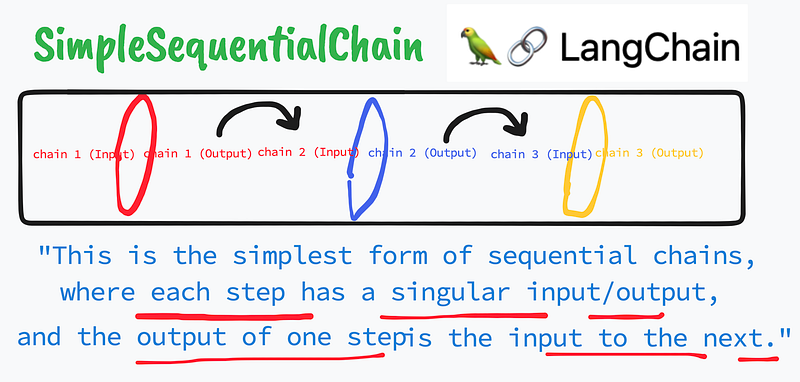
As the name suggests, one of the most powerful attributes (among many others!) which LangChain provides is to create Chains. Chains are an important feature of LangChain enable users to combine multiple components together to create a single, coherent application. One example of this is creating a chain that takes user input, formats it using a PromptTemplate, and then passes the formatted response to a Large Language Model (LLM) for processing.
In this blog post, we will primarily look into the abstraction capabilities of Sequential chains. Sequential chains, as the name suggests, execute their links in a sequential or step-by-step order. In other words, the output of one link is passed as the input to the next link in the chain. This means that the output of the first LLM becomes the input to the second LLM and so on, until the final output is generated. This approach allows users to create more complex and sophisticated models by combining the strengths of multiple LLMs.
Building a demo Web App with LangChain + OpenAI + Streamlit
Let's now try to implement this idea of LangChain in a real use-case and I'm certain that would help us to have a quick grasp !
But before! We need to install few dependencies — as we are going to build a Streamlit Web App using LangChain and OpenAI GPT-3 model.
# Dependencies to install

pip install streamlit
pip install langchain
pip install openai- Streamlit is a popular Python library for building data science web apps
- OpenAI provides access to OpenAI’s GPT-3 language model.
To know more about Streamlit — Open AI integration , make sure to check my other blog posts or video tutorials. How to obtain Open AI API keys ? Check this blog post!
Build the Web App
1. Importing Libraries
Here, we start with importing the necessary packages. We also import three classes from the langchain package: LLMChain, SimpleSequentialChain, and PromptTemplate. These classes are used to define and run our language model chains.
import streamlit as st # import the Streamlit library
from langchain.chains import LLMChain, SimpleSequentialChain # import LangChain libraries
from langchain.llms import OpenAI # import OpenAI model
from langchain.prompts import PromptTemplate # import PromptTemplate
2. Basic set up of the app (Header, subheader etc …)
We set up the app, with few relevant informations, using simple Streamlit syntax,
# Set the title of the Streamlit app
st.title("✅ What's TRUE  : Using LangChain `SimpleSequentialChain`")

# Add a link to the Github repository that inspired this app
st.markdown("Inspired from [fact-checker](https://github.com/jagilley/fact-checker) by Jagiley")
3. Input widgets to interact with Front-end user (API KEY, Question widget …)
The app also allows the user to enter their OpenAI API key, which will be used to access OpenAI’s language model.
# If an API key has been provided, create an OpenAI language model instance
if API:
    llm = OpenAI(temperature=0.7, openai_api_key=API)
else:
    # If an API key hasn't been provided, display a warning message
    st.warning("Enter your OPENAI API-KEY. Get your OpenAI API key from [here](https://platform.openai.com/account/api-keys).\n")
Further we need to provide an input widget, which will allow our user to enter any questions .
# Add a text input box for the user's question
user_question = st.text_input(
    "Enter Your Question : ",
    placeholder = "Cyanobacteria can perform photosynthetsis , are they considered as plants?",
)
3. The CHAINS are in work
Now , in order to generate a valid response to our user-end's question, we pass the questions, through couple of SimpleSequentialChain pipeline — as soon as the button Tell me about it is clicked!
# Generating the final answer to the user's question using all the chains
if st.button("Tell me about it", type="primary"):
    # Chain 1: Generating a rephrased version of the user's question
    template = """{question}\n\n"""
    prompt_template = PromptTemplate(input_variables=["question"], template=template)
    question_chain = LLMChain(llm=llm, prompt=prompt_template)

    # Chain 2: Generating assumptions made in the statement
    template = """Here is a statement:
        {statement}
        Make a bullet point list of the assumptions you made when producing the above statement.\n\n"""
    prompt_template = PromptTemplate(input_variables=["statement"], template=template)
    assumptions_chain = LLMChain(llm=llm, prompt=prompt_template)
    assumptions_chain_seq = SimpleSequentialChain(
        chains=[question_chain, assumptions_chain], verbose=True
    )

    # Chain 3: Fact checking the assumptions
    template = """Here is a bullet point list of assertions:
    {assertions}
    For each assertion, determine whether it is true or false. If it is false, explain why.\n\n"""
    prompt_template = PromptTemplate(input_variables=["assertions"], template=template)
    fact_checker_chain = LLMChain(llm=llm, prompt=prompt_template)
    fact_checker_chain_seq = SimpleSequentialChain(
        chains=[question_chain, assumptions_chain, fact_checker_chain], verbose=True
    )

    # Final Chain: Generating the final answer to the user's question based on the facts and assumptions
    template = """In light of the above facts, how would you answer the question '{}'""".format(
        user_question
    )
    template = """{facts}\n""" + template
    prompt_template = PromptTemplate(input_variables=["facts"], template=template)
    answer_chain = LLMChain(llm=llm, prompt=prompt_template)
    overall_chain = SimpleSequentialChain(
        chains=[question_chain, assumptions_chain, fact_checker_chain, answer_chain],
        verbose=True,
    )

    # Running all the chains on the user's question and displaying the final answer
    st.success(overall_chain.run(user_question))
The SimpleSequentialChain combines several chains of operations to run a pipeline. Here, we are using four different chains to build the fact-checker pipeline :
question_chain: This chain takes the user's question as input and returns it as output. This is the starting point for our pipeline. The template for this chain is just the user's question.assumptions_chain: This chain takes the output fromquestion_chainas input and produces a bullet-point list of assumptions based on a statement related to the question. The statement is generated using LangChain'sLLMChainand theOpenAImodel. The template for this chain asks the user to make a bullet-point list of the assumptions made when producing the statement.fact_checker_chain: This chain takes the outputs fromquestion_chainandassumptions_chainas inputs and produces a bullet-point list of assertions based on the question and assumptions. LangChain'sLLMChainand theOpenAImodel are used to generate the assertions. The template for this chain asks the user to determine whether each assertion is true or false, and to explain why if it is false.answer_chain: This chain takes the outputs fromquestion_chain,assumptions_chain, andfact_checker_chainas inputs and produces an answer to the user's question based on the facts generated by the previous chains. The template for this chain asks the user to answer the original question based on the generated facts.
Finally, we combine these chains into the overall_chain . The result is the answer to the user's question based on the facts generated by the previous chains.
Conclusion
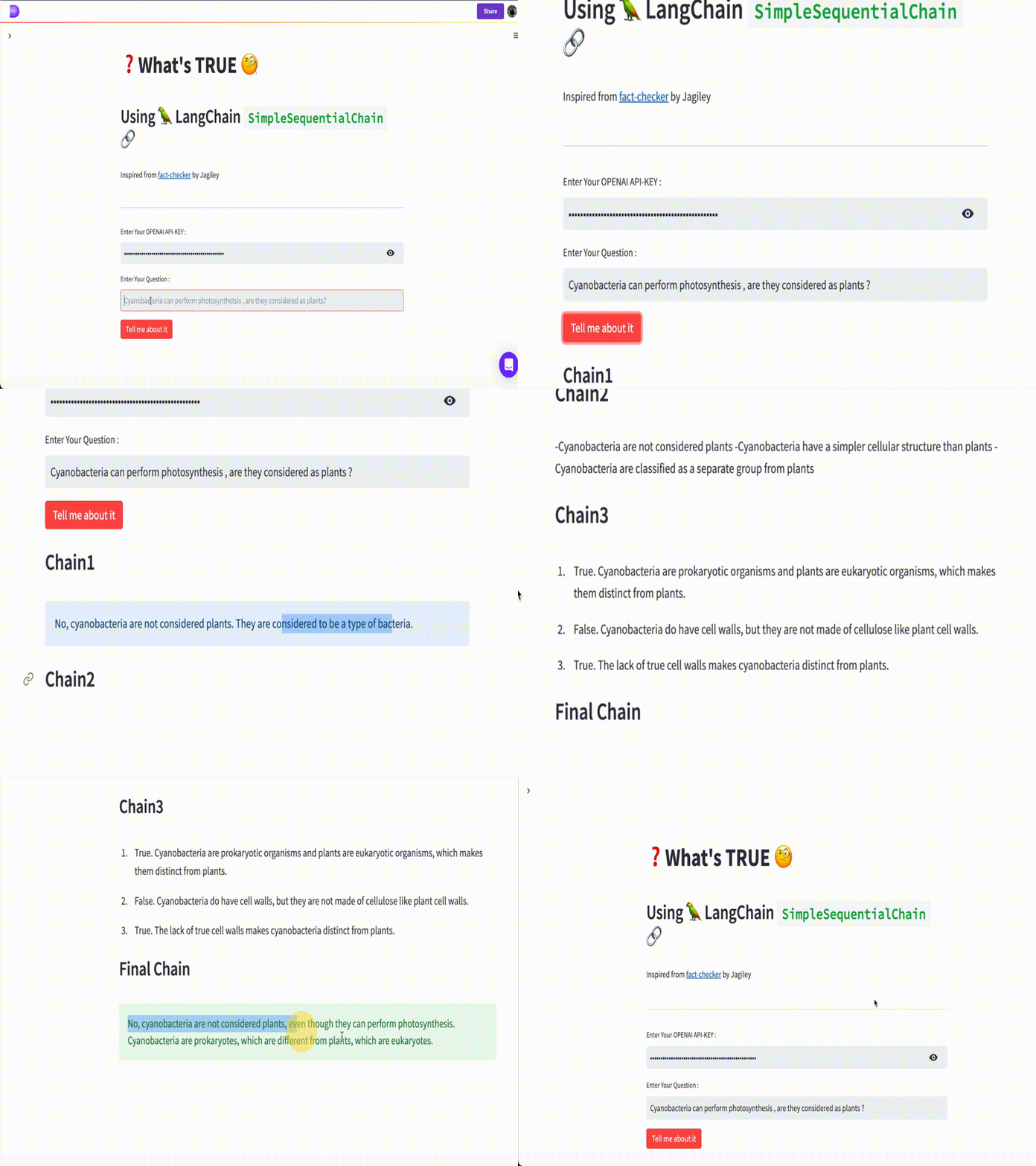
We have successfully used the SimpleSequentialChain module that LangChain provides us and build a very simple yet significant use case to demostrate the abstraction ability of LangChain in form of Chains⛓️ .
You can find the live app here.
👨🏾💻 GitHub ⭐️| 🐦 Twitter | 📹 YouTube | ☕️ BuyMeaCoffee | Ko-fi💜
Hi there ! I’m always on the lookout for sponsorship, affiliate links and writing/coding gigs to keep broadening my online contents. Any support, feedback and suggestions is very much appreciated ! Interested ? Drop an email here : [email protected]
Related Blogs
- Summarizing Scientific Articles with OpenAI ✨ and Streamlit
- Build Your Own Chatbot with openAI GPT-3 and Streamlit
- How to ‘stream’ output in ChatGPT style while using openAI Completion method
- ChatGPT helped me to built this Data Science Web App using Streamlit-Python
- Using Embedchain — A powerful LangChain Python wrapper to build Chat Bots even faster!
Recommended YouTube Playlists
Links , references and credits
- LangChain Docs : https://langchain.readthedocs.io/en/latest/index.html
- LangChain Prompt Template : https://langchain.readthedocs.io/en/latest/modules/prompts/getting_started.html#what-is-a-prompt-template
- LangChain SequentialChain Doc : https://langchain.readthedocs.io/en/latest/modules/chains/getting_started.html#combine-chains-with-the-sequentialchain
- LangChain GitHub Repo : https://github.com/hwchase17/langchain
- Inspiration from the fast-checker repo : https://github.com/jagilley/fact-checker
- Streamlit : https://streamlit.io/
- DataButton : https://www.databutton.io/
- Open AI document


