
Full Flutter Background Trick
Sometimes it’s the android side you have to do the work-around and sometimes its on the iOS side. For background images behind the app bar it’s an android work-around. I am going to show you the android workarounds and the Flutter code to make your app beautiful.
Background
The problem is while Google does an excellent job at giving you an introduction to widgets; it’s not the techniques you really need to have mastered to develop a professional application and in a mature market. That is my self-assigned job in pushing out medium articles and my flutter design and development book series.
And, the name of the game Branding like this maybe:
It’s equal parts; branding, user experience, user interface, code, and DevOps. Great apps work on all those levels.
I am authoring several Flutter Design and Development books and preview the subjects and the chapters by writing medium articles. Some subjects covered are:
DevOps
Tuning A Cheap MS Windows Laptop for Flutter Devepoment https://readmedium.com/tuning-a-cheap-ms-windows-laptop-for-flutter-app-development-572d09cd4d19
Log Driven Learning Flutter https://readmedium.com/log-driven-learning-flutter-d76b49b75a8c
UML Coolness in Flutter https://itnext.io/uml-coolness-in-flutter-6bb14217b5f2
Lint Like A Boss https://itnext.io/lint-like-a-boss-60b85e82c227
McCabe Cycles in Flutter https://readmedium.com/mccabe-cycles-in-flutter-3aa913e19428
Getting Real Code Coverage https://readmedium.com/getting-real-code-coverage-951231afa2bc
Lcov on Windows https://readmedium.com/lcov-on-windows-7c58dda07080
Test Secrets, Test Suites https://itnext.io/test-secrets-test-suites-99f8390b8d4b
How To, Flutter Internal Packages https://itnext.io/how-to-flutter-internal-packages-cad1285fe8c
An Architecture Layout https://readmedium.com/an-architecture-layout-8f414271b2b4
Logging, The Expert Way https://readmedium.com/logging-the-expert-way-5beb5c967e44
Catch Flutter Application Exceptions https://itnext.io/catch-flutter-application-exceptions-cad036d0fd4e
Flutter Perfect SetUp https://readmedium.com/flutter-perfect-setup-c5462b412f78
Animation
Animations Users Love(rive) https://readmedium.com/animations-users-love-75a57a8cad5
Since, my articles appear in multiple publications the best way to keep updated to those posting is to join one of these social platforms and follow me using my profile links:
LinkedIN https://www.linkedin.com/in/fredgrottstartupfluttermobileappdesigner/
Xing https://www.xing.com/profile/Fred_Grott/cv
Discord https://discordapp.com/users/9388/
Gitter(join this forum to get the article links) https://gitter.im/flutter/flutter
Slack https://app.slack.com/client/TGT6YF2J1/CGS4QDJ56/user_profile/UHK8PNRGU
Twitter https://twitter.com/fredgrott
Medium https://fredgrott.medium.com
Reddit FlutterDev Subedit(just join this forum and you will get the notices via reddit) https://www.reddit.com/r/FlutterDev/
As always, the code to both the articles and the books can be found at:
flutter design and arch rosetta at GitHub https://github.com/fredgrott/flutter_design_and_arch_rosetta
And, the plugins I contribute to are
Flutter Platform Widgets https://github.com/stryder-dev/flutter_platform_widgets
Flutter Rive(player) Plugin https://github.com/rive-app/rive-flutter
Thus, if you like the idea of only have to spend 1000–2000 hours working through my tutorials to get to the expert level of Flutter App Design and Development; then you know what to do.
The Native Android Part of Work Around
In the android sub-folder in the app sub-folder open the build.gradle file. In the last dependencies block you will add the line for the core-ktx library:
dependencies {implementation "org.jetbrains.kotlin:kotlin-stdlib-jdk7:$kotlin_version"implementation 'androidx.core:core-ktx:1.5.0-beta01'}
In the same folder, go into the src sub-folder and add these imports:
import android.os.Buildimport android.view.WindowManagerimport androidx.core.view.WindowCompatAnd the inner function of:
override fun onPostResume() {super.onPostResume()// to handle case of the bottom sys navbarif(Build.VERSION.SDK_INT>= Build.VERSION_CODES.O_MR1){window.addFlags(WindowManager.LayoutParams.FLAG_DRAWS_SYSTEM_BAR_BACKGROUNDS)window.addFlags(WindowManager.LayoutParams.FLAG_TRANSLUCENT_NAVIGATION)}
// fixes edge to edge on 30 and beyond onlyif (Build.VERSION.SDK_INT >= Build.VERSION_CODES.Q) {WindowCompat.setDecorFitsSystemWindows(window, false)window.navigationBarColor = 0}
}
The full MainActivity should look like this:
Now, for the Flutter part.
The Flutter Part
Because I use Android-Native to set how to draw the systems bar and navigation I do not have to access the SystemChrome API in Flutter. How did I know to do the Android-Native stuff first rather than the SystemChrome stuff in Flutter? Because the Google-OEM interaction always slows down API maturation into something that fully works when touching stuff like the systemUI; hence me using an Android-Native workaround to drive the flutter workaround.
I still have another group of android workarounds to apply at the scaffold of:
Scaffold(extendBodyBehindAppBar: true,extendBody: true,resizeToAvoidBottomInset: false,)
The aspect of this is using the correct User-Interface widgets. In this case, it’s this:
Stack(children: <Widget>[Center(child: Container(constraints: const BoxConstraints.expand(),decoration: const BoxDecoration(image: DecorationImage(image: AssetImage("images/background.jpg"),fit: BoxFit.cover,),
),
),
),
])
Remember, the Stack widget starts with the bottom item listed first. Now on to the full source.
The Source
While I am listing the full source here, it’s also in this git repo under visual_tricks sub-folder under the background_trick sub-folder. The git repo is:
https://github.com/fredgrott/flutter_design_and_arch_rosetta
The app_globals.dart file:
The theme, material_themes.dart:
The main.dart file:
And the myapp.dart file is:
And the mybackground.dart file:
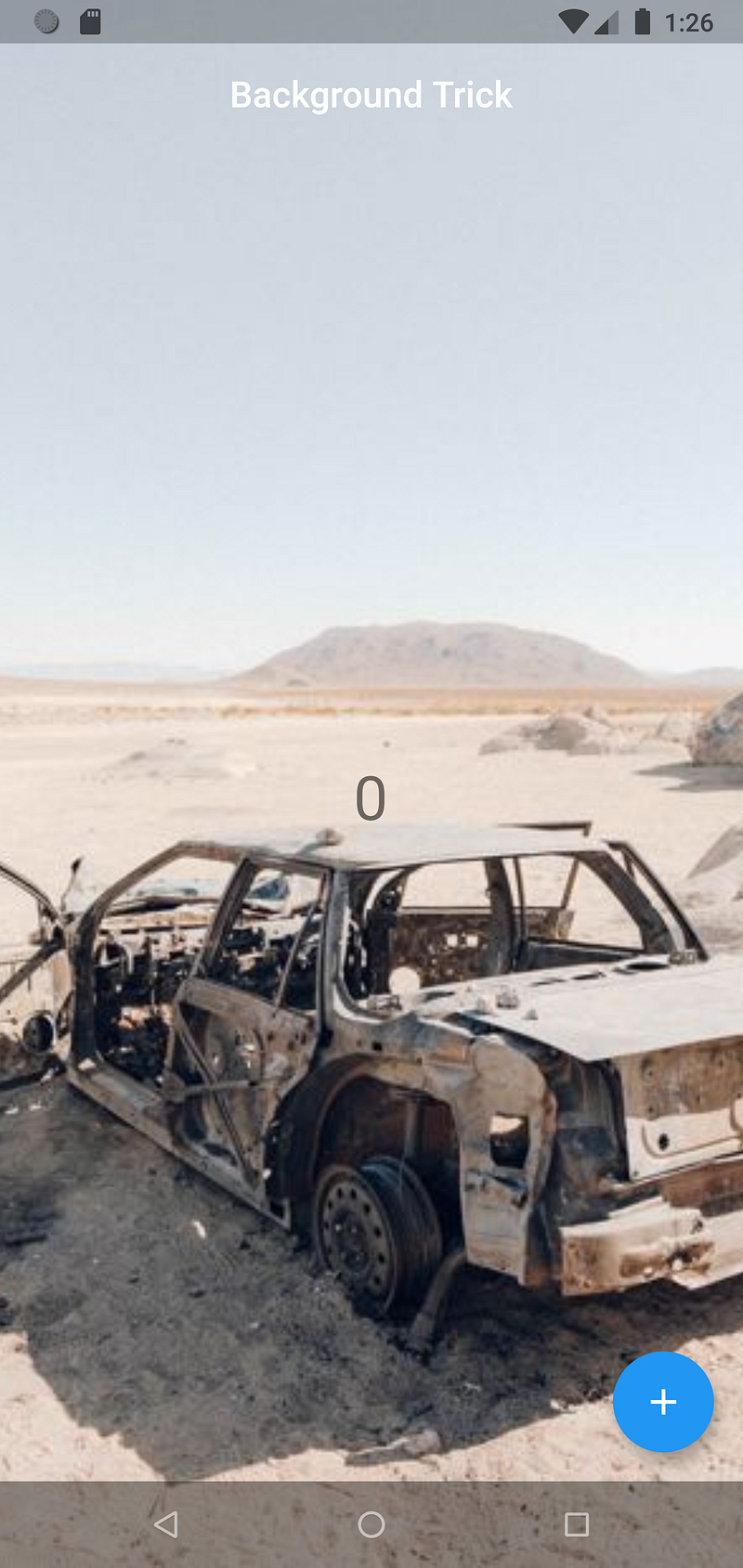
And, all that produces this:
Conclusion
This is not the only way to do a background image in Flutter. In a few articles in the future, I will be showing you how to use the Rive animation player to put a background animation into Flutter applications.
Resources
Resources specific to the article:
flutter design and arch rosetta
General Flutter and Dart resources:
Google Firebase Mobile Device TestLab
Trademark Notice
Google LLC owns the following trademarks; Dart, Flutter, Android, Roboto, Noto. Apple Inc owns the trademarks iOS, MacOSX, Swift, and Objective-C. Apple Inc owns trademarks to their fonts of SF Pro, Sf Compact, SF mono, and New York. JetBeans Inc owns the trademarks to JetBeans, IntelliJ, and Kotlin. Oracle Inc owns the Java trademark. Microsoft Inc owns the trademarks of MS Windows OS and Powershell. Gradle is a trademark of Gradle Inc. The Git Project owns the trademark to Git. Linux Foundation owns the trademark of Linux. Smartphone OEM’s own trademarks to their mobile phone product names. To the best of my ability, I follow the brand and usage guidelines with the above-mentioned trademarks.
About Fred Grott
My keybase profile is at: https://keybase.io/fredgrott


