
Logging, The Expert Way

There is a proliferation of logging plugins and almost the same amount of alleged expert ways to implement logging in Flutter Application projects. This is my expert way to log in Flutter application projects based on the application development process and in-depth knowledge of how dart and flutter work.
NOTE: As always, these sample flutter app demos are collated at my flutterdeepdive GitHub repo:
https://github.com/fredgrott/flutterdeepdive
And at some point by flutter developer book app code will also be collated there as well.
Background
Why do we need to log? It’s not because writing log statements is fun, obviously! Let me give you an image:
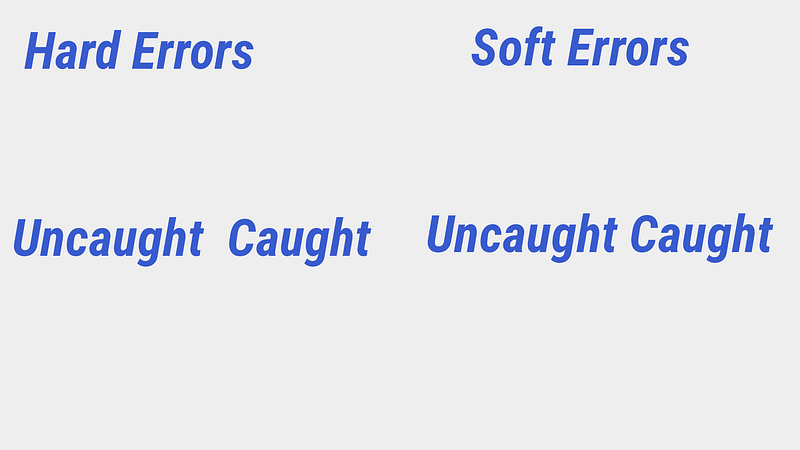
The way we get an error-free program that reliably works is that we move all the uncaught errors in both the hard and soft groups to the caught group. And we accomplish that by implementing a logging infrastructure in our flutter app to make it easy to add log statements as we write and test code.
And since one of the artifacts produced in such a process is a better knowledge of how the dart and flutter APIs work and how the activity we are automating works is the full reason why I emphatically insist on learning both Dart and Flutter you have to start with a-tricked-out-skeleton-app like the ones I’m implementing such as this one:
https://github.com/fredgrott/base_rvierpod
Let me close out the background by stating that most of the logging plugins came out during a time when the logging package did not exist in the Dart and Flutter plugin-and-package ecosystem. They all implemented their own hacky-system that happens to be somewhat not real good in performance.
You should be moving towards fully using all the power of the developer.log and logging-package pairing, and I am showing exactly how to do that very set of steps.
Our Logging Implementation First Steps
First, we need to install these plugins:
-ansicolor
-logging
-logging_appenders
-simple_logger
So, in your pubspec under the dependencies block:
ansicolor: ^1.1.1logging: ^1.0.1logging_appenders: ^1.0.0simple_logger: ^1.8.0+1At first, we will use the ansicolor to create some helper classes to colorize our logs:
And that is just using the plugin API directions from the pub.dev plugin page:
https://pub.dev/packages/ansicolor
Now we need to set up our logging initialize logic to set up the logging package, logging appenders, and the simple logger settings.
Our Logging Initialize Logic
The first part of our logging initialize logic is to re-use a build modes implementation:
Now, I can show you the full logging initialize logic:
We in debug mode use simple_logger to set our level to INFO. Then we use the logging package to set to listen to those streams that have log events. Then we use the logging appenders package to set up a print appender.
In release mode, we make sure to turn off logging by setting the log level to OFF. And, the last part of it is using simple_logger to format how the logger outputs the output for each log level.
Now, I have to explain my logging strategy as that then helps everyone see why I have implemented the specific logger helpers I have implemented.
My Logging Strategy
If we go into this blind, then at certain parts and points we do not get full logging coverage of errors and exceptions. And to complicate things we do not have checked exceptions that would be useful in functional programming. So we need an implementation of logger helpers that is flexible but somewhat puts both classes and functions on equal footing as far as being able to log both informs of logger helpers.
We are going to use some different features of dart; namely abstract classes, dart types, and mixins to implement this set of logger helpers.
Our Logger Helpers Implementation
Let’s start with our types implementation:
The type we are setting up is for the mixins we are going to implement for logging via logger in our classes.
So what is that LoggerSpawner? That bit of magic ensures that we always get a full logger name as the log-tag in any class where we use a logger mixin:
The reason why I use different mixins even though I have a class name as the log-tag is for finer filtering when I review logging feedback in log view.
The lasted listed function is so that I can log in functions beyond the LogException class implement that I will next show you:
LogException is used in my Future try-catch blocks.
And the result of this logger helper infrastructure is that I can get full logger logging coverage even in my functions!
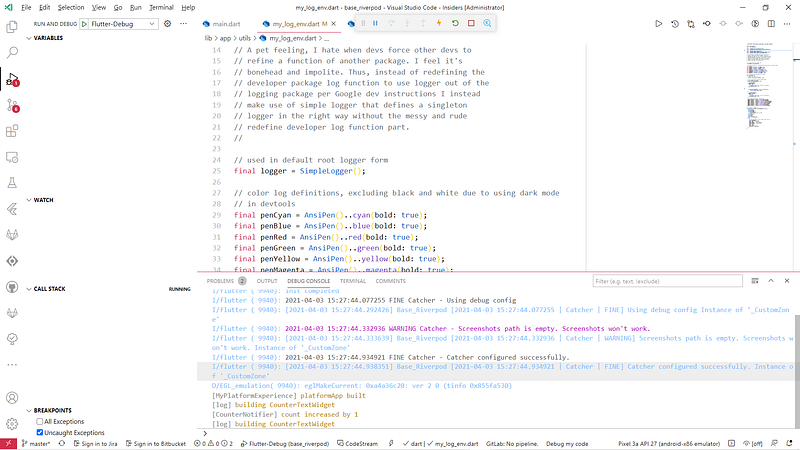
BTW, can you please log your damn state changes! Like this:
Then you have an easy time debugging your business logic! And that bit of code is often called Middleware in reactive architecture discussions.
Conclusion
Not only does this logger helper implementation make it easy to debug log flutter app code it's future proof ready for when desktop app support is in the fully stable version of the Flutter SDK with its underlying use of streams to output log event records via the logging package.
Resources
base_riverpod GitHub repo https://github.com/fredgrott/base_rvierpod
flutterdeepdive GitHub repo https://github.com/fredgrott/flutterdeepdiv
developer.log source at Github repo https://github.com/dart-lang/sdk/blob/master/sdk/lib/developer/developer.dart
logging package at pub.dev https://pub.dev/packages/logging
ansicolor at pub.dev https://pub.dev/packages/ansicolor
logging appenders at pub.dev https://pub.dev/packages/logging_appenders
simple logger at pub.dev https://pub.dev/packages/simple_logger
General Flutter and Dart resources:
Flutter Community Resources https://flutter.dev/community
Flutter SDK https://flutter.dev/docs/get-started/install
Android Studio IDE https://developer.android.com/studio
Visual Studio Code IDE https://code.visualstudio.com/
Flutter Docs https://flutter.dev/docs
Dart Docs https://dart.dev/guides
Google Firebase DeviceLab https://firebase.google.com/docs/test-lab
Trademark Notice
Google LLC owns the following trademarks; Dart, Flutter, Android, Roboto, Noto. Apple Inc owns the trademarks iOS, MacOSX, Swift, and Objective-C. Apple Inc owns trademarks to their fonts of SF Pro, Sf Compact, SF mono, and New York. JetBeans Inc owns the trademarks to JetBeans, IntelliJ, and Kotlin. Oracle Inc owns the Java trademark. Microsoft Inc owns the trademarks to MS Windows OS and Powershell. Gradle is a trademark of Gradle Inc. The Git Project owns the trademark to Git. Linux Foundation owns the trademark to Linux. Smartphone OEM’s own trademarks to their mobile phone product names. To the best of my ability, I follow the brand and usage guidelines with the above-mentioned trademarks.
About Fred Grott
I’m the crazy SOB who as a former android mobile developer is starting to write about flutter mobile app development, design, and life(see Eff COVID and GOP). Will I reach the pivotal One Million Medium monthly viewers mark? Sit back and watch. Find me on social platforms such as Xing, LinkedIN, Keybase, and Twitter.