
Frontend Development Beyond React: Qwik (3/3)
Delving into Svelte, Solid, and Qwik

Introduction
This article is part of a series that I will focus on studying Frontend development outside of React. After discovering Svelte and Solid and their interesting features, we will explore Qwik in this article.
This article provides a summary of the important aspects of Qwik, both theoretically and practically.
As a long-time React developer, I intend to challenge the current state of React with other approaches through this series, especially if they have a better way of looking at things.
I will share with you all the knowledge I have gained from my studies in this article, and I hope it will be helpful and make it easier for you to begin using Qwik.
Here’s the menu I suggest: · Core Concepts Guide ∘ VDOM (Virtual DOM)? ∘ Hydration ∘ Resumability · Ecosystem Guide ∘ Development Kits ∘ Devtools ∘ Supported Styles ∘ Scoped styles ∘ UI libraries ∘ Tools ∘ Documentation · Practical Guide ∘ Project structure ∘ Components, composition and props ∘ Component States ∘ Store ∘ Computed state ∘ Conditional Rendering ∘ Events ∘ Is there a useEffect by chance? ∘ Lists ∘ Http Requests · SAGE (Semantic, Accessible, Green, Easy) ∘ A glance towards the Greeness ∘ Assessing the validity of HTML ∘ Assessing accessibility · Optimization Guide ∘ Handling large data sources ∘ Image lazy loading · Summary · Conclusion
If you’re motivated to follow me, buckle your belts. We’re going to start right away! 🚀
Core Concepts Guide
VDOM (Virtual DOM)?
Qwik uses vDOM only sometimes, and other times it does what SolidJS does (direct DOM update.) — https://qwik.dev/docs/faq/#does-qwik-use-a-vdom-virtual-dom
VDOM will be used by Qwik when the change is structural. In the following example the DOM structure needs to be updated (replace <h1> with <button>) and so VDOM will be used for rendering:
export const StructuralChange = component$(() => {
  const isLoggedIn = useSignal(false);
  return (
    <div>
      {isLoggedIn.value ? <h1>you are logged in!</h1> : <button>Log in</button>}
    </div>
  )
});
If the change in state does not have a structural change then Qwik will most likely not use VDOM.
Hydration
To understand the concepts of Qwik, let me briefly explain the concept of Hydration, which occurs when the application is rendered in SSR/SSG mode (i.e. on the server side).
Server-side rendering and client-side hydration in React go through these key steps:
- Server-Side Rendering involves HTML generation, sending content, and static rendering.
- Client-Side Hydration involves hydration initiation, binding event handlers, and state synchronization.
- Dynamic Interactions involve handling user inputs and interactions, updating component states and properties dynamically to reflect changes in the UI.
Let’s examine this code:
import React from 'react';
import ReactDOM from 'react-dom/client';
import { renderToStaticMarkup } from 'react-dom/server';

// Step 1. Define a simple button component with an inline click event handler
const MyButton = () => <button onClick={() => console.log('Click me!')}>A simple button</button>;

// Step 2. Render the component to static HTML without any JavaScript logic or interactivity
const html = renderToStaticMarkup(<MyButton />);

// Step 3. Insert the generated HTML string into the DOM at the element with ID 'root'
document.querySelector('#root').insertAdjacentHTML('beforeend', html);

// Step 4. Hydrate the root element by binding JavaScript logic and event handlers to the DOM elements
ReactDOM.hydrateRoot(document.querySelector('#root'), <MyButton />);renderToStaticMarkup: A function from react-dom/server that generates a static HTML string from a React component tree, without including any JavaScript logic. Thus, up until step 3, the outcome is HTML code without any action:
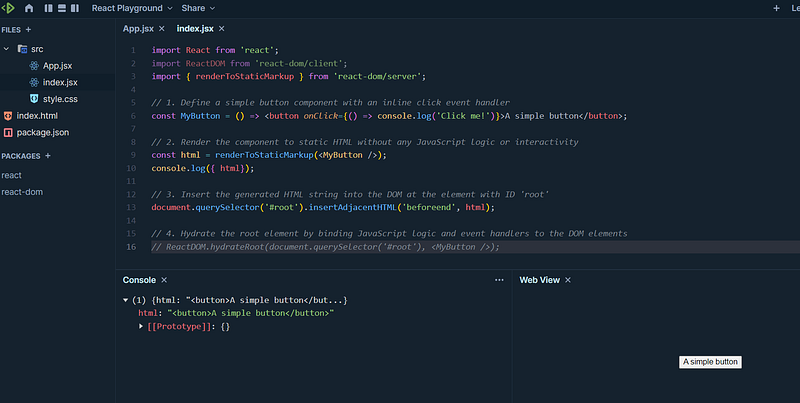
📍 Clicking on the button does not trigger any action.
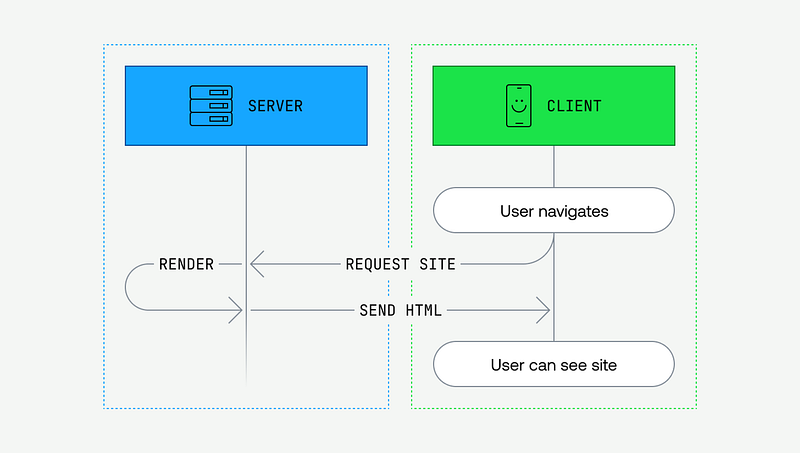
This is what SSR servers usually do to display the html page as quickly as possible. Nevertheless, the behavior is incomplete, it lacks the interactions.
Hydration occurs at this level. Once the static HTML page is rendered on the client side, the Frontend framework (React, Vue, Angular, etc.) connects the page/components to the appropriate events or JavaScript logic.
ReactDOM.hydrateRoot: This function initializes the React application by binding JavaScript logic and event handlers to the existing DOM elements. This makes the MyButton component interactive and dynamic.
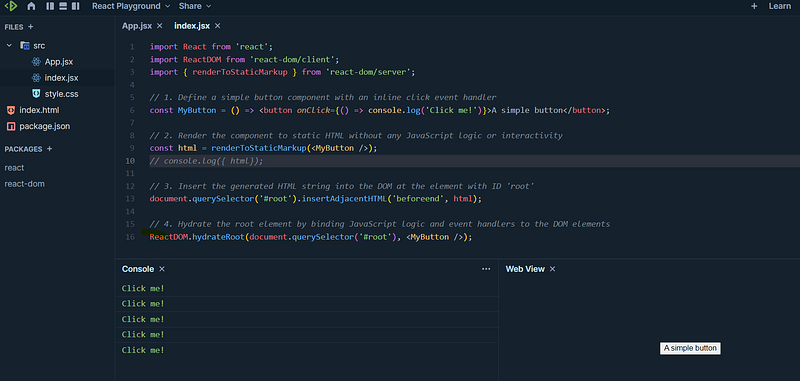
We can see that clicking on the button shows the message to the console.
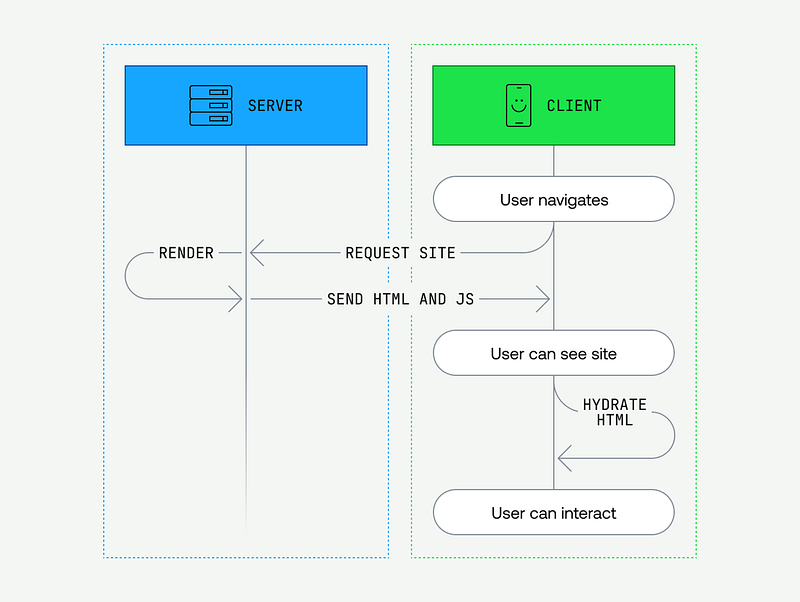
📍 If JavaScript is needed during the SSR phase, it is primarily the JavaScript of the Frontend framework, which generates the HTML content and sets up the structure for the application. The specific JavaScript logic for the application’s functionality is then incorporated during the hydration phase, making the web page interactive and dynamic.
In summary, the process is as follows:
- In an SSR setup, the server generates the initial HTML content of the web page, including all necessary tags and structures to render the UI, but without JavaScript logic for interactivity.
- This content is sent to the browser for a quick initial view, with CSS included to style the page.
- The browser renders this static HTML, displaying the visual elements, but without dynamic behaviors.
- The hydration process then begins, where the SSR framework or a client-side JavaScript framework (like React, Angular, or Vue) connects the HTML to the required JavaScript logic, including event binding and state synchronization.
SSR delivers a fast initial load by rendering HTML on the server, while Hydration ensures that dynamic JavaScript logic and interactivity are applied to the page.
This balance is particularly useful for modern web applications, where both initial load performance and dynamic interactions are essential.
We have now understood the principle of hydration. Let’s see how Qwik will change things. 😉
Resumability
First, as rendering techniques, Qwik uses Server-Side Rendering (SSR) and Static Site Generation (SSG).
Nevertheless, it has taken a different approach to SSR. Instead of using the hydration principle, it uses the Resumability principle. Let’s see what it is!
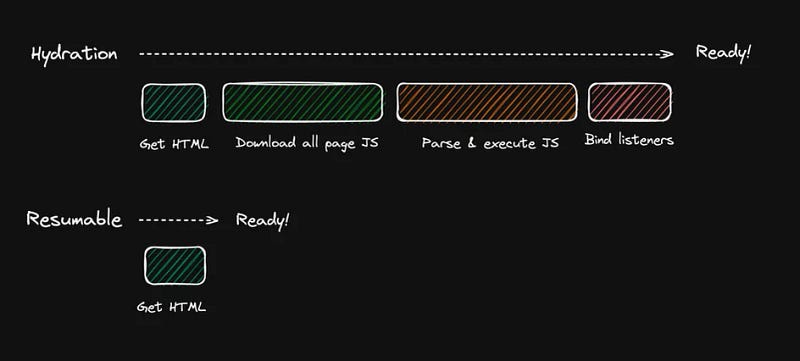
To understand things step by step, we will use Qwik’s playground and create a simple program:
import { component$ } from '@builder.io/qwik';

export default component$(() => {
  return (
    <>
      <h1>First day in Qwik World!</h1>
      <p>
        Lorem ipsum dolor sit amet, consectetur adipiscing elit, sed do eiusmod tempor incididunt ut labore et dolore magna aliqua.
      </p>
      <button onClick$={() => console.log('Hello !')}>Click Me!</button>
    </>
  );
});
This code shows a Qwik component and the display result is:
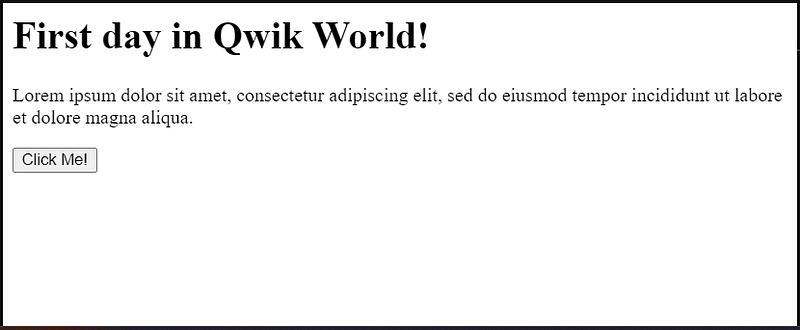
component$() is like a React Higher Order Component or a JavaScript Higher Order Function (functions that operate on other functions).
🚩 Keep in mind that the HTML that is delivered to the browser and displayed in the playground is actually being rendered on the server.
The code given at the top won’t be executed in the client browser. The HTML that will be executed is as follows:
<!doctype html>
<html
  q:container="paused"
  q:version="1.5.2-dev20240418142224"
  q:render="ssr-dev"
  q:base="/repl/hfqw8sqq7s/build/"
  q:manifest-hash="flr6jb"
>
  <!--qv q:key=0t_1-->
  <head q:head>
    <title q:head>Hello Qwik</title>
  </head>
  <body>
    <!--qv q:id=0 q:key=Ncbm:0t_0--><!--qv q:key=4e_0-->
    <h1>First day in Qwik World!</h1>
    <p>
      Lorem ipsum dolor sit amet, consectetur adipiscing elit, sed do eiusmod
      tempor incididunt ut labore et dolore magna aliqua.
    </p>
    <button
      on:click="app_component__fragment_button_onclick_mnnondgjcgg.js#app_component__Fragment_button_onClick_MNNOnDGJCgg"
    >
      Click Me!</button
    ><!--/qv--><!--/qv-->
  </body>
  <!--/qv-->
  <script type="qwik/json">
    {"refs":{},"ctx":{},"objs":[],"subs":[]}
  </script>
  <script id="qwikloader">
    ((e,t)=>{const n="__q_context__",o=window,s=new Set,a="replace",i="forEach",r="target",c="getAttribute",l="isConnected",p="qvisible",f="_qwikjson_",u=t=>e.querySelectorAll(t),b=e=>e&&"function"==typeof e.then,d=(e,t,n=t.type)=>{u("[on"+e+"\\:"+n+"]")[i]((o=>m(o,e,t,n)))},w=t=>{if(void 0===t[f]){let n=(t===e.documentElement?e.body:t).lastElementChild;for(;n;){if("SCRIPT"===n.tagName&&"qwik/json"===n[c]("type")){t[f]=JSON.parse(n.textContent[a](/\\x3C(\/?script)/gi,"<$1"));break}n=n.previousElementSibling}}},y=(e,t)=>new CustomEvent(e,{detail:t}),m=async(t,o,s,i=s.type)=>{const r="on"+o+":"+i;t.hasAttribute("preventdefault:"+i)&&s.preventDefault();const p=t._qc_,f=p&&p.li.filter((e=>e[0]===r));if(f&&f.length>0){for(const e of f){const n=e[1].getFn([t,s],(()=>t[l]))(s,t),o=s.cancelBubble;b(n)&&await n,o&&s.stopPropagation()}return}const u=t[c](r);if(u){const o=t.closest("[q\\:container]"),i=new URL(o[c]("q:base"),e.baseURI);for(const r of u.split("\n")){const c=new URL(r,i),p=c.hash[a](/^#?([^?[|]*).*$/,"$1")||"default",f=performance.now();let u;const d=r.startsWith("#");if(d)u=(o.qFuncs||[])[Number.parseInt(p)];else{const e=import(c.href.split("#")[0]);w(o),u=(await e)[p]}const y=e[n];if(t[l])try{e[n]=[t,s,c],d||q("qsymbol",{symbol:p,element:t,reqTime:f});const o=u(s,t);b(o)&&await o}finally{e[n]=y}}}},q=(t,n)=>{e.dispatchEvent(y(t,n))},v=e=>e[a](/([A-Z])/g,(e=>"-"+e.toLowerCase())),h=async e=>{let t=v(e.type),n=e[r];for(d("-document",e,t);n&&n[c];){const o=m(n,"",e,t);let s=e.cancelBubble;b(o)&&await o,s=s||e.cancelBubble||n.hasAttribute("stoppropagation:"+e.type),n=e.bubbles&&!0!==s?n.parentElement:null}},g=e=>{d("-window",e,v(e.type))},_=()=>{var n;const a=e.readyState;if(!t&&("interactive"==a||"complete"==a)&&(t=1,q("qinit"),(null!=(n=o.requestIdleCallback)?n:o.setTimeout).bind(o)((()=>q("qidle"))),s.has(p))){const e=u("[on\\:"+p+"]"),t=new IntersectionObserver((e=>{for(const n of e)n.isIntersecting&&(t.unobserve(n[r]),m(n[r],"",y(p,n)))}));e[i]((e=>t.observe(e)))}},C=(e,t,n,o=!1)=>e.addEventListener(t,n,{capture:o,passive:!1}),E=t=>{for(const n of t)s.has(n)||(C(e,n,h,!0),C(o,n,g,!0),s.add(n))};if(!(n in e)){e[n]=0;const t=o.qwikevents;Array.isArray(t)&&E(t),o.qwikevents={push:(...e)=>E(e)},C(e,"readystatechange",_),_()}})(document)
  </script>
  <script>
    window.qwikevents.push("click")
  </script>
</html>
There are many magical parts, right? The HTML is overloaded with extra information like q:head and numerous HTML comments, what is this?
Frameworks work with component trees. To that end, frameworks need a complete understanding of the component trees to know which components need to be rerendered and when. If you look into the existing framework SSR/SSG output, the component boundary information has been destroyed. There is no way of knowing where component boundaries are by looking at the resulting HTML. To recreate this information, frameworks re-execute the component templates and memoize the component boundary location. Re-execution is what hydration is. Hydration is expensive as it requires both the download of component templates and their execution. Qwik collects component boundary information as part of the SSR/SSG and then serializes that information into HTML. — https://qwik.dev/docs/concepts/resumable/#application-state
What a smart solution! ✨
The result is that Qwik can: Rebuild the component hierarchy information without the component code actually being present. The component code can remain lazy. Qwik can do this lazily only for the components which need to be re-rendered rather than all upfront. Qwik collects relationship information between stores and components. This creates a subscription model that informs Qwik which components need to be re-rendered as a result of state change. The subscription information also gets serialized into HTML. — https://qwik.dev/docs/concepts/resumable/#application-state
Serializing in Qwik is analogous to making HTTP requests with additional metadata or headers that help the client understand and process the server’s response effectively. This is a brilliant solution to use HTML to convey information about the tree and the state of components!
Another magical trick is the transformation of the code at the onClick$ level of my button. The code for my button was as follows:
<button onClick$={() => console.log('Hello !')}>Click Me!</button>It is then transformed and delivered to the browser as follows:
<button on:click="app_component__fragment_button_onclick_mnnondgjcgg.js#app_component__Fragment_button_onClick_MNNOnDGJCgg">
    Click Me!
</button>
The onClick$ becomes on:click and the JavaScript code is transformed into something like a script link (path).
It seems that Qwik automatically detached (splitted) the JavaScript part and encapsulated it in a script. We can verify this in the playground:
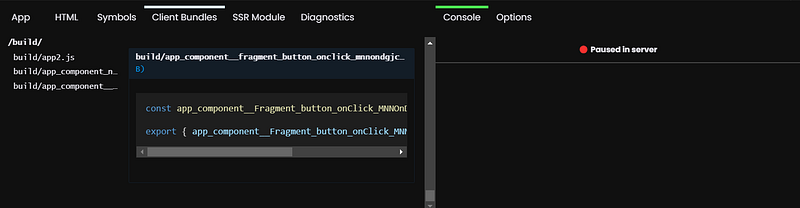
The on:click attribute contains all the information necessary to resume the application without any further action, whoa!
Qwik allows any component to be resumed without the parent component code being present. — https://qwik.dev/docs/concepts/resumable/#application-state
The downloaded bundles include Qwik source code, App source code, and JavaScript code that must be executed upon clicking:
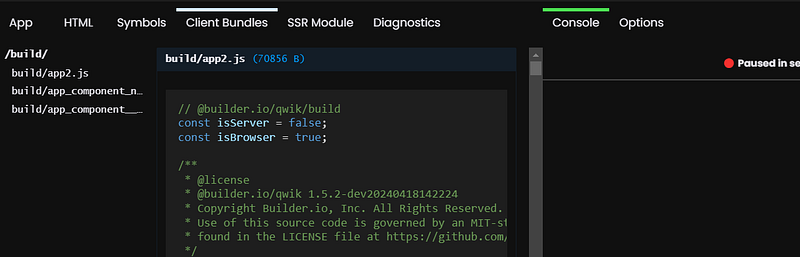
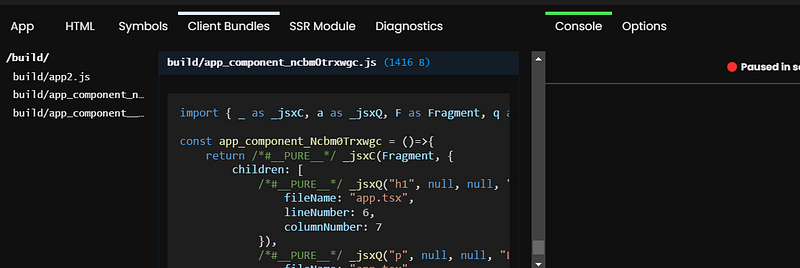
The application code is JSX code like React, which is then transformed into JS to create the component tree (objects).
The onClick$ call is now wrapped in a magic function qrl :
onClick$: qrl(()=>import('./app_component__fragment_button_onclick_mnnondgjcgg.js')It’s similar to the lazy React function, qrl makes a dynamic import of the extracted JavaScript script. We’re starting to grasp the workflow!
The HTML contains a URL to the chunk and symbol name. The attribute tells Qwikloader which code chunk to download and which symbol to retrieve from the chunk and then to be executed. [..] Qwik’s event processing implementation understands asynchronicity which allows it to lazy load closures automatically. — https://qwik.dev/docs/concepts/resumable/
Let us now look at the other magical parts:
<!--/qv-->
<script type="qwik/json">
    { "refs": {}, "ctx": {}, "objs": [], "subs": [] }
</script>
<script id="qwikloader">
   ((e,t)=>{const n="__q_context__",o=window,s=new Set,a="replace",i="forEach",r="target",c="getAttribute",l="isConnected",p="qvisible",f="_qwikjson_",u=t=>e.querySelectorAll(t),b=e=>e&&"function"==typeof e.then,d=(e,t,n=t.type)=>{u("[on"+e+"\\:"+n+"]")[i]((o=>m(o,e,t,n)))},w=t=>{if(void 0===t[f]){let n=(t===e.documentElement?e.body:t).lastElementChild;for(;n;){if("SCRIPT"===n.tagName&&"qwik/json"===n[c]("type")){t[f]=JSON.parse(n.textContent[a](/\\x3C(\/?script)/gi,"<$1"));break}n=n.previousElementSibling}}},y=(e,t)=>new CustomEvent(e,{detail:t}),m=async(t,o,s,i=s.type)=>{const r="on"+o+":"+i;t.hasAttribute("preventdefault:"+i)&&s.preventDefault();const p=t._qc_,f=p&&p.li.filter((e=>e[0]===r));if(f&&f.length>0){for(const e of f){const n=e[1].getFn([t,s],(()=>t[l]))(s,t),o=s.cancelBubble;b(n)&&await n,o&&s.stopPropagation()}return}const u=t[c](r);if(u){const o=t.closest("[q\\:container]"),i=new URL(o[c]("q:base"),e.baseURI);for(const r of u.split("\n")){const c=new URL(r,i),p=c.hash[a](/^#?([^?[|]*).*$/,"$1")||"default",f=performance.now();let u;const d=r.startsWith("#");if(d)u=(o.qFuncs||[])[Number.parseInt(p)];else{const e=import(c.href.split("#")[0]);w(o),u=(await e)[p]}const y=e[n];if(t[l])try{e[n]=[t,s,c],d||q("qsymbol",{symbol:p,element:t,reqTime:f});const o=u(s,t);b(o)&&await o}finally{e[n]=y}}}},q=(t,n)=>{e.dispatchEvent(y(t,n))},v=e=>e[a](/([A-Z])/g,(e=>"-"+e.toLowerCase())),h=async e=>{let t=v(e.type),n=e[r];for(d("-document",e,t);n&&n[c];){const o=m(n,"",e,t);let s=e.cancelBubble;b(o)&&await o,s=s||e.cancelBubble||n.hasAttribute("stoppropagation:"+e.type),n=e.bubbles&&!0!==s?n.parentElement:null}},g=e=>{d("-window",e,v(e.type))},_=()=>{var n;const a=e.readyState;if(!t&&("interactive"==a||"complete"==a)&&(t=1,q("qinit"),(null!=(n=o.requestIdleCallback)?n:o.setTimeout).bind(o)((()=>q("qidle"))),s.has(p))){const e=u("[on\\:"+p+"]"),t=new IntersectionObserver((e=>{for(const n of e)n.isIntersecting&&(t.unobserve(n[r]),m(n[r],"",y(p,n)))}));e[i]((e=>t.observe(e)))}},C=(e,t,n,o=!1)=>e.addEventListener(t,n,{capture:o,passive:!1}),E=t=>{for(const n of t)s.has(n)||(C(e,n,h,!0),C(o,n,g,!0),s.add(n))};if(!(n in e)){e[n]=0;const t=o.qwikevents;Array.isArray(t)&&E(t),o.qwikevents={push:(...e)=>E(e)},C(e,"readystatechange",_),_()}})(document)
</script>
<script>
    window.qwikevents.push("click");
</script>
Qwikloader sets up a single global listener instead of many individual listeners per DOM element. This step can be done with no application code present. — https://qwik.dev/docs/concepts/resumable/
Let’s sum up the important points right now:
- Qwik utilizes serialized data within the HTML response to retain information and facilitate easy identification of the component tree.
- During server-side rendering (SSR), Qwik embeds serialized data directly into the HTML, containing metadata and identifiers for each rendered component.
- This serialized data serves multiple purposes, including retaining application state and aiding in the reconstruction of the component tree on the client side during hydration.
- By parsing this serialized data, the client-side can efficiently identify components and reconstruct the component hierarchy, ensuring that the client-side representation matches the server-rendered structure accurately.
- The metadata can also includes information such as component dependencies, size, priority, and any other relevant details that can inform the lazy loading strategy.
- Qwik enables granular lazy loading by loading only the necessary JavaScript code for each component when it’s required.
- Qwik supports dynamic loading strategies based on various factors such as user interactions, viewport visibility, or network conditions.
I can say that everything I did manually with React and Webpack, such as lazy loading components and routes, dynamic imports, split bundles, and so on, is done automatically by Qwik, that is wonderful!
The game masters behind Qwik’s magic are:
- https://qwik.dev/docs/advanced/qwikloader/
- https://qwik.dev/docs/advanced/optimizer/
- https://qwik.dev/docs/advanced/speculative-module-fetching/
Having an understanding of the inner workings of Qwik, it’s time to practice. But let’s start from the beginning by preparing our tools. 👷
Ecosystem Guide
Development Kits
To develop Qwik, there are two main components:
1️⃣ Qwik: Core framework, stable, primitives, component model.
import { component$ } from '@builder.io/qwik';

export default component$(() => {
  return <section class="section bright">A Joke!</section>;
});
2️⃣ Qwik City: Opinionated file-based router, middle-ware, endpoints, and data fetching and update.
import { component$ } from '@builder.io/qwik';
import { routeLoader$ } from '@builder.io/qwik-city';

export const useDadJoke = routeLoader$(async () => {
  const response = await fetch('https://icanhazdadjoke.com/', {
    headers: { Accept: 'application/json' },
  });
  return (await response.json()) as {
    id: string;
    status: number;
    joke: string;
  };
});

export default component$(() => {
  // Calling our `useDadJoke` hook, will return a reactive signal to the loaded data.
  const dadJokeSignal = useDadJoke();
  return (
    <section class="section bright">
      <p>{dadJokeSignal.value.joke}</p>
    </section>
  );
});
To create a Qwik application we should use the Qwik CLI:
pnpm create qwik@latestLet’s check if there are any tools that can aid in the analysis and debugging of a Qwik application. 🔨
Devtools
This will eventually become Devtools for your browser to better debug application. For now it is a collection of utilities to better understand the state of your application. — https://qwik.dev/docs/labs/devtools/
🔻 At present, there are no Devtools that integrate with the browser.
Supported Styles
Qwik does not enforce a specific styling approach, you can style your Qwik app using any method you prefer, such as CSS, CSS-in-JS, CSS modules… — https://qwik.dev/docs/components/styles/
// src/components/MyComponent/MyComponent.module.css
.container {
  background-color: red;
}

// src/components/MyComponent/MyComponent.tsx
import { component$ } from '@builder.io/qwik';
import styles from './MyComponent.module.css';

export default component$(() => {
  return <div class={styles.container}>Hello world</div>;
});// styles.css.ts
import { styled } from 'styled-vanilla-extract/qwik';
export const BlueBox = styled.div`
display: block;
width: 100%;
height: 500px;
background: blue;
`;
// component.tsx
import { component$ } from '@builder.io/qwik';
import { BlueBox } from './styles.css';
export const Cmp = component$(() => {
return <BlueBox />;
});Scoped styles
Qwik provides a way to associate and scope styles with a component:
import { useStylesScoped$, component$ } from '@builder.io/qwik';

export const List = component$(() => {
  useStylesScoped$(`
    .list {
      display: flex;

      > :global(*nth-child(3)) {
        width: 100%
      }
    }
  `);

  return (
    <div class="list">
      <Slot />
    </div>;
  );
});
The useStylesScoped$ call tells Qwik to associate the styles with the component only (scoping). That’s wonderful!
UI libraries
I found this official Qwik components library: Qwik’s official Headless and styled component library.
My thoughts on this library:
- There are fewer components available.
- No components are in a stable status.
However, this is not a blocker as long as Qwik supports different style modes with scope magic. It is not difficult to develop its own library of components.
Tools
Here is what can be used:
- ESLint-Rules.
- Vite.
- Vitest for unit tests.
- Cypress for end-to-end tests.
- Storybook.
- VSCode Qwik snippets.
- Intellij Qwik plugin.
Great! I found my tools!
Documentation
The documentation of Qwik is very complete and rich. Bravo!
There is also a playground (sandbox) to try or have examples.
A nice documentation for best practices and bundle optimization.
After completing the necessary preparations to initiate the development, let’s take a look at some practical considerations. 🚀
Practical Guide
Project structure
A typical Qwik project looks like this:
qwik-app-demo
├── README.md
├── package.json
├── public
│   └── favicon.svg
├── src
│   ├── components
│   │   └── router-head
│   │       └── router-head.tsx
│   │       Button
│   │       └── button.tsx
│   ├── entry.ssr.tsx
│   ├── global.css
│   ├── root.tsx
│   └── routes
│       ├── flower
│       │   ├── flower.css
│       │   └── index.tsx
│       ├── contact
│       │   └── index.tsx
│       ├── index.tsx
│       ├── layout.tsx
│       └── service-worker.ts
├── tsconfig.json
└── vite.config.tsHere, you will find information about every folder.
The
src/routes/directory is a special directory for Qwik City since it's the directory where Qwik City will look for your pages. Folders and files inside this directory have a special meaning and they will be mapped to the URL of your app. — https://qwik.dev/docs/project-structure/
This is similar to what we have on NextJS: directory-based routing.
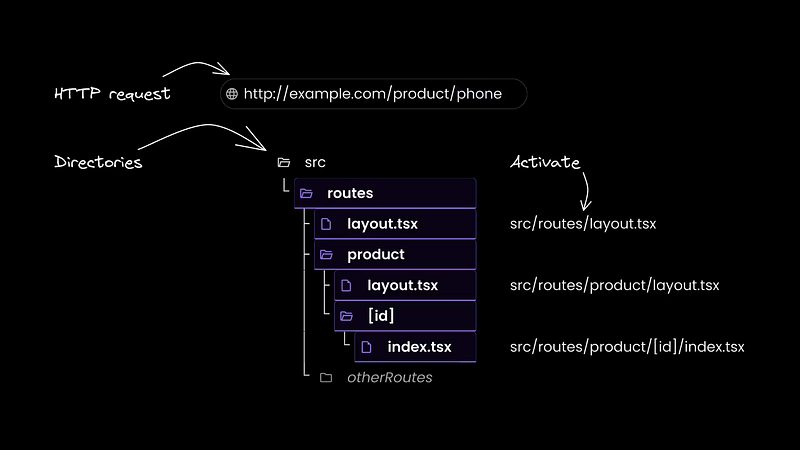
src/
└── routes/
    ├── contact/
    │   └── index.mdx         # https://example.com/contact
    ├── about/
    │   └── index.md          # https://example.com/about
    ├── docs/
    │   └── [id]/
    │       └── index.ts      # https://example.com/docs/1234
    │                         # https://example.com/docs/anything
    ├── [...catchall]/
    │   └── index.tsx         # https://example.com/anything/else/that/didnt/match
    │
    └── layout.tsx            # This layout is used for all pages
Additional information about routing is available here.
Components, composition and props
Component creation, composition, and props are very similar to React:
// Import the component$ function from the Qwik library
import { component$ } from '@builder.io/qwik';

// Define the interface for the props that the Item component accepts
interface ItemProps {
  name?: string;
  quantity?: number;
  description?: string;
  price?: number;
}

// Define the Item component using component$
export const Item = component$<ItemProps>((props) => {
  // Render the Item component with the props passed to it
  return (
    <ul>
      <li>name: {props.name}</li>
      <li>quantity: {props.quantity}</li>
      <li>description: {props.description}</li>
      <li>price: {props.price}</li>
    </ul>
  );
});

// Define the main component using component$
export default component$(() => {
  // Render the main component
  return (
    <>
      <h1>Props</h1>
      {/* Render the Item component with specific props */}
      <Item name="hammer" price={9.99} />
    </>
  );
});
That’s wonderful!
Component States
Qwik’s useSignal() is similar to React’s useState(), except that useSignal() is reactive signal:
// Import the component$ and useSignal functions from the Qwik library
import { component$, useSignal } from '@builder.io/qwik';

// Define the main component using component$
export default component$(() => {
  // Declare a signal called "count" using useSignal and initialize it with a value of 0
  const count = useSignal(0);

  // Render the main component
  return (
    // Render a button element with an onClick event handler that increments the count signal's value
    <button onClick$={() => count.value++}>
      Increment {count.value} {/* Display the current value of the count signal */}
    </button>
  );
});
Another peculiarity is that useSignal() does not return a getter or setter, but an object with a single property .value:
// set
onClick$={() => count.value++}

// get
Increment {count.value}
The reactive signal returned by
useSignal()consists of an object with a single property.value. If you change thevalueproperty of the signal, any component that depends on it will be updated automatically. — https://qwik.dev/docs/components/state/
Store
One can think of a store as a multiple-value signal or an object made of several signals. — https://qwik.dev/docs/components/state/#usestore
This is similar to useReducer in React.
import { component$, useStore } from '@builder.io/qwik';

export default component$(() => {
  const state = useStore({ count: 0, name: 'Qwik' });

  return (
    <>
      <button onClick$={() => state.count++}>Increment</button>
      <p>Count: {state.count}</p>
      <input
        value={state.name}
        onInput$={(_, el) => (state.name = el.value)}
      />
    </>
  );
})
Because
useStore() tracks deep reactivity, that means that Arrays and Objects inside the store will also be reactive. — https://qwik.dev/docs/components/state/#usestore
Computed state
In React, for example, we have cases where we have to calculate and memoize values derived from other states, so we can use useMemo. useComputed$ is almost identical, but the dependencies array is not visible because it is managed explicitly:
import { component$, useComputed$, useSignal } from '@builder.io/qwik';

export default component$(() => {
  const name = useSignal('Qwik');
  const capitalizedName = useComputed$(() => {
    // it will automatically reexecute when name.value changes
    return name.value.toUpperCase();
  });

  return (
    <>
      <input type="text" bind:value={name} />
      <p>Name: {name.value}</p>
      <p>Capitalized name: {capitalizedName.value}</p>
    </>
  );
});
🚩 useComputed$() is synchronous.
Conditional Rendering
Since Qwik uses JSX, conditional rendering is also very similar to React:
import { component$ } from '@builder.io/qwik';

export default component$(() => {
  const show = useSignal(false);
  return (
    <>
      <button onClick$={() => show.value = !show.value}>Toggle</button>
      {show.value ? <h1>Visible</h1> : <h1>Hidden</h1>}
      {show.value && <div>Only show when it's visible</div>}
    </>
  );
});
Events
Because of the async nature of Qwik, an event’s handler execution might be delayed because the implementation has not been loaded into the JavaScript VM yet. Because of the asynchronous nature of event processing in Qwik the following APIs on an
Eventobject will not work:event.preventDefault() event.currentTarget. — https://qwik.dev/docs/components/events/
It is very important to keep this point in mind, as seen before. The button click will invoke a JS script.
import { component$, useSignal } from '@builder.io/qwik';

export default component$(() => {
  const count = useSignal(0);

  return (
    <button onClick$={(event) => count.value++}>
      Increment {count.value}
    </button>
  );
});
We can also write it this way:
import { component$, useSignal, $ } from '@builder.io/qwik';

export default component$(() => {
  const count = useSignal(0);
  const increment = $((event) => count.value++);
  return (
    <>
      <button onClick$={increment}>Increment</button>
      <p>Count: {count.value}</p>
    </>
  );
});
More information can be found here.
Is there a useEffect by chance?
Tasks are similar to
useEffect()in React, but there are enough differences that we did not want to call them the same so as not to bring preexisting expectations about how they work. The main differences are: Tasks are asynchronous, Task run on server and browser and Tasks run before rendering and can block rendering. — https://qwik.dev/docs/components/tasks/
The purpose of tasks is to execute asynchronous operations as part of component initialization or change of component state.
useTask$ without track() behaves like a mount hook (useEffect() without dependencies):
import { component$, useTask$ } from '@builder.io/qwik';

export default component$(() => {

  useTask$(async () => {
    // A task without `track` any state effectively behaves like a `on mount` hook.
    console.log('Runs once when the component mounts in the server OR client.');
  });

  return <div>Hello</div>;
});
The
track()function allows you to set up a dependency on a component state on the server (if initially rendered there) and then re-execute the task when the state changes on the browser (the same task will never be executed twice on the server side). — https://qwik.dev/docs/components/tasks/
import { component$, useSignal, useTask$ } from '@builder.io/qwik';

export default component$(() => {
  const text = useSignal('');
  const debounceText = useSignal('');

  useTask$(({ track, cleanup }) => {
    const value = track(() => text.value);
    const id = setTimeout(() => (debounceText.value = value), 500);
    cleanup(() => clearTimeout(id));
  });

  return (
    <section>
      <label>
        Enter text: <input bind:value={text} />
      </label>
      <p>Debounced text: {debounceText}</p>
    </section>
  );
});
When a new task is triggered, the previous task’s
cleanup()callback is invoked. — https://qwik.dev/docs/components/tasks/
cleanup() is like the return of useEffect :
  useEffect(() => {
    const connection = createConnection(serverUrl, roomId);
    connection.connect();
    return () => {
      connection.disconnect();
    };
  }, [serverUrl, roomId]);
🔻 It can be challenging for a novice to grasp the concept of juggling between servers and clients in Qwik, I admit.
Lists
Since we are in the context of JSX, we can easily do:
     <ul>
        {users.value.map(user => (
          <li key={user.id}>
            <a href={`/users/${user.id}`}>{user.name} ({user.email})</a>
          </li>
        ))}
      </ul>
We’ll see after what Qwik offers to optimize large lists.
Http Requests
Use
useResource$()to create a computed value that is derived asynchronously. It's the asynchronous version ofuseComputed$(), which includes thestateof the resource (loading, resolved, rejected) on top of the value. — https://qwik.dev/docs/components/state/#useresource
import {
  component$,
  Resource,
  useResource$,
  useSignal,
} from '@builder.io/qwik';

export default component$(() => {
  const prNumber = useSignal('3576');

  const prTitle = useResource$<string>(async ({ track }) => {
    // it will run first on mount (server), then re-run whenever prNumber changes (client)
    // this means this code will run on the server and the browser
    track(() => prNumber.value);
    const response = await fetch(
      `https://api.github.com/repos/QwikDev/qwik/pulls/${prNumber.value}`
    );
    const data = await response.json();
    return data.title as string;
  });

  return (
    <>
      <input type="number" bind:value={prNumber} />
      <h1>PR#{prNumber}:</h1>
      <Resource
        value={prTitle}
        onPending={() => <p>Loading...</p>}
        onResolved={(title) => <h2>{title}</h2>}
      />
    </>
  );
});
The
useResource$hook is meant to be used with<Resource />. The<Resource />component is a convenient way to render different UI based on the state of the resource. — https://qwik.dev/docs/components/state/#useresource
      <Resource
        value={prTitle}
        onPending={() => <p>Loading...</p>}
        onResolved={(title) => <h2>{title}</h2>}
      />
More information can be found here and here.
Now that we know how to develop an app with Qwik, let’s try to validate each pillar of our magical approach: SAGE.
SAGE (Semantic, Accessible, Green, Easy)
A glance towards the Greeness
Based on this page and Qwik-based applications, I can state that the performance is excellent.
Let us examine a few benchmarks for the performance of client-side rendering:
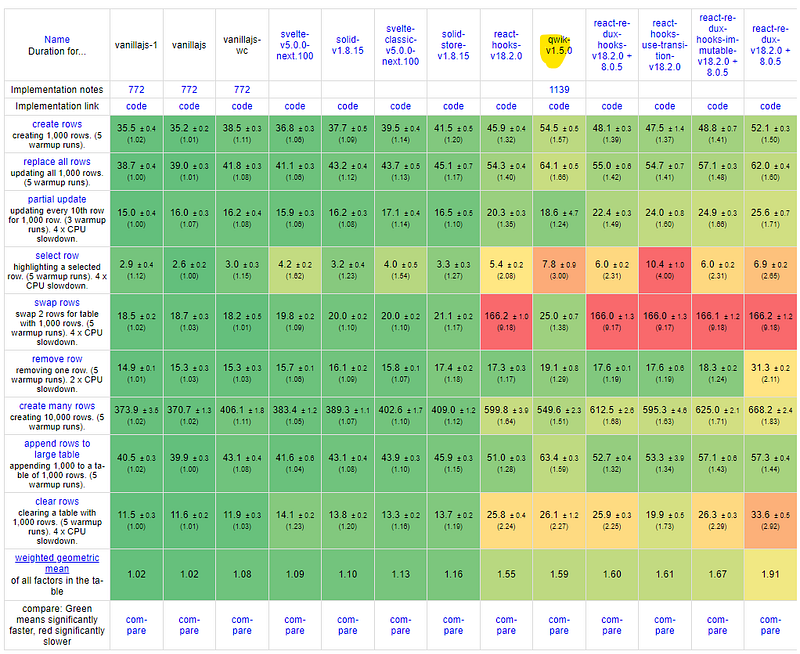
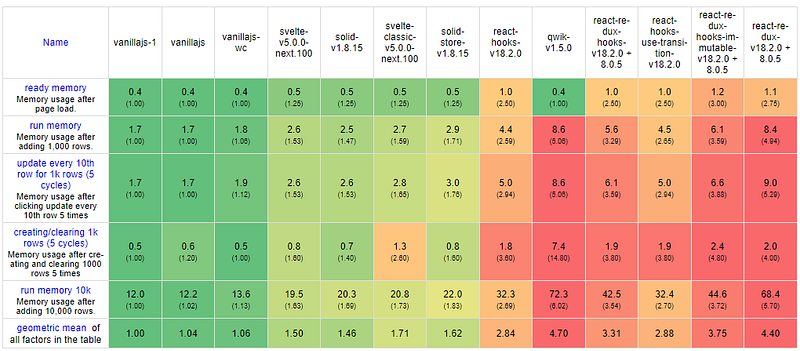
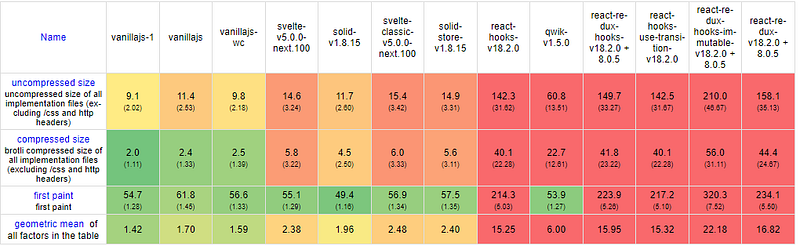
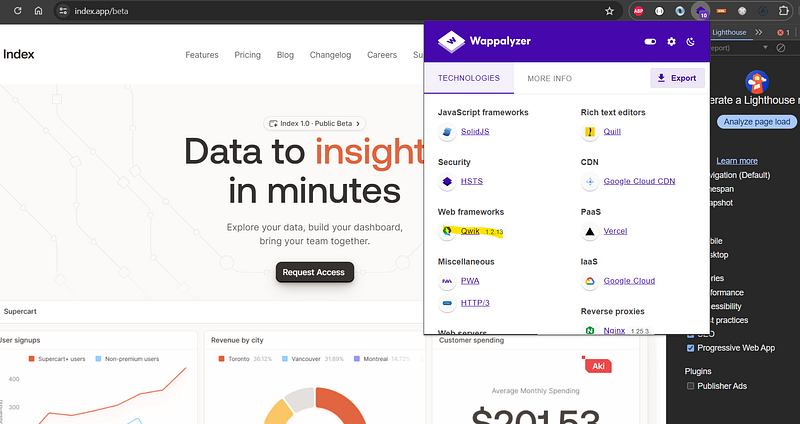
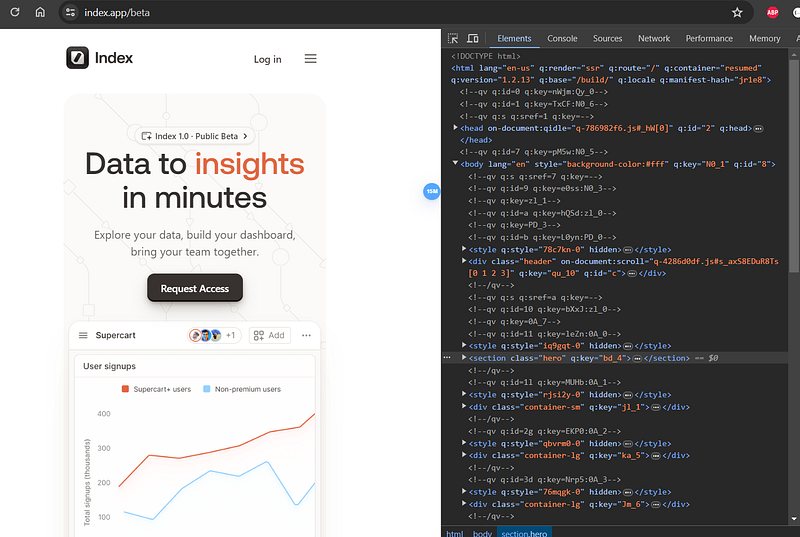
I admit that I am a little confused about the results. I will try to audit a website using Qwik. Let’s review this case, The dashboard seems well-loaded, that’s good!
I will use webpagetest to obtain unbiased results:
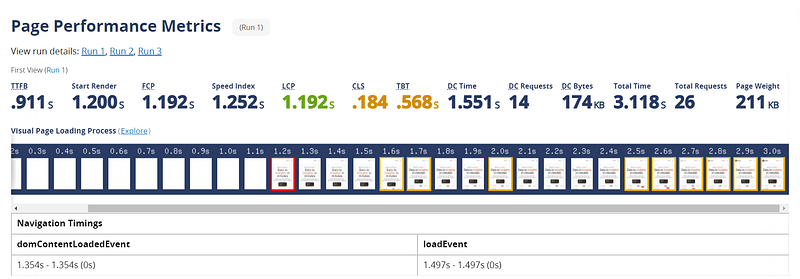
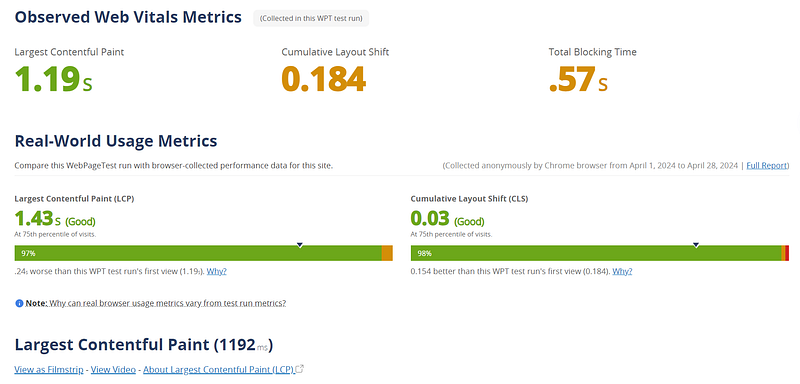
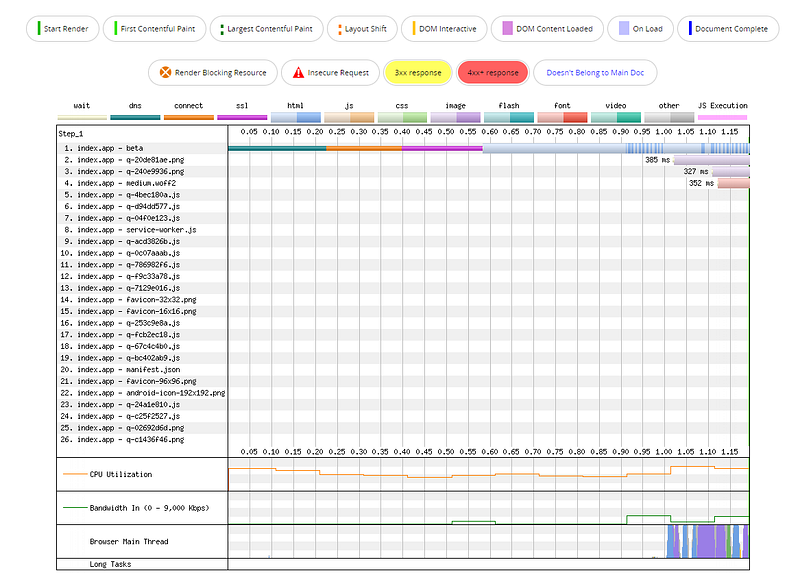
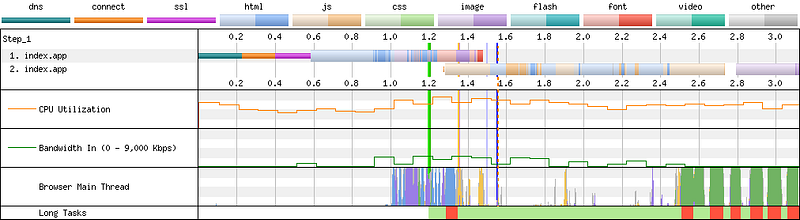




Overall, the status is good, except for the last error in the final HTML size, which reflects that the site relies heavily on JavaScript. This can delay the availability of content for screen readers.
Now that we have a more or less clear understanding of performance, let’s proceed to examine HTML.
Assessing the validity of HTML
Validating the semantics of the generated HTML will involve using my friend NU.
Let’s take a look at this source code:
import { component$ } from '@builder.io/qwik';

export default component$(() => {
  return (
    <main>
      <h1>Qwik</h1>
      <section>
        <h2>Core features</h2>
        <p>
          Lorem ipsum dolor sit amet, consectetur adipiscing elit, sed do eiusmod tempor incididunt ut labore et dolore magna aliqua. Ut enim ad minim veniam, quis nostrud exercitation ullamco laboris nisi ut aliquip ex ea commodo consequat.
        </p>
      </section>
    </main>
  );
});
The HTML generated is the following:
<!doctype html>
<html
  q:container="paused"
  q:version="1.5.2-dev20240418142224"
  q:render="ssr-dev"
  q:base="/repl/1lsst7gz46v/build/"
  q:manifest-hash="vhqpfk"
>
  <!--qv q:key=0t_1--><head q:head>
    <title q:head>Hello Qwik</title>
  </head>
  <body>
    <!--qv q:id=0 q:key=Ncbm:0t_0-->
    <main q:key="4e_0">
      <h1>Qwik</h1>
      <section>
        <h2>Core features</h2>
        <p>
          Lorem ipsum dolor sit amet, consectetur adipiscing elit, sed do
          eiusmod tempor incididunt ut labore et dolore magna aliqua. Ut enim ad
          minim veniam, quis nostrud exercitation ullamco laboris nisi ut
          aliquip ex ea commodo consequat.
        </p>
      </section>
    </main>
    <!--/qv-->
  </body>
  <!--/qv-->
  <script type="qwik/json">
    {"refs":{},"ctx":{},"objs":[],"subs":[]}
  </script>
</html>
Ouch, unfortunately, this code has generated errors and warnings:
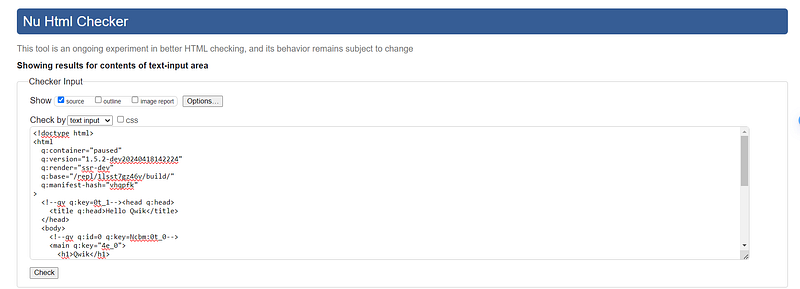
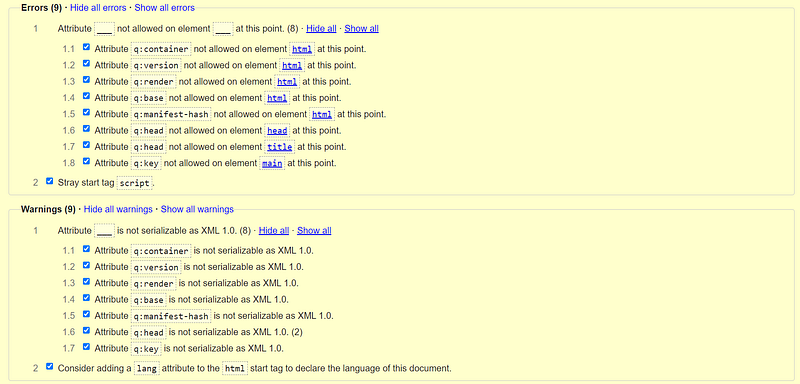
I’m a little sad to have these warnings and errors for such a small code. If you have CI tools like mine that are based on NU to validate HTML semantics, you will be blocked. I created an issue on Qwik’s Github. 😢
Assessing accessibility
Let’s review this case:
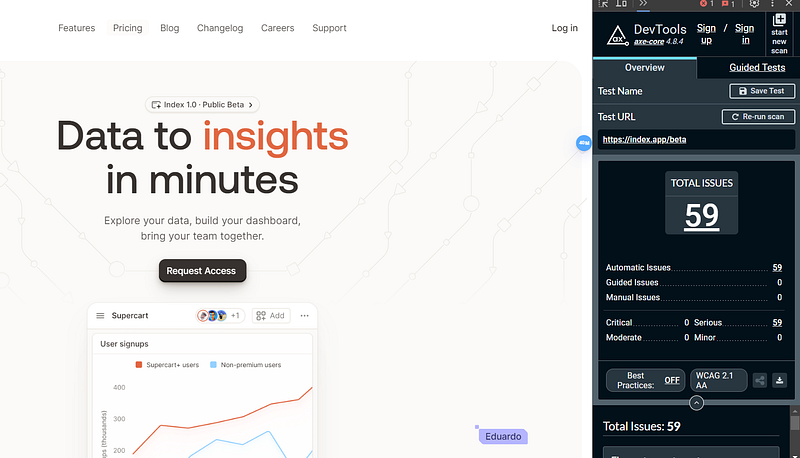
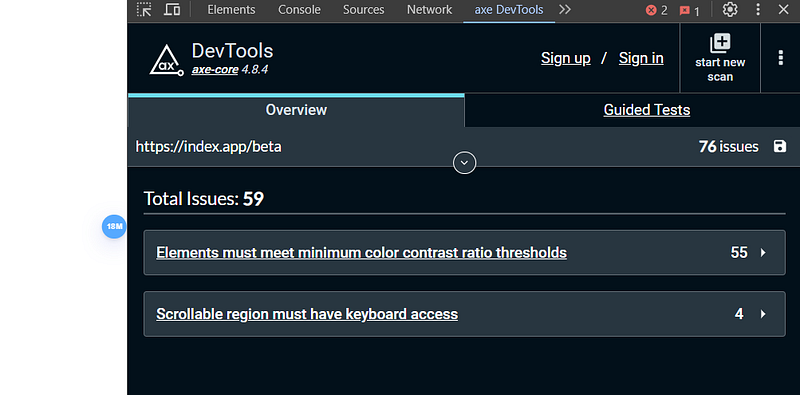
Thankfully, previous semantic problems did not negatively affect the page’s accessibility.
🚩 I am still concerned about the HTML error caused by size and semantic errors. I am unsure about the potential impact on screen readers. I keep this as a point of attention.
Now, let’s see if there are any optimization tips to follow and exploit.
Optimization Guide
Handling large data sources
In this POC, a list of data is shown with virtual scrolling and server pagination: https://github.com/literalpie/qwik-virtual-scroll/tree/main.
ZERO JavaScript is evaluated until the moment you scroll. The first “page” of data is loaded on the server and used to generate the HTML shown when you navigate to the page. The initial state of the virtual scrolling list is also calculated on the server. When you do start scrolling, the appropriate JavaScript is loaded in the browser (this happens quickly because it was most likely cached by the service worker in a background thread before you started scrolling). — https://github.com/literalpie/qwik-virtual-scroll/tree/main
Image lazy loading
There is also a magic offered by Qwik on this subject and thanks to vite-imagetools:
import { component$ } from '@builder.io/qwik';
import Image from '~/media/your_image.png?jsx';

export default component$(() => {
  return (
    <div>
      <Image />
    </div>
  );
});
The <Image /> component will be transformed to:
<img

  decoding="async"
  loading="lazy"
  srcset="
    /@imagetools/141464b77ebd76570693f2e1a6b0364f4b4feea7 200w,
    /@imagetools/e70ec011d10add2ba28f9c6973b7dc0f11894307 400w,
    /@imagetools/1f0dd65f511ffd34415a391bf350e7934ce496a1 600w,
    /@imagetools/493154354e7e89c3f639c751e934d1be4fc05827 800w,
    /@imagetools/324867f8f1af03474a17a9d19035e28a4c241aa1 1200w"
  width="1200"
  height="1200"
>
You can find more information here.
For information, several things we do before manually with React and webpack, Qwik and Vite do it automatically:
We are getting close to the end of our study. This trip was amazing! It’s time to sum up everything!
Summary
✳️ What I found appealing about Qwik’s features is:
- Efficient Resumability.
- Effective Server-Side Rendering (SSR).
- Optimized Lazy Loading.
- Built-in Serialization.
- Familiar JSX Syntax.
- Comprehensive DevKit.
- Scoped Styles for CSS Encapsulation.
- Integrated Tools for Development.
- Flexible Configuration Options.
- Reactive State Management.
- Efficient Event Handling.
- Asynchronous Rendering and Data Fetching.
- Performance Optimization.
✴️ The points that are a little bothering me are:
- The size of the HTML.
- Parts of HTML semantics that do not conform.
- Relying heavily on JavaScript can cause delays in getting full HTML rendering, which can cause accessibility difficulties with screen readers.
- Relatively new and less mature compared to established frameworks.
- Learning curve.
At this juncture, it’s time to provide you with my final choice as an alternative and complement to React.
Conclusion
After conducting extensive research to explore alternatives and complements to React, I have concluded that Svelte is the optimal choice. Svelte excels in all aspects that are critical to me, including performance, simplicity, adherence to best practices, maturity, ecosystem richness, and community support.
Qwik presents itself as a promising alternative as well. However, due to some encountered semantic issues, I find myself unable to fully commit to it at the moment. Nevertheless, I’m keen on monitoring its progress closely, as it continues to evolve.
Despite being impressed by SolidJS’s intelligent and efficient approach to rendering, its low adoption rate in production hinders me from selecting it at this time. Despite this, I am keeping up with its progress and development as it continues to evolve.
I trust my input has aided in your exploration of these frameworks, particularly from the standpoint of someone well-versed in React development.
Ultimately, I’d like to extend my gratitude to all the creators, communities, and individuals tirelessly contributing to the advancement of the web, particularly in the realm of Frontend development. It’s through their collective efforts that we continue to witness the evolution of this remarkable platform. 😘 🌺
Until we meet again in a new article and a fresh adventure! ❤️
Thank you for reading my article.
Want to Connect?
You can find me at GitHub: https://github.com/helabenkhalfallah


