
Frontend Development Beyond React: Solid (2/3)
Delving into Svelte, Solid, and Qwik

Introduction
This article is part of a series that I will focus on studying Frontend development outside of React. After discovering Svelte and its interesting features, we will explore Solid in this article.
This article provides a reference that summarizes the important aspects of Solid, both in theory and practice.
Similarly, as a React developer for a long time, through this series, I will try to challenge what is currently in React with other approaches: if they see things differently and especially more effectively.
This article will provide you with all the knowledge I gained from my studies, and I hope that it will be beneficial and make it easier for you to start using Solid.
Here’s the menu I suggest: · Core Concepts Guide ∘ JSX for UI ∘ Reactive System ∘ Immutability ∘ Life cycle ∘ Scoped CSS ∘ A stopover to evaluate performance and adoption · Ecosystem Guide ∘ Development Kits ∘ Devtools ∘ UI libraries ∘ Application testing ∘ Documentation · Advanced Guide ∘ Fetching Data ∘ Conditional Rendering ∘ Lists ∘ Navigation ∘ Redering techniques · Optimization Guide ∘ Handling large data sources ∘ Component lazy loading ∘ Image lazy loading · Summary · Conclusion
If you’re motivated to follow me, buckle your belts. We’re going to start right away! 🚀
Core Concepts Guide
SolidJS is built on JSX, reactivity, fine-grained reactivity, and immutability, providing a powerful foundation for creating efficient web applications. Let’s dive deeper into each of these core aspects!
JSX for UI
In both SolidJS and React, JSX is utilized to declaratively describe the structure and appearance of user interfaces:
// SolidJS
import { createSignal } from 'solid-js';

function Counter() {
  const [count, setCount] = createSignal(0);

  const increment = () => {
    setCount(count() + 1);
  };

  return (
    <div>
      <h1>Count: {count()}</h1>
      <button onClick={increment}>Increment</button>
    </div>
  );
}

// React
import React, { useState } from 'react';

function Counter() {
  const [count, setCount] = useState(0);

  const increment = () => {
    setCount(count + 1);
  };

  return (
    <div>
      <h1>Count: {count}</h1>
      <button onClick={increment}>Increment</button>
    </div>
  );
}
Just like in React, JSX in SolidJS enables component composition, dynamic content rendering, event handling, and seamless integration with JavaScript expressions and logic:
import { createSignal, createEffect } from "solid-js";
import { render } from "solid-js/web";

// Child component with JavaScript logic
function ChildComponent(props) {
  const [isEven, setIsEven] = createSignal(false);

  // Effect to determine if count is even or odd
  createEffect(() => {
    setIsEven(props.count() % 2 === 0);
  });

  return (
    <p>
      <span>Count: {props.count()}</span>
      <span>{isEven() ? " (Even)" : " (Odd)"}</span>{" "}
      {/* Display whether count is even or odd */}
    </p>
  );
}

// Parent component managing state and passing it to ChildComponent
function ParentComponent() {
  const [count, setCount] = createSignal(0); // Signal to hold count state

  const increment = () => {
    setCount(count() + 1); // Increment count when button is clicked
  };

  return (
    <div>
      <h1>Parent Component</h1>
      <button onClick={increment}>Increment Count</button>{" "}
      {/* Button to increment count */}
      <ChildComponent count={count} />{" "}
      {/* Render ChildComponent and pass count state */}
    </div>
  );
}

render(() => <ParentComponent />, document.getElementById("app")!);
SolidJS and React both use JSX as a way to bridge the gap between JavaScript and HTML, providing a more expressive and intuitive syntax for building UI components.
Reactive System
Solid’s design is based on reactivity, which ensures that applications are synchronized with their underlying data. Updates are constrained to the modified portions, avoiding the need to refresh the entire component:
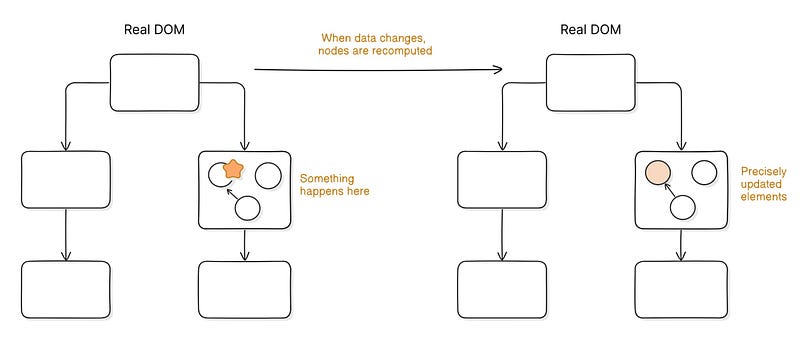
This is called Fine-grained reactivity. Fine-grained reactivity refers to the ability to update only the specific parts of a component that have changed, rather than re-rendering the entire component. This approach enhances performance and efficiency by minimizing unnecessary updates.
Signals and Subscribers are the core components of Solid’s reactive systems:
- Signals are based on the Observer design pattern.
- Each signal comes with a set of subscribers.
- When a signal is accessed, such as in a custom function, this function is added to the signal’s subscriber list.
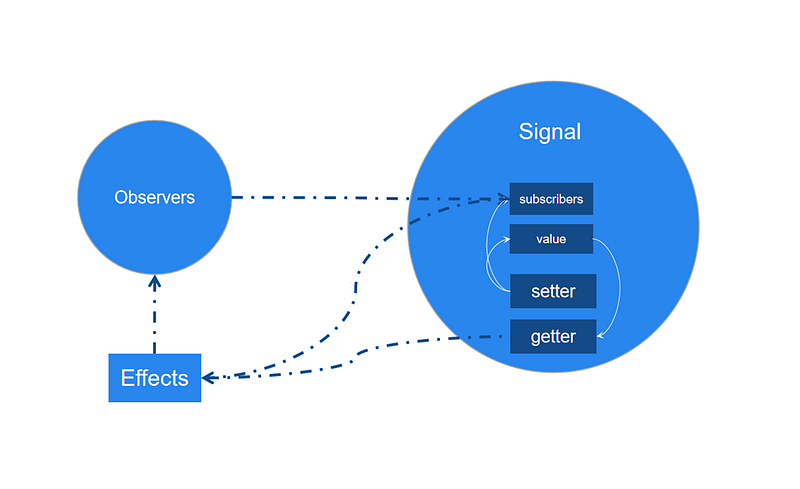
✳️ How does SolidJS ensure fine-grained reactivity? Here is the complete process in detail!
Solid actually has 2 graphs sitting on top of each other. The dependency graph and the structural graph. — https://github.com/solidjs/solid/issues/153
1️⃣ SolidJS maintains an internal dependency graph that maps signals to the components or elements within the view that depend on them.
// when the value of the signal value changes,
// SolidJS knows that it needs to re-render MyComponent,
// which in turn updates the <div> element with the new value.
Signal (value) --> MyComponent --> <div>
Signals are event emitters that hold a list of subscriptions. They notify their subscribers whenever their value changes. Where things get more interesting is how these subscriptions happen. Solid uses automatic dependency tracking. Updates happen automatically as the data changes. The trick is a global stack at runtime. — https://www.solidjs.com/guides/reactivity
2️⃣ When a signal changes, SolidJS refers to the dependency graph to efficiently identify and update only the affected parts of the view.
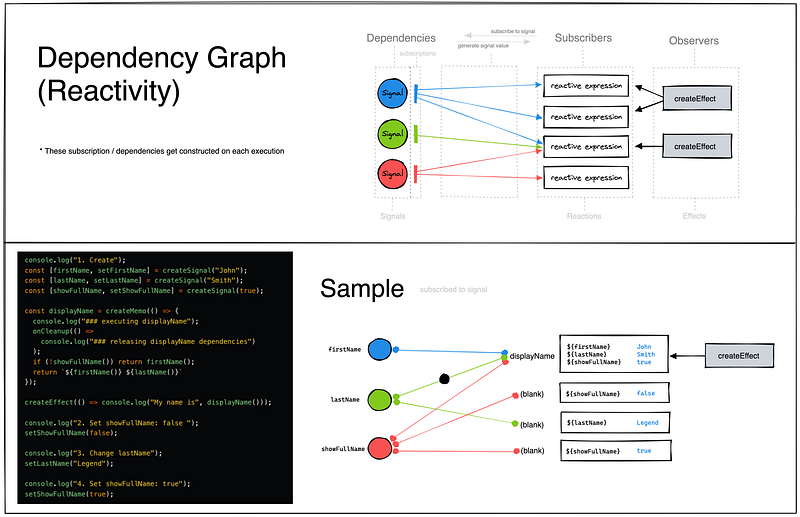
3️⃣ SolidJS constructs its dependency graph at runtime. During the execution of a SolidJS application, when signals are created and dependencies between signals and components are established, SolidJS dynamically updates its internal dependency graph to reflect these relationships.
Constructing the graph nodes as you create the DOM nodes once upon initialization and then just updating what changes turns out to be incredibly fast across the board. — https://ryansolid.medium.com/designing-solidjs-dualities-69ee4c08aa03
Below is a simplified internal implementation of the interaction between the “signal” and the “dependency graph”:
4️⃣ The structural graph represents the hierarchical structure of the UI components. SolidJS leverages the structural graph to optimize rendering and updates.
5️⃣ When a component updates, SolidJS traverses the structural graph to determine the optimal order in which to update components and render the DOM.
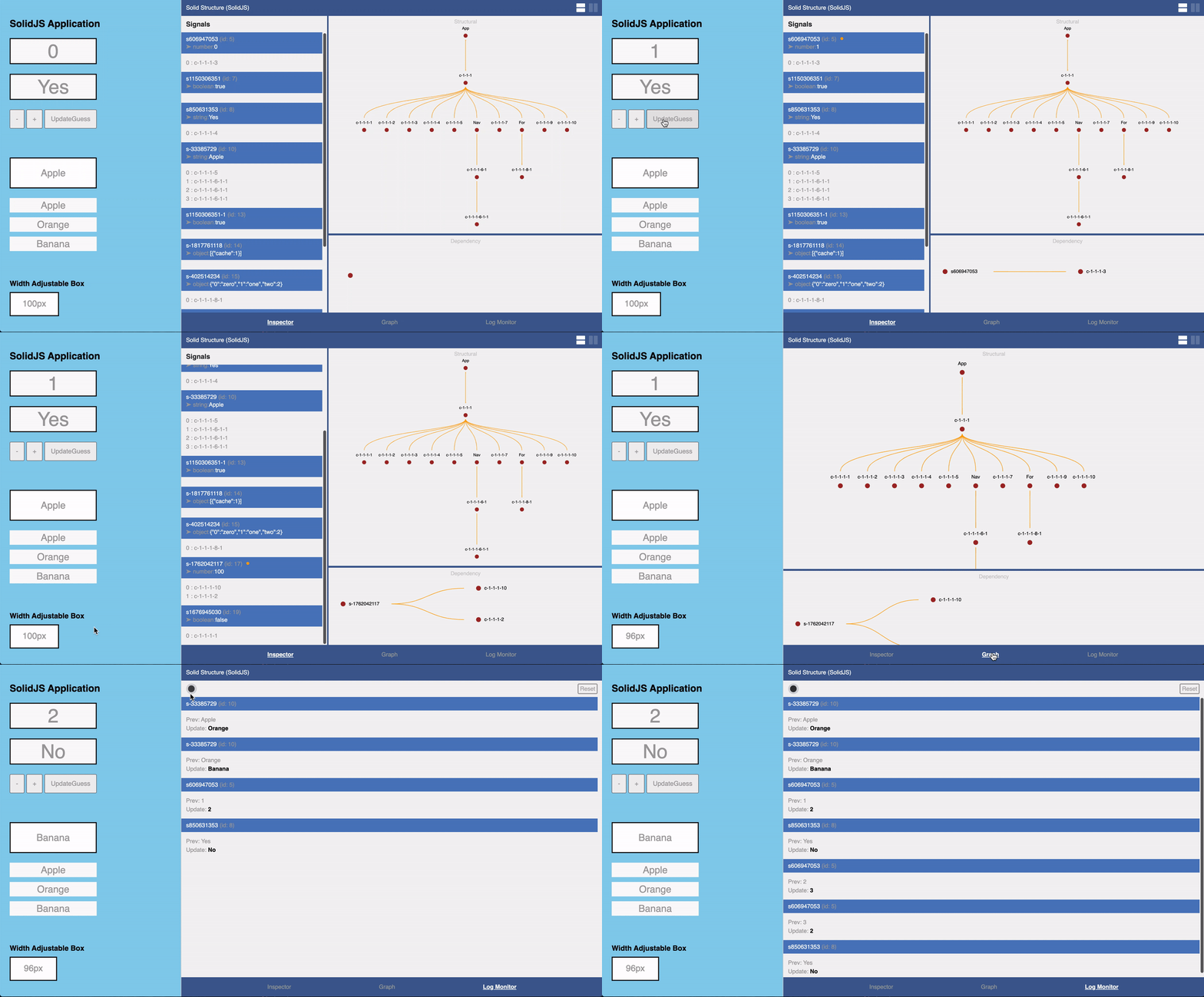
💡 The combination of the dependency graph and the structural graph allows SolidJS to efficiently manage reactivity and rendering.
✳️ There is another case of reactivity: Store. A store is a special type of signal that holds reactive state. While signals manage a single piece of state, stores create a centralized location to reduce code redundancy (the same purpose as using useReducer in React).
Stores are Solid’s answer to nested reactivity. They are proxy objects whose properties can be tracked and can contain other objects which automatically become wrapped in proxies themselves, and so on. — https://www.solidjs.com/tutorial/stores_createstore
JavaScript Proxies offer a versatile toolset for implementing reactive systems, enabling the interception of data access and facilitating seamless updates in response to data changes.
Using JavaScript’s proxy mechanism, reactivity extends beyond just the top-level objects or arrays. With stores, you can now target nested properties and elements within these structures to create a dynamic tree of reactive data. — https://docs.solidjs.com/concepts/stores
☑ Here’s an illustration:
- Proxy for the state (
stateProxy): a proxy is established for the state object via theProxyconstructor, enabling interception of object operations like property access and assignment. gettrap: intercepts attempts to read properties ofstateProxy. When a property is accessed, a logged message indicates the property being accessed, and its value is returned.settrap: intercepts attempts to set properties ofstateProxy. Upon setting a property, a logged message indicates the property and its new value before updating the property’s value.
To correctly update the state while still maintaining the proxy behavior (i.e., triggering the set trap), we need to update the properties of the existing stateProxy object one by one. This way, each property assignment will go through the proxy, allowing the set trap to intercept and handle the update (thereby "stateProxy = newState" is incorrect).
☑ We can modify the code to allow attaching and triggering callbacks whenever the state changes:
In this updated code:
- We’ve added an array called
subscribersto hold callback functions. - In the
settrap of the proxy, after updating the state, we trigger all the callbacks (subscribers) with the updated state. - We’ve added a
subscribefunction to allow attaching callback functions to be called whenever the state changes. - We’ve subscribed to state changes using the
subscribefunction and provided a callback function that logs the updated state to the console.
Now, whenever the state changes, all subscribed callback functions will be triggered with the updated state.
☑ To make a React functional component subscribe to state changes in the reactive store, here’s how we can adjust the code:
- The
Countercomponent renders the count from the store's state. - It uses the
useStatehook to manage local state for the component. - The
useEffecthook is used to subscribe to state changes and update the local state accordingly when the component mounts. - Another
useEffecthook increments the count in the store's state every 5 seconds usingsetInterval.
☑ In SolidJS, this code can be replaced by:
import { onCleanup } from "solid-js";
import { createStore } from "solid-js/store";
import { render } from "solid-js/web";

// Create a store with initial state
const [store, setStore] = createStore({ count: 0 });

// Define the Counter component
function Counter() {
  // Set up an interval timer to increment the count every 5 seconds
  const timer = setInterval(() => {
    setStore((prev) => ({ ...prev, count: prev.count + 1 }));
  }, 5000);

  // Clean up the interval timer when the component unmounts
  onCleanup(() => {
    clearInterval(timer);
  });

  // Render the count from the store
  return <span>Count: {store.count}</span>;
}

// Render the Counter component to the DOM
render(() => <Counter />, document.getElementById("app")!);- We create a store using
createStorewith an initial state{ count: 0 }. - The
Countercomponent sets up an interval timer to increment the count in the store every 5 seconds.
☑ SolidJS’ source codes can be found here:
Babel Plugin JSX DOM Expressions: This package is a JSX compiler built for DOM Expressions to provide a general JSX to DOM transformation for reactive libraries that do fine grained change detection. This package aims to convert JSX statements to native DOM statements and wrap JSX expressions with functions that can be implemented with the library of your choice. Sort of like a JSX to Hyperscript for fine change detection. — https://github.com/ryansolid/dom-expressions/tree/main/packages/babel-plugin-jsx-dom-expressions
DOM Expressions: DOM Expressions is a Rendering Runtime for reactive libraries that do fine grained change detection. These libraries rely on concepts like Observables and Signals rather than Lifecycle functions and the Virtual DOM. Standard JSX transformers are not helpful to these libraries as they need to evaluate their expressions in isolation to avoid re-rendering unnecessary parts of the DOM. — https://github.com/ryansolid/dom-expressions/tree/main/packages/dom-expressions
💡 In summary, SolidJS prioritizes reactivity and directly manipulates the DOM for efficient updates, unlike React’s virtual DOM. This approach ensures fine-grained reactivity without performance drawbacks and emphasizes functional programming, offering tools like signals and memoization for state management and rendering optimization.
Immutability
Immutable data structures are ones where the contents cannot be modified after creation. This approach promotes predictability and helps prevent unintended side effects in applications.
SolidJS encourages immutability in several ways:
- Reactive state management ensures immutable updates through signals and setters, creating new data structures instead of mutating existing ones.
- It advocates functional programming, emphasizing operations on immutable data and returning new data instead of modifying existing data directly.
- SolidJS provides utilities like
createSignalandcreateStore for managing state immutably and triggering reactivity. - Additionally, it offers the
produce function, akin to Immer, facilitating convenient and expressive immutable updates to state.
SolidJS’s immutability principles make it easier to build predictable, maintainable, and scalable applications.
Life cycle
Here are the main lifecycle methods available in SolidJS:
1️⃣ onMount: This method is called when a component is mounted to the DOM for the first time.
import { render } from "solid-js/web";
import { onMount } from "solid-js";

const MyComponent = () => {
  onMount(() => {
    console.log("Component mounted");
  });

  return <span>Hello, World!</span>;
};

render(() => <MyComponent />, document.getElementById("app")!);
2️⃣ onCleanup: This method is called when a component is unmounted from the DOM. It’s useful for performing cleanup tasks, such as removing event listeners or subscriptions.
import { createSignal, onCleanup, onMount } from "solid-js";
import { render } from "solid-js/web";

export const App = () => {
  // Create a signal to store the window dimensions
  const [rect, setRect] = createSignal({
    height: window.innerHeight, // Initialize height with current window height
    width: window.innerWidth,   // Initialize width with current window width
  });

  // Event handler to update dimensions when window is resized
  const handler = (event: Event) => {
    setRect({  // Update signal with new dimensions
      height: window.innerHeight,  // Update height with new window height
      width: window.innerWidth,    // Update width with new window width
    });
  };

  // Add resize event listener when component mounts
  onMount(() => {
    window.addEventListener("resize", handler); // Listen for window resize events
  });

  // Remove resize event listener when component unmounts
  onCleanup(() => {
    window.removeEventListener("resize", handler); // Remove event listener to avoid memory leaks
  });

  // Render the component with window dimensions
  return <span>Window Dimensions: {JSON.stringify(rect())}</span>;
};

// Render the App component into the document body
render(() => <App />, document.body);
3️⃣ createEffect: This function creates an effect that runs when the component renders or when its dependencies change. It’s similar to useEffect in React and is often used for handling side effects.
import { render } from "solid-js/web";
import { createEffect, createSignal } from "solid-js";

const MyComponent = () => {
  const [count, setCount] = createSignal(0);

  createEffect(() => {
    // each time the count changes,
    // it will log the updated count to the console
    console.log("Count changed:", count());
  }); // without dependencies list

  return (
    <div>
      <button onClick={() => setCount(count() + 1)}>Increment Count</button>
    </div>
  );
};

render(() => <MyComponent />, document.getElementById("app")!);
4️⃣ createMemo: This function creates a memoized value (derived value) based on other reactive values. It only recalculates when its dependencies change.
import { createMemo, createSignal, For } from "solid-js";
import { render } from "solid-js/web";

// Sample list of items
const items = [
  { id: 1, name: "Apple" },
  { id: 2, name: "Banana" },
  { id: 3, name: "Orange" },
  { id: 4, name: "Grapes" },
  { id: 5, name: "Pineapple" },
];

const App = () => {
  // State to store the search query
  const [searchQuery, setSearchQuery] = createSignal("");

  // Memoized value for filtered items based on search query
  const filteredItems = createMemo(() => {
    const query = searchQuery().toLowerCase();
    if (!query) return items; // Return all items if search query is empty

    return items.filter((item) => item.name.toLowerCase().includes(query));
  });

  // Function to handle search query change
  const handleSearchChange = (e: { target: { value: any } }) => {
    setSearchQuery(e.target.value);
  };

  return (
    <div>
      <input
        type="text"
        placeholder="Search items..."
        onInput={handleSearchChange}
      />
      <ul>
        <For each={filteredItems()}>{(item) => <li>{item.name}</li>}</For>
      </ul>
    </div>
  );
};

render(() => <App />, document.getElementById("app")!);
All examples are functional. You can test them in the playground here.
In Solid, you often don’t need to wrap functions in memos; you can alternatively just define and call a regular function to get similar reactive behavior. The main difference is when you call the function in multiple reactive settings. In this case, when the function’s dependencies update, the function will get called multiple times unless it is wrapped in createMemo. — https://docs.solidjs.com/reference/basic-reactivity/create-memo
Scoped CSS
SolidJS does not natively support scoped CSS like Svelte does. However, we can achieve scoped CSS in SolidJS using CSS Modules:
For this feature to work, the
.cssfile must be named with the.module.cssextension. This convention also works for.scssand.sassfiles, which can be named with the.module.scssand.module.sassextensions, respectively. — https://docs.solidjs.com/solid-start/building-your-application/css-and-styling#css-modules-for-scoped-styles
When we use CSS Modules, the class names defined in the CSS files are automatically transformed during compilation. Each class name is given a unique identifier, typically a hash or a random string, to ensure its uniqueness across the application.
CSS Modules locally scope CSS by automatically creating a unique class name. This allows you to use the same class name in different files without worrying about collisions. This behavior makes CSS Modules the ideal way to include component-level CSS. — https://nextjs.org/docs/app/building-your-application/styling/css-modules#css-modules
Here’s an example of how we might use scoped CSS in a SolidJS component:
/* MyComponent.module.css */
.container {
  background-color: #f0f0f0;
  padding: 10px;
}

.text {
  color: blue;
}

.button {
  background-color: green;
  color: white;
}
Then we import the CSS file inside the component:
// MyComponent.jsx
import { createSignal } from "solid-js";
import styles from "./MyComponent.module.css";

const MyComponent = () => {
  const [count, setCount] = createSignal(0);

  const increment = () => setCount(count() + 1);

  return (
    <div class={styles.container}>
      <span class={styles.text}>Count: {count()}</span>
      <button class={styles.button} onClick={increment}>Increment</button>
    </div>
  );
};

export default MyComponent;
The CSS classes defined in “MyComponent.module.css” are scoped to the “MyComponent” component. They are imported into the component file and applied to the corresponding JSX elements using the class attribute. This ensures that the styles only affect the elements within the component, avoiding unintended side effects.
A stopover to evaluate performance and adoption
At this point, I am pondering many questions about execution (runtime) performance. Is it more efficient to compare the DOM and make a diff/patch (VDOM and reconciliation), or to maintain two graphs (dependency graph and structural graph), especially for large and complex views? I will refer to benchmarks and SolidJS usage in real-world production environments.
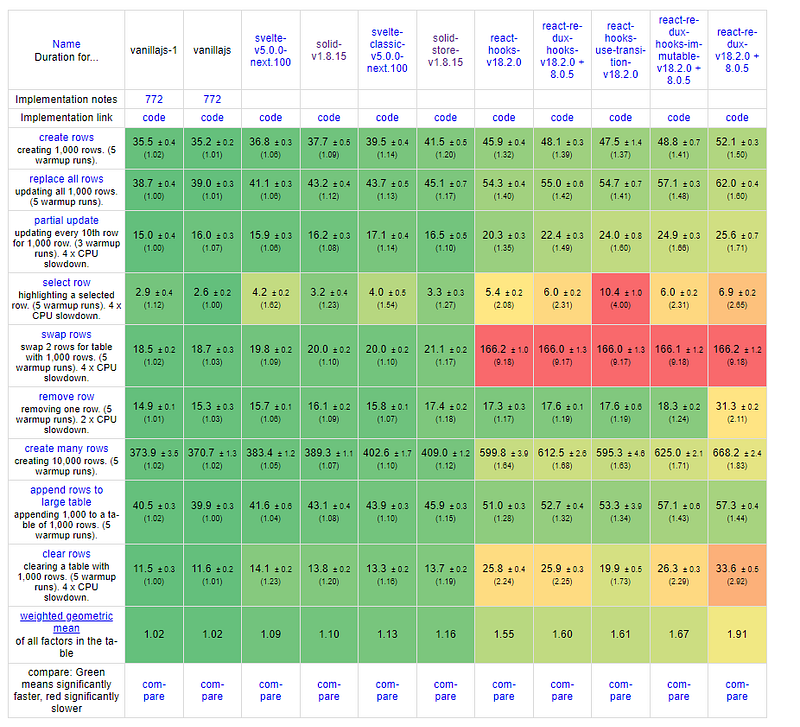
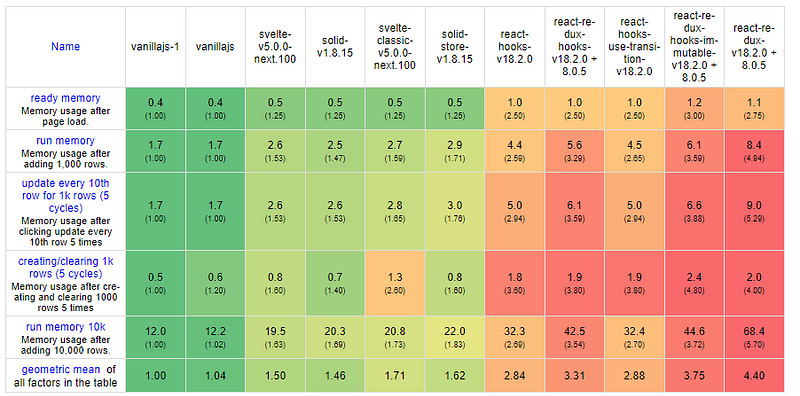
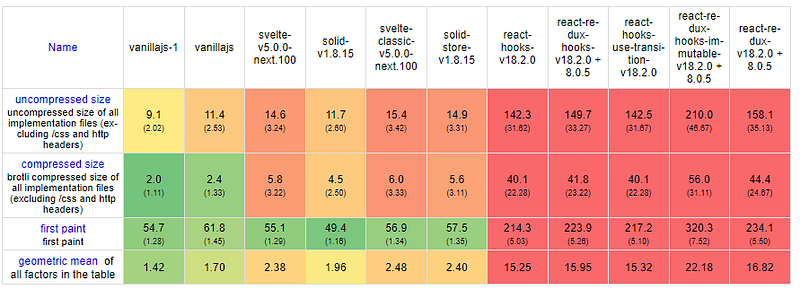
These benchmarks show that SolidJS is more efficient in memory, CPU, and network than React.
Let’s now examine its use in real-world production environments. Throughout my investigation, I encountered only two notable applications that utilize SolidJS:
🔻 The limited adoption of SolidJS in production raises concerns regarding its maturity, stability, and reliability. This situation could potentially hinder the framework’s development, affecting its capability to manage diverse workloads, tackle challenges, and foster innovation.
Now that we’ve gained insight into Solid’s internal mechanisms, let’s put our knowledge into practice. 💻
Ecosystem Guide
Development Kits
SolidStart is an open source, meta-framework that provides the platform to put components that comprise a web application together. It is built on top of SolidJS and uses Vinxi, an agnostic Framework Bundler that combines the power of Vite and Nitro. — https://docs.solidjs.com/solid-start
Here are the configuration steps to follow.
The default structure of a SolidStart application looks like this:
my-solid-app/
├── public/                  // Public assets
│   ├── index.html           // HTML entry file
│   └── favicon.ico          // Favicon
├── src/                     // Source code
│   ├── components/          // Components
│   │   ├── Header.tsx       // Example component
│   │   └── ...
│   ├── routes/              // Router configuration
│   │   ├── index.ts         // Router setup
│   │   └── ...
│   ├── store/               // State management
│   │   ├── index.ts         // Store setup
│   │   └── ...
│   ├── styles/              // CSS or styling files
│   │   ├── main.css         // Main stylesheet
│   │   └── ...
│   ├── utils/               // Utility functions
│   │   └── ...
│   ├── entry-client.tsx     // Client-side entry file
│   └── entry-server.tsx     // Server-side entry file
├── .gitignore               // Git ignore file
├── package.json             // NPM package configuration
└── README.md // Project documentationsrc/: thesrcdirectory is where most of the SolidStart application code will live.public/: thepublicdirectory contains publicly-available assets (images, styles, fonts, etc.) for the application.src/routes— this is where routes/pages will be located.
☑️ SolidStart uses file-based routing: each file in the routes directory is treated as a route:
example.com/blog ➜ /routes/blog.tsx
example.com/contact ➜ /routes/contact.tsx
example.com/directions ➜ /routes/directions.tsx
☑️ For nested routes, we can create a directory with the name of the preceding route segment, and create new files in that directory:
example.com/blog/article-1 ➜ /routes/blog/article-1.tsx
example.com/work/job-1 ➜ /routes/work/job-1.tsx
☑️ Dynamic routes are routes that can match any value for one segment of the route:
example.com/users/:id ➜ /routes/users/[id].tsx
example.com/users/:id/:name ➜ /routes/users/[id]/[name].tsx
example.com/*missing ➜ /routes/[...missing].tsx
More details can be found in this documentation.
Devtools
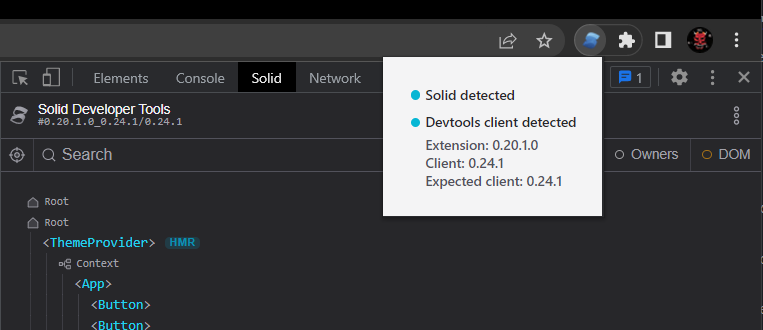
Chrome devtools extension for debugging Solid applications. It allows for visualizing and interacting with Solid’s reactivity graph, as well as inspecting the component state and hierarchy. — https://github.com/thetarnav/solid-devtools/tree/main/packages/extension#5-run-the-app-and-play-with-the-devtools
- https://github.com/thetarnav/solid-devtools
- https://github.com/thetarnav/solid-devtools?tab=readme-ov-file#the-chrome-extension
- https://github.com/thetarnav/solid-devtools/tree/main/packages/extension#getting-started
UI libraries
For the development of inclusive and user-friendly web applications, it is crucial to guarantee accessibility and semantic HTML. Here are the libraries I kept after selection:
✳️ Kobalte is a UI toolkit for building accessible web apps and design systems with SolidJS.
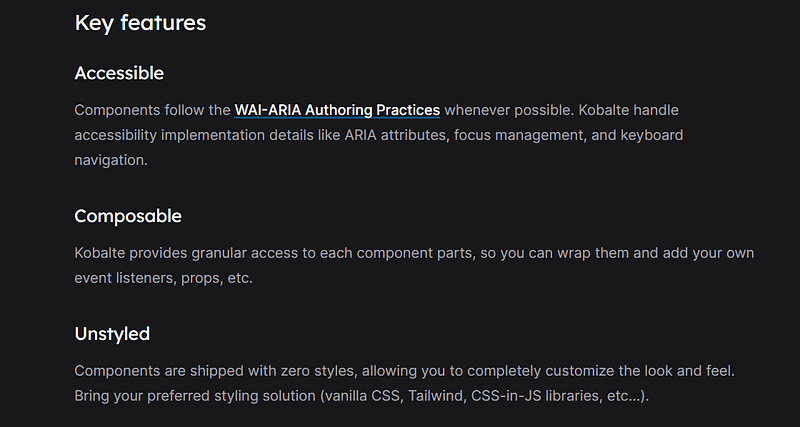
✳️ Ark UI fully customizable and accessible UI components.

I admit that research and selection were difficult. The majority of libraries are either not complete, not accessible, or deprecated.
Application testing
In the SolidJS official GitHub repository, I discovered this library: solid-jest.
Nevertheless, there is no documentation in the Readme on how to use it and some examples. I recommend that you see and follow this article accordingly.
I could not validate other tools because I did not find official documentation (Cypress, Playwright, etc.).
Documentation
I was confused by the old and new documentation, to be honest.
Nevertheless the tutorial and the playground helped me a lot.
It’s evident that the SolidJS ecosystem is continuously evolving, with ongoing efforts to refine and expand its features and capabilities.
Advanced Guide
Fetching Data
createResource is a utility provided by SolidJS for managing asynchronous data fetching and caching:
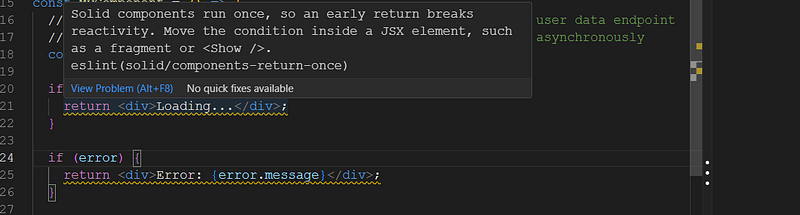
Be careful, the SolidJS components are rendered only once, you must use the Match, Switch, Show tags to manage the display according to the loading status: loading, error and data. Hence, doing this is not correct:
  if (loading) {
    return <span>Loading...</span>;
  }

  if (error) {
    return <span>Error: {error.message}</span>;
  }

  return (
    <div>
      <h1>User Data</h1>
      <ul>
        {userData.map((user) => (
          <li key={user.id}>{user.name}</li>
        ))}
      </ul>
    </div>
  );
Solid components run once, so an early return breaks reactivity. Move the condition inside a JSX element, such as a fragment or
. eslint(solid/components-return-once) — https://docs.solidjs.com/concepts/components/basics#component-lifecycles
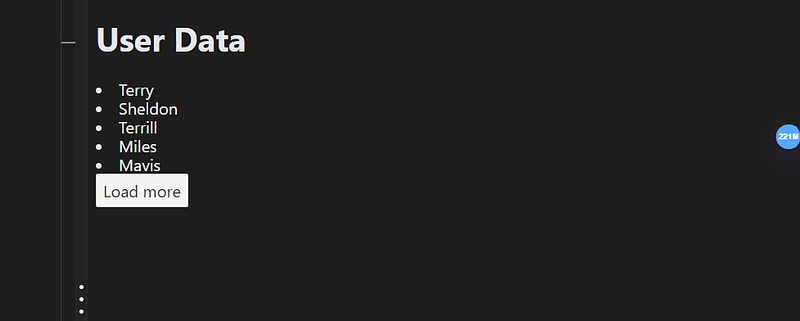
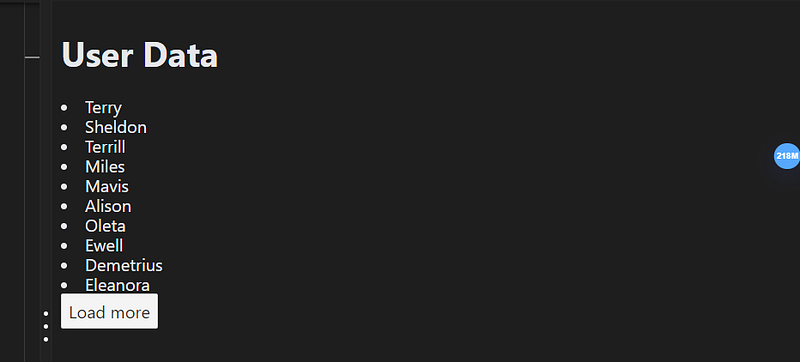
To create a simple load more list:
The execution results:
Conditional Rendering
We used in the previous section <Show>, <Switch> and <Match>.
✳️ <Show> renders its children when a condition is evaluated to be true:
import { Show } from "solid-js"

<Show when={!data.loading} fallback={<span>Loading...</span>}>
  <h1>Hi, I am {data().name}.</h1>
</Show>
✳️ Similar to JavaScript’s switch/case structure, <Switch> wraps multiple <Match> components so that each condition is evaluated in sequence:
import { Switch, Match } from "solid-js"

<Switch fallback={<p>Fallback content</p>}>
  <Match when={condition1}>
    <p>Outcome 1</p>
  </Match>
  <Match when={condition2}>
    <p>Outcome 2</p>
  </Match>
</Switch>
The first <Match> component that evaluates to true will have its children rendered, and the rest will be ignored.
Lists
We used in the previous sections <For> :
<For each={data()}>
  {(item, index) => (
    <li>
      {item.name}
    </li>
  )}
</For>
<For>is designed to be used when the order and length of the list may change frequently. When the list value changes in<For>, the entire list is re-rendered. However, if the array undergoes a change, such as an element shifting position,<For>will manage this by simply moving the corresponding DOM node and updating the index. […] If you were using<For>, the entire list would be re-rendered when a value changes, even if the length of the list remains unchanged. — https://docs.solidjs.com/concepts/control-flow/list-rendering#index-vs-for
Navigation
If you go through SolidStart, the routing is managed automatically. Otherwise, Solid Router simplifies routing in Solid applications:
import { render } from "solid-js/web";
import { Router, Route } from "@solidjs/router";

import Home from "./pages/Home";
import Users from "./pages/Users";

const App = props => (
  <>
    <h1>Site Title</h1>
    {props.children}
  </>
)

render(() => (
  <Router root={App}>
    <Route path="/" component={Home} />
    <Route path="/users" component={Users} />
  </Router>
), document.getElementById("root"));
It looks a lot like React Router.
Redering techniques
SolidJS provides support for both client-side rendering (CSR) and server-side rendering (SSR).
However, there is no framework like NextJs for SolidJS, if I’m not wrong. Therefore, everything should be done manually from the beginning.
Furthermore, let us take a look at this article written by the creator of SolidJS: 5 Places SolidJS is not the Best. Among the points, there is SSR:
While we haven’t seen a framework successfully pull this off as of yet, nor have an architecture granular enough it can leverage it, it will happen. For now, Solid will just have to be satisfied being the fastest raw renderer in the server and the browser, with the knowledge that it is theoretically possible that other frameworks will outperform it on the server one day. — https://dev.to/this-is-learning/5-places-solidjs-is-not-the-best-5019
Once again, it is evident that SolidJS is not as mature as React.
Optimization Guide
Handling large data sources
List virtualization, also known as ‘windowing’, is a highly efficient method for presenting extensive lists. I’m looking for libraries like react-window and react-virtualized.
I found the same question here:
- https://github.com/solidjs/solid/discussions/512
- https://www.reddit.com/r/solidjs/comments/17m1rsi/what_is_the_recommonded_way_to_implement_the/
It seems that there are no mature libraries available in the ecosystem for this purpose. These options are available:
Component lazy loading
Solid’s lazy method allows to wrap the component's dynamic import for deferred lazy loading. Suspense serves as a boundary that can display a fallback placeholder instead of the partially loaded content as these async events resolve:
import { render } from "solid-js/web";
import { lazy, Suspense } from "solid-js";

const Greeting = lazy(async () => {
    // simulate delay
    await new Promise(r => setTimeout(r, 1000))
    return import("./greeting")
});

function App() {
    return (
        <>
            <h1>Welcome</h1>
            <Suspense fallback={<p>Loading...</p>}>
                <Greeting name="Jake" />
            </Suspense>
        </>
    );
}

render(() => <App />, document.getElementById("app"));
Déjà vu (already seen) in React!
Image lazy loading
Without an additional implementation, natively we can use the loading attribute to load images in a lazy way:
      <img
        class="rounded-lg"
        src={character()?.image}
        alt={character()?.name}
        loading="lazy"
      />
Browser support for this option can be found here.
However, this GitHub thread discusses an issue with image lazy loading in SolidJS, specifically related to how the loading="lazy" attribute behaves within SolidJS applications. Users have reported that using this attribute does not trigger lazy loading as expected, leading to images being loaded immediately instead of deferring loading until they enter the viewport.
The issue is always open. No suggestion or solution since 27 days.
This is somewhat upsetting. I’m wondering if there are any other compatibility issues because SolidJS isn’t used much in production (less feedback).
Summary
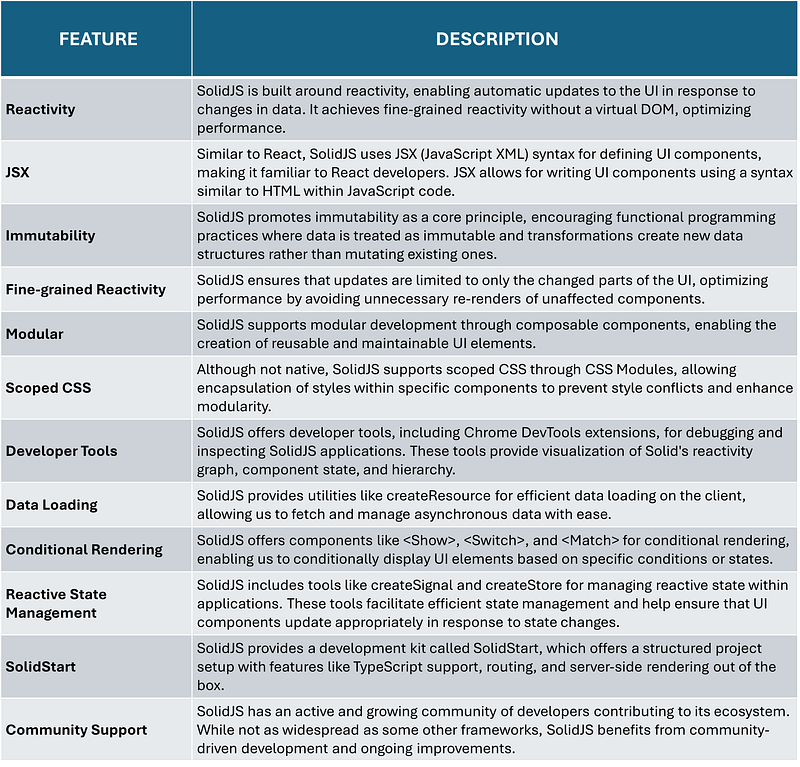
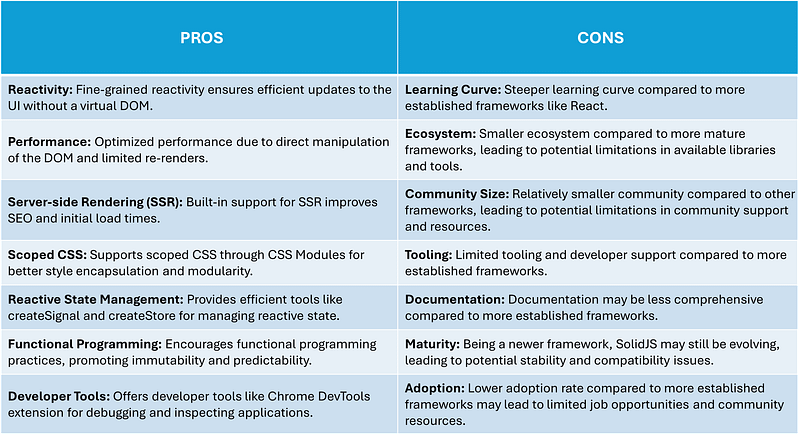
Conclusion
I appreciate the innovative concepts introduced by SolidJS and its focus on enhancing web application performance. However, I remain cautious due to its limited adoption, sparse tooling and library support, as well as potential issues with bugs and compatibility.
For smaller-scale projects or internal proof-of-concepts where I have the flexibility to develop from scratch and address challenges as they arise, I would consider using SolidJS.
However, when asked what is my preferred framework for future projects (besides React), I would currently lean towards Svelte, given its established ecosystem and proven track record. I keep this choice until soon discover Qwik.
Until we meet again in a new article and a fresh adventure! ❤️
Thank you for reading my article.
Want to Connect?
You can find me at GitHub: https://github.com/helabenkhalfallah


