
From Zero to Hero: Building a Generative AI Chatbot with MongoDB and Langchain
Your Complete Beginner guide from what to why to how
Introduction
Picture this: During Christmas, you receive the gift of your dreams — an extraordinary time machine capable of transporting you anywhere at any time. The catch? You only have 10 minutes to make it work, or it will vanish. The good news? You possess a 2000-page PDF detailing everything about this time machine: its history, the creator, construction details, operation guidelines, past users, and even a way back if needed.
Now, the challenge is clear: How do you extract valuable information to activate the time machine within the 10-minute window from this extensive documentation?
Enter your superhero: a generative AI-powered chatbot. You feed it the time machine manual, pose questions, and witness the magic of retrieval-augmented generation (RAG Gen AI) in action.
By the end of this article, you’ll grasp:
- What a Generative AI chatbot powered by RAG is.
- The advantages of using MongoDB Atlas Vector Search.
- The significance of incorporating Langchain.
- A step-by-step guide to implementing your very own chatbot.
Let the journey begin!

Before we start! 🦸🏻♀️
- If you found value in this article and wish to show your support, please ‘like’ this LinkedIn post. Your engagement will help extend the reach of this article, your support acts as a great motivator for me. ✍🏻🦾❤️
- Clap my article 50 times, that will really really help me out and boost this article to others.👏
- Follow me on Medium , LinkedIn and subscribe to get my latest article🫶
What a Generative AI chatbot powered by RAG is?
In this section, we’ll explore the world of Generative AI Chatbots, supercharged by Retrieval-Augmented Generation (RAG).
Generative AI Chatbots have the incredible ability to create responses on the fly. However, using directly generated answers from models like chatGPT comes with its challenges:
Hallucination:
- Large language models might create text about events, characters, or places that don’t exist in reality.
- They might provide information that is not true or is misleading.
No Access to Your Private Information:
- Directly generated answers may lack access to your private information.
Answer Too General:
- Responses might be too general and not specific to a particular domain like Retail, Financial, Manufacturing etc.
To tackle these challenges, we turn to RAG, or Retrieval-Augmented Generation. RAG is an AI framework designed to fetch accurate and up-to-date facts from an external knowledge base. Its role is crucial in providing context and understanding during the generative process of large language models (LLMs).
High-Level Overview RAG-powered Chatbot
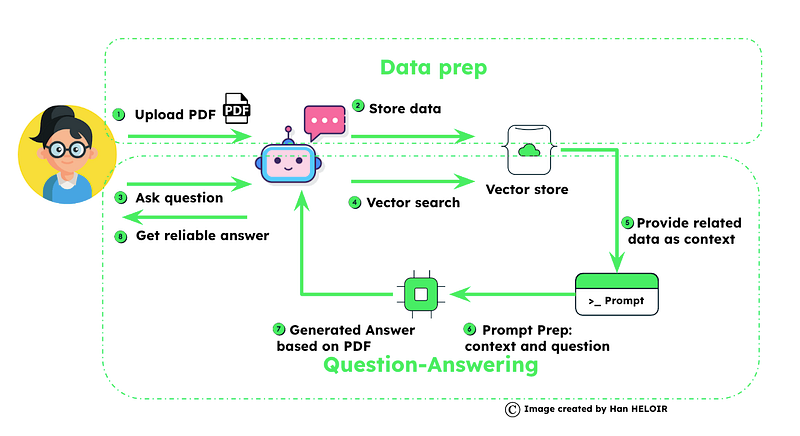
Here’s a high-level overview of how RAG-powered chatbots operate; we’ll delve deeper in the implementation section:
Part 1: Data Preparation:
- We gather necessary data, including private or domain-specific information, and store it in a vector store.
Part 2: RAG in Action:
- Leveraging RAG, we use the stored data in the vector store to obtain precise and relevant answers.
This two-part process not only helps reduce hallucination in LLM models but also ensures that the chatbot can provide accurate and contextually relevant responses. Join us in the next section for a more in-depth exploration of RAG’s role in our AI-powered chatbot adventure!
Power of MongoDB Atlas Vector Search
MongoDB Atlas stands out as an exceptional vector store for several compelling reasons, making it enterprise-ready:
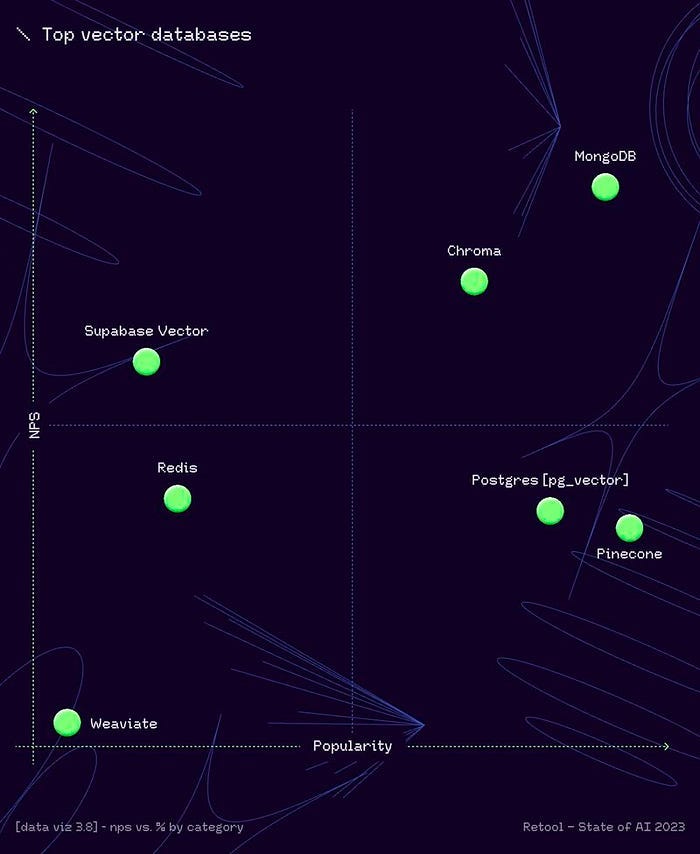
- As per the Retool AI report, MongoDB takes the lead, earning its place as the top-ranked vector database.
2. Its seamless integration with existing MongoDB databases makes it a natural extension for organizations already utilizing MongoDB for their data management. This ensures a smooth transition into vector storage without requiring extensive system overhauls.
3. MongoDB Atlas is purpose-built to handle large-scale, operational-critical applications, showcasing its robustness and reliability. This becomes particularly crucial in applications where data accuracy and availability are paramount, and its ability to horizontally scale ensures efficiency.
4. The flexibility of MongoDB Atlas in handling diverse data types and structures makes it an ideal choice for accommodating the intricate nature of vector embeddings.
5. Positioned at an enterprise level, MongoDB Atlas boasts high-security standards, availability across multiple clouds, and being fully managed. This ensures organizations can trust it for secure, reliable, and efficient operations.
With MongoDB Atlas, organizations can confidently store and retrieve embeddings, unlocking the full potential of AI for their applications. Its enterprise-grade features make it a dependable choice for those seeking not just performance but also robust security and management capabilities.
The Role of Langchain in building Intelligent Chatbots
LangChain, a powerful framework for language model-driven applications, is a game-changer in building intelligent chatbots. Here’s a concise look at what makes LangChain stand out:
Context Awareness:
LangChain enables applications, especially chatbots, to understand and respond based on contextual information from various sources like prompt instructions and historical interactions.
Reasoning Abilities:
The framework empowers applications to reason effectively, allowing them to make informed decisions based on provided context. Key Components:
LangChain Libraries:
Python and JavaScript libraries with interfaces and integrations for diverse components. Basic runtime for combining components into chains and agents, with ready-made implementations, including chatbots.
LangChain is the one key option that you may adopt to developing intelligent chatbots with contextual awareness, reasoning abilities, and efficient access to information. Stay with us as we delve deeper into LangChain’s mechanics, showcasing its prowess in crafting cutting-edge conversational AI applications, especially in enterprise settings with MongoDB.
Step-by-Step Guide: Implementing Your Own Chatbot
What You’ll Gain from This Step-by-Step Guide? By the end of this guide, you’ll achieve the following:
- A clear understanding of the RAG chatbot creation workflow.
- Proficiency in utilizing the main functions of LangChain and leveraging MongoDB’s native integration.
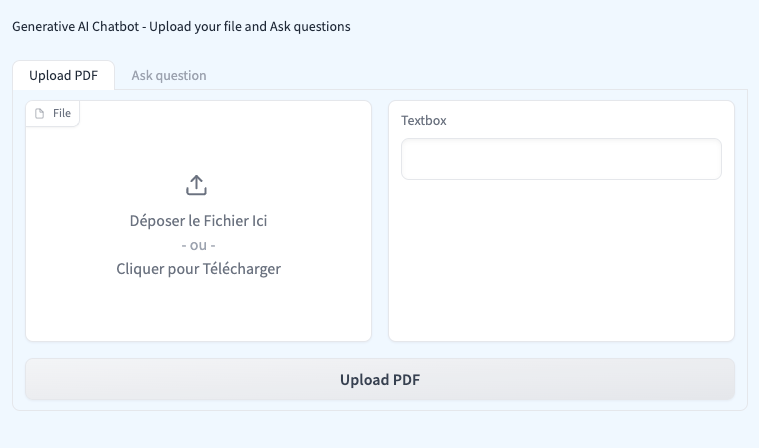
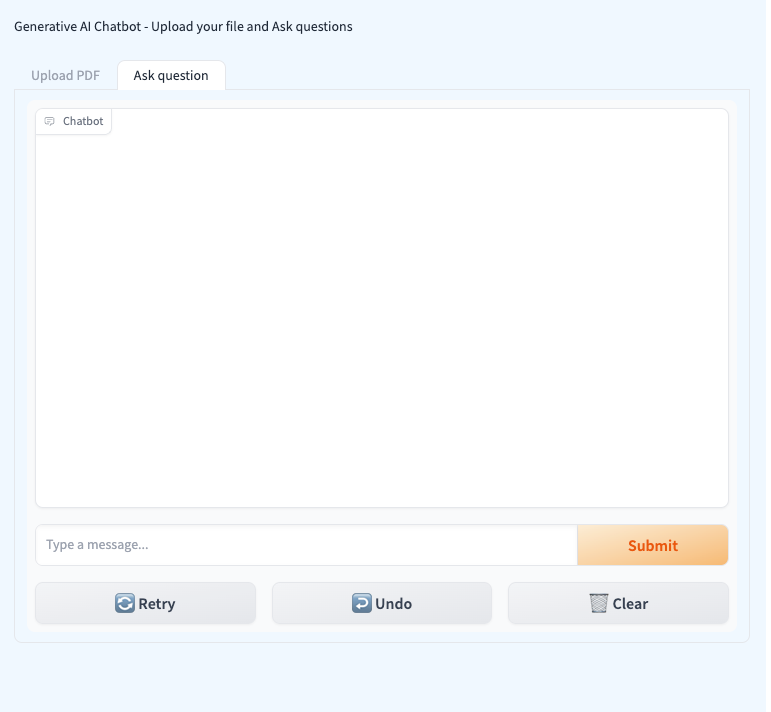
- Access to a user-friendly UI that facilitates PDF uploads and enables easy questioning through Gradio.
Additionally, your application’s UI will consist of two tabs — one for uploading PDFs and another for asking questions.
As mentioned earlier, the chatbot creation process involves two parts. The initial step is dedicated to establishing a knowledge base:
Data / PDF Processing Workflow:
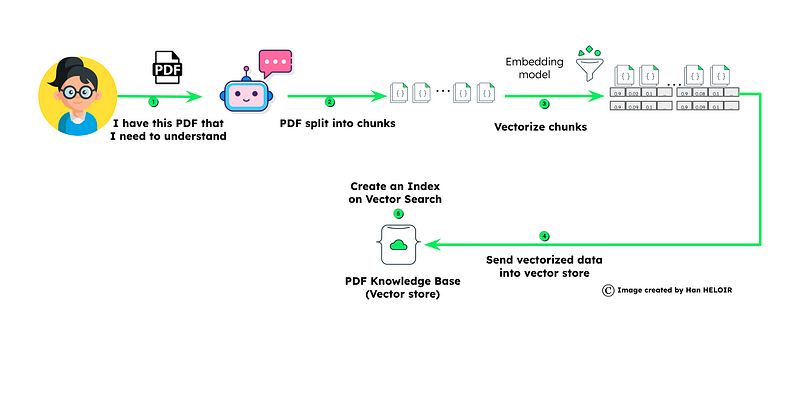
- Loading Data:
- The initial step involves obtaining the necessary data for question-answering. This can be achieved by extracting information from either a web page or a PDF document.
2. Data Chunks:
- Once the data is obtained, it undergoes segmentation into manageable chunks. This ensures efficient processing of information.
3. Generating Embeddings:
- Each segmented chunk goes through an embedding process. This transformation converts the text into a numerical representation suitable for analysis. To delve deeper into embedding generation, check out my article on Generating Text Embeddings with Azure OpenAI. This approach ensures data security while storing it in MongoDB Atlas.
4. MongoDB Vector Storage:
- The generated embeddings find a home in MongoDB, where they are stored for quick retrieval during the question-answering phase. For more insights into vectors (embeddings), refer to my previous article: Unleashing the Power of Vector Search: A Next-Generation Search Technology.
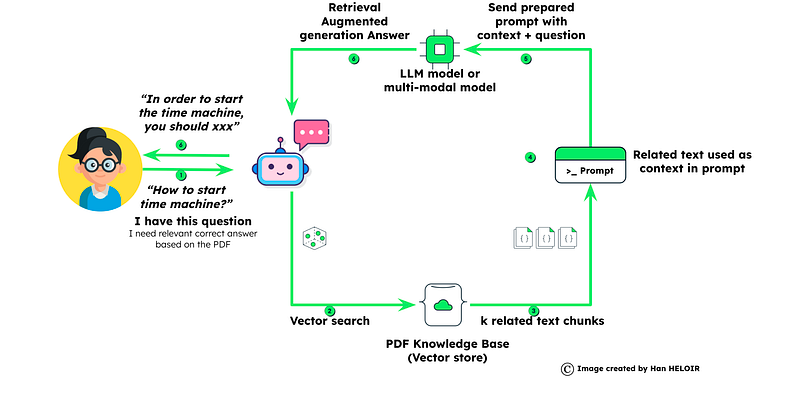
Retrieval Augmented Generation Question-Answering workflow
- Question Embeddings:
- When a user asks a question, embeddings for that specific question are generated. This step prepares the question for comparison with the stored data in MongoDB Atlas.
2. Retrieve Similar Chunks:
- Leveraging MongoDB’s vector search capabilities, the system retrieves relevant chunks of data — prepared in Part 1 — that best match the posed question.
3. Prompt Preparation with Context Creation and Question:
- The retrieved data chunks and the user’s question are merged to create a comprehensive context. This context serves as the foundation for formulating a query for the Large Language Models (LLM).
4. Tailored Answer Generation through RAG:
- The LLM models, armed with the provided context, generate a customized answer that is specific to both the user’s question and the dataset. This ensures a personalized and accurate response.
Now let’s break out the code to details:
Importing Libraries and Setting Up Environment
import os
import re
from openai import OpenAI
import time
from dotenv import load_dotenv
from pymongo import MongoClient
from langchain.chat_models import ChatOpenAI
from langchain.schema import AIMessage, HumanMessage
from langchain.llms import OpenAI
from langchain.document_loaders import PyPDFLoader
from langchain.text_splitter import RecursiveCharacterTextSplitter
from langchain.embeddings import OpenAIEmbeddings
from langchain.vectorstores import MongoDBAtlasVectorSearch
from langchain.chains import RetrievalQA
from langchain.schema.language_model import BaseLanguageModel
import gradio as gr
This part includes importing necessary libraries and modules for various functionalities such as interacting with MongoDB, handling PDFs, utilizing language models, and creating a user interface with Gradio.
Setting Up Environment and MongoDB Connection
# Load environment variables from .env file
load_dotenv(override=True)

# Set up MongoDB connection details
OPENAI_API_KEY = os.environ["OPENAI_API_KEY"]
MONGO_URI = os.environ["MONGO_URI"]
DB_NAME = "pdfchatbot"
COLLECTION_NAME = "pdfText"
ATLAS_VECTOR_SEARCH_INDEX_NAME = "vector_index"

# Initialize OpenAIEmbeddings with the API key
embeddings = OpenAIEmbeddings(openai_api_key=OPENAI_API_KEY)

# Define field names
EMBEDDING_FIELD_NAME = "embedding"
TEXT_FIELD_NAME = "text"

# Connect to MongoDB
client = MongoClient(MONGO_URI)
db = client[DB_NAME]
collection = db[COLLECTION_NAME]
Here, environment variables are loaded, including API keys for OpenAI and MongoDB connection details. The code initializes the OpenAIEmbeddings with the API key and sets up a connection to MongoDB.
PDF Processing Function
def process_pdf(file,progress=gr.Progress()):
    progress(0, desc="Starting")
    time.sleep(1)
    progress(0.05)
    new_string = ""
    for letter in progress.tqdm(file.name, desc="Uploading Your PDF into MongoDB Atlas"):
        time.sleep(0.25)

    loader = PyPDFLoader(file.name)
    pages = loader.load_and_split()

    # Print loaded pages
    print(pages)

    # Split text into documents
    text_splitter = RecursiveCharacterTextSplitter(chunk_size=500, chunk_overlap=50)
    docs = text_splitter.split_documents(pages)
    # Remove single spaces between letters and replace double spaces
    # docs_cleaned = [re.sub(r'\s+', ' ', doc.replace(' ', '')) for doc in docs]

    # Convert 'Document' objects to strings
    docs_as_strings = [str(doc) for doc in docs]

    # Set up MongoDBAtlasVectorSearch with embeddings
    vectorStore = MongoDBAtlasVectorSearch(
        collection, embeddings, index_name=ATLAS_VECTOR_SEARCH_INDEX_NAME
    )

    # Insert the documents into MongoDB Atlas Vector Search
    docsearch = vectorStore.from_documents(
        docs,
        embeddings,
        collection=collection,
        index_name=ATLAS_VECTOR_SEARCH_INDEX_NAME,
    )

    return docsearch
Defines a function process_pdf to handle the processing of a PDF document, including loading, splitting, and storing it in MongoDB Atlas.
Query and Display Function
Defines a function query_and_display responsible for querying MongoDB Atlas Vector Search, retrieving relevant documents, and displaying the results in the console.
def query_and_display(query,history):
    history_langchain_format = []
    for human, ai in history:
        history_langchain_format.append(HumanMessage(content=human))
        history_langchain_format.append(AIMessage(content=ai))
    history_langchain_format.append(HumanMessage(content=query))
    # Set up MongoDBAtlasVectorSearch with embeddings
    vectorStore = MongoDBAtlasVectorSearch(
        collection,
        OpenAIEmbeddings(openai_api_key=OPENAI_API_KEY),
        index_name=ATLAS_VECTOR_SEARCH_INDEX_NAME,
    )
    print(query)
    # Query MongoDB Atlas Vector Search
    print("---------------")
    docs = vectorStore.max_marginal_relevance_search(query, K=5)


    llm = OpenAI(openai_api_key=OPENAI_API_KEY, temperature=0)
    retriever = vectorStore.as_retriever(
        search_type="similarity",
        search_kwargs={"k": 5},
    )

    for document in retriever:
        print(str(document) + "\n")


    qa = RetrievalQA.from_chain_type(
        llm, chain_type="stuff", retriever=retriever
    )
    retriever_output = qa.run(query)

    print(retriever_output)
    return retriever_output
Gradio User Interface
with gr.Blocks(css=".gradio-container {background-color: AliceBlue}") as demo:
    gr.Markdown("Generative AI Chatbot - Upload your file and Ask questions")

    with gr.Tab("Upload PDF"):
        with gr.Row():
            pdf_input = gr.File()
            pdf_output = gr.Textbox()
        pdf_button = gr.Button("Upload PDF")

    with gr.Tab("Ask question"):

        gr.ChatInterface(query_and_display)

    pdf_button.click(process_pdf, inputs=pdf_input, outputs=pdf_output)

demo.launch()
Sets up the Gradio user interface, including two tabs (“Upload PDF” and “Ask Question”) with corresponding input and output components.
Conclusion
In conclusion, our journey from novice to chatbot hero, powered by MongoDB and Langchain, has been nothing short of magical.
With RAG, we’ve overcome challenges associated with large language models, ensuring precise and contextually relevant responses. MongoDB Atlas Vector Search stands as our reliable ally, offering enterprise-ready solutions with seamless integration and scalability.
This is not just a conclusion; it’s a beginning. As you delve into chatbot mastery, may your journey be as magical as that extraordinary time machine ride!
Before you go! 🦸🏻♀️
If you liked my story and you want to support me:
- Clap my article 50 times, that will really really help me out.👏
- Follow me on Medium and subscribe to get my latest article🫶
- Follow me on my LinkedIn to get other information about data 🔭


