
AutoGen and MongoDB Magic: Your Beginner Guide to Setup an Enterprise-level Retrieval Agent
Step by step on creating your MongoDB Retrieval agent in the AutoGen framework
A special thanks to Chi Wang, Principal Researcher at Microsoft Research, for encouraging me to work on the AutoGen and MongoDB retrieval topic!
Introduction:
Welcome to the world of AutoGen, Microsoft’s cool framework introduced in October 2023 that brings together an awesome team of LLM agents. These agents are like your AI superheroes, coordinating seamlessly and performing real-world tasks.
But wait, what’s an LLM agent? Firstly, LLM model itself is like your text wizard — great at generating text but not so great at action. That’s where the LLM agent steps in, armed with APIs, toolings, and search engines, turning words into actions. Picture this: telling the LLM agent to send an email doesn’t just get a big paragraph. it’s like telling Iron Man to fire up his suit and deliver the message.
Now, let’s dive into the AutoGen magic.
Picture automating the planning and operations of product fabrication. AutoGen emerges as the optimal solution, orchestrating a team of specialized LLM agents tailored for the manufacturing context. Envision one LLM agent engaging with users, another seamlessly retrieving product descriptions and Bill of Materials (BOM) from a vector database, and a third expertly overseeing material inventory. It’s akin to assembling an Avengers team specifically crafted for an AI-driven manufacturing mission.
Before we start! 🦸🏻♀️
If you like this topic and you want to support me:
- Follow me on my LinkedIn and like this FREE friend link for this article and other information about data 🔭
- Clap my article 50 times, that will really really help me out.👏
- Follow me on Medium and subscribe to get my latest article🫶

Curious about AutoGen? Check out my previous article for a simple yet deep dive into this AutoGen superhero framework.
AutoGen’s Super Agents
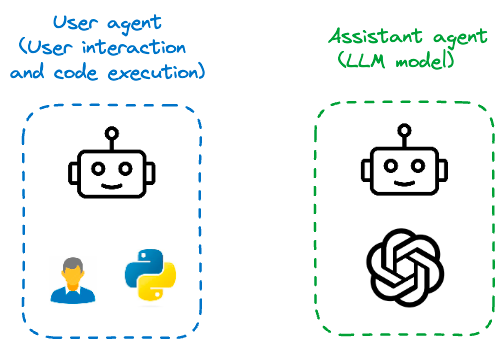
AutoGen offers a variety of agents, from the basic User Proxy Agent, executing code and giving feedback, to the Assistant Agent tackling tasks with LLM.
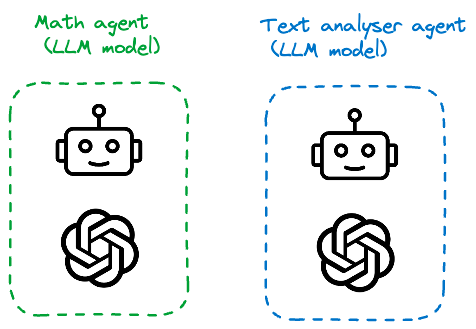
Then there are task-specific agents like MathChat, Text Analysis etc. each with their own superpowers.
And here’s where the spotlight shines on the teachable Agent and Retrieval Agent — your secret weapon. These agents are conversational systems for retrieving augmented code generation and question answering.
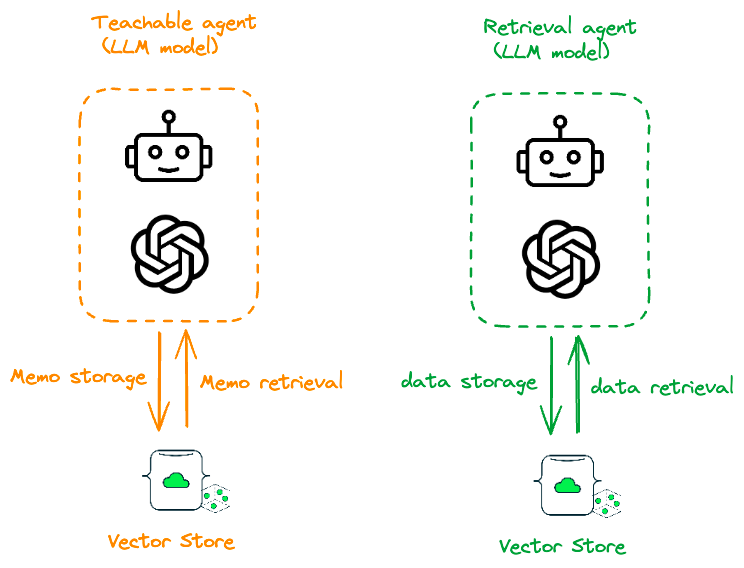
When it comes to Retrieval Agents, you’ve got only two options: Chroma DB or Qdrant DB. But hold on, there was no MongoDB as an option!
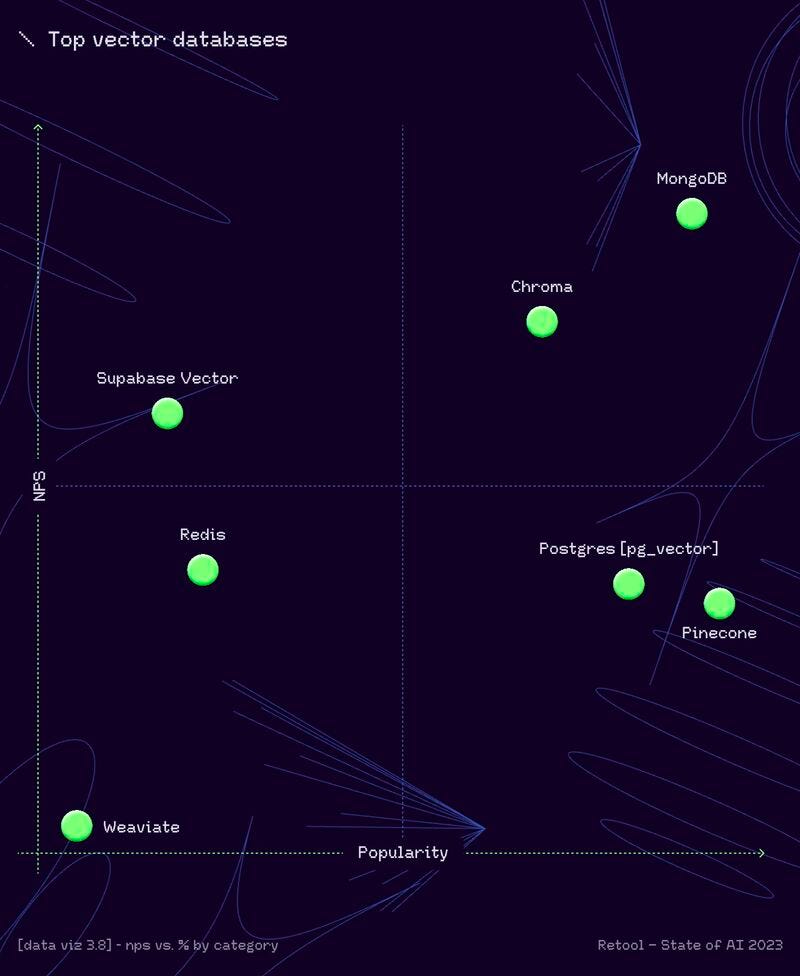
MongoDB is the star here, ranked as the best vector database in the Retool AI report. Missing out on tapping into its retrieval capabilities would be a real loss.
Ready to create your MongoDB retrieval agent? Let’s turn those AutoGen gears and unleash the magic!
Overview of the Project RAG: AutoGen and MongoDB retrieval agent
Retrieval augmentation Generation (RAG) has emerged as a practical and effective approach for mitigating the intrinsic limitations of LLMs by incorporating external documents. In this project, we’re introducing RAG agents of AutoGen, which enable generation with the help of retrieved information.
The system has two agents: one, called MongoDB RetrieveUserProxyAgent, is designed to get data from a MongoDB vector store, and the other, called RetrieveAssistantAgent, is a Retrieval-augmented Assistant agent. RetrievalAssistantAgent is extension of built-in agents from AutoGen. MongoDB RetrieveUserProxyAgent is our custom agent. The figure above shows the overall structure of the RAG agents.
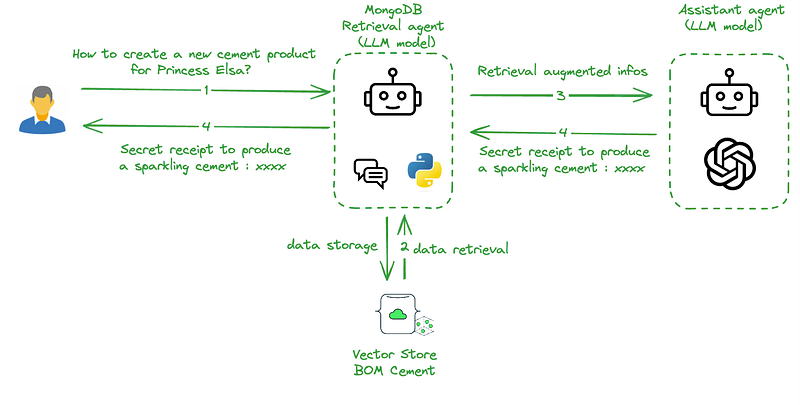
AutoGen — MongoDB retrieval agent implementation
Let’s break down the code snippet that will empower you to create a MongoDB Retrieval Agent with AutoGen.
# Import necessary libraries and modules
import autogen
from autogen import AssistantAgent, UserProxyAgent, config_list_from_json
from autogen.agentchat.contrib.retrieve_assistant_agent import RetrieveAssistantAgent
from autogen.agentchat.contrib.retrieve_user_proxy_agent import RetrieveUserProxyAgent
from typing import List, Dict, Union
from pymongo import MongoClient
import pymongo
import openai

# Load the configuration from JSON file
config_list = config_list_from_json(env_or_file="llm_config")
Here, we’re setting the stage by importing the required tools. autogen and its components, along with pymongo and openai, will play crucial roles in our retrieval agent performance.
class MongoRetrieveUserProxyAgent(RetrieveUserProxyAgent):
    def query_vector_db(self, query_texts: List[str], n_results: int = 10, search_string: str = "", **kwargs) -> Dict[str, Union[List[str], List[List[str]]]]:
        # Combine all query texts into one string
        concatenated_text = " ".join(query_texts)

        # Fetch the embedding from MongoDB
        embedding = self.get_embedding(concatenated_text)

        # Retrieve similar documents from MongoDB
        documents = self.find_similar_documents(embedding)
        ids = [str(idx) for idx in range(1, len(documents) + 1)]
        document_contents = [document.get("text_chunks", "") for document in documents]
        return {
            "ids": [ids],  # Wrap ids in a list
            "documents": [document_contents],  # Wrap document_contents in a list
        }

    def retrieve_docs(self, problem: str, n_results: int = 20, search_string: str = "", **kwargs):
        # Query for similar documents
        results = self.query_vector_db(
            query_texts=[problem],
            n_results=n_results,
            search_string=search_string,
            **kwargs,
        )
        self._results = results

        # Check if results is a dictionary and "documents" is a list
        if isinstance(results["ids"], list) and len(results["ids"]) > 0 and isinstance(results["ids"][0], str):
            doc_id = results["ids"][0]
            if doc_id in self._doc_ids:
                # Access the "documents" key in the results dictionary
                for idx, document in enumerate(results["documents"]):
                    if isinstance(document, dict):
                        print(f"Document {idx + 1}: {document.get('text_chunks', '')}")
                    else:
                        print(f"Document {idx + 1}: {document}")
            else:
                print("No documents found.")

    def get_embedding(self, text, model="text-embedding-ada-002"):
        """
        Get the embedding for a given text using OpenAI's API.
        """
        text = text.replace("\n", " ")
        return openai.Embedding.create(input=[text], model=model)['data'][0]['embedding']

    def connect_mongodb(self):
        """
        Connect to the MongoDB server and return the collection.
        """
        mongo_url = "mongodb+srv://YOUR_LOGIN:YOUR_PASSWORD@YOUR_ATLAS_CLUSTER/test?retryWrites=true&w=majority"
        client = pymongo.MongoClient(mongo_url)
        db = client["YOUR_VECTOR_DB"]
        collection = db["YOUR_VECTOR_COLLECTION"]
        return collection

    def find_similar_documents(self, embedding):
        """
        Find similar documents in MongoDB based on the provided embedding.
        """
        collection = self.connect_mongodb()
        documents = list(collection.aggregate([
            {
                "$search": {
                    "index": "YOUR_VECTOR_INDEX",
                    "knnBeta": {
                        "vector": embedding,
                        "path": "YOUR_EMBEDDING_FIELD",
                        "k": 10,
                    },
                }
            },
            {"$project": {"_id": 1, "text_chunks": 1}}
        ]))
        return documents
Above code defines the MongoDB retrieve user proxy agent, let me break down this part of code step by step for you:
MongoRetrieveUserProxyAgent Class:
class MongoRetrieveUserProxyAgent(RetrieveUserProxyAgent):This class extends the RetrieveUserProxyAgent class, indicating that it inherits functionalities from RetrieveUserProxyAgent.
query_vector_db Method:
def query_vector_db(self, query_texts: List[str], n_results: int = 10, search_string: str = "", **kwargs) -> Dict[str, Union[List[str], List[List[str]]]]:
    concatenated_text = " ".join(query_texts)
    embedding = self.get_embedding(concatenated_text)
    documents = self.find_similar_documents(embedding)
    ids = [str(idx) for idx in range(1, len(documents) + 1)]
    document_contents = [document.get("text_chunks", "") for document in documents]

    return {
        "ids": [ids],  # Wrap ids in a list
        "documents": [document_contents],  # Wrap document_contents in a list
    }
Purpose: This method queries the MongoDB database for similar documents based on the provided query texts.
Parameters:
query_texts: List of strings representing the queries.n_results: Number of results to retrieve (default is 10).search_string: A string to refine the search (default is an empty string).
Returns:
- A dictionary containing lists of document IDs and document contents.
retrieve_docs Method:
def retrieve_docs(self, problem: str, n_results: int = 20, search_string: str = "", **kwargs):
    results = self.query_vector_db(
        query_texts=[problem],
        n_results=n_results,
        search_string=search_string,
        **kwargs,
    )
    self._results = results
    if isinstance(results["ids"], list) and len(results["ids"]) > 0 and isinstance(results["ids"][0], str):
        doc_id = results["ids"][0]
        if doc_id in self._doc_ids:
            for idx, document in enumerate(results["documents"]):
                if isinstance(document, dict):
                    print(f"Document {idx + 1}: {document.get('text_chunks', '')}")
                else:
                    print(f"Document {idx + 1}: {document}")
        else:
            print("No documents found.")
Purpose: This method retrieves documents based on a specified problem and prints them.
Parameters:
problem: The problem statement for which documents are retrieved.n_results: Number of results to retrieve (default is 20).search_string: A string to refine the search (default is an empty string).
Prints:
- Prints document details or a message if no documents are found.
get_embedding Method:
def get_embedding(self, text, model="text-embedding-ada-002"):
    text = text.replace("\n", " ")
    return openai.Embedding.create(input=[text], model=model)['data'][0]['embedding']
Purpose: This method fetches the embedding for a given text using OpenAI’s API.
Parameters:
text: The text for which the embedding is needed.model: The OpenAI model to use (default is "text-embedding-ada-002").
Returns:
- The embedding for the given text.
connect_mongodb Method:
def connect_mongodb(self):
    mongo_url = "mongodb+srv://YOUR_LOGIN:YOUR_PASSWORD@YOUR_ATLAS_CLUSTER/test?retryWrites=true&w=majority"
    client = pymongo.MongoClient(mongo_url)
    db = client["YOUR_VECTOR_DB"]
    collection = db["YOUR_VECTOR_COLLECTION"]
    return collection
Purpose: This method establishes a connection to the MongoDB server and returns the specified collection.
Returns:
- The MongoDB collection.
find_similar_documents Method:
def find_similar_documents(self, embedding):
    collection = self.connect_mongodb()
    documents = list(collection.aggregate([
        {
            "$search": {
                "index": "YOUR_VECTOR_INDEX",
                "knnBeta": {
                    "vector": embedding,
                    "path": "YOUR_EMBEDDING_FIELD",
                    "k": 10,
                },
            }
        },
        {"$project": {"_id": 1, "text_chunks": 1}}
    ]))
    return documents
Purpose: This method finds similar documents in MongoDB based on the provided embedding.
Parameters:
embedding: The embedding to use for similarity search.
Returns:
- A list of documents with their IDs and text chunks.
Additional Note:
Ensure to replace placeholder values like YOUR_LOGIN, YOUR_PASSWORD, YOUR_ATLAS_CLUSTER, YOUR_VECTOR_DB, YOUR_VECTOR_COLLECTION, YOUR_VECTOR_INDEX, and YOUR_EMBEDDING_FIELD with your actual MongoDB credentials and configuration.
If you want to know more about how to set up MongoDB as a vector database, you can read my previous articles on how to generate embedding, and how to prepare a vector database with Langchain.
Next, we define a custom MongoRetrieveUserProxyAgent class, tailored for MongoDB retrieval. This agent will be our go-to guy for interacting with the MongoDB database.
# Instantiate the Assistant Agent with provided configuration
assistant = RetrieveAssistantAgent(
    name="assistant",
    system_message="You are a helpful assistant.",
    llm_config=config_list,
)

# Instantiate the User Proxy Agent with MongoDB functionality
RAGproxyagent = MongoRetrieveUserProxyAgent(
    name="MongoRAGproxyagent",
    human_input_mode="NEVER",
    max_consecutive_auto_reply=2,
    retrieve_config={"task": "qa"},
)
# Reset the assistant and retrieve documents for a specific problem
assistant.reset()
ragproxyagent.initiate_chat(assistant, problem="When mifid2 is created?")
Conclusion
AutoGen, Microsoft’s powerhouse, and its LLM agents are the real game-changers. They seamlessly transform text generation into actions, offering a superhero squad for automating tasks and enhancing productivity.
AutoGen’s versatile agents, especially the Retrieval Agent, coupled with MongoDB’s vector search, create a winning combination. The provided code snippet is your ticket to leverage the magic of AutoGen and MongoDB for AI adventures.
With this knowledge and tool in hand, dive into the world of artificial intelligence — turn those AutoGen gears and let the magic happen! 🚀
Before you go! 🦸🏻♀️
If you liked my story and you want to support me:


