
Flutter Widget Guide — ListWheelScrollView Widget in 5 mins or less

This is Part 18 in the series where I’ll cover all the Flutter widgets that are in this YouTube playlist. I have created my own widget guide which I believe will help people who are new in this space. Please have a look at this GitHub project to explore all the amazing widgets.
Click here to ⏬ the App available on Google Play Store. 📱
My main motive behind this series is to keep things to the point. Your time is precious, let’s not waste it and get started.
ListView is a very common widget to have in an application. It easily lets you browse through multiple elements that cannot fit on a screen at once. As flutter developers, we all love to go above and beyond what others normally would do with a view. To spice things up in case of a simple, rather boring way of showing elements in a list, Flutter has an interesting widget in store for you.
ListWheelScrollView Widget
1 | What?
This widget is similar to a ListView but with the restriction that all children must be the same size along the scrolling axis (set using itemExtent property). When the list is at the zero scroll offset, the first child is aligned with the middle of the viewport. When the list is at the final scroll offset, the last child is aligned with the middle of the viewport (as can be seen in the GIF below). The elements in this widget are rendered as if rotating on a cylinder in 3D instead of scrolling on a plane like a normal ListView widget.
2 | Wondering how it works?
Have a look at the Code snippet below.
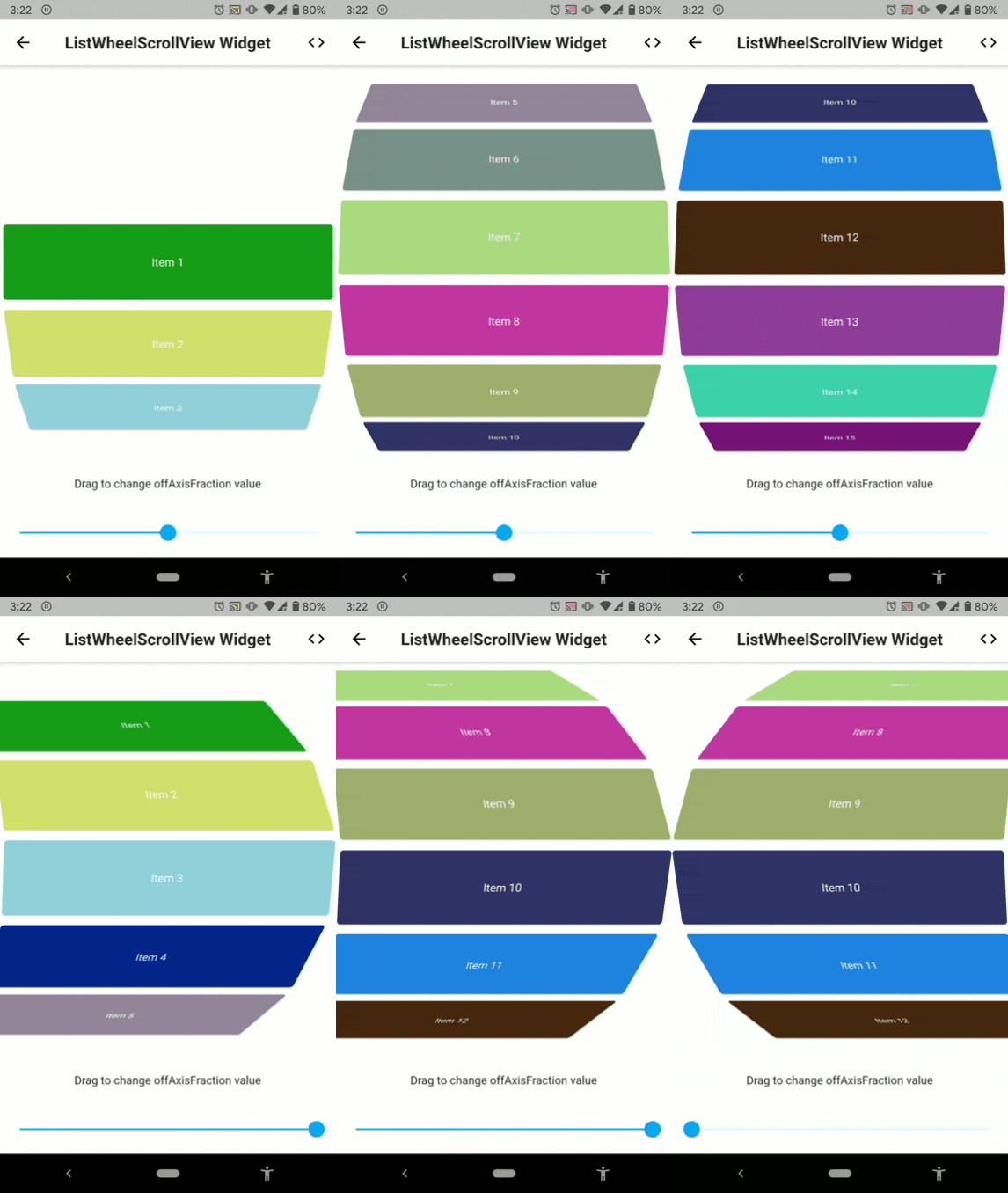
Below is the visual representation of the code above.
3 | Explanation
In the above example, we have a ListWheelScrollView widget along with a Slider widget. We are feeding the ListWheelScrollView widget with a list of Card widgets generated via its children property. Next, we specify the size of each child (in the main axis, here, height) with the itemExtent property. This overrides your size constraints that you set for each child, what I mean by this is, you cannot vary height of the cards in our case by wrapping it up with a Container widget and giving it a height. We can set the diameter of the wheel with diameterRatio property.
Here, we are using the Slider widget to change another interesting property of this widget, which is offAxisFraction. This property lets you make the wheel off axis. See it in action in the GIF above.
Previous 👆
Next 👇
How many claps does this article deserve?
If you find this article useful, please click the 👏 button and share to help others find it! Feel free to clap many times (10💥, 20💥 or maybe 50💥 ?) It fuels my focus to write more of it.
Connect with me on LinkedIn or say hi on Twitter, mentioning this article. You can drop an e-mail at [email protected] as well.
See more in the series -
Have a wonderful day 🙂


