
Flutter Widget Guide — ShaderMask Widget in 5 mins or less

This is Part 19 in the series where I’ll cover all the Flutter widgets that are in this YouTube playlist. I have created my own widget guide which I believe will help people who are new in this space. Please have a look at this GitHub project to explore all the amazing widgets.
Click here to ⏬ the App available on Google Play Store. 📱
My main motive behind this series is to keep things to the point. Your time is precious, let’s not waste it and get started.
It is always fun to use Gradients inside your applications. They are visually appealing and helps giving your views a modern look and feel (when used adequately). In flutter, there are ways to give Container widget a gradient using BoxDecoration widget and providing it with Linear, Radial or Sweep gradient. To apply gradient to widgets like Text or Image etc, flutter has a widget prepared for you to use.
ShaderMask Widget
1 | What?
This widget is helpful when you want to apply shaders to views like a Text widget. You can use this widget to apply Gradients or Images to other widgets just by wrapping them with this and providing a shader you wish to apply.
2 | Wondering how it works?
Have a look at the Code snippet below.
Below is the visual representation of the code above.
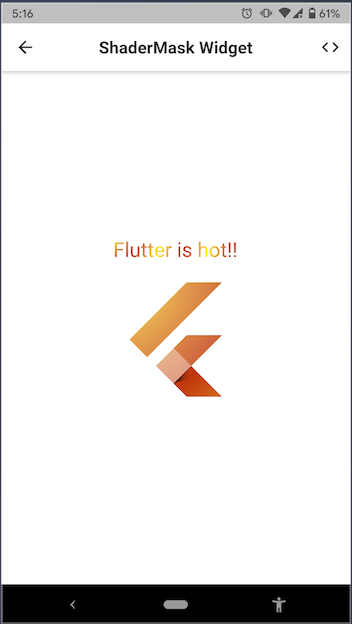
3 | Explanation
In the example above, we have a Text widget and a FlutterLogo widget with Gradients applied to them using ShaderMask widget. It is done by simply wrapping those widgets with ShaderMask and providing it with a Gradient (can be Linear, Radial or Sweep) via its shaderCallback property. The shaderCallback is called with the current size of the child of ShaderMask (here, Text and FlutterLogo widgets) so that it can customize the shader to the size and location of the child. The createShader method of the Gradient classes in Flutter is used to create a shader using the bounds passed on to the shaderCallback property (as can be seen in the code snippet above).
Also, do keep in mind to pass color as white to the child widgets of ShaderMask to see the desired result.
Previous 👆
How many claps does this article deserve?
If you find this article useful, please click the 👏 button and share to help others find it! Feel free to clap many times (10💥, 20💥 or maybe 50💥 ?) It fuels my focus to write more of it.
Connect with me on LinkedIn or say hi on Twitter, mentioning this article. You can drop an e-mail at [email protected] as well.
See more in the series -
Have a wonderful day 🙂