
Fine-tune an LLM on your personal data: create a “The Lord of the Rings” storyteller
OpenAI launched the most significant AI revolution with the release of ChatGPT. Everybody was amazed by the possibilities provided by this generative AI.
Organizations started to use this technology to accelerate their work and the value they can bring to their customers: chatbots, writing assistants, tasks automation, etc …
However, using OpenAI models come with a price not all organizations are ready to pay: the lack of data privacy. Indeed, the generative model uses the text provided by users to improve itself.
But the recent leakage of Samsung's personal information drew attention to this major issue.
At the same time, with the success of this AI, we witnessed the emergence of open-source Large Language Models (LLMs) instantiated by Meta with LLaMA: Vicuna, Alpaca, GPT4All, …
If you’re interesting in the topic, check my article where I introduce these models you can run on your laptop!
However, even if the LLaMa’s weights leaked after its release, allowing anybody to use the pre-trained version (which cost around 5M$ to train), it’s important to remind everybody that any commercial usage is prohibited by its license…
Therefore, it was impossible to run this kind of LLM for a business purpose.
Until recently.
StableLM, Dolly-2, and MPT-7B (there) are open-source models that achieve state-of-the-art results, and they were released with a commercial license.
That means any organization can use them for business purposes.
It also means these models can be fine-tuned with private data, allowing any organization to exploit the maximum of LLMs power, without leaking their private data to an external organization like OpenAI. That’s what Bloomberg did with its own LLM: BloombergGPT.
In this article, I will show you how to train your own LLM on your own data. For this example, I’ll fine-tune Bloom-3B on the “The Lord of the Rings” book.
I will explain every step, from the preparation of the dataset, how the loss for causal language models is calculated, how to fit this large model on CPU/GPU using quantization coupled with Accelerate from Hugging Face, and finally how to use PEFT LoRA adapters to hasten the model training.
Let’s go!

Extract the data
For this example, we want to create a language model capable of helping us write a story in “The Lord of The Rings” style. Therefore, we need to extract the story from the book.
Originally, the 3 books were once one.
To extract texts from the pdf, we use the pdfplumber library.
It provides an easy way to extract a desired area from a pdf page. This way, it is possible to remove footers and headers from the extracted story.
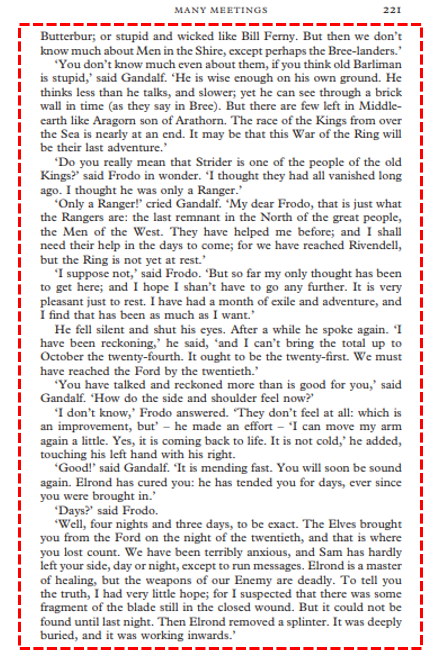
We also don’t consider pages containing the author’s notes and annex respectively at the beginning and the end of the book.
The text from each page is saved in a Jsonl file.
{"243": "Chapter 1\nMANY MEETINGS\nFrodo woke and found himself lying in bed.[...]"}
{"244": "and afterwards there were other things to think about. How do you[...]"}
{"245": "Butterbur; or stupid and wicked like Bill Ferny.[...]"}
We can now prepare the data for the training.
Prepare the dataset
Training a Causal language model is quite simple in theory.
Note: Nowadays, we use Large Language Model (LLM) term to describe the kind of models capable of generating text like GPT-4. However, it’s a misconception.
LLM defines a language model with a large number of parameters (usually above the billion). This model has a deep understanding of natural language and can be tuned to solve any NLP task, like text classification or summarization… Thus, a model capable of generating the next most probable token is called Causal Language Model. This is what we talk about in this article.
How the loss is computed?
In deep learning, a loss is a function that measures how well a machine learning model is able to make predictions.
We know that a causal language model, like GPT, which is the decoder part of the Transformer architecture, takes a sequence in input and retrieves the next token. The input in addition to the new token generated is then stored in the “memory” of the model, and the next token is generated.
You can find more details about this process in my previous article:
To train a Causal Language Model, we measure how well it predicts a sequence… from the exact same sequence!
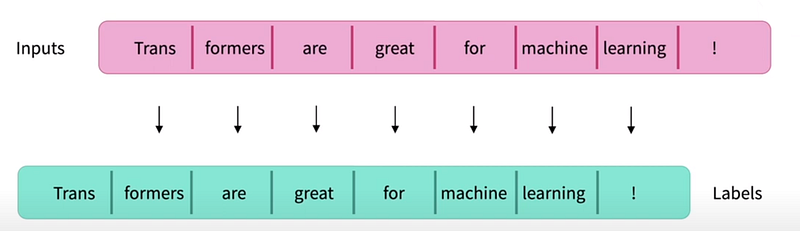
We compute the loss, by comparing each input token with the generated ones, using Cross Entropy Loss. Only 2 tokens can not be compared:
- The first one because it was not generated by the model,
- And the last one, which we don’t see in the picture, which was generated after the entire sequence. It’s this one that is used to generate sequences during inferences.
This process is handled automatically by the HuggingFace data collator: DataCollatorForLanguageModeling, which also pads the sequence to the maximal length of the batch.
Or you can do it yourself with Pytorch if you need more flexibility during the training (custom the loss function for instance).
import torch
from torch.nn import CrossEntropyLoss

def compute_loss(inputs, logits):
  # Drop the first token in inputs
  shifted_labels = inputs[:, 1:]
  # Drop the last token of the output
  shifted_logits = logits[:, :-1, :]
  loss_fn = CrossEntropyLoss(reduction="mean")
  # Reshape to concatenate batches. The overall loss is calculated
  loss = loss_fn(shifted_logits.reshape(-1, shifted_logits.size(-1)),
                 shifted_labels.reshape(-1)
  )
  return loss
I suggest you take a look at the Hugging Face course for Causal Language Modeling if you want to know more about it.
Preprocess the data
Now we understood how to train a causal language model, we need to prepare the sequences.
First of all, we need to indicate the EOS token.
The EOS token (End-Of-Sequence), as its name suggests, characterizes the end of the sequence. It is used during inferences to indicate to the model that it can stop generating text.
We manually add the EOS token to our data (the tokenizer doesn’t do it automatically). A good place to stop generating would be at the end of a paragraph. Therefore, we replace ".\n" with the tokenizer’s EOS token </s>. In our case, we use the BloomTokenizer .
def preprocess_data(dataset_path: Path, min_length: int, tokenizer: PreTrainedTokenizer) -> str:
    """Prepare dataset for training from the jsonl file.

    Args:
        dataset_path (Path): Extracted text from the book
        min_length (int): Filter pages without text
        tokenizer (PreTrainedTokenizer): HuggingFace tokenizer

    Yields:
        str: text of the pages
    """
    with open(dataset_path, 'r') as f:
        grouped_text = ""
        for line in f:
            elt = json.loads(line)
            text: str = list(elt.values())[0]
            if len(text) > min_length:
                grouped_text += text
        # End of paragraphs defined by ".\n is transformed into EOS token"
        grouped_text = grouped_text.replace(".\n", "." + tokenizer.eos_token)
        return preprocess_text(grouped_text)


def preprocess_text(text: str) -> str:
    text = text.replace('\n', ' ')
return textNext, we divide each text into shorter sequences based on the max_context_length . The maximal context length of Bloom-3B is 2048 tokens.
To do so, we use the map()method that comes with the datasets library from Hugging Face. We first create a tokenize method that uses the pre-trained tokenizer with return_overflowing_tokens=True .
Finally, the last vector of tokens, which is shorter than the maximal context length, is dropped.
def tokenize(element: Mapping, tokenizer: Callable,
             context_length: int) -> str:
    inputs = tokenizer(element['text'], truncation=True, return_overflowing_tokens=True,
                       return_length=True, max_length=context_length)
    inputs_batch = []
    for length, input_ids in zip(inputs['length'], inputs['input_ids']):
        if length == context_length: # We drop the last input_ids that are shorter than max_length
            inputs_batch.append(input_ids)
    return {"input_ids": inputs_batch}
def prepare_dataset(dataset_path: Path, min_length: int, context_length: int,
test_size: float, shuffle: bool, hf_repo: str) -> None:
"""Prepare dataset for training and push it to the hub.
"""
tokenizer = AutoTokenizer.from_pretrained("bigscience/bloom-3b")
LOGGER.info(f'Start preparing dataset from {dataset_path}')
text = preprocess_data(dataset_path=dataset_path, min_length=min_length, tokenizer=tokenizer)
dataset = Dataset.from_dict({'text': [text]})
tokenized_dataset = dataset.map(tokenize, batched=True, fn_kwargs={'tokenizer': tokenizer, 'context_length': context_length},
remove_columns=dataset.column_names)
LOGGER.info(f'The tokenized dataset is composed of {tokenized_dataset.num_rows} elements, each one composed of {context_length} tokens.')
tokenized_dataset_dict = tokenized_dataset.train_test_split(test_size=test_size, shuffle=shuffle)
LOGGER.info(f'The training dataset is composed of {tokenized_dataset_dict["train"].num_rows} elements, the test dataset is composed of {tokenized_dataset_dict["test"].num_rows} elements.')
tokenized_dataset_dict.push_to_hub(hf_repo)
LOGGER.info(f'Preparing dataset finished.')The dataset is pushed to the hub and is ready for training.
Train the Causal Language Model
We can now train our large language model.
However, as the name suggests, this kind of model that has a deep understanding of natural language is massive. Thus, they require a lot of memory. Also, training an LLM is long and consumes a lot of computing power (GPUs).
For these reasons, techniques have been developed to tackle these problems for LLMs. Let’s introduce two of them: Quantization and PEFT LoRA.
Quantization
Quantization is a technique to reduce the computational and memory costs of running inference by representing the weights and activations with low-precision data types like 8-bit integer (int8) instead of the usual 32-bit floating point (float32).
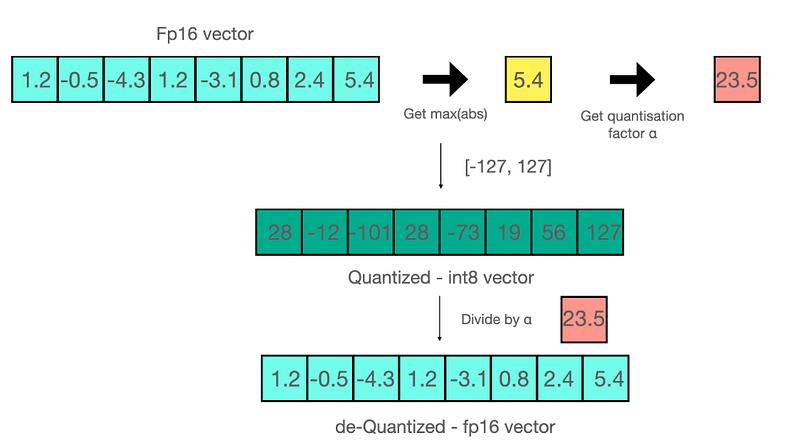
We can think that applying this method to a model would decrease its performance… But it is actually not the case! In the paper, it was shown that no performance degradation was witnessed for the tested models!
For more information about quantization, I suggest you check this blog post from the Hugging Face team.
Hugging Face provides a library,bitsandbytes , to load any LLM in its quantized version. It is also required to install the accelerate library. You can then load the quantized model with the from_pretrained() method using theload_in_8bits=True option.
import bitsandbytes
import accelerate
from transformers import AutoModelForCausalLM

model = AutoModelForCausalLM.from_pretrained("bigscience/bloom-3b",
                  device_map="auto", load_in_8bit=True)
The accelerate library handles the repartition of the model through the CPU and GPU memories, instead of storing the entire model in one.
However, as mentioned above, quantization can only be used for inferences. Therefore, it is not possible to train a quantized model…
But there is a solution.
Low-Rank Adapters (LoRA)
LoRA (Low-Rank Adapters) is a PEFT (Parameter-Efficient Fine-Tuning) technique consisting in adding untrained parameters to an existing pre-trained model. By freezing the rest of the parameters, only those new weights are trained.
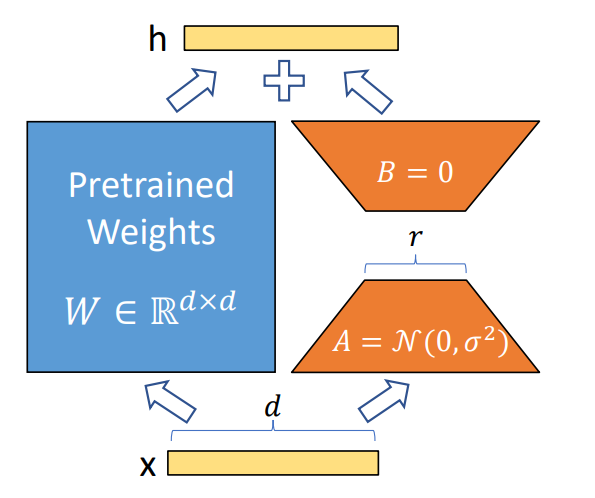
The motivation behind this technique is twofold.
Firstly, it decreases the risk of catastrophic forgetting when training a pre-trained model. In other words, by adding “new knowledge” into the model, there is a risk the model “forgets” its past learnings.
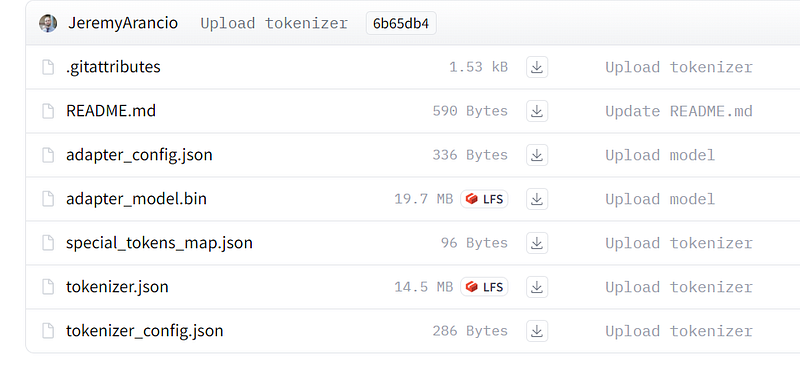
Secondly, with LLM becoming bigger and bigger, deploying several models into production would be challenging due to their size. With LoRA, only tiny checkpoints are required. These ones are worth a few MBs compared to the large checkpoints of a fully fine-tuned model, worth tens of GBs.
The small trained weights from PEFT approaches are added on top of the pretrained LLM. So the same LLM can be used for multiple tasks by adding small weights without having to replace the entire model.
Check the Hugging Face blog post about PEFT approaches.
Prepare the model
Now we explained the theory behind training a causal language model, it’s time to code!
After we import the model as shown previously, we need to prepare it for the training using the peft library.
As the blog post from Hugging Face suggests, we need to apply some post-processing on the 8-bit model to enable the training. First, we freeze all parameters from the native model.
for param in model.parameters():
  param.requires_grad = False  # freeze the model - train adapters later
Then we cast the layer-norm in float32 for stability.
import torch

if param.ndim == 1:
  # cast the small parameters (e.g. layernorm) to fp32 for stability
  param.data = param.data.to(torch.float32)
We also cast the output of the last layer in float32 for the same reasons.
class CastOutputToFloat(nn.Sequential):
    def forward(self, x):
        return super().forward(x).to(float32)
model.lm_head = CastOutputToFloat(model.lm_head)
We can then apply LoRA to our model.
from peft import LoraConfig, get_peft_model

lora_config = LoraConfig(
    r=16,
    lora_alpha=32,
    lora_dropout=0.05,
    bias="none",
    task_type="CAUSAL_LM" # set this for CLM or Seq2Seq
)

model = get_peft_model(model, lora_config)
Now let’s have a look at our new model. We are going to check the number of parameters that will be trained.
def print_trainable_parameters(model):
    trainable_params = 0
    all_param = 0
    for _, param in model.named_parameters():
        all_param += param.numel()
        if param.requires_grad:
            trainable_params += param.numel()
    return f"trainable params: {trainable_params} || all params: {all_param} || trainable%: {100 * trainable_params / all_param}"
print_trainable_parameters(model)
#trainable params: 4915200 || all params: 3007472640 || trainable%: 0.1634329082375293Of the overall parameters contained in the model, only 0.16% will be trained, corresponding to the adapters, which will drastically accelerate the training.
Train
To train our model, we will use the Trainer class provided by transformers associated with the data collator specific to causal language training: DataCollatorForLanguageModeling. As explained previously, the data collator will take care of padding the sequences and shifting inputs and labels.
from transformers import Trainer, TrainingArguments, DataCollatorForLanguageModeling
from datasets import load_dataset

hf_repo = "JeremyArancio/llm-tolkien"
dataset = load_dataset(hf_repo)

tokenizer = AutoTokenizer.from_pretrained("bigscience/bloom-3b")
trainer = Trainer(
    model=model,
    train_dataset=dataset['train'],
    args=TrainingArguments(
        per_device_train_batch_size=1,
        gradient_accumulation_steps=1,
        warmup_steps=100,
        weight_decay=0.1,
        num_train_epochs=3,
        learning_rate=2e-4,
        fp16=True,
        logging_steps=1,
        output_dir="outputs"
    )
    data_collator=DataCollatorForLanguageModeling(tokenizer, mlm=mlm)
We are now ready to train our model.
model.config.use_cache = False  # silence warnings
trainer.train()
The model is trained on 268 vectors, each one composed of 2048 tokens. That represents 548,864 tokens, which is a tiny portion of what Bloom-3B was trained on: 350B tokens. But remember that we only fine-tune a pre-trained.
It took ~2 hours to train the model on a 15GB GPU-T4, provided by Google Colab.
Once finished, we push the LoRA adapters to the hub using the push_to_hub() method. These adapters only weigh a few MBs!
model.push_to_hub(hf_repo)
Results
We load our fine-tuned model in two steps. First, we load the native model, here Bloom-3B with the pre-trained weights. Then we implement the adapters we have just trained to the model using peft .
from transformers import AutoModelForCausalLM, AutoTokenizer
from peft import PeftConfig, PeftModel

# Import the model
config = PeftConfig.from_pretrained(hf_repo)
model = AutoModelForCausalLM.from_pretrained(config.base_model_name_or_path, return_dict=True, load_in_8bit=True, device_map='auto')
tokenizer = AutoTokenizer.from_pretrained(config.base_model_name_or_path)
# Load the Lora model
model = PeftModel.from_pretrained(model, hf_repo)
Once loaded, we can start writing a sentence, and the model will complete it, using the generate() method.
prompt = "The hobbits were so suprised seeing their friend"

inputs = tokenizer(prompt, return_tensors="pt")
tokens = model.generate(
    **inputs,
    max_new_tokens=100,
    temperature=1,
    eos_token_id=tokenizer.eos_token_id,
    early_stopping=True
)
"""The hobbits were so suprised seeing their friend again that they did not
speak. Aragorn looked at them, and then he turned to the others.</s>"""We have now fine-tuned an LLM on our own data!
To conclude
With the latest innovations in deep learning, it is now possible to fine-tune an open-source LLM on any data at a low cost.
The time when companies were concerned by the risk of their data leakage by using OpenAI services is now over. Any organization can now have its own LLM for various cases: private internal documents, customers information, etc…
With these new possibilities will come new issues: deployments, monitoring, or preventing hallucination risks,… that organizations will have to tackle.
I hope you enjoyed the reading.
I publish regularly on Linkedin about my journey and learnings. You can also subscribe to my newsletter.
You can contact me on Linkedin, or even book a call.
Happy coding!
Where to find the code, model, and dataset
- Github repo containing the code
- HuggingFace model repo & LOTR text dataset
- Google Colab notebook where the model was trained (version Pro)
Resources
- Efficient Large Language Model training with LoRA and Hugging Face, by Philipp Schmid ❤
- Training a causal language model from scratch, a Hugging Face course
- A Gentle Introduction to 8-bit Matrix Multiplication for transformers at scale using Hugging Face Transformers, Accelerate and bitsandbytes
- 🤗 PEFT: Parameter-Efficient Fine-Tuning of Billion-Scale Models on Low-Resource Hardware
- LLM.int8(): 8-bit Matrix Multiplication for Transformers at Scale
- LoRA: Low-Rank Adaptation of Large Language Models
- “The Lord of the Rings” book


