
Create your Document ChatBot with GPT-3 and Langchain
AI assistants, also known as chatbots, are computer programs designed to simulate conversations with human users. They are powered by advanced Natural Language Processing (NLP) algorithms to generate responses.
With the recent development of Large Language Models (LLMs) such as GPT-3, we have accessed amazing capabilities to not only discuss with the machine but also to give specific tasks to achieve astonishing results. (prompt engineering)
These chatbots have the ability to understand and interpret human language, allowing them to answer questions and perform various tasks. They have found applications in various fields, including customer service, education, and entertainment. With the latest advancements in AI technology, chatbots are becoming increasingly sophisticated and are changing the way people interact with technology.
With GPT-3, provided by OpenAI, you have now the possibility to access a powerful model trained on a massive amount of data, and able to understand human language. The applications are infinite.
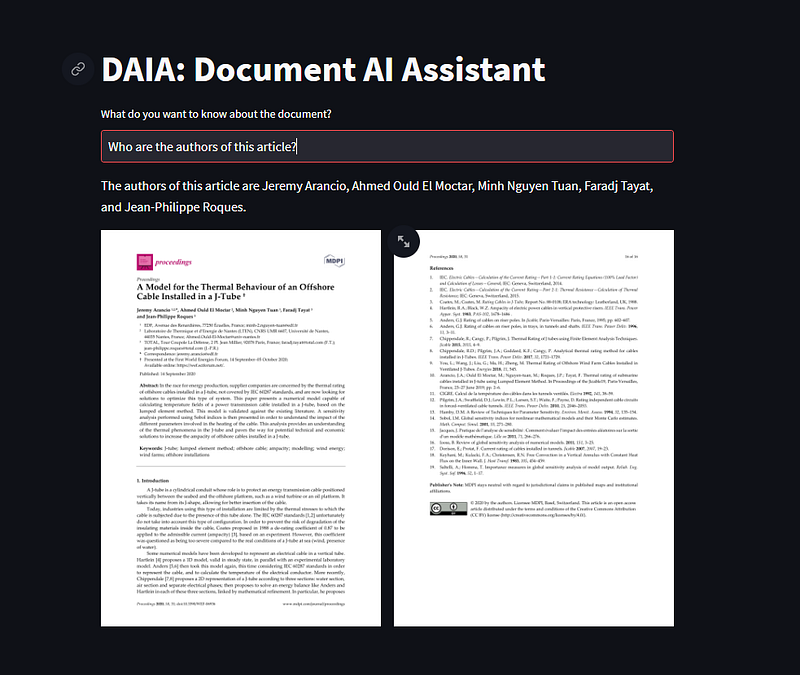
For example, one can build a chatbot capable of extracting any kind of information from a set of documents to a user’s question.
Through this article, I’m going to show you how to build your own Document Assistant from scratch, using GPT-3 and Langchain, an open-source library designed to work with LLMs.
Let’s go!
What is a Large Language Model?
A Large Language Model (LLM) is a type of neural network, such as the Transformer architecture. It has a comprehensive grasp of natural language due to its billions of parameters trained on vast amounts of text found across the internet.
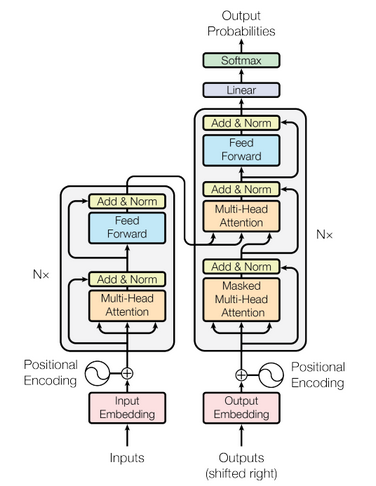
GPT-3 (for Generative Pretrained Transformer - version 3) is an advanced language generation model developed by OpenAI and corresponds to the right part of the Transformers architecture. It is capable of generating human-like text and performing various natural language processing tasks such as text completion, translation, and summarization.
GPT-3.5, its latest version, has been trained on a massive amount of data and has the ability to generate text that is coherent and contextually relevant. It has been widely recognized as one of the most powerful language models to date.
If you’re interested in understanding how the GPT architecture works, I can’t suggest you enough to check out this blog article by Jay Allamar!
In a few words, how the GPT architecture works?
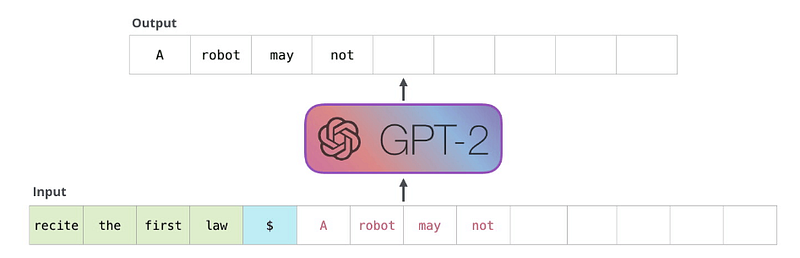
GPT is a next-token predictor, meaning it generates the next token in a sequence based on probabilities, starting from an initial prompt. Once a token is generated, it is stored in the “memory” along with the initial prompt.
The next token is generated, stored in the memory, and so on… The next token generation stops when the token EOS is returned (End Of Sentence).
Consequently, if you provide GPT-3 with a question in addition to a specific context, it can generate an accurate answer. However, the probabilistic approach employed by GPT-3 ensures that the generated text is well-written for human readers, but it does not guarantee the accuracy of the information provided. This phenomenon is referred to as model hallucination, which we will discuss in more detail later in the article.
The use of memory explains why ChatGPT keeps the history of the conversation and can be instructed precisely with a sequence of prompts. However, the history that GPT can consider is constrained by the number of tokens that can be incorporated into the architecture simultaneously. (remember that GPT is the decoder part of the Transformers architecture: the right part).
The current token limit for GPT-3.5 is 4097 tokens, equivalent to approximately 3000 words.
If the number of tokens is limited, how can we implement thousand of documents?
Glad you ask!
It is not feasible to input all of our documents into GPT-3. Even if we were to iterate over them to insert them into the memory, the token limit would cause the model to forget about the first documents.
Thus how can we bypass the limitation of tokens imposed by the model?
One solution is to select only the sections of text that pertain to the user’s question rather than attempting to input all documents.
And this is possible with the use of embeddings.
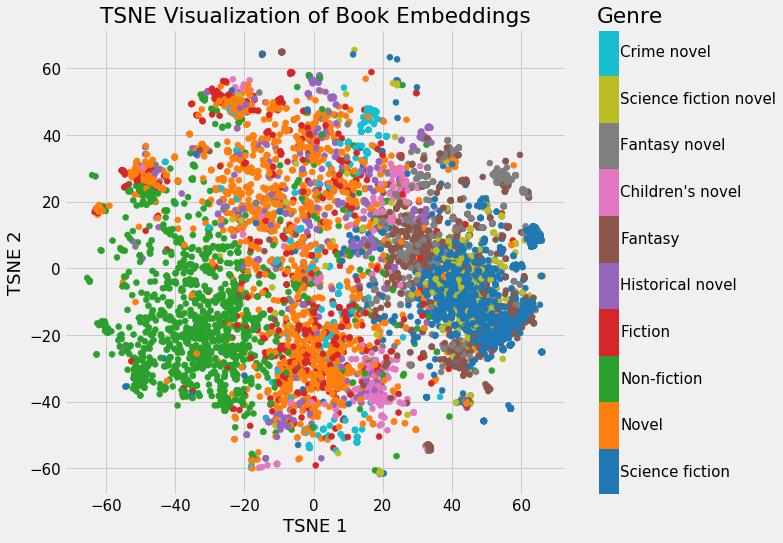
An embedding is the vector representation of a token or a group of tokens. Thus, the meaning of the text can be represented as a point on an N-dimensional graph, where N corresponds to the size of the vector or the number of axes.
Mathematical algorithms such as cosine similarity or euclidean distance can be employed to compare two vectors and estimate the similarity between a section of text extracted from documents and the user’s prompt.
This process is commonly referred to as similarity search, and it is a crucial component of the document assistant we are developing.
Building the application
The architecture of the application is quite simple:
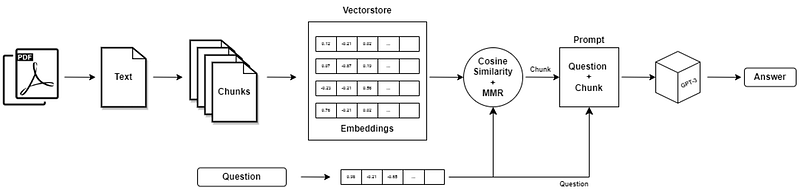
- Documents content is extracted using the proper Python library (PDF, PPT, Docx, …);
- The text is divided into chunks;
- Each chunk is embedded into a vector, the same for the user’s question;
- The most similar chunks to the question are picked;
- The question and extracted text chunks are fed as input prompts into GPT-3;
- An answer is provided.
The application is developed using LangChain, which is an open-source library designed to simplify the utilization of LLMs with Chain of Thoughts. This project has been gaining increasing attention over the past months, thanks to the success of ChatGPT.
Extract the text
The appropriate method must be employed based on the document format, such as PDF, PPT, DOC, and so on.
For Pdf documents, we use the library PyPDF2.
reader = PdfReader(file)
page_texts = [page.extract_text() for page in self.reader.pages]
text = " ".join(self.page_texts)
Divide the text into chunks
In order to use the document content as context for the GPT-3 prompt, the text must be divided into smaller sections or “chunks”. This enables the user to ask a question and search for the specific chunk that contains the relevant information.
We use the CharacterTextSplittertool from the LangChain library to achieve this goal. The parameters of the splitter, including the separator and chunk_size, are hyperparameters characterizing the chunk to avoid cutting the text in the middle of a sentence for instance.
from langchain.text_splitter import CharacterTextSplitter
text_splitter = CharacterTextSplitter(
            separator='\n',
            chunk_size=1300,
            chunk_overlap=0
       )
Vectorize the chunks
Each chunk of text is transformed into a vector using the embedding module proposed by OpenAI: text-embedding-ada-002. All information about this model is presented on the OpenAI official website.
To optimize the search similarity, LangChain made a collaboration with Chroma, an open-source library designed for vector search. Further details about the collaboration are on the official LangChain blog.
#!pip install chromadb
from langchain.vectorstores import Chroma
from langchain.embeddings.openai import OpenAIEmbeddings

embeddings = OpenAIEmbeddings()
Chroma.from_texts(
  texts=texts,
  embedding=self.embeddings,
  persist_directory=persist_directory, # Corresponds to the directory where the database is stored
  metadatas=metadatas
)
logging.info(f"All documents were processed and saved in {persist_directory}.")
Search similarity
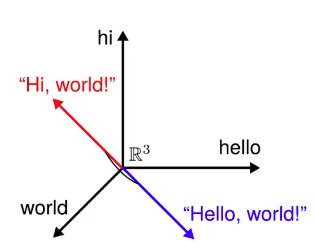
The user’s question is embedded in the same manner as the text chunks. The spatial representation of vectors enables us to determine which chunks are most similar to the user’s query.
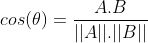
One possible method for estimating similarity is cosine similarity, which involves calculating the cosine of the angle between two vectors. The more similar two vectors are, the smaller the angle between them, and the closer the cosine value is to 1.
Langchain proposes an additional method to improve the search similarity result: Maximal Marginal Relevance. In short, it provides a good balance between the diversity of the selected chunks while preserving the ranking. This blog post explains perfectly the logic behind this algorithm.
Instruct the model
Once the chunks are selected, they can be implemented into the GPT-3 prompt. To obtain great results, the model has to be “fine-tuned” with a custom prompt.
This technique emerged along with the notoriety of the Large Language Model. It involves giving specific instructions to the model and guiding its “behavior” toward a particular objective. In our case, the objective is to retrieve information from documents.
# [Prompt]
prompt_template = """You are a Bot assistant answering any questions about documents.
You are given a question and a set of documents.
If the user's question requires you to provide specific information from the documents, give your answer based only on the examples provided below. DON'T generate an answer that is NOT written in the provided examples.
If you don't find the answer to the user's question with the examples provided to you below, answer that you didn't find the answer in the documentation and propose him to rephrase his query with more details.
Use bullet points if you have to make a list, only if necessary.

QUESTION: {question}

DOCUMENTS:
=========
{context}
=========
Finish by proposing your help for anything else.
"""
We “ask” the model to answer the user’s question based only on the provided examples: the chunks of text. This way we prevent hallucinations from the model.
Hallucination is a term used with LLMs to characterize generated texts that make perfect sense but are actually invented. For our solution, it is necessary to prevent this to happen.
In addition to instructing GPT not to generate irrelevant or false information, we also set the model’s temperature to 0. This means that GPT will choose the next token with the highest probability based on the previous ones. Setting the temperature to 0 reduces the likelihood of less plausible tokens being generated.
Code with LangChain
Now that we have explained all the principles behind the application, let’s start coding it with LangChain.
LangChain made the task very easy and can be done in a few lines of code.
def answer(
  self,
  prompt: str,
  persist_directory: str = config.PERSIST_DIR
  ) -> str:
        """From a question asked by the user, generate the answer based on the vectorstore.

        Args:
            prompt (str): Question asked by the user.
            persist_directory (str): Vectorstore directory.

        Returns:
            str: Answer generated with the LLM
        """
        LOGGER.info(f"Start answering based on prompt: {prompt}.")
        vectorstore = Chroma(persist_directory=persist_directory, embedding_function=self.embeddings)
        prompt_template = PromptTemplate(template=config.prompt_template, input_variables=["context", "question"])
        doc_chain = load_qa_chain(
            llm=OpenAI(
              openai_api_key=open_ai_key, # Put your OPENAI API KEY here
              model_name="text-davinci-003",
              temperature=0,
              max_tokens=300, # Maximal number of tokens returned by the LLM
            )
            chain_type="stuff",
            prompt=prompt_template,
        )
        LOGGER.info(f"The top {config.k} chunks are considered to answer the user's query.")
        qa = VectorDBQA(
            vectorstore=vectorstore,
            combine_documents_chain=doc_chain,
            k=4
        )
        result = qa({"query": prompt})
        answer = result["result"]
        LOGGER.info(f"The returned answer is: {answer}")
        LOGGER.info(f"Answering module over.")
        return answer
The code above performs the following tasks:
- The vectorstore containing the chunks and their embeddings is imported. It will be used for the search similarity and retrieving the selected pieces of text where the information the user wants is.
- The chain is prepared with the LLM (here OpenAI DaVinci-003, but it is totally possible to use a cheaper model, or even provide our own open-source LLM), the prompt template, and the chain type (here “stuff”). This chain type is the simplest because it stacks the k-selected chunks and inserts them into the prompt’s context we have created.
- The search similarity and the question answering are performed within the
VectorDBobject. We decide to select the top 4 (k) chunks to answer the user’s question. - The answer is finally returned to the user.
Conclusions
LangChain provides an easy way to build chatbots capable of retrieving information from a set of documents. There are many potential business applications for this technology, including:
- Customer service: Chatbots can be used to quickly answer customer queries about products or services, reducing wait times and improving customer satisfaction,
- Legal research: Lawyers and paralegals can use chatbots to quickly search through large volumes of legal documents and find relevant information for a case,
- Government: Chatbots can be used to help citizens find information about government services, such as taxes or permits.
And more…
Coupled with the power of LLMs, like GPT-3, and their understanding of Natural Language, the number of applications will only expand over the year. For now, OpenAI possesses a monopoly over GPT-3 access, shared with Microsoft.
Since the beginning of the year, we have been witnessing an acceleration in the development of LLMs, and many of them are now open-source: LLaMA from Meta, Open-Assistant by LAION-AI, Palm from Google (not open-source yet?) …
The opportunities in business are no longer a matter of “how”, but rather a matter of “when” and “what”, limited only by the creativity of developers.
As a result, it has become essential for companies to keep up with the latest technologies in order to provide their customers with the best possible user experience.
If you want to know more about Natural Language Processing, the rise of LLMs, or the latest trends in AI, follow me on Linkedin, Medium, and Github!
This work has be done in collaboration with Creative Dock.


