avatarChristianlauer

Free AI web copilot to create summaries, insights and extended knowledge, download it at here

1565

Abstract

One time lowercase, one time uppercase and one time the Czech letter <a href="https://en.wikipedia.org/wiki/%C4%8C">Č</a>.</p><div id="4ace"><pre><span class="hljs-keyword">SELECT</span> * <span class="hljs-keyword">FROM</span> UNNEST([ <span class="hljs-keyword">COLLATE</span>(‘Č’, ‘und:ci’), ‘c’, ‘C’ ]) <span class="hljs-keyword">AS</span> <span class="hljs-type">character</span> <span class="hljs-keyword">ORDER</span> <span class="hljs-keyword">BY</span> <span class="hljs-type">character</span></pre></div><p id="4237">Collation ensures that these are sorted according to their encoding.</p><figure id="f67f"><img src="https://cdn-images-1.readmedium.com/v2/resize:fit:800/1*Z3QeNZujd7jMNPhXgJ7ViA.png"><figcaption>Results — Image by Author</figcaption></figure><h2 id="58fc">The Language Tag</h2><p id="6401">When using collation you will need to use the language tag like you can see in the example. It determines how strings are generally sorted and compared. Allowed values for <code>language_tag</code> are[4]:</p><ul><li><code>und</code>: A locale string representing the <i>undetermined</i> locale. <code>und</code> is a special language tag defined in the <a href="https://www.iana.org/assignments/language-subtag-registry/language-subtag-registry">IANA language subtag registry</a> and used to indicate an undetermined locale. This is also known as the <i>root</i> locale and can be considered the <i>default</i> Unicode collation. It defines a reasonable, locale agnostic collation.</li></ul><h2 id="546e">The Collation Attribute</h2><p id="c61

Options

8">Additional to the language tag, the unicode collation specification must have a <code>collation_attribute</code>, which enables additional rules for sorting and comparing strings. <code>ci</code>: means that the Collation is case-insensitive [4].</p><h2 id="c962">Summary</h2><p id="3b79">A very handy feature that Google now provides in BigQuery. I hope the example helps you with the first steps. For all further information feel free to use the links below. Especially the documentation of Google should help you here, e.g. with which functions, expressions and operators you can use with this. You might be also interested in <a href="https://readmedium.com/normalize-and-casefold-in-bigquery-675c670976b0">“NORMALIZE AND CASEFOLD” in BigQuery</a>.</p><h2 id="a38f">Sources and Further Readings</h2><p id="c860">[1] Google, <a href="https://cloud.google.com/bigquery/docs/release-notes">Release Notes </a>(2022)</p><p id="711c">[2] Microsoft, <a href="https://docs.microsoft.com/en-us/sql/relational-databases/collations/collation-and-unicode-support?view=sql-server-ver15#:~:text=Collations%20in%20SQL%20Server%20provide,represented%20for%20that%20data%20type.">Collation and Unicode support</a> (2022)</p><p id="6de6">[3] Github, <a href="https://stackoverflow.com/questions/55596473/sql-server-latin-accent-sensitive-collation">SQL Server Latin Accent Sensitive collation</a> (2019)</p><p id="915b">[4] Google, <a href="https://cloud.google.com/bigquery/docs/reference/standard-sql/collation-concepts">Working with collation</a> (2022)</p></article></body>

Using Collation in Google BigQuery

How to Compare and Sort Strings easily with SQL

After Google has made headlines with new tools in the area of Data Lakehouse (click here for more info), there are now again novelties for Data Analysts working with BigQuery SQL. Google now offers the functionality of case-insensitive collation [1].

What is Collation?

Collation determines how your data is sorted and compared. It’s for example important when working international texts and chars. Collations provide sorting rules, case, and accent sensitivity properties for your data. Collations that are used with character data types, such as char and varchar, dictate the code page and corresponding characters that can be represented for that data type [2].
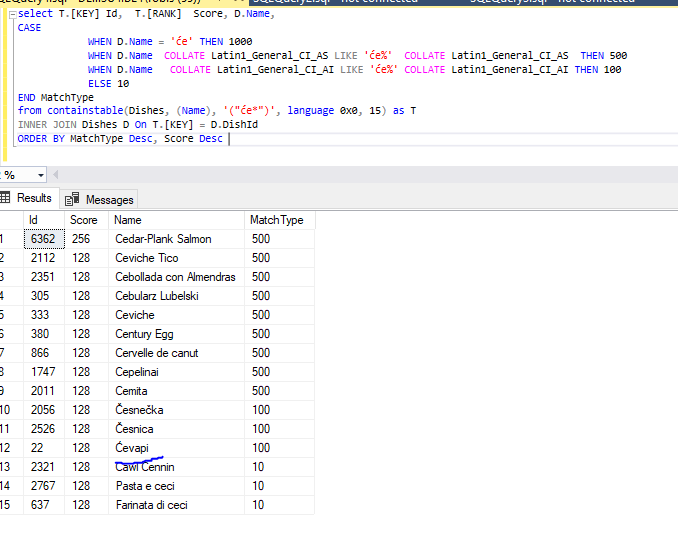
Example of using Collate in SQL with international letters — Source Github[3]

Example

Here is a small example of how to use it within BigQuery with distinctive representation of the letter ‘c’. One time lowercase, one time uppercase and one time the Czech letter Č.

SELECT * FROM UNNEST([
 COLLATE(‘Č’, ‘und:ci’),
 ‘c’,
 ‘C’
]) AS character
ORDER BY character

Collation ensures that these are sorted according to their encoding.
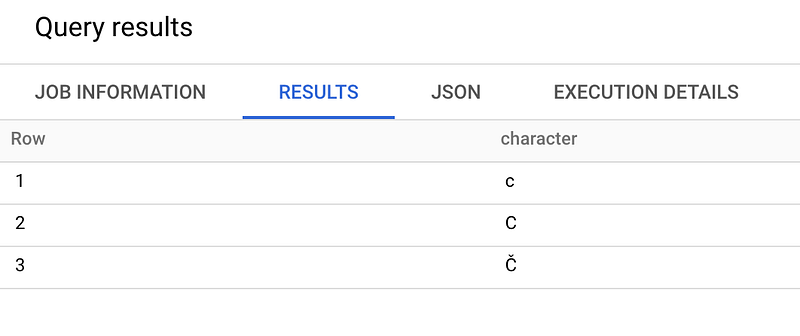
Results — Image by Author

The Language Tag

When using collation you will need to use the language tag like you can see in the example. It determines how strings are generally sorted and compared. Allowed values for language_tag are[4]:

  • und: A locale string representing the undetermined locale. und is a special language tag defined in the IANA language subtag registry and used to indicate an undetermined locale. This is also known as the root locale and can be considered the default Unicode collation. It defines a reasonable, locale agnostic collation.

The Collation Attribute

Additional to the language tag, the unicode collation specification must have a collation_attribute, which enables additional rules for sorting and comparing strings. ci: means that the Collation is case-insensitive [4].

Summary

A very handy feature that Google now provides in BigQuery. I hope the example helps you with the first steps. For all further information feel free to use the links below. Especially the documentation of Google should help you here, e.g. with which functions, expressions and operators you can use with this. You might be also interested in “NORMALIZE AND CASEFOLD” in BigQuery.

Sources and Further Readings

[1] Google, Release Notes (2022)

[2] Microsoft, Collation and Unicode support (2022)

[3] Github, SQL Server Latin Accent Sensitive collation (2019)

[4] Google, Working with collation (2022)

Data Science
Sql
Programming
Google
Bigquery
Recommended from ReadMedium