
“NORMALIZE AND CASEFOLD” in BigQuery
How to improve Data Quality when working with Strings

With the BigQuery SQL function NORMALIZE_AND_CASEFOLDyou have a wonderful possibility to work with strings with different Unicode encodings.
What was Unicode and the different Encodings again?
You can use Unicode to represent strings in multiple forms. With the ever-increasing adoption of Unicode , especially over the Internet, it has become necessary to eliminate nonessential differences in Unicode strings. Multiple representations for a combination of characters complicate software, for example, when a web server responds to a page request or a linker searches for a particular identifier in a library. So what may be rendered the same on the screen may have different encoding. Examples of different encodings [1]:
- 7-bit ASCII
- ISO 8859–1 Latin-1
- Utf-8 — 8-bit variable-length encoding
Example of different Encodings
To give you a concrete example: If you would display the different encoding of a string via Python, you would get different results. Here an example:
c = chr(0xa9)
print(c)
print(c.encode('utf-8'))
print(c.encode('iso-8859-1'))
The results showing the different encoding formats:
©
b'\xc2\xa9'
b'\xa9'
Normalization Modes in BigQuery
Google BigQuery supports four optional normalization modes [2]:
NFC: Normalization Form Canonical Composition Decomposes characters and reassembles them according to canonical equivalence. NFKC: Normalization Form Compatibility Composition Decomposes characters according to compatibility and reassembles them according to canonical equivalence. NFD: Normalization Form Canonical Decomposition Decomposes characters according to canonical equivalence and multiple combining characters are arranged in a specific order. NFKD: Normalization Form Compatibility Decomposition Decomposes characters according to compatibility and multiple combination characters are arranged in a specific order.
How to use “NORMALIZE AND CASEFOLD”
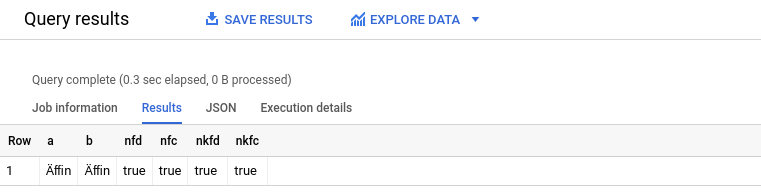
So let’s try it out, how we can apply the whole thing in BigQuery. Here are two strings that are encoded differently but actually represent the same thing.
WITH Strings AS (
 SELECT ‘A\u0308\uFB03n’ AS a, ‘Ä\uFB03n’ AS b
)
SELECT a, b,
NORMALIZE_AND_CASEFOLD(a, NFD)=NORMALIZE_AND_CASEFOLD(b, NFD) AS nfd,
NORMALIZE_AND_CASEFOLD(a, NFC)=NORMALIZE_AND_CASEFOLD(b, NFC) AS nfc,
NORMALIZE_AND_CASEFOLD(a, NFKD)=NORMALIZE_AND_CASEFOLD(b, NFKD) AS nkfd,
NORMALIZE_AND_CASEFOLD(a, NFKC)=NORMALIZE_AND_CASEFOLD(b, NFKC) AS nkfc
FROM Strings;And the expected results:
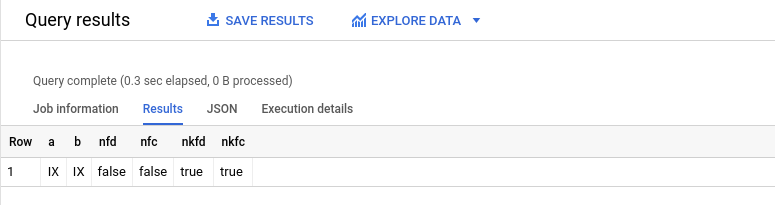
And now another try with values which will result is a false for certain normalization modes.
WITH Strings AS (
SELECT '\u2168' AS a, 'IX' AS b UNION ALL
)
SELECT a, b,
 NORMALIZE_AND_CASEFOLD(a, NFD)=NORMALIZE_AND_CASEFOLD(b, NFD) AS nfd,
 NORMALIZE_AND_CASEFOLD(a, NFC)=NORMALIZE_AND_CASEFOLD(b, NFC) AS nfc,
 NORMALIZE_AND_CASEFOLD(a, NFKD)=NORMALIZE_AND_CASEFOLD(b, NFKD) AS nkfd,
 NORMALIZE_AND_CASEFOLD(a, NFKC)=NORMALIZE_AND_CASEFOLD(b, NFKC) AS nkfc
FROM Strings;Here, we get a false for the NFD and NFC mode — here only the one with Compatibility Decomposition (NFKD and NFKC) is working:
Summary
This is a short description of the very practical function with which you can check strings to see if they have an identical encoding. Certainly not a function you use all the time, but it can be useful in data preparation — and it’s quite unique within SQL, so it’s worth mentioning that Google has equipped BigQuery with this function.
Last but not least a small Note: In BigQuery you can use the case folding for the caseless comparison of strings. If you need to compare strings and case should not be considered, use NORMALIZE_AND_CASEFOLD, otherwise you can use NORMALIZE.
Sources and Further Readings
[1] informIT, Operators and Expressions (2006)
[2] Google, NORMALIZE_AND_CASEFOLD (2022)


