
Tagging Tips for Increased Visibility
Tips and tricks for getting more eyes on your stories

Medium’s recent controversial decision to change the way our stories are distributed — from 100 Topics to 7 million Tags — has caused confusion for many writers. As is often the case from official Medium channels, the answers are few and the questions are many. How do we figure out what Tags are “official”? Which tags are most effective for our stories? If there are now 7 million Tags, how do we check where our stories appear?
Granted, they’ve told us how it’s different from the old system. The new Tag Pages no longer just feature curated work, but (theoretically) every story carriying that particular Tag. They now have three newstreams: Trending, Latest and Best.
I say “theoretically”, because there’s some things they are clearly not telling us about the new system. Sometimes, stories don’t show up on the relevant Tag Pages. And no matter how many of my prose poems are curated under the Poetry Tag, and no matter how diligently I tag them “Poetry”, they no longer show on the Poetry Tag Page. My guess? Some sub-genres of the original 100 Topics have an automatic “diverge” command that automatically re-routes relevant stories into the sub-genre Tag Page.
Apart from lauding how “granular” the new distribution system is, and encouraging us all to get down and dirty in Medium’s giant tagging sandbox, they’ve given little advice on how this impacts story visibility, and how to evaluate if your tagging strategies are working. Regardless, the ridiculously niche number of interests (translate that to “Tags”) readers can now indicate they want to hear more about certainly suggests some changes in Tagging strategies to improve visibility for your work.
I may not have all the answers — but I’ve been intensively researching, observing and experimenting with Tagging for quite a few months now, as well as blitzing Medium Support with questions — so I want to share my strategies and observations with you. In particular, I hope this article helps new writers on Medium, or those for whom the technical aspects of writing and publishing online feel a little challenging.
So, you’ve written a new story. Congratulations! Let’s move through some common questions and scenarios that crop up when you’re ready to tag your story.
Tagging 101: How do I check a Tag has an official Tag Page?
Theoretically, the more pages your story displays on, the more potential views. You don’t want to waste any of your 5 Tags — so you need to ensure you’re using official tags, not rubbish tags that will send your story into limbo.
At the moment, just typing a Tag name into the “Change Tags” section (top right drop-down menu in your story editor) won’t indicate clearly if there’s an official Tag Page.
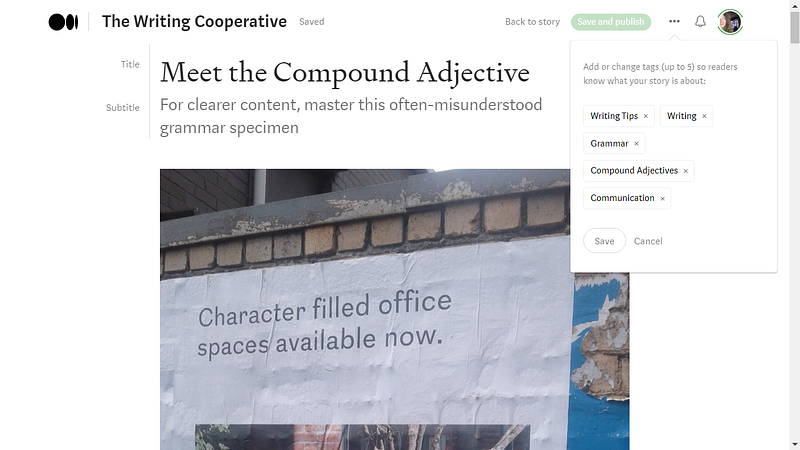
Misspelt tags and tags that one writer used once three years ago may appear. Sometimes you see the number of times the tag has been used in brackets, sometimes you don’t. These issues exist because Medium seems to invest little or no value in background data clean-up.
The quickest 3-step non-techie hack to check if the tag has a Tag Page (without having to type entire browser addresses into the search bar) is below. You can also use this method to check the Tag Pages your stories appear on after publishing:
- Go to your Home Page. Newbies — hit the Medium icon at the top of any page on Medium — yes, those three big blobby black dots some genius in marketing thought would make a distinguishing icon for Medium — when really it’s just a deformed ellipsis. No points for originality there, guys.
- Find where your Topics are listed (above the people you Follow on Desktop). These “Topics” now all lead to Tag Pages. Don’t worry about what they’re called for now. Medium doesn’t.
- Click on one. You’re now on a Tag Page. Say it is Poetry. Head up to the address bar. The text in the address bar should look like this: https://medium.com/tag/poetry
- Now backspace out the specific word(s) denoting the actual tag page (in this case “poetry”) and type in your own query. Let’s say it’s Prose. It will look like this: https://medium.com/tag/prose
- If it’s more than one word, type a dash (-) in between each word. Eg: short-story. Keep everything else the same. Hit Enter. https://medium.com/tag/short-story
- If the Tag Page exists, Medium will take you there. If it doesn’t, you’ll get an error page. Spoiler alert — both prose and short story have an official Tag Page. Experiment with similar, but slightly different words /phrases (singular instead of plural, for example) and you may hit Tag gold. But sometimes, certain tags don’t exist because the magic (yet unknown) number of writers aren’t writing about it yet.
NOTE: For those who’ve been writing here B.C (Before Changes), all those categories that were formerly Topics have their Tag Page equivalent. Remember, those old favourites that still have Top Writer Badges — such as: Family, Feminism, Productivity, Writing, Relationships, Nature, Mythology and Love. Use those to your little heart’s content — safe and sure in the knowledge that they still exist and your story will appear there. Theoretically.
Tagging Scenarios: Tips and Tricks
Now that you know how to search and research Tags, here are some more tips to help your Tags work for you. Now that Tagging has become user-directed, rather than system-centred (confirmed by me via Medium Support, but also stated in this official Medium article), this is all the more important to get right.
When should I create a new Tag?
There are reasons to start a new Tag Page. Here are a few:
- If you’re writing about something no-one’s ever written about here before —for example an emerging movement (think the “me too” movement when it was just starting) or a hot new musical artist. Use the Tagging 101 technique to check that your tag doesn’t exist yet.
- If you’re creating a writer’s challenge or prompt and want a specific tag for it. Eg: Scrittura Theme Prompt. Remember to tell all participants to use the Tag and boom — your prompt becomes searchable.
But while you’re being a maverick for your new Tag, make sure you allocate other Tags to established catgories. Otherwise you’ll be shouting into a black hole. I’ll talk more about Tagging strategies below.
When shouldn’t I create a new Tag?
- Don’t use your name for a Tag. That’s what your Profile Page and newsfeed is for — to group your work together. You’re just wasting a Tag.
- When your Tag is almost identical to a Tag or Tags wih established stories and writers. Go with one that has a Tag Page already — that people are Following — which means Medium is filtering off stories from that page into people’s apps and their Digests for Recommended Reading.
How Do I Evaluate if a Tag is a Quality Tag?
You’ve confirmed that the Tag you want to use has an official Tag Page. But you also want to ensure it’s a quality tag. Let’s look at a Tag Page to work through this.
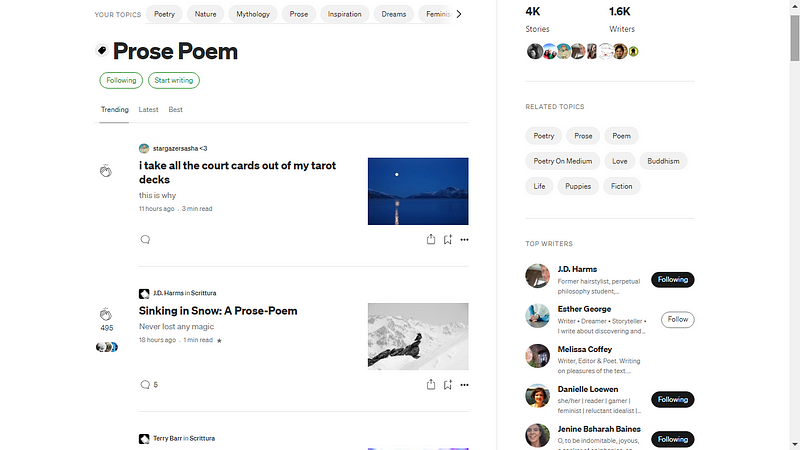
- Check the number of stories carrying this Tag (Top right area of screen). Is it 4 or 4K? The bigger the number, the more likelihood your story will be filtered to a larger number of readers.
- Check the number of writers using this tag and writing about it. (Top right corner) This can go both ways, and should be evaluated along with the impact of your other chosen tags. I’ll talk more about the cumulative effect of your 5 Tags below.
- Check a few stories under this Tag. Are they writing about similar things to you? If not, consider another Tag.
- Still unsure if this is your best option? Check the “Related Tags” segment for other, but similar Tag options. (Right side of page above the Top Writers)
Selecting your Tags: Go Macro & Micro
What do I mean by this? Consider the overall “coverage” of your 5 tags — make sure your Tags indicate both the big picture (macro) and some specifics (micro) of what your story is about.
Macro Tags
Start with the macro aspects of your story. Consider the following:
- Genre: I usually use one to denote the genre eg: Non Fiction / Prose / Poetry / Fiction. This helps readers who love particular genres and have indicated that in their interests to find their way to it.
- Theme / Subject: Many of the Tags that were formerly Topics fall under the category of a general theme or subject — such as Relationships, Nature, or Family — so ensure you use at least one of these Tags to catch the attention of the enormous potential readership on those more established Tags. The Page may show your story in the Trending or Latest stream, even if it’s not curated and even if you’re not a Top Writer — and give you good exposure that way.
Micro Tags
This is where many of the new Tag Pages come in. They’re about the micro details or, as Medium calls them — the granular aspects of the story. They allow people who are crazy for chocolate to go straight to the heart of what they love, instead of wading through all the food articles. Or people obsessed with ravens, above all other birds, to indulge their interest.
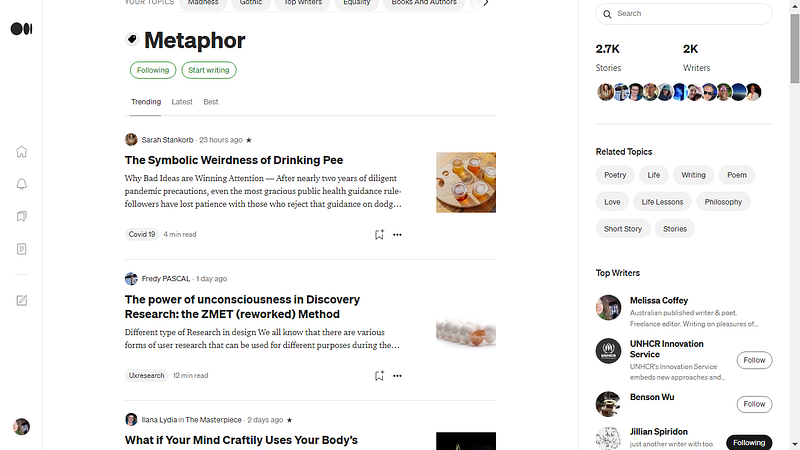
The newer Tag Pages also give you plenty of potential exposure. If there’s only 10 writers and 400 stories, this gives you an easy chance to be a Top Writer on the power of only a few stories with that Tag. For example, I’m now the #1 Top Writer in Metaphor — on the combined strength of of a poem, two prose poems and two articles.
Returning to the Subject Tag examples I refer to in the Macro section, when I wrote Oubliette a Fiction story (macro) about Relationships (macro), I use those two tags, but it’s also specifically about madness. I’ve done my research. I know there’s a Tag Page doing quite well about madness — so I use that for my micro tag.
I wrote a prose poem about ravens in the Gothic style. I tagged my story as Nature (macro) and Prose Poem (macro), but also I tag Gothic (micro) and Ravens (micro).
I wrote Motherlines, a personal essay about my relationship with my mother, her death from cancer, and the uncovering of a family secret. I used Non Fiction for the general genre tag (macro), Family for the general theme (macro), but I also used Memoir (micro) and now there’s a big choice of micro “family” sub-theme tags — such as mothers and daughters, family history and family secrets.
When you use the macro /micro approach, you’re hooking in to different audiences — both through big-picture genres and subjects, and more niche interests. This should help get more eyes on your story.
Tag Like A Pro: Tips to Go
To sum up:
- Research your Tags before you use them
- Don’t forget the dashes (-) between multi-word terms when you search
- Keep a running List. We writers tend to write about a particular selection of topics, subjects and themes. Set up a draft in Medium. Title it MY TAGS or something equally obvious. Keep a running list of the Tags you use regularly — and any notes on them you might find useful.
- Think Macro and Micro when you Tag. Remember to indicate: genre, general theme / subject, sub-genres and niche (micro) aspects.
- Top Writer Tagging Tip: You can return to already-published stories and give them new tags to have subsequent views count (from the date you change the Tag) towards that Tag. So if you’re aiming for a Top Writer Badge or already have one, this strategy allows more views to get — and keep — you there.
- You can change your Tags post-publishing. If you think of more appropriate Tags after you hit Publish, you can change them through Medium Editor.
- Follow the Tags you write about and/or are interested in reading about. Tell Newbies to do the same. The system doesn’t work as well for anyone if only a few people are doing this.
I hope these tips help writers to increase visibility for their stories. For more information about the new Tag Pages, you can also check out my story below.
Until then — Keep Calm & Keep Tagging!
For Writers of short poems & Micro-Fiction: