
Why a Dual Monitor Setup Will Never Make Me (More) Productive
But instead, I continue to use multiple screens and Ethan.

There are days when I wake up and look at my work desk setup. And I tell myself, I must get a second monitor that will help me become more productive as a writer.
And an inner voice will say, get yourself a coffee that will kick your day and become productive. So I follow my inner voice and make myself a cup of coffee.
Men need more gadgets.
This may sound sexist, but men love gadgets, or that’s what I would like to believe, and I am no exception. Although, this has been debunked already.
I still salivate whenever I read about the new iMac or the new iPhone 12. But Mark Ellis “makes” me want them more.
I always think I need them, but on the contrary, my 5-year-old laptop does the work, and my iPhone 6 still works.
I am not here to argue why people think setting up a 4K monitor as a secondary monitor would make them more productive.
Like everything about life, there’s no one-size-fits-all when it comes to making a decision. And that includes, should you buy a second monitor or not?
Working from home is ideal for some people. But it’s not for everyone. For me, working from home has been an incredible experience, but it did take some getting used to. While many people may have used dual monitors in their office, many are now left with one monitor while working from home.
Why you need a dual monitor setup
Having a dual monitor setup is one of the best ways to increase your productivity and efficiency while you work. You can have one monitor for your email, calendar, to-do list, Twitter feed, etc.
Let me cut myself here. A second screen for Twitter feed?
I'm sure others can multitask, but keeping my eyes on two screens has constantly distracted me. That is why even when I talk to people, most of the time, I flip my phone. It really helps me focus on the person I am talking to not get distracted by my phone anymore.
Lorie Marrero, an organizational expert, gave us a rundown of when two monitors could be helpful, broken down by the four Cs: checking, comparing, compiling, and centralizing.
Checking is job-oriented vigilance. If you need to have your eye on one set of information at all times — watching system status, stock prices, or a corporate social media feed, for example — a two-monitor setup is useful to keep information in place while you complete other tasks.
Comparing means you have multiple documents to look at — say, an Excel sheet on one monitor, a Web page with data on another, and a Word doc on a third — and you need to synthesize all of that information onto one page.
Compiling is for pulling data rather than synthesizing information.
Centralizing is a technique where you start with your inbox and your calendar and you branch off and then come back to those things, because you’re constantly scheduling, writing email messages, or performing other tasks.
Source: The New York Times — Two Monitors, or Not Two Monitors: That Is the Question
The downside here is that you end up having to feed two monitors with your time. And for me, I can’t focus when my eyes go from one screen to another.
Best to use two monitors.
When I was planning on buying a second monitor, I did due diligence. And began looking for the cheapest 4k monitor, but it didn’t stop there. I also “need” a bigger desk to accommodate my soon-to-be 27-inch 4k monitor.
I had to stop myself literally and applied some Zen intervention. With some luck, I read about the single monitor manifesto by Corey House.
Corey House, in the article he wrote, nailed it for me. He said it best, focus.
And while it makes me feel I am a badass writer and computing machine. Do I really need to have an elaborate desk setup with a new computer, an ergonomic chair, and a dual monitor setup? Am I trying to you impress anyone? Is this to feed my ego?
So I dumped the idea of a dual monitor setup and joined a growing group of people who will be forever single, I mean a single monitor guy. And as Corey House wrote, we are not alone.
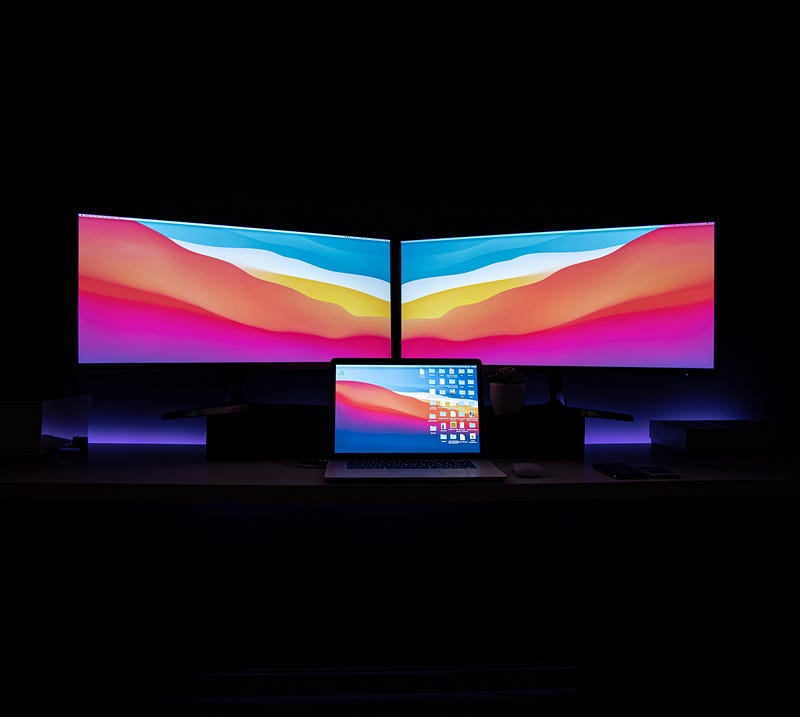
My multiple screen setup.
Because I worked hard and was rewarded with a $500 writing bonus, I call it my happy money. I bought myself a Google Chromecast with a TV and a Google Nest Mini smart speaker.
And I would say get yourself one. It is better than investing in a dual monitor setup, especially if you are a writer like me.
I use my Google Nest Mini speaker to help me become the writer I want to be, and that is to be a writing machine.
Oh, it is actually an ongoing love affair.
But here are the three things my Google Nest Mini Speaker Does
- Ethan plays Spotify music. — To get me inspired as I write, he plays me LoFi sounds.
- Find my answers — In between writing, if I am lost with words, I ask Ethan or Google assistant to you for words. Ethan is a sesquipedalian.
- To-do list — Get myself more productive each day, and Ethan gently reminds me if I am spending a lot of time doing nothing.
Yes, I call my Google Assistant, Ethan.
Ethan does more. He does most of the jobs I can think of doing on a second screen.
My Google Chromecast with Google TV transformed my old non-smart TV into an entertainment powerhouse. It is also another screen that I use. If I want a bigger screen to read an article, I cast a Google Chrome tab on the TV.
With the new Google Chrome cast with Google TV, it is easy-peasy. Did I use that word?
Hey, Google (Ethan), what does easy peasy mean? (Love) it means very easy or lemon squeezy.
Also, after fixing my 5-year-old laptop, it feels brand new that I can open as many tabs as I write.
Too much of anything becomes its opposite . — Tim Ferriss
How to set up your own dual monitor setup
Again, whatever works for you, you can find tons of information on the topic.
There are alternatives to a second monitor set up like a virtual desktop. You may also want to check your current computer. It may only need a simple RAM upgrade. And with additional RAM, your laptop will not hang when you open multiple tabs.
Dual Screen Setup for Desktop Computer Monitors
1.Set the Primary and Secondary Monitor
2.Set the Monitor Resolution
3.Set the Monitor Display Style
4.Set the Monitor Position
Final Words
We will discover on our own what works best for us. Still, studies on dual monitor setup remain inconclusive — especially this one showed that increasing display size increased people’s productivity.
It didn’t seem to matter that the research was sponsored by Dell and NEC, among other monitor manufacturers. Now two-monitor setups, once the rarefied domain of Wall Street and Silicon Valley, have become de rigueur in office parks across America.
“Choice has made us not freer but more paralyzed, not happier but more dissatisfied.” — by Barry Schwartz in his book, The Paradox of Choice: Why More Is Less
I know for sure that productivity should not be my only goal. I already am doing too much.
We keep on chasing work and forget we are here to enjoy life. Keep the work and life balance. I try my best.
Disclosure
As an Amazon Associate, I earn from qualifying purchases.