
Do you know where your certificates reside when you use AWS ACM with a “Trusted Enclave”?
ACM.426 I was surprised at what I discovered when digging into the details
~~~~~~~~~~~~~~~~~~~~~~~~~~~~~~~~~~~~~~~~~~~~~~~~~~~~~~~~~
⚙️ Part of my series on Automating Cybersecurity Metrics. The Code.
🔒 Related Stories: Encryption | Application Security
💻 Free Content on Jobs in Cybersecurity | ✉️ Sign up for the Email List
~~~~~~~~~~~~~~~~~~~~~~~~~~~~~~~~~~~~~~~~~~~~~~~~~~~~~~~~~
In my last post I explained how to import the default route table for a VPC into your CloudFormation templates.
I got sidetracked for a minute (as always) and I need to wrap up some other thoughts on the brain which are related to deployment of static websites. Currently I’m deploying static websites in a Lambda function but eventually I have other ideas about web sites on web servers and I also needed a TLS certificate for another tool I was trying to deploy recently….which leads me to this post.
I typically just use AWS ACM certificates because I’m generally deploying static websites using Lambda functions, for example. For example, I deploy a static website to test for cross-site scripting flaws that can send requests to my own websites to do nefarious things. 😈
I was look at different ways to automate a private instance of Burp Collaborator — and that comes with certain challenges in regards to certificates. Most of the examples I see tell you to use Let’s Encrypt with a validation method that requires you to run a web server on your host. What? No thank you. More on that in another post but first, I really just wanted to use an AWS Certificate Manager certificate. I looked into that possibility and how that might work.
The key thing is that you need the certificate on your EC2 instance for end-to-end encrypted traffic. You also need to generate the certificates and provide them to Burp Collaborator in a manner it understands.
You need to use a wildcard TLS certificate for your domain name to make TLS connections to the Collaborator server. Can we create a wildcard certificate with ACM? Yes.
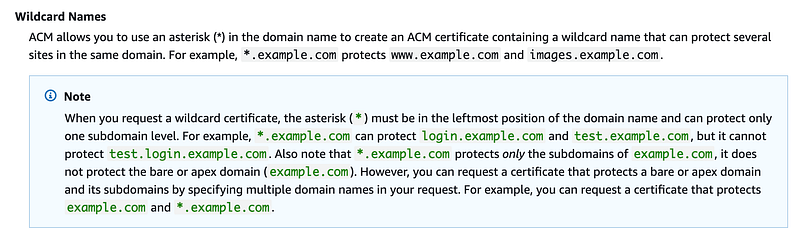
When you create an AWS ACM certificate you can only use it with certain services. The services are listed here:
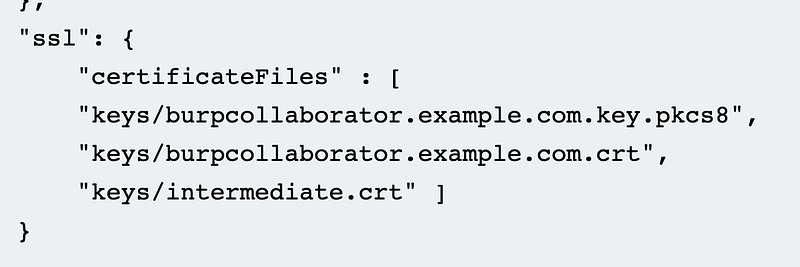
Burp Collaborator wants you to point your configuration to files on your system in order to work with HTTPS.
Can you create an AWS TLS certificate and use it with EC2? Note the warning at the top of the page:

You have to use a Nitro Enclave. I wrote about Nitro Enclaves here:
That sounds more secure. But will it work with Burp Collaborator, which wants you to point to the SSL Certificate files it needs?
Where do your certificate files end up when you use a Nitro Enclave?
Here’s what AWS has to say about that:
Previously, when running a web server on an EC2 instance, you would have created SSL certificates and stored them as plaintext on your instance. With ACM for Nitro Enclaves, you can now bind AWS Certificate Manager certificates to an enclave and use those certificates directly with your web server, without exposing the certificates in plaintext form to the parent instance and its users.
SSL in the above should be changed to TLS but generally people know what they mean.
Cool, but can we use it with Burp Collaborator?
Currently, ACM for Nitro Enclaves works with NGINX servers and Apache HTTP servers running on Amazon EC2 instances to install the certificate and seamlessly replace expiring certificates. Support for additional web servers will be added over time.
Doesn’t sound like it. But let’s take a closer look at ACM with Nitro Enclaves.
First of all, here are some considerations.
- ACM for Nitro Enclaves only supports RSA certificates. This may be an issue if this SSH vulnerability related to the RSA encryption algorithm expands to other scenarios. NIST is generally recommending ECC these days.
- ACM for Nitro Enclaves is available for Linux instances only. It is currently not supported on Windows instances.
- ACM for Nitro Enclaves is not available in all regions.
How would this work, if it did work with Burp Collaborator?
Here’s the configuration for Apache.
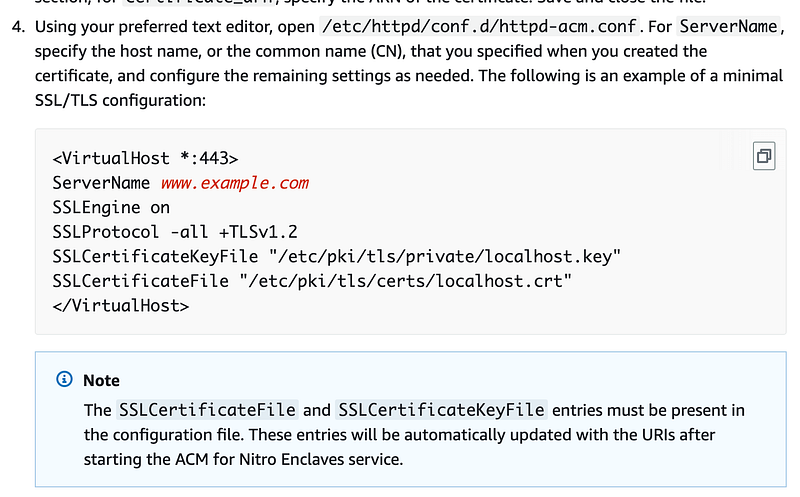
So is AWS changing your configuration file? I don’t like that at all. I’d rather get the value I need to set in that file and deploy the change myself.
The above configuration file looks similar to the Burp Collaborator configuration but I definitely do not want to have a service running on my system updating that configuration file. What happened to the concept that AWS never touches customer data? This implementation does not seem to align with prior AWS architectural principles. What happens if the service inadvertently mangles the file? Not a fan.
I’m also looking at the role you have to assign to your EC2 instance to use this service. Personally, I’m trying to avoid roles on EC2 instances except where necessary these days. There are valid use cases and they were all nifty at first but one of the primary ways application credentials get compromised on AWS. The pass role permission in IAM is one of the main culprits. If and when I do grant a role I will always look what that role can do pretty carefully.
Let’s take a look at the proposed policy in the documentation:
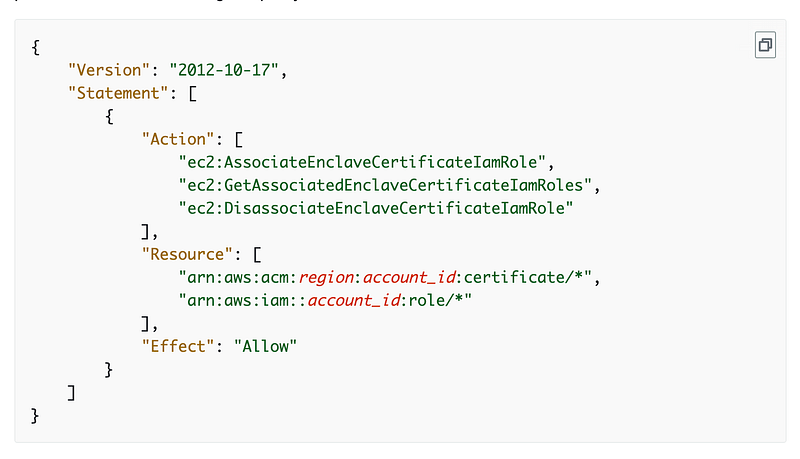
Am I reading correctly that this role gets access to any certificate in your account and any role.
What?
If I grant permission for a specific server it should only get permission to access the certificate associated with that specific application.
I also only want to allow the access to the required role. What are the required roles in the resources section? It appears those are the roles that are allowed to access the certificate also listed in the resources. So any role can access any certificate?
Hopefully I’m reading that wrong. Maybe some other part of the process provides additional limitations on role assumption and access to certificates. I would need to dig into the details to see how it works but I will explain why I’m not doing that right now below.
This is a case where you are using a security feature to increase security in theory but may create other security risks in the process if you are not careful. Make sure you understand what permissions you grant to what and make them specific.
So what does AssociateEnclaveCertificateIamRole do actually?
The role that is added to the above policy can access the certificate, certificate chain, and encrypted private key in an Amazon S3 location that only that role can access. So it sounds like the ACM service is putting the certificate details into an S3 bucket, or perhaps that is where it deploys them in the first place.
But this doesn’t sound like what I think of when I think of a trusted enclave. You can call a trusted enclave whatever you want and build it in hardware or software. So skip the semantics arguments please.
A trusted enclave was initially something in hardware on the device that generates the encryption keys and certificates it uses. They never leave the hardware security module where they are created.
Azure was the first to offer trusted execution environments (TEEs). The solution is implemented in hardware and you can read more about there here on the Microsoft Azure website:
I searched around to find AWS documentation on TEEs and found this — so it sounds like someone is using TEEs at AWS.
Perhaps a Nitro Enclave is or provides a TEE but it’s not generating the keys in the traditional sense of an on-device hardware security module (HSM) or a Trusted Platform Module (TPM) as it’s often called when embedded into a piece of hardware.
Side note: when I worked at a particular security vendor, the head of engineering before me was blocking the use of a TPM in the product at the security company for whatever reason. People on the engineering team wanted to use them but the head of engineering had a process that validated devices using MACs (which is known to be insecure and especially if using routable MACS with IPv6!) Why? I don’t know. He left so I didn’t get a chance to ask him what the reasoning was for this decision.
The beauty of an on-device TPM is that certificates and keys are generated in the hardware on that device. They never leave that device or are accessible to anyone else. Even the people who manage the device can’t access the certificates and keys in that hardware module or ever see them. So essentially, those certificates and keys can be used to identify the device. No one else can every have them or access them so you know the operation involving those keys or certificates occurred on that device.
So how does that help in the case of a TLS certificate? A TLS certificate is device dependent. Most people think of encrypting traffic with a TLS certificate. That’s only part of it. The TLS certificate also verifies you are getting to the correct server for that website. So the beauty of only ever generating the certificate on the server itself and never letting it “escape” or let anyone see it means that someone else hasn’t stolen the certificate and tried to use it elsewhere.
I would think an TLS certificate could be created on a particular hardware associated with a VM and never leave that hardware or be stored in an S3 bucket at all. Why would you need an encrypted copy in an S3 bucket if it the certificate was generated in a TPM associated with the VM that is using the certificate? What if someone gets access to the S3 bucket or the encryption key that encrypts that private certificate?
The other problem with this approach is that you have to open up your server to the AWS S3 service on the network, even if you are not using AWS S3. That’s not ideal. But then almost every application uses S3…is it in an S3 bucket that you can restrict to your VPC Endpoint? Likely it is a bucket controlled by AWS but I didn’t dig into all of that.
I’m not sure how and why AWS made this decision to put your certificates in an S3 bucket. Perhaps there is a good reason, but it is not what I was expecting to find. I love S3 but when it comes to encryption keys and certificates, it has a pretty large attack surface. Werner Vogels wrote about the architecture here:
It also won’t work with Burp Collaborator anyway, so I’m going to move on and look at some other options. I don’t want to run something on my instance that has access to change my configuration files either.
Someone might argue — well the data is only decrypted in the TEE (Nitro Enclave) — which I presume is the case. The private certificate is stored encrypted in the bucket and then pulled down into the TEE where it gets decrypted and is then used with the encrypted data, so the sensitive data is never exposed outside the TEE.
Ok let me think about that for a minute. Someone can access the encrypted private key in the S3 bucket. In that case, you better make darn sure that no one has access to the key that can decrypt that private ACM key besides the process that is supposed to be allowed to do that.
So where is that key that is allowed to decrypt the private TLS certificate in the S3 bucket. Is that inside the enclave? Was that created on the specific hardware that is using the TLS certificate?
So this is where some of the information in my prior post on trusted enclaves comes into play. There’s a process for attestation and use of the key that can decrypt the data.
And that’s where I’m going to stop today. Because the above implementation first of all won’t work and second of all is not something I want to run on systems where I’m hacking into other people’s servers. I could spend a lot more time on this and it could be fine for a front-end web server but I’d have to look into it in more detail. Maybe I will later.
If you simply deploy a TLS certificate on your Load Balancer, then the traffic from your load balancer to your EC2 instance is not encrypted. That’s not ideal either. If you are looking at that versus the keys in an S3 bucket perhaps the bucket solution is better, but my first take on it is that it is not ideal. I’d rather just have the TLS certificates created in something in hardware on the device and they never leave that device.
What about rotation? TPMs have APIs that you could call to automate the rotation of the key.
What if the VM goes down? Either you could take that TPM and associate it with the new VM (other risks to consider there) or generate a new certificate associated with the TPM for a new VM and do whatever the steps are to deploy it as you did in the first place. I presume that could be automated as well. The issues with the VM going down are that you need to make sure someone can’t take down a VM and redeploy it to gain access to the certificates and keys somehow.
Just some ideas and thoughts — untested so I don’t know if and how they would actually work.
By the way, back in the day when I was running e-commerce web servers I was using mostly Digicert or Verisign certificates with Java KeyStore.
With a TPM I would expect that you could essentially take that KeyStore and stick it into the hardware enclave specific to that device. “Just” is a dangerous word, but that implementation seems much simpler, host-specific, with less points of potential compromise. Then the services call APIs associated with the TEE to generate a new certificate or keys. They never have access to or see the certificate -it’s all in hardware in the enclave associated with that device.
In fact, if AWS used a method where you could just add a wrapper that looked and worked like Java KeyStore, then it would work with Burp Collaborator. The documentation shows you how to use Burp Collaborator with Java KeyStore. It would work for a lot of other Java-based web servers as well. I’ve used Tomcat, JBoss, Jetty (which used to be my favorite) and others.
Not sure why AWS did not implement it that way. If they did, you likely wouldn’t need to add an IAM role like the one above to use the ACM grant access to a role and an ACM certificate at all. You would grant access to the ACM service to rotate the keys on the specific hardware associated with your VM. No S3 buckets involved!
The downside I can think of in a device-specific hardware solution is that perhaps AWS is attempting to maintain segregation of duties somehow by splitting all these things up, but I am not sure if that actually increases or decreases the risk. In addition, the device-specific solution may be more expensive and time consuming to deploy. I presume if they are using a hardware solution, the time to encrypt and decrypt would be similar. The on-device solution should eliminate network latency and nay issues with DNS, BGP, or access to S3 over the network. Pros and cons.
In any case, be aware of where your keys actually exist, even if encrypted, and who has permission to access those locations via the network and IAM, and who can access the KMS keys used to decrypt that data.
Follow for updates.
Teri Radichel | © 2nd Sight Lab 2024
About Teri Radichel:
~~~~~~~~~~~~~~~~~~~~
⭐️ Author: Cybersecurity Books
⭐️ Presentations: Presentations by Teri Radichel
⭐️ Recognition: SANS Award, AWS Security Hero, IANS Faculty
⭐️ Certifications: SANS ~ GSE 240
⭐️ Education: BA Business, Master of Software Engineering, Master of Infosec
⭐️ Company: Penetration Tests, Assessments, Phone Consulting ~ 2nd Sight Lab
Need Help With Cybersecurity, Cloud, or Application Security?
~~~~~~~~~~~~~~~~~~~~~~~~~~~~~~~~~~~~~~~~~~~~~~~~~~~~~~~~~~~~~
🔒 Request a penetration test or security assessment
🔒 Schedule a consulting call
🔒 Cybersecurity Speaker for PresentationFollow for more stories like this:
~~~~~~~~~~~~~~~~~~~~~~~~~~~~~~~~~~~~~~~~~~~~~~~~~~~~~~~~~~~~~
❤️ Sign Up my Medium Email List
❤️ Twitter: @teriradichel
❤️ LinkedIn: https://www.linkedin.com/in/teriradichel
❤️ Mastodon: @teriradichel@infosec.exchange
❤️ Facebook: 2nd Sight Lab
❤️ YouTube: @2ndsightlab


