avatarMunish Goyal

Free AI web copilot to create summaries, insights and extended knowledge, download it at here

12607

Abstract

d="617e"><i>Here:</i></p><ul><li>The return value is a <code>SparkSession</code> object.</li><li><code>master(master)</code> sets the Spark master URL to connect to, such as <code>"local"</code> to run locally, and <code>"local[4]"</code> to run locally with <code>4</code> cores, or <code>"spark://master:7077"</code> to run on the Spark standalone cluster.</li><li><code>appName(name)</code> sets a name for the application, which will be shown in the Spark web UI. If no application name is set, a randomly generated name will be used.</li><li><code>config(key=None, value=None, conf=None)</code> sets a config option. Options set using this method are automatically propagated to both <code>SparkConf</code> and <code>SparkSession</code>‘s own configuration.</li><li><code>getOrCreate()</code> gets an existing <code>SparkSession</code> or, if there is no existing one, creates a new one based on the options set in this builder.</li></ul><h1 id="eac1">Functional programming languages and Distributed systems</h1><p id="4045"><b><i>Why we need functional programming for distributed systems?</i></b></p><p id="c8bd"><i>Spark uses functional programming language, Scala. The reason behind this is that functional programming is perfect for distributed systems.</i></p><p id="50df"><i>In functional programming, if <code>f(x) = x + 5</code>, then <code>f(3)</code> is always <code>8</code>. But, this is not always true in non-functional languages such as Python. For example,</i></p><div id="5ffd"><pre><span class="hljs-attribute">w</span> <span class="hljs-operator">=</span> -<span class="hljs-number">2</span></pre></div><div id="473a"><pre><span class="hljs-keyword">def</span> <span class="hljs-title function_">f</span>(<span class="hljs-params">x</span>): <span class="hljs-keyword">global</span> w w -= <span class="hljs-number">1</span> <span class="hljs-keyword">return</span> x + w + <span class="hljs-number">10</span></pre></div><div id="60f7"><pre><span class="hljs-function"><span class="hljs-title">f</span><span class="hljs-params">(<span class="hljs-number">3</span>)</span></span> <span class="hljs-function"><span class="hljs-title">f</span><span class="hljs-params">(<span class="hljs-number">3</span>)</span></span></pre></div><p id="6bdb"><i>As a result, running the same code again can give different results. The problem in this example is easy to see, not that easy when you have dozens of machines running code in parallel, and sometimes you need to restart a calculation if one of the machines has a temporary issue. These unintended side effects can lead to a major headaches. The confusion comes from sloppy language.</i></p><p id="3d88"><b><i>How DAG and lazy evaluation helps in the running of memory:</i></b></p><p id="1330">Just like bread companies make copies of the starter from their mother dough, <i>every Spark function makes a copy of its input data and never changes the original parent data (that is, <b>original data is kept immutable</b>)</i>. Because Spark doesn’t change or mutate the input data, it is known as immutable. This makes sense when you have a single function, but in case you have multiple functions, then you chain together multiple functions that each accomplish a small chunk of the work. You’ll often see a function that is composed of multiple sub-functions, and in order for this big function to be peer, each sub-function also has to be a peer. It would seem that Spark needs to make a copy of the input data for each sub-function. If this was the case, your Spark program would run out of memory pretty quickly.</p><p id="3160">Fortunately, Spark avoids this by using a <i>functional programming concept called <b>lazy evaluation</b></i>. Before Spark does anything with the data in your program, it first builds step-by-step directions of what functions and data it will need. These directions are like recipes of your bread, and in Spark this is called a <b>Directed Acyclic Graph (DAG)</b>. Once Spark builds the DAG from your code, it <i>checks if it can procrastinate, waiting until the last possible moment to get the data</i>. Thus, spark has the opportunity to <b><i>optimize the overall transformation process</i></b>. This is exactly what you would do if you were making bread. You want to grab the flour, bring it back to your bowl, and then go back to the pantry and get some sugar and add it to the bowl, and then go back to the cupboard for the salt, and so on for every ingredient. This would be the cooking equivalent of thrashing. Instead, you look at the recipe before you start mixing ingredients together to see what you can grab and mix together in one big step. In fact, you often mix all your dry ingredients, then mix all your wet ingredients, and combine them together before baking. In Spark, these multi-step combos are called stages.</p><p id="544d"><b><i>Functional programming in Python:</i></b></p><p id="5f74"><b><i>Anonymous functions</i></b><i> can be thought of as a Python feature for writing functional-style programming.</i></p><h1 id="efdc">Declarative Programming vs. Imperative Programming in Spark</h1><p id="3e94"><b><i>Declarative programming</i></b><i> is concerned with <b>What</b> and in Spark can be done with <a href="http://spark.apache.org/docs/latest/api/python/pyspark.sql.html#pyspark.sql.SparkSession.sql"><b>Spark SQL</b></a> using <a href="https://spark.apache.org/docs/latest/api/sql/index.html">Spark SQL built-in functions</a>. Whereas, <b>imperative programming</b> is concerned with <b>How</b> and in Spark can be done with <a href="http://spark.apache.org/docs/latest/api/python/pyspark.sql.html#pyspark.sql.DataFrame"><b>Spark DataFrames and Python</b></a>.</i></p><h1 id="8d39">Dataset and DataFrame in Spark</h1><h2 id="c00f">Difference between Dataset and DataFrame</h2><p id="a9d8"><i>A <a href="http://spark.apache.org/docs/latest/sql-programming-guide.html"><b>Dataset</b></a> is a distributed collection of data. Dataset interface provides the benefits of <a href="http://spark.apache.org/docs/latest/rdd-programming-guide.html">Resilient Distributed Dataset (RDD)</a> with the benefits of Spark SQL’s optimized execution engine. The Dataset API is available in Scala and Java. Python does not have the support for the Dataset API.</i></p><p id="a34c"><i>A <b>DataFrame</b> is a Dataset organized into named columns. It is conceptually equivalent to a table in a relational database or a data frame in R/Python, but with richer optimizations under the hood. DataFrames can be constructed from a wide array of <a href="https://spark.apache.org/docs/latest/sql-data-sources.html">sources</a>. The DataFrame API is available in Scala, Java, Python (<a href="https://spark.apache.org/docs/latest/api/python/pyspark.sql.html#pyspark.sql.DataFrame"><co<b>de>pyspark.sql.DataFrame</co<b></a>), and R.</i></p><p id="c93c"><i>Note that the <a href="http://0.0.0.0:8000/arch_big_data.html#spark-in-cluster-mode"><co<b>de>pyspark.sql.SparkSession</co<b></a> is the entry point to programming Spark with Dataset/DataFrame API. A SparkSession can be used to create DataFrame, register DataFrame as tables, execute SQL over tables, cache tables, and read parquet files.</i></p><h2 id="f0df">Spark vs Pandas</h2><p id="3ce3"><i>One of the key differences between Pandas and Spark dataframes is eager versus <b>lazy execution</b>. In PySpark, operations are delayed until a result is actually needed in the pipeline. This approach is used to avoid pulling the full data frame into memory and enables more effective processing across a cluster of machines. With Pandas dataframe, everything is pulled into memory, and every Pandas operation is immediately applied. Another key difference is that Spark lets you use <b>parallalization using partitions</b>.</i></p><h2 id="2cae">The Parquet Format</h2><p id="3339"><i>Parquet is a <b>columnar file</b> (unlike CSV which is row-based storage) format that saves both time and space when it comes to big data processing, and it is a file format that <b>includes metadata about column data types</b>. Parquet, for example, is shown to boost Spark SQL performance by 10x on average compared to using text, thanks to low-level reader filters, efficient execution plans, and in Spark 1.6.0 improved scan throughput! Refer to this <a href="https://developer.ibm.com/hadoop/2016/01/14/5-reasons-to-choose-parquet-for-spark-sql/">article</a> by IBM.</i></p><p id="d773"><i>So, if data is in CSV format, it makes sense to load those files in Spark, convert and save them in parquet format, and then use them whenever they are required.</i></p><p id="c821"><i>When using CSV files into <code>DataFrame</code>s, Spark performs the operation in eager mode (that is, all of the data is loaded into memory before the next step begins execution), while a <b>lazy approach</b> is used when reading files in parquet format.</i></p><p id="58c9"><i>Also note that while working with Spark, for distributed clusters it doesn’t make sense to load files (or write files to) from local storage. We should rather be using <b>Amazon S3</b> or HDFS.</i></p><h2 id="d825">The DataFrame</h2><p id="4eef"><i>A <a href="https://spark.apache.org/docs/latest/api/python/pyspark.sql.html#pyspark.sql.DataFrame"><code>pyspark.sql.DataFr</code>ame</a> (and <a href="https://spark.apache.org/docs/latest/api/python/pyspark.sql.html#pyspark.sql.GroupedData"><code>pyspark.sql.GroupedD</code>ata</a>) is equivalent to a relational table in Spark SQL, and can be created using various functions in <a href="https://spark.apache.org/docs/latest/api/python/pyspark.sql.html#pyspark.sql.SparkSession"><code>pyspark.sql.SparkSess</code>ion</a>.</i></p><p id="c5ff"><i>Use <code><spark_session>.read</code> to access <a href="https://spark.apache.org/docs/latest/api/python/pyspark.sql.html#pyspark.sql.DataFrameReader"><code>pyspark.sql.DataFrameRea</code>der</a> to load <code>DataFrame</code> from external storage systems.</i></p><p id="4750"><i>Use <code><data_frame>.write</code> to access <a href="https://spark.apache.org/docs/latest/api/python/pyspark.sql.html#pyspark.sql.DataFrameWriter"><code>pyspark.sql.DataFrameWri</code>ter</a> to write <code>DataFrame</code> to external storage.</i></p><p id="03fc"><i>Use <a href="https://spark.apache.org/docs/latest/api/python/pyspark.sql.html#pyspark.sql.types.StructType"><code>sql.types.StructT</code>ype</a> with a list of <a href="https://spark.apache.org/docs/latest/api/python/pyspark.sql.html#pyspark.sql.types.StructField"><code>sql.types.StructFi</code>elds</a> to represent a data type representing a row.</i></p><p id="7997"><i>For example:</i></p><figure id="42b8"><img src="https://cdn-images-1.readmedium.com/v2/resize:fit:800/1*BQdVyiI7GkSGwXRWyJeSDg.png"><figcaption></figcaption></figure><figure id="287d"><img src="https://cdn-images-1.readmedium.com/v2/resize:fit:800/1*Y7iCDYdtoIpxIIOTx9GbFg.png"><figcaption></figcaption></figure><p id="f3c3">Before we continue further with the example, let’s briefly look at some categories of commonly used functions:</p><figure id="8685"><img src="https://cdn-images-1.readmedium.com/v2/resize:fit:800/1*pQFlok-sgOwZtmNtdPwhNA.png"><figcaption></figcaption></figure><p id="9066">continuing with the example..</p><figure id="3155"><img src="https://cdn-images-1.readmedium.com/v2/resize:fit:800/1*xB25Lnirgkuumt2PAlASmw.png"><figcaption></figcaption></figure><h1 id="165f">Where to store data? S3 or HDFS</h1><p id="de93"><i>When you use <b>Amazon S3</b> (<b>preferred</b>), you’re separating the data storage from your cluster. One of the downsides is that you have to download your data across the network which can be a bottleneck (but, it won’t be the case is Spark is running on AWS itself). Another solution is to store the data on your Spark cluster with HDFS.</i></p><p id="0e41"><i>Spark and <b>HDFS</b> are designed to work well together. When Spark needs some data from HDFS, it grabs the closest copy which minimizes the time data spends traveling around the network. But there is a trade-off to HDFS. You have to maintain and fix the system yourself. For many companies, from small startups to big corporations, S3 is just easier, since you don’t have to maintain a separate cluster. Also, if you rent clusters from AWS, your data usually doesn’t have to go too far in the network since the cluster hardware and the S3 hardware are both on Amazon’s data centers. Finally, Spark is smart enough to download a small chunk of data and process that chunk while waiting for the rest to download.</i></p><h1 id="11f1">Submitting

Options

Spark Applications</h1><p id="003b"><i>The <code><b>spark-submit</b></code> the script in Spark’s <code>bin</code> the directory is used to <a href="https://spark.apache.org/docs/latest/submitting-applications.html">launch applications on a cluster</a>. It can use all of the Spark’s supported <a href="http://0.0.0.0:8000/arch_big_data.html#spark-in-cluster-mode">cluster managers</a> through a uniform interface so you don’t have to configure your application for each one.</i></p><p id="0b43"><i>If your code depends on other projects, you will need to package them alongside your application in order to distribute the code to a Spark cluster. For Python, you can use the <code>--py-files</code> argument of <code>spark-submit</code> to add <code>.py</code>, <code>.zip</code> or <code>.egg</code> files to be distributed with your application. If you depend on multiple Python files, it is recommended to package them into a <code>.zip</code> or <code>.egg</code>.</i></p><p id="13bd">Once a user application is bundled, it can be launched using <code>bin/spark-submit</code> a script. This script takes care of setting the classpath with Spark and its dependencies, and can support different cluster managers and deploy modes that Spark supports:</p><div id="a076"><pre>./bin/spark-submit <span class="hljs-string"></span> --<span class="hljs-keyword">class</span> <main-<span class="hljs-keyword">class</span>> <span class="hljs-string"></span> --master <master-url> <span class="hljs-string"></span> --deploy-mode <deploy-mode> <span class="hljs-string"></span> --conf <key>=<value> <span class="hljs-string"></span> ... <span class="hljs-comment"># other options</span> <application-jar> <span class="hljs-string"></span> [application-arguments]</pre></div><p id="57e1"><i>Some of the commonly used options are:</i></p><ul><li><code>--class</code>: The entry point for your application (e.g. <code>org.apache.spark.examples.SparkPi</code>)</li><li><code>--master</code>: The <a href="https://spark.apache.org/docs/latest/submitting-applications.html#master-urls">master URL</a> for the cluster</li><li><code>--deploy-node</code>: Whether to deploy your driver on the worker nodes (<code>cluster</code>) or locally as an external client (<code>client</code>) (default)</li><li><code>--conf</code>: Arbitrary Spark configuration property in <code>"key=value"</code> format.</li><li><code>application-jar</code>: Path to a bundled jar including your application and all dependencies. The URL must be globally visible inside of your cluster, for instance, an <code>hdfs://</code> path or a <code>file://</code> path that is present on all nodes.</li><li><code>application-arguments</code>: Arguments passed to the main method of your main class, if any</li></ul><p id="1a07"><i>For Python applications, simply pass a <code>.py</code> file in the place of <code><application-jar></code> instead of a JAR, and add Python <code>.zip</code>, <code>.egg</code> or <code>.py</code> files to the search path with <code>--py-files</code>.</i></p><h1 id="cba0">Spark Streaming</h1><p id="9d0e"><a href="http://spark.apache.org/docs/latest/streaming-programming-guide.html">Spark Streaming</a></p><p id="a975">Spark’s Limitation: Spark Streaming’s latency is at least 500 milliseconds since it operates on micro-batches of records, instead of processing one record at a time. Native streaming tools such as <a href="http://storm.apache.org/">Storm</a>, <a href="https://apex.apache.org/">Apex</a>, or <a href="https://flink.apache.org/">Flink</a> can push down this latency value and might be more suitable for low-latency applications. Flink and Apex can be used for batch computation as well, so if you’re already using them for stream processing, there’s no need to add Spark to your stack of technologies.</p><h1 id="f721">Debugging and Optimization in Spark</h1><p id="43ee"><i>When you are working on a distributed Spark cluster, errors in your code can be very hard to diagnose.</i></p><p id="3a04"><i>Normally, when a function is passed to a Spark operation (such as <code>map</code> or <code>reduce</code>) is executed on remote cluster worker nodes, they work on separate copies of all the variables used in the function. These variables are copied to each machine, and no update to the variable on the remote worker machines are propagated back to the driver program.</i></p><p id="087b">Supporting general, read-write shared variables across tasks would be inefficient. However, Spark does provide two limited types of <a href="https://spark.apache.org/docs/latest/rdd-programming-guide.html#shared-variables"><b>shared variables</b></a> for two common usage patterns: <a href="http://0.0.0.0:8000/arch_big_data.html#broadcast-variables-in-spark">broadcast variables</a> and <a href="http://0.0.0.0:8000/arch_big_data.html#accumulators-in-spark">accumulators</a>.</p><h2 id="e177">Broadcast Variables in Spark</h2><p id="b588"><a href="https://spark.apache.org/docs/latest/rdd-programming-guide.html#broadcast-variables">Broadcast variables</a> allow the programmer to keep a read-only variable cached on each machine rather than shipping a copy of it with tasks. They can be used, for example, to give every node a copy of a large input dataset in an efficient manner. Spark also attempts to distribute broadcast variables using efficient broadcast algorithms to reduce communication costs.</p><p id="0d66">Spark actions are executed through a set of stages, separated by distributed “shuffle” operations. Spark automatically broadcasts the common data needed by tasks within each stage. The data broadcasted this way is cached in serialized form and deserialized before running each task. This means that explicitly creating broadcast variables is only useful when tasks across multiple stages need the same data or when caching the data in the deserialized form is important.</p><p id="49c9"><i>Broadcast variables can be created from a variable <code>v</code> by calling <code>SparkContext.broadcast(v)</code>. The broadcast variable is a wrapper around <code>v</code>, and its value can be accessed by calling the <code>value</code> method.</i></p><div id="8aed"><pre>>>> broadcastVar = sc<span class="hljs-selector-class">.broadcast</span>(<span class="hljs-selector-attr">[1, 2, 3]</span>) <pyspark<span class="hljs-selector-class">.broadcast</span><span class="hljs-selector-class">.Broadcast</span> <span class="hljs-selector-tag">object</span> at <span class="hljs-number">0</span>x102789f10></pre></div><div id="612a"><pre><span class="hljs-meta prompt_">>>></span> <span class="language-python">broadcastVar.value</span> [1, 2, 3]</pre></div><p id="08f4">After the broadcast variable is created, it should be used instead of the value <code>v</code> in any function run on the cluster so that <code>v</code> is not shipped to the nodes more than once. In addition, the object <code>v</code> should not be modified after it is broadcast in order to ensure that all nodes get the same value of the broadcast variable (e.g. if the variable is shipped to a new node later).</p><h2 id="0b27">Accumulators in Spark</h2><p id="3aaa"><a href="https://spark.apache.org/docs/latest/rdd-programming-guide.html#accumulators">Accumulators</a> are variables that are only “added” to through an associative and commutative operation and can, therefore, be efficiently supported in parallel. They can be used to implement counters (as in MapReduce) or sums. Spark natively supports accumulators of numeric type, and programmers can add support for new types.</p><p id="aa19">As a user, you can create named or unnamed accumulators. As seen in the image below, a named accumulator (in this instance counter) will display in the web UI for the stage that modifies that accumulator. Spark displays the value for each accumulator modified by a task in the “Tasks” table.</p><p id="610d">Tracking accumulators in the UI can be useful for understanding the progress of running stages (NOTE: this is not yet supported in Python).</p><p id="b67f"><i>An accumulator is created from an initial value <code>v</code> by calling <code>SparkContext.accumulator(v)</code>. Tasks running on a cluster can then add to it using the <code>add</code> method or the <code>+=</code> operator. However, they cannot read its value. Only the driver program can read the accumulator’s value, using its <code>value</code> attribute.</i></p><div id="7e78"><pre><span class="hljs-meta prompt_">>>></span> <span class="language-python">accum = sc.accumulator(<span class="hljs-number">0</span>)</span> <span class="hljs-meta prompt_">>>></span> <span class="language-python">accum</span> Accumulator<id=0, value=0></pre></div><div id="5109"><pre><span class="hljs-meta prompt_">>>></span> <span class="language-python">sc.parallelize([<span class="hljs-number">1</span>, <span class="hljs-number">2</span>, <span class="hljs-number">3</span>, <span class="hljs-number">4</span>]).foreach(<span class="hljs-keyword">lambda</span> x: accum.add(x))</span> <span class="hljs-meta prompt_">...</span> 10/09/29 18:41:08 INFO SparkContext: Tasks finished in 0.317106 s</pre></div><div id="2990"><pre><span class="hljs-meta prompt_">>>></span> <span class="language-python">accum.value</span> 10</pre></div><p id="894f"><i>Accumulators do not change the lazy evaluation model of Spark. If they are being updated within an operation on a DataFrame, their value is only updated once that DataFrame is computed as part of the action.</i></p><h2 id="4fb4">Spark Web UI</h2><p id="86a8">Each driver program has a <a href="https://spark.apache.org/docs/3.0.0-preview/web-ui.html"><b>web UI</b></a>, typically on port <code>4040</code>, that displays information about running tasks, executors, and storage usage. Simply go to <code>http://<driver-node>:4040</code> in a web browser to access this UI. The <a href="https://spark.apache.org/docs/latest/monitoring.html">monitoring guide</a> also describes other monitoring options.</p><p id="c655">The web UI provides the current configuration for the cluster which can be useful for double-checking that your desired settings went into effect.</p><p id="368a"><i>The web UI also shows you the <b>DAG</b>, the recipe of the steps for your program. A Spark application consists of as many <b>jobs</b> as many actions (like saving DataFrame to a database or taking some records back to the driver for inspection) regarding the code. Jobs are further broken up into <b>stages</b>. Stages are units of work that depend on one another. The smallest unit within a stage is a <b>task</b>. Tasks are a series of Spark transformations that can be run in parallel on different partitions of our DataFrame. So, if we have 10 partitions, we run 10 of the same task to complete a stage. Tasks are the steps that the individual worker nodes are assigned. In each stage, the worker node divides up the input data and runs the task for that stage.</i></p><p id="978f">By default, Spark master uses port <code>7077</code> to communicate with the worker nodes, port <code>4040</code> shows active Spark jobs, the web UI for your master node is on port <code>8080</code> (or <code>4040</code>) .</p><p id="0b44"><b>Here are some related interesting stories that you might find helpful:</b></p><ul><li><a href="https://readmedium.com/fluent-numpy-187cc14f2832">Fluent NumPy</a></li><li><a href="https://readmedium.com/fluent-pandas-22473fa3c30d">Fluent Pandas</a></li><li><a href="https://readmedium.com/data-streaming-with-apache-kafka-e1676dc5e975">Data Streaming With Apache Kafka</a></li><li><a href="https://readmedium.com/apache-cassandra-distributed-row-partitioned-database-for-structured-and-semi-structured-data-1dc37e72e67c">Apache Cassandra — Distributed Row-Partitioned Database for Structured and Semi-Structured Data</a></li><li><a href="https://readmedium.com/data-pipelines-with-apache-airflow-46258deb2844">Data Pipelines with Apache Airflow</a></li><li><a href="https://readmedium.com/designing-workflows-using-argo-9d0dc5036348">Designing Workflows using Argo</a></li><li><a href="https://readmedium.com/the-why-and-how-of-mapreduce-17c3d99fa900">The Why and How of MapReduce</a></li><li><a href="https://readmedium.com/observer-pattern-vs-pub-sub-pattern-7f467bcf5fe">Observer Pattern vs. Pub-Sub Pattern</a></li></ul><p id="b9f0"><b>Gain Access to Expert View — <a href="https://datadriveninvestor.com/ddi-intel">Subscribe to DDI Intel</a></b></p></article></body>

Distributed Data Processing with Apache Spark

Data processing with a general-purpose distributed data processing engine.
Photo by Scott Webb on Unsplash

Apache Spark, written in Scala, is a general-purpose distributed data processing engine. Or in other words: load big data, do computations on it in a distributed way, and then store it.

Spark provides high-level APIs in Java, Scala, Python and R, and an optimized engine that supports general execution graphs. It also supports a rich set of higher-level tools including Spark SQL for SQL and structured data processing, MLlib for machine learning, GraphX for graph processing, and Spark Streaming.

To run Spark, you can either spin your own cluster or use Amazon EMR with/without Amazon Glue, or use Google Dataproc.

Apache Spark contains libraries for data analysis, machine learning, graph analysis, and streaming live data. Spark is generally faster than Hadoop. This is because Hadoop writes intermediate results to disk (that is, lots of I/O operations) whereas Spark tries to keep intermediate results in memory (that is, in-memory computation) whenever possible. Moreover, Spark offers lazy evaluation of operations and optimizes them just before the final result; Sparks maintains a series of transformations that are to be performed without actually performing those operations unless we try to obtain the results. This way, Spark is able to find the best path looking at overall transformations required (for example, reducing two separate steps of adding number 5 and 20 to each element of the dataset into just a single step of adding 25 to each element of the dataset, or not actually doing operations on part of the dataset which will eventually will be filtered out in the final result). This makes Spark one of the most popular tools for big data analytics currently.

Hadoop saves intermediate states to disk and communicates over a network. If we consider the logistic regression of ML model, then each iteration state is saved back to disk. The process is slow. Whereas, Spark keeps all data immutable and in-memory. It achieves this using idea from functional programming such as fault tolerance, which works by replaying functional transformations over original datasets.

Spark laziness (on transformation) and eagerness (on action) is how Spark optimizes network communication using the programming model. Hence, Spark defines transformations and actions on Datasets (and RDD) to support this. The transformations (such as where) are lazy, and so their resultant output is not immediately computed. Actions (such as take) are eager. Their results are immediately computed.

The Hadoop ecosystem includes a distributed file storage system called HDFS (Hadoop Distributed File System). Spark, on the other hand, does not include a file storage system. You can use Spark on top of HDFS but you do not have to. Spark can read in data from other sources as well such as Amazon S3.

While Spark doesn’t implement MapReduce, one can write Spark programs that behave in a similar way to the map-reduce paradigm.

For Big Data processing, the most common form of data is key-value pairs. In fact, in a 2004 mapReduce research paper the designer states that key-value pairs is a key-choice in designing mapReduce. During the transformations, a key generally acts as a group against which aggregated value is calculated in a transformation.

Similar to Hadoop, partitioning in Spark(Hash partitioners or Range partitioners) can bring enormous performance gains, especially in the shuffling phase.

Data streaming is a specialized topic in big data. The use case is when you want to store and analyze data in real-time such as Facebook posts or Twitter tweets. Spark has a streaming library called Spark Streaming although it is not as popular and fast as some other streaming libraries. Other popular streaming libraries include Apache Storm and Apache Flink. Kafka or Kinesis are useful when using Spark Streaming.

Handy References:

Spark in Local Mode

The easiest way to try out Apache Spark is in Local Mode. The entire processing is done on a single server. You thus still benefit from parallelization across all the cores in your server, but not across several servers.

Spark runs on JVM. It exposes a Python, R, Scala and SQL interface.

For Python, Spark provides Python API via PySpark, which is available in PyPI and so can be installed via pip. It can be imported or directly invoked as pyspark to get an interactive shell.

# install pyspark
pip install --upgrade pyspark
# get pyspark help
pyspark --help
# invoke pyspark interactive shell
pyspark
# or through python or ipython
ipython
>> import pyspark

Similarly, Scala and R also provide interactive shells spark-shell and sparkR respectively.

For other installation options, check spark.apache.org/downloads.html.

Spark in Cluster-Mode

The Spark cluster mode overview explains the key concepts in running on a cluster. Spark can run both by itself (standalone), or over several existing cluster managers (Hadoop, Apache Mesos, Kubernetes).

The system currently supports several cluster managers:

  • Standalone — a simple cluster manager included with Spark that makes it easy to set up a cluster.
  • Apache Mesos — a general cluster manager that can also run Hadoop MapReduce and service application.
  • Hadoop YARN — the resource manager in Hadoop 2
  • Kubernetes — an open-source system for automating deployment, scaling, and management of containerized applications

Spark is organized in a master/workers topology. In the context of Spark, the driver program is a master node whereas the executor nodes are the workers. Each worker node runs the same task and returns the results to the master node. The resource distribution is handled by a cluster manager.

Spark applications run as independent sets of processes on a cluster, coordinated by the de>SparkContext object in your main program (called the driver program).

Specifically, to run on a cluster, the SparkContext can connect to several types of cluster managers, which allocate resources across applications. Once connected, Spark acquires executors on nodes in the cluster, which are processes that run computations and store data for your application. Next, it sends your application code (defined by JAR or Python files passed to SparkContext) to the executors. Finally, SparkContext sends tasks to the executors to run.

Each application gets its own executor processes, which stay up for the duration of the whole application and run tasks in multiple threads. This has the benefit of isolating applications from each other, on both the scheduling side (each driver schedules its own tasks) and executor side (tasks from different applications run in different JVMs). However, it also means that data cannot be shared across different Spark applications (instances of SparkContext) without writing it to an external storage system.

Each driver program has a web UI, typically on port 4040.

Spark gives control over resource allocation both across applications (at the level of the cluster manager) and within applications (if multiple computations are happening on the same SparkContext). The job scheduling overview describes this in more detail.

While de>pyspark.SparkContext is the main entry point for Spark functionality and represents the connection to Spark cluster, and can be used to create RDD and broadcast variables on that cluster, the de>pyspark.sql.SparkSession is the entry point to programming Spark with the Dataset and DataFrame API. For example,
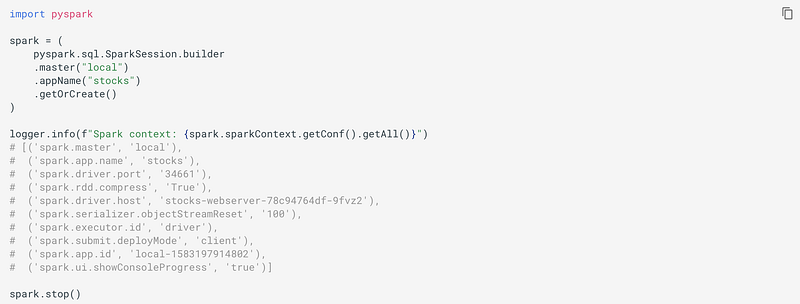
Here:

  • The return value is a SparkSession object.
  • master(master) sets the Spark master URL to connect to, such as "local" to run locally, and "local[4]" to run locally with 4 cores, or "spark://master:7077" to run on the Spark standalone cluster.
  • appName(name) sets a name for the application, which will be shown in the Spark web UI. If no application name is set, a randomly generated name will be used.
  • config(key=None, value=None, conf=None) sets a config option. Options set using this method are automatically propagated to both SparkConf and SparkSession‘s own configuration.
  • getOrCreate() gets an existing SparkSession or, if there is no existing one, creates a new one based on the options set in this builder.

Functional programming languages and Distributed systems

Why we need functional programming for distributed systems?

Spark uses functional programming language, Scala. The reason behind this is that functional programming is perfect for distributed systems.

In functional programming, if f(x) = x + 5, then f(3) is always 8. But, this is not always true in non-functional languages such as Python. For example,

w = -2
def f(x):
    global w
    w -= 1
    return x + w + 10
f(3)
f(3)

As a result, running the same code again can give different results. The problem in this example is easy to see, not that easy when you have dozens of machines running code in parallel, and sometimes you need to restart a calculation if one of the machines has a temporary issue. These unintended side effects can lead to a major headaches. The confusion comes from sloppy language.

How DAG and lazy evaluation helps in the running of memory:

Just like bread companies make copies of the starter from their mother dough, every Spark function makes a copy of its input data and never changes the original parent data (that is, original data is kept immutable). Because Spark doesn’t change or mutate the input data, it is known as immutable. This makes sense when you have a single function, but in case you have multiple functions, then you chain together multiple functions that each accomplish a small chunk of the work. You’ll often see a function that is composed of multiple sub-functions, and in order for this big function to be peer, each sub-function also has to be a peer. It would seem that Spark needs to make a copy of the input data for each sub-function. If this was the case, your Spark program would run out of memory pretty quickly.

Fortunately, Spark avoids this by using a functional programming concept called lazy evaluation. Before Spark does anything with the data in your program, it first builds step-by-step directions of what functions and data it will need. These directions are like recipes of your bread, and in Spark this is called a Directed Acyclic Graph (DAG). Once Spark builds the DAG from your code, it checks if it can procrastinate, waiting until the last possible moment to get the data. Thus, spark has the opportunity to optimize the overall transformation process. This is exactly what you would do if you were making bread. You want to grab the flour, bring it back to your bowl, and then go back to the pantry and get some sugar and add it to the bowl, and then go back to the cupboard for the salt, and so on for every ingredient. This would be the cooking equivalent of thrashing. Instead, you look at the recipe before you start mixing ingredients together to see what you can grab and mix together in one big step. In fact, you often mix all your dry ingredients, then mix all your wet ingredients, and combine them together before baking. In Spark, these multi-step combos are called stages.

Functional programming in Python:

Anonymous functions can be thought of as a Python feature for writing functional-style programming.

Declarative Programming vs. Imperative Programming in Spark

Declarative programming is concerned with What and in Spark can be done with Spark SQL using Spark SQL built-in functions. Whereas, imperative programming is concerned with How and in Spark can be done with Spark DataFrames and Python.

Dataset and DataFrame in Spark

Difference between Dataset and DataFrame

A Dataset is a distributed collection of data. Dataset interface provides the benefits of Resilient Distributed Dataset (RDD) with the benefits of Spark SQL’s optimized execution engine. The Dataset API is available in Scala and Java. Python does not have the support for the Dataset API.

A DataFrame is a Dataset organized into named columns. It is conceptually equivalent to a table in a relational database or a data frame in R/Python, but with richer optimizations under the hood. DataFrames can be constructed from a wide array of sources. The DataFrame API is available in Scala, Java, Python (de>pyspark.sql.DataFrame), and R.

Note that the de>pyspark.sql.SparkSession is the entry point to programming Spark with Dataset/DataFrame API. A SparkSession can be used to create DataFrame, register DataFrame as tables, execute SQL over tables, cache tables, and read parquet files.

Spark vs Pandas

One of the key differences between Pandas and Spark dataframes is eager versus lazy execution. In PySpark, operations are delayed until a result is actually needed in the pipeline. This approach is used to avoid pulling the full data frame into memory and enables more effective processing across a cluster of machines. With Pandas dataframe, everything is pulled into memory, and every Pandas operation is immediately applied. Another key difference is that Spark lets you use parallalization using partitions.

The Parquet Format

Parquet is a columnar file (unlike CSV which is row-based storage) format that saves both time and space when it comes to big data processing, and it is a file format that includes metadata about column data types. Parquet, for example, is shown to boost Spark SQL performance by 10x on average compared to using text, thanks to low-level reader filters, efficient execution plans, and in Spark 1.6.0 improved scan throughput! Refer to this article by IBM.

So, if data is in CSV format, it makes sense to load those files in Spark, convert and save them in parquet format, and then use them whenever they are required.

When using CSV files into DataFrames, Spark performs the operation in eager mode (that is, all of the data is loaded into memory before the next step begins execution), while a lazy approach is used when reading files in parquet format.

Also note that while working with Spark, for distributed clusters it doesn’t make sense to load files (or write files to) from local storage. We should rather be using Amazon S3 or HDFS.

The DataFrame

A pyspark.sql.DataFrame (and pyspark.sql.GroupedData) is equivalent to a relational table in Spark SQL, and can be created using various functions in pyspark.sql.SparkSession.

Use <spark_session>.read to access pyspark.sql.DataFrameReader to load DataFrame from external storage systems.

Use <data_frame>.write to access pyspark.sql.DataFrameWriter to write DataFrame to external storage.

Use sql.types.StructType with a list of sql.types.StructFields to represent a data type representing a row.

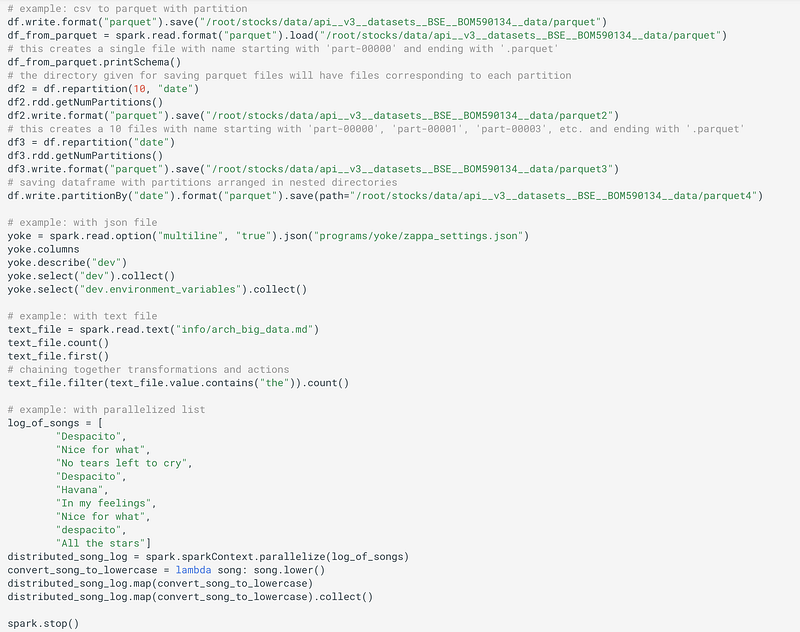
For example:
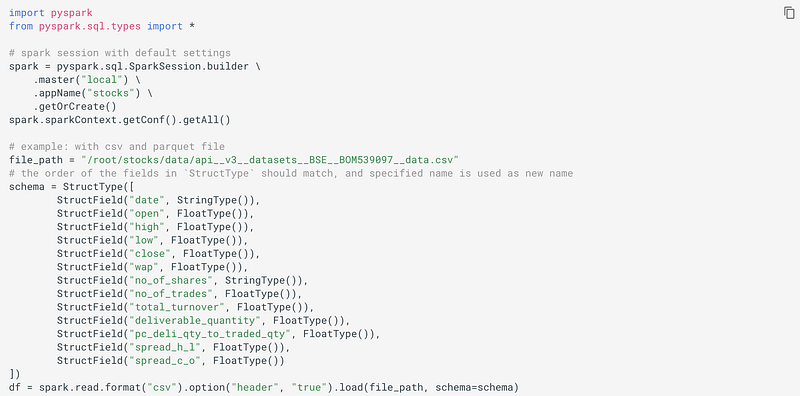
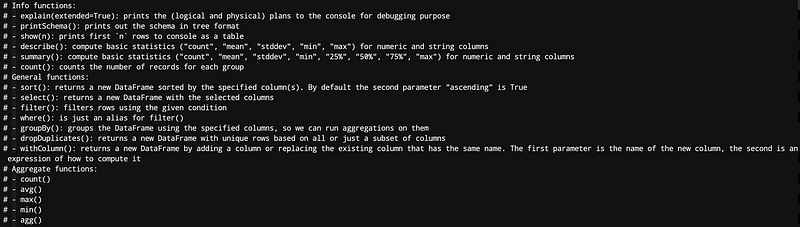
Before we continue further with the example, let’s briefly look at some categories of commonly used functions:
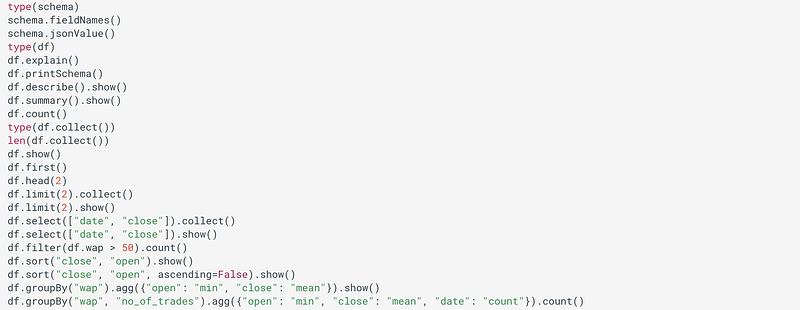
continuing with the example..
Where to store data? S3 or HDFS

When you use Amazon S3 (preferred), you’re separating the data storage from your cluster. One of the downsides is that you have to download your data across the network which can be a bottleneck (but, it won’t be the case is Spark is running on AWS itself). Another solution is to store the data on your Spark cluster with HDFS.

Spark and HDFS are designed to work well together. When Spark needs some data from HDFS, it grabs the closest copy which minimizes the time data spends traveling around the network. But there is a trade-off to HDFS. You have to maintain and fix the system yourself. For many companies, from small startups to big corporations, S3 is just easier, since you don’t have to maintain a separate cluster. Also, if you rent clusters from AWS, your data usually doesn’t have to go too far in the network since the cluster hardware and the S3 hardware are both on Amazon’s data centers. Finally, Spark is smart enough to download a small chunk of data and process that chunk while waiting for the rest to download.

Submitting Spark Applications

The spark-submit the script in Spark’s bin the directory is used to launch applications on a cluster. It can use all of the Spark’s supported cluster managers through a uniform interface so you don’t have to configure your application for each one.

If your code depends on other projects, you will need to package them alongside your application in order to distribute the code to a Spark cluster. For Python, you can use the --py-files argument of spark-submit to add .py, .zip or .egg files to be distributed with your application. If you depend on multiple Python files, it is recommended to package them into a .zip or .egg.

Once a user application is bundled, it can be launched using bin/spark-submit a script. This script takes care of setting the classpath with Spark and its dependencies, and can support different cluster managers and deploy modes that Spark supports:

./bin/spark-submit \
  --class <main-class> \
  --master <master-url> \
  --deploy-mode <deploy-mode> \
  --conf <key>=<value> \
  ... # other options
  <application-jar> \
  [application-arguments]

Some of the commonly used options are:

  • --class: The entry point for your application (e.g. org.apache.spark.examples.SparkPi)
  • --master: The master URL for the cluster
  • --deploy-node: Whether to deploy your driver on the worker nodes (cluster) or locally as an external client (client) (default)
  • --conf: Arbitrary Spark configuration property in "key=value" format.
  • application-jar: Path to a bundled jar including your application and all dependencies. The URL must be globally visible inside of your cluster, for instance, an hdfs:// path or a file:// path that is present on all nodes.
  • application-arguments: Arguments passed to the main method of your main class, if any

For Python applications, simply pass a .py file in the place of <application-jar> instead of a JAR, and add Python .zip, .egg or .py files to the search path with --py-files.

Spark Streaming

Spark Streaming

Spark’s Limitation: Spark Streaming’s latency is at least 500 milliseconds since it operates on micro-batches of records, instead of processing one record at a time. Native streaming tools such as Storm, Apex, or Flink can push down this latency value and might be more suitable for low-latency applications. Flink and Apex can be used for batch computation as well, so if you’re already using them for stream processing, there’s no need to add Spark to your stack of technologies.

Debugging and Optimization in Spark

When you are working on a distributed Spark cluster, errors in your code can be very hard to diagnose.

Normally, when a function is passed to a Spark operation (such as map or reduce) is executed on remote cluster worker nodes, they work on separate copies of all the variables used in the function. These variables are copied to each machine, and no update to the variable on the remote worker machines are propagated back to the driver program.

Supporting general, read-write shared variables across tasks would be inefficient. However, Spark does provide two limited types of shared variables for two common usage patterns: broadcast variables and accumulators.

Broadcast Variables in Spark

Broadcast variables allow the programmer to keep a read-only variable cached on each machine rather than shipping a copy of it with tasks. They can be used, for example, to give every node a copy of a large input dataset in an efficient manner. Spark also attempts to distribute broadcast variables using efficient broadcast algorithms to reduce communication costs.

Spark actions are executed through a set of stages, separated by distributed “shuffle” operations. Spark automatically broadcasts the common data needed by tasks within each stage. The data broadcasted this way is cached in serialized form and deserialized before running each task. This means that explicitly creating broadcast variables is only useful when tasks across multiple stages need the same data or when caching the data in the deserialized form is important.

Broadcast variables can be created from a variable v by calling SparkContext.broadcast(v). The broadcast variable is a wrapper around v, and its value can be accessed by calling the value method.

>>> broadcastVar = sc.broadcast([1, 2, 3])
<pyspark.broadcast.Broadcast object at 0x102789f10>
>>> broadcastVar.value
[1, 2, 3]

After the broadcast variable is created, it should be used instead of the value v in any function run on the cluster so that v is not shipped to the nodes more than once. In addition, the object v should not be modified after it is broadcast in order to ensure that all nodes get the same value of the broadcast variable (e.g. if the variable is shipped to a new node later).

Accumulators in Spark

Accumulators are variables that are only “added” to through an associative and commutative operation and can, therefore, be efficiently supported in parallel. They can be used to implement counters (as in MapReduce) or sums. Spark natively supports accumulators of numeric type, and programmers can add support for new types.

As a user, you can create named or unnamed accumulators. As seen in the image below, a named accumulator (in this instance counter) will display in the web UI for the stage that modifies that accumulator. Spark displays the value for each accumulator modified by a task in the “Tasks” table.

Tracking accumulators in the UI can be useful for understanding the progress of running stages (NOTE: this is not yet supported in Python).

An accumulator is created from an initial value v by calling SparkContext.accumulator(v). Tasks running on a cluster can then add to it using the add method or the += operator. However, they cannot read its value. Only the driver program can read the accumulator’s value, using its value attribute.

>>> accum = sc.accumulator(0)
>>> accum
Accumulator<id=0, value=0>
>>> sc.parallelize([1, 2, 3, 4]).foreach(lambda x: accum.add(x))
...
10/09/29 18:41:08 INFO SparkContext: Tasks finished in 0.317106 s
>>> accum.value
10

Accumulators do not change the lazy evaluation model of Spark. If they are being updated within an operation on a DataFrame, their value is only updated once that DataFrame is computed as part of the action.

Spark Web UI

Each driver program has a web UI, typically on port 4040, that displays information about running tasks, executors, and storage usage. Simply go to http://<driver-node>:4040 in a web browser to access this UI. The monitoring guide also describes other monitoring options.

The web UI provides the current configuration for the cluster which can be useful for double-checking that your desired settings went into effect.

The web UI also shows you the DAG, the recipe of the steps for your program. A Spark application consists of as many jobs as many actions (like saving DataFrame to a database or taking some records back to the driver for inspection) regarding the code. Jobs are further broken up into stages. Stages are units of work that depend on one another. The smallest unit within a stage is a task. Tasks are a series of Spark transformations that can be run in parallel on different partitions of our DataFrame. So, if we have 10 partitions, we run 10 of the same task to complete a stage. Tasks are the steps that the individual worker nodes are assigned. In each stage, the worker node divides up the input data and runs the task for that stage.

By default, Spark master uses port 7077 to communicate with the worker nodes, port 4040 shows active Spark jobs, the web UI for your master node is on port 8080 (or 4040) .

Here are some related interesting stories that you might find helpful:

Gain Access to Expert View — Subscribe to DDI Intel

Spark
Data Processing
Data Engineering
Big Data
Hadoop
Recommended from ReadMedium