
Designing Workflows Using Argo
Orchestrate parallel jobs on K8s with the container-native workflow engine.
Table of Contents
∘ Argo CLI ∘ Deploying Applications ∘ Argo Workflow Specs
Argo Workflows is an open-source container-native workflow engine for orchestrating parallel jobs on K8s. Argo Workflows are implemented as a K8s CRD (Custom Resource Definition). As a result, Argo workflow can be managed using kubectl and natively integrates with other K8s services such as volumes, secrets, and RBAC. Each step in the Argo workflow is defined as a container.
- Define workflows where each step in the workflow is a container.
- Model multi-step workflows as a sequence of tasks or capture the dependencies between tasks using a graph (DAG).
- Easily run compute-intensive jobs for ML or Data Processing in a fraction of time using Argo Workflows on K8s.
- Run CI/CD pipelines natively on K8s without configuring complex software development products.
You can list all workflows as:
kubectl api-resources | grep workflow
kubectl get workflow              # or just `kubectl get wf`
Argo CLI
Get the list of all Argo commands and flags as:
argo --helpHere’s a quick overview of the most useful Argo command-line interface (CLI) commands.

You can also run workflow specs directly using kubectl but the Argo CLI provides syntax checking, nicer output, and requires less typing.

Deploying Applications
First install argo controller:
kubectl create namespace argokubectl apply -n argo -f https://raw.githubusercontent.com/argoproj/argo/stable/manifests/install.yamlExamples below will assume you’ve installed Argo in the Argo namespace. If you have not, adjust the commands accordingly.
NOTE: On GKE, you may need to grant your account the ability to create new cluster roles
kubectl create clusterrolebinding YOURNAME-cluster-admin-binding --clusterrole=cluster-adminConsider sample micro-service application instana with its source-code named robot-shop.
It can be deployed as easy as:

Getting a list of application Pods and wait for all of them to finish starting up:
# watching as Pods are being created withing given namespace
kubectl get pods -n robot-shop -w
Once all the pods are up, you can access the application in a browser using the public IP of one of your Kubernetes servers and port 30080:
echo http://${kube_server_public_ip}:30080Argo Workflow Specs
For a complete description of Argo workflow spec, refer to spec definitions, and check Argo Workflow Examples.
Argo adds a new kind of K8s spec called a Workflow. The entrypoint specifies the initial template that should be invoked when the workflow spec is executed by K8s. The entrypoint template generally contains steps which makes use of other templates. Also, each template which is container based or steps based (as opposed to script based) can have initContainers.
The kubectl apply issue with generateName field of Workflow:
Argo CLI can submit the same workflow any number of times, and each time it gets a unique identifier at the end of name (generated using generateName). But if you use kubectl apply -f to apply an Argo workflow, it raises resource name may not be empty error. As a work-around, you can either use:
kubectl createinstead ofkubectl apply, or- Argo CLI instead of
kubectl apply, or - Use
namefiled containing a unique identifier instead of usinggeneratedNamefield with a generic name
ARGO STEPS
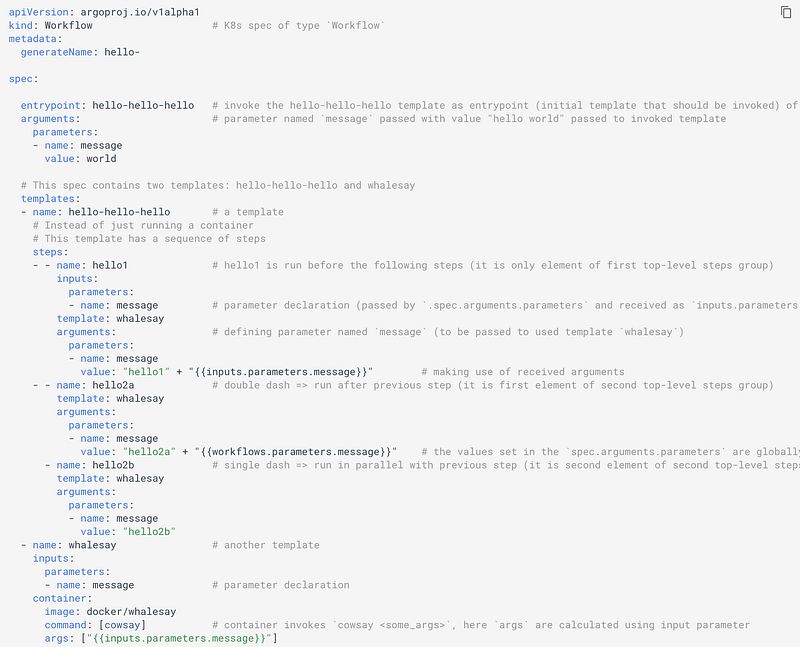
Let’s look at below workflow spec:
Here is how steps look like in JSON:
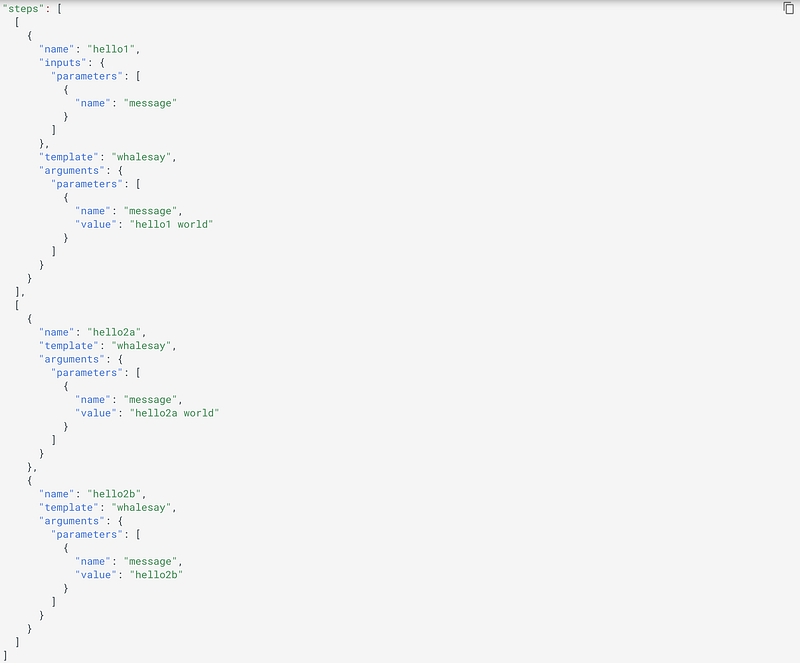
This suggests that top-level elements in steps have to be a group of steps and they run sequentially, whereas the individual steps within each group run in parallel.
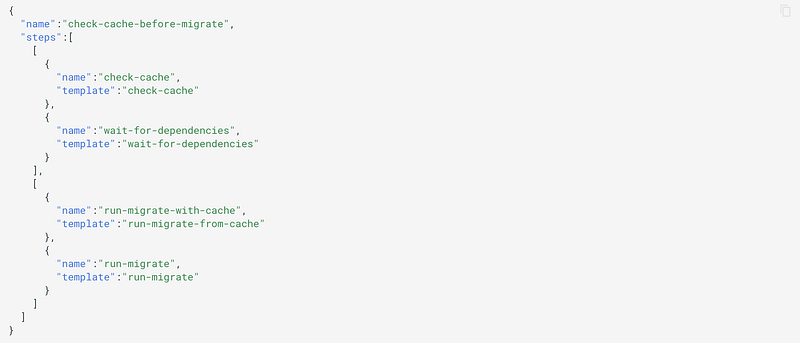
Here is another example of nested steps:

The whalesay template takes a parameter (as array element containing a key-value pair in inputs.parameters[]) such as name: message that is passed as the args to the cowsay command. In order to reference the parameters (e.g. "{{inputs.parameters.message}}"), the parameter must be enclosed in double-quotes to escape the curly braces in YAML.
The following command would bind the message parameter to “goodbye world” instead of the default “hello world”.
argo submit arguments-parameters.yaml -p message="goodbye world"In the case of multiple parameters that can be overridden, the Argo CLI provides a command to load parameter files in YAML or JSON format. For example,
argo submit arguments-parameters.yaml --parameter-file params.yamlCommand-line parameters can also be used to override the default entrypoint and invoke any template in the workflow spec. For example,
argo submit arguments-parameters.yaml --entrypoint whalesayBy using a combination of --entrypoint and --parameter-file, you can call any template in the workflow spec with any parameter that you like.
The values set in the .spec.arguments.parameters[] are globally scoped and can be accessed via {{workflow.parameters.parameter_name}}. This is useful in passing information in multiple steps in a workflow.
Similarly to global parameters, any step can also pass parameters (arguments.parameters[]) to the template being called.
The above workflow spec prints three different flavors of “hello”. The hello-hello-hello template consists of three steps. The first step named hello1 will be run in sequence whereas the next two steps named hello2a and hello2b will be run in parallel with each other.
STEP                                     PODNAME
 ✔ arguments-parameters-rbm92
 ├---✔ hello1 world             steps-rbm92-2023062412
 └-·-✔ hello2a world            steps-rbm92-685171357
   └-✔ hello2b                  steps-rbm92-634838500
DEBUGGING ARGO STEPS
First of all you can list all workflows as argo list -n <namespace> or using kubectl get worflow -n <namespace>.
You can watch any running Argo workflow as argo watch <workflow_name> -n <namespace>. Each of its steps runs as a pod (with names starting with name of workflow) and each pod contains two containers: wait (facilitator) and main (where the actual stuff happens).
You can tail logs either as argo logs <workflow_name> -n <namespace> or using kubectl logs on the pods it created.
ARGO DAG
As an alternative to specifying sequences of steps, you can define the workflow as a directed-acyclic graph (DAG) by specifying the dependencies of each task. This can be simpler to maintain for complex workflows and allows for maximum parallelism when running tasks.
In the following workflow, step A runs first, as it has no dependencies. Once A has finished, steps B and C run in parallel. Finally, once B and C have completed, step D can run.
apiVersion: argoproj.io/v1alpha1
kind: Workflow
metadata:
  generateName: dag-diamond-
spec:
  entrypoint: diamond
  templates:
  - name: echo
    inputs:
      parameters:
      - name: message
    container:
      image: alpine:3.7
      command: [echo, "{{inputs.parameters.message}}"]
  - name: diamond
    dag:
      tasks:
      - name: A
        template: echo
        arguments:
          parameters: [{name: message, value: A}]
      - name: B
        dependencies: [A]
        template: echo
        arguments:
          parameters: [{name: message, value: B}]
      - name: C
        dependencies: [A]
        template: echo
        arguments:
          parameters: [{name: message, value: C}]
      - name: D
        dependencies: [B, C]
        template: echo
        arguments:
          parameters: [{name: message, value: D}]
The dependency graph may have multiple roots. The templates called from a DAG or steps template can themselves be DAG or steps templates. This allows for complex workflows to be split into manageable pieces.
The DAG logic has a built-in FailFast feature to stop scheduling new steps, as soon as it detects that one of the DAG nodes is failed. Then it waits until all DAG nodes are completed before failing the DAG itself. The FailFast flag defaults to true; but if set to false, it will allow a DAG to run all branches of the DAG to completion (either success or failure), regardless of the failed outcomes of branches in DAG.
ARGO ARTIFACTS
When running workflows, it is very common to have that generate or consume artifacts. Often, the output of artifact of one step may be used as input artifacts to a subsequent step.
A template output an artifact, in form {name: <artifact_name>, path: <artifact_path>}, via outputs.artifacts[]. Similarly, a template accepts an artifact, in form {name: <artifact_name>, path: <artifact_path>}, via inputs.artifacts[]. An argument can be passed to a template via a step in form {name: <artifact_name>, from: "{{steps.<step_name>.outputs.artifacts.<artifact_name>}}"}.
Artifacts are packaged as Tarballs and gzipped by default. You may customize this behavior by specifying an archive strategy, using the archive field.
ARGO SCRIPTS AND RESULTS
Often, we just want a template that executes a script specified as a here document in the workflow spec.
Example of such a template:
# ...
  - name: gen-random-int-python
    script:
      image: python:alpine3.6
      command: [python]
      source: |
        import random
        i = random.randint(1, 100)
        print(i)
  # ...
The script keyword allows the specification of the script body using the source tag. This creates a temporary file containing the script body and then passes the name of the temporary file as the final parameter to command, which should be an interpreter (such as bash, python, etc.) that executes the script body.
The use of the script feature also assigns the standard output of running the script to a special output parameter named result. This allows you to use the result of running the script itself in the rest of the workflow spec.
ARGO OUTPUT PARAMETERS
The output parameter provides a general mechanism to use the result of a step as a parameter rather than as an artifact. This allows you to use the result from any type of step, not just a script, for conditional tests, loops, and arguments. Output parameter work similar to script-result except that the value of the output parameter is set to the contents of a generated file rather than the contents of stdout.
ARGO SECRETS
Argo supports the same secrets syntax and mechanism as K8s Pod specs, which allows access to secrets as environment variables or volume mounts.
LOOPS, CONDITIONS, RETRYSTRATEGY, RECURSION, EXIT HANDLERS AND TIMEOUTS IN ARGO
Loops:
When writing workflows, it is often very useful to be able to iterate over a set of inputs. For example,
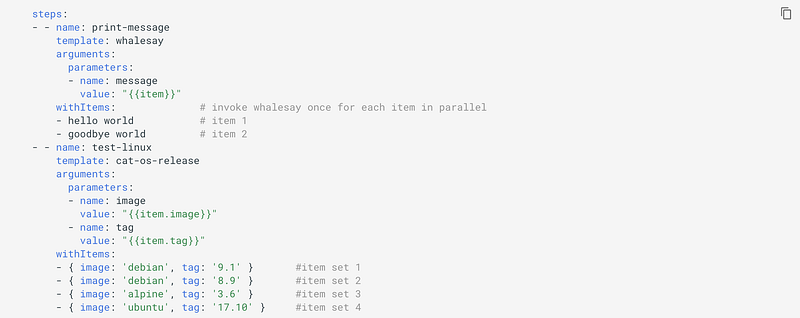
We can pass a list of items as parameters:
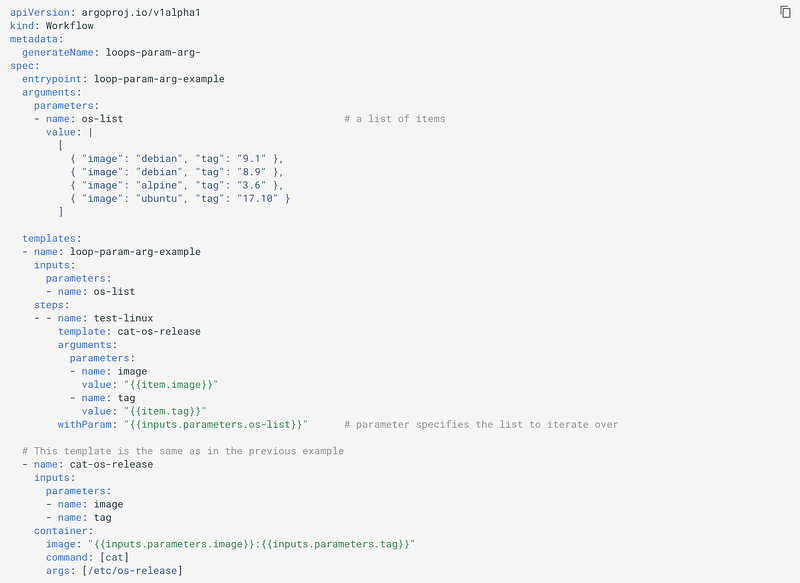
We can even dynamically generate the list of items to iterate over.
Conditionals:
Argo also support conditional execution as shown in this example,
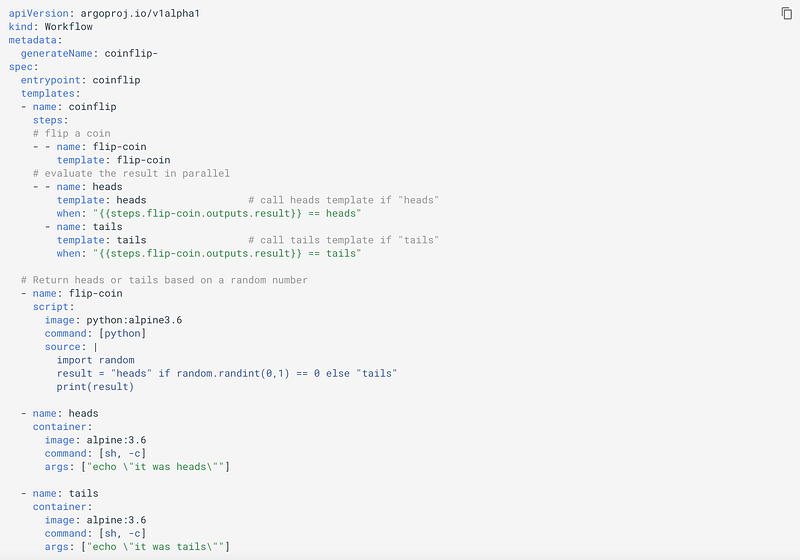
Retrying Failed or Errored Steps:
You can specify a retryStrategy that will dictate how failed or errored steps are retried:
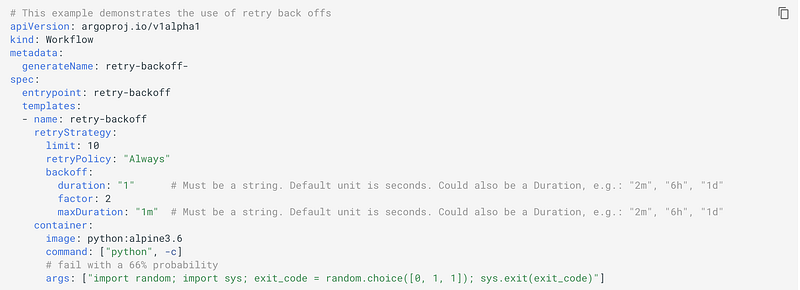
Here,
limitis the maximum number of times the container will be retried.retryPolicyspecifies if a container will be retried"OnFailure"(default),"OnError", or both ("Always").backoffis an exponential backoff
Providing an empty retry strategy, retryStrategy: {} will cause a container to retry until completion.
Recursion:
Templates can recursively invoke each other!
Exit handlers:
An exit handler is a template that always executes, irrespective of success or failure, at the end of the workflow. It is specified as:
spec:
  entrypoint: intentional-fail
  onExit: exit-handler
Timeouts:
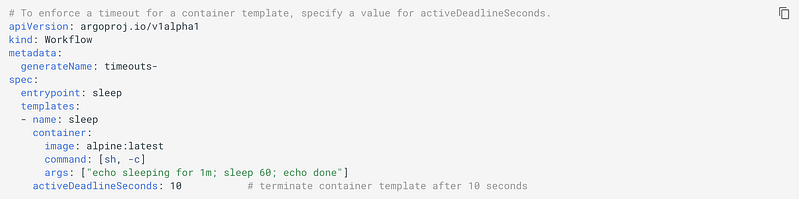
To limit the elapsed time for a workflow, you can set the variable activeDeadlineSeconds.
DAEMON CONTAINERS AND SIDECARS IN ARGO
Daemon Containers:
Argo workflows can start containers that run in the background, known as daemon containers, while the workflow itself continues execution. Daemons will be automatically destroyed when the workflow exits the template scope in which the daemon was invoked. The big advantage of daemons compared with sidecars is that their existence can persist across multiple steps or even the entire workflow.
You can make a template a daemon as daemon: true. For example,

Sidecars:
A sidecar is another container that executes concurrently in the same pod as the main container and is useful in creating multi-container pods.
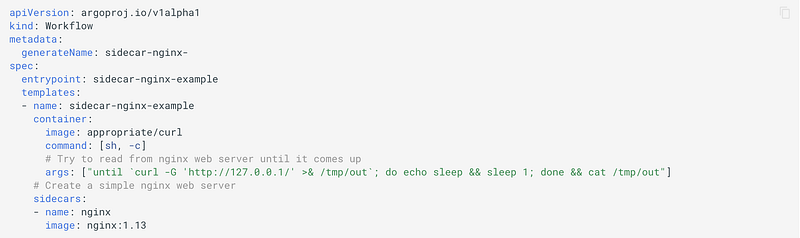
In the above example, we create a sidecar container that runs Nginx as a simple web server. The order in which containers come up is random, so in this example, the main container polls the Nginx container until it is ready to service requests .
Conclusion
This article has explored Argo as a tool to orchestrate workflows on K8s. It can also be used to design data workflows instead of using language-specific tools such as Airflow. I hope you have found this article helpful, thank you for reading!
Here are some related interesting stories that you might find helpful:
- Distributed Data Processing with Apache Spark
- Data Streaming With Apache Kafka
- Apache Cassandra — Distributed Row-Partitioned Database for Structured and Semi-Structured Data
- Data Pipelines with Apache Airflow
- The Why and How of MapReduce
- Observer Pattern vs. Pub-Sub Pattern

Subscribe to FAUN topics and get your weekly curated email of the must-read tech stories, news, and tutorials 🗞️
Follow us on Twitter 🐦 and Facebook 👥 and Instagram 📷 and join our Facebook and Linkedin Groups 💬


