
Difference between apply() and transform() in Pandas
Some of the most useful Pandas tricks

Pandas is an amazing library that contains extensive built-in functions for manipulating data. When looking for applying a custom function, you might be confusing with the following two choices:
apply(func, axis=0): call a functionfuncalong an axis of the DataFrame. It returns the result of applyingfuncalong the given axis.transform(func, axis=0): call a functionfuncon self producing a DataFrame with transformed values. It returns a DataFrame that has the same length as self.
They take the same arguments func and axis. Both call the func along the axis of the given DataFrame. So what is the difference? How do you choose one over the other?
In this article, we will cover the following usages and go through their difference:
- Manipulating values
- In conjunction with
groupby()results
Please check out my Github repo for the source code.
Please check out the following articles if you are not familiar with them:
When to use Pandas transform() function
Some of the most useful Pandas tricks
towardsdatascience.com
1. Manipulating values
Both apply() and transform() can be used to manipulate values. Let’s see how they work with the help of some examples.
df = pd.DataFrame({'A': [1,2,3], 'B': [10,20,30] })def plus_10(x):
return x+10For the entire DataFrame
Both apply() and transform() can be used to manipulate the entire DataFrame.
df.apply(plus_10)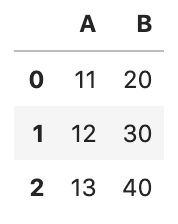
df.transform(plus_10)Both apply() and transform() support lambda expression and below is the lambda equivalent:
df.apply(lambda x: x+10)df.transform(lambda x: x+10)For a single column
Both apply() and transform() can be used for manipulating a single column
df['B_ap'] = df['B'].apply(plus_10)
# The lambda equivalent
df['B_ap'] = df['B'].apply(lambda x: x+10)df['B_tr'] = df['B'].transform(plus_10)
# The lambda equivalent
df['B_tr'] = df['B'].transform(lambda x: x+10)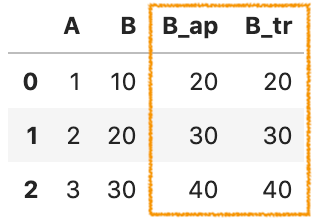
What are the differences?
Here are the three main differences
- (1)
transform()works with function, a string function, a list of functions, and a dict. However,apply()is only allowed with function. - (2)
transform()cannot produce aggregated results. - (3)
apply()works with multiple Series at a time. But,transform()is only allowed to work with a single Series at a time.
Let’s take a look at them with the help of some examples.
(1) transform() works with function, a string function, a list of functions, and a dict. However, apply() is only allowed a function.
For transform(), we can pass any valid Pandas string function to func
df.transform('sqrt')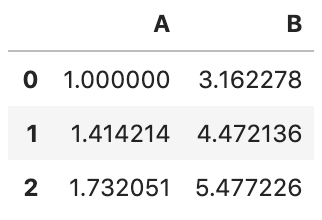
func can be a list of functions, for example, sqrt and exp from NumPy:
df.transform([np.sqrt, np.exp])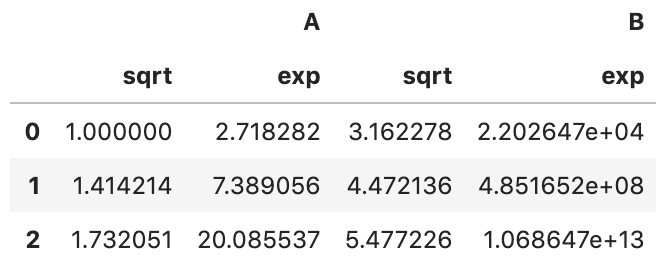
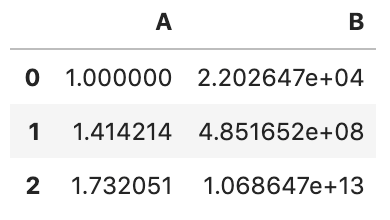
func can be a dict of axis labels -> function. For example
df.transform({
    'A': np.sqrt,
    'B': np.exp,
})
(2) transform() cannot produce aggregated results.
We can use apply() to produce aggregated results, for example, the sum
df.apply(lambda x:x.sum())A 6
B 60
dtype: int64However, we will get a ValueError when trying to do the same with transform() . We are getting this problem because the output of transform() has to be a DataFrame that has the same length as self.
df.transform(lambda x:x.sum())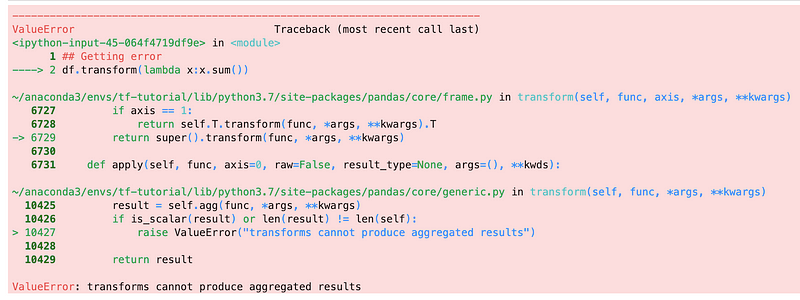
(3) apply() works with multiple Series at a time. But, transform() is only allowed to work with a single Series at a time.
To demonstrate this, let’s create a function to work on 2 Series at a time.
def subtract_two(x):
    return x['B'] - x['A']
apply() works perfect with subtract_two and axis=1
df.apply(subtract_two, axis=1)0 9
1 18
2 27
dtype: int64However, we are getting a ValueError when trying to do the same with transform(). This is because transform() is only allowed to work with a single Series at a time.
# Getting error when trying the same with transform
df.transform(subtract_two, axis=1)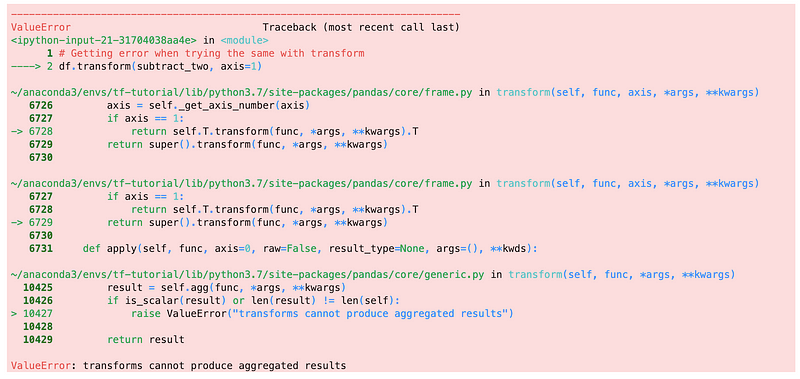
We will get the same result when using a lambda expression
# It is working
df.apply(lambda x: x['B'] - x['A'], axis=1)
# Getting same error
df.transform(lambda x: x['B'] - x['A'], axis=1)2. In conjunction with groupby()
Both apply() and transform() can be used in conjunction with groupby(). And in fact, it is one of the most compelling usages of transform(). For more details, please take a look at “Combining groupby() results” from the following article:
When to use Pandas transform() function
Some of the most useful Pandas tricks
towardsdatascience.com
Here are the 2 differences when using them in conjunction with groupby()
- (1)
transform()returns a DataFrame that has the same length as the input - (2)
apply()works with multiple Series at a time. But,transform()is only allowed to work with a single Series at a time.
Let’s create a DataFrame and show the difference with some examples
df = pd.DataFrame({
    'key': ['a','b','c'] * 4,
    'A': np.arange(12),
    'B': [1,2,3] * 4,
})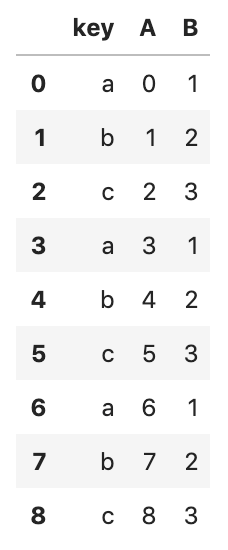
In the example above, the data can be split into three groups by key.
(1) transform() returns a Series that has the same length as the input
To demonstrate this, let’s make a function to produce an aggregated result.
# Aggregating the sum of the given Series
def group_sum(x):
    return x.sum()
For apply() , it returns one value for each group and the output shape is (num_of_groups, 1) .
gr_data_ap = df.groupby('key')['A'].apply(group_sum)
gr_data_ap
key
a 9
b 12
c 15
Name: A, dtype: int64For transform(), it returns a Series that has the same length as the given DataFrame and the output shape is (len(df), 1)
gr_data_tr = df.groupby('key')['A'].transform(group_sum)
gr_data_tr
0 9
1 12
2 15
3 9
4 12
5 15
6 9
7 12
8 15
Name: A, dtype: int64(2) apply() works with multiple Series at a time. Buttransform() is only allowed to work with a single Series at a time.
This is the same difference as we mentioned in “1. Manipulating values”, and we just don’t need to specify the argument axis on a groupby() result.
To demonstrate this, let’s create a function to work on 2 Series at a time.
def subtract_two(x):
    return x['B'] - x['A']
apply() works with multiple Series at a time.
df.groupby('key').apply(subtract_two)key
a 0 1
3 -2
6 -5
b 1 1
4 -2
7 -5
c 2 1
5 -2
8 -5
dtype: int64However, we are getting a KeyError when trying the same with transform()
df.groupby('key').transform(subtract_two)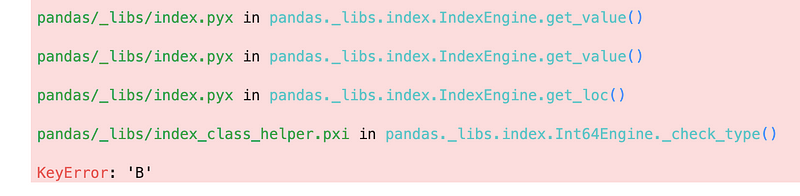
Summary
Finally, here is a summary
For manipulating values, both apply() and transform() can be used to manipulate an entire DataFrame or any specific column. But there are 3 differences
transform()can take a function, a string function, a list of functions, and a dict. However,apply()is only allowed a function.transform()cannot produce aggregated resultsapply()works with multiple Series at a time. But,transform()is only allowed to work with a single Series at a time.
For working in conjunction with groupby()
transform()returns a Series that has the same length as the inputapply()works with multiple Series at a time. But,transform()is only allowed to work with a single Series at a time.
That’s it
Thanks for reading.
Please checkout the notebook on my Github for the source code.
Stay tuned if you are interested in the practical aspect of machine learning.
You may be interested in some of my other Pandas articles:
- When to use Pandas transform() function
- Using Pandas method chaining to improve code readability
- Working with datetime in Pandas DataFrame
- Pandas read_csv() tricks you should know
- 4 tricks you should know to parse date columns with Pandas read_csv()
More can be found from my Github


