
Did You Know You Have an RSS Feed on Medium?
How to use Medium’s RSS feed for your online writing

Did you know that Medium.com includes an RSS feed for every user and publication on the platform?
If you were like me, you might have seen this term mentioned around the internet on various blogs, stores, and websites — but not really know what it means.
So, this article will quickly cover what it is, how it’s normally used, and list a few ways it can help you on Medium.com itself.
Let’s get started!
What is the definition of an RSS feed?
For those unfamiliar with the older technology (it’s been around since the ‘90s), RSS stands for:
- RDF Site Summary (RDF = Resource Description Framework)
- Really Simple Syndication
- Sich Site Summary
- Ricki’s Sweet Saxophone
It doesn’t really matter which acronym you remember (the 1st one is proper), as most people will just say RSS.
What is an RSS feed?
In simple terms, an RSS feed is a page on your blog or website that posts information every time there is an update on that site.
More importantly, the information posted in the feed is computer-readable and will contain details like the publishing date, the author's name, and either the full or summarized text of an article.
This means that other websites or feed readers (or news aggregators) can easily and automatically find updates from your site without you doing any work!
Users can also subscribe to individual RSS feeds to form a kind of collection of blog posts, other links, or even podcasts.
Imagine making a personalized Google News Aggregator that only allows links from RSS feeds you follow.
Is an RSS feed still useful in 2020?
Yes and no. Many websites still use an RSS feed to automatically promote their work, but the technology itself is becoming less and less supported around the world wide web.
But, as it’s a free technology and may increase your views for very little effort — why not try it out?
You’ll see in a section down below that many very popular and influential websites still use RSS feeds even in 2020.
How are RSS feeds used today?
I’ll just discuss RSS feeds in terms of blogging and podcasting.
This is a big subject to get into and you can always start by reading more from the Wikipedia entry or Neil Patel’s updated (I assume) blog post on the topic.
The two ways to use RSS feeds for your blog or podcast website are:
- Sign up for a feed service like Feedburner (taken over by Google in 2007)
- Display a friendly link to your RSS feed on your website (like below)
Have you ever noticed this symbol (badly outlined in red) while browsing a website?

Outside of the other common social media icons you see, probably around 25%–50% of relevant websites these days still include the RSS feed link too.
What’s the Google RSS feed?
In 2007, Google took over a company called Feedburner. This is now a free RSS feed service that helps you manage your feed.
I can’t confirm that it helps spread your workaround, but I noticed 24 hours after I added my Medium’s RSS feed on the service recently that I had these results from 1 article:

** If any experts on the subject are reading this, I would love your input on the above uncertainty.**
If you want to try the same, just head over to Google’s RSS and enter your RSS feed URL to start with.
They have some other options you can set up if you’d like too (for stats tracking and other fun things).
How do I add an RSS feed icon on my blog?
As there’s a few platforms for hosting your blog these days, you’ll have to look up specific instructions for each one.
Luckily, there are simple guides on how to do it for every hosting platform.
Here’s a few of the main ones to save you some time:
- Wordpress
- Blogger
- Wix
- *If you want to see additional blog hosting websites, please comment and I’ll add them**
How can I use my RSS feed on Medium.com?
I came across this neat trick the other day and wanted to share it with the Medium community.
I had no idea Medium had RSS feeds available for all publications AND user accounts.
To find yours, just go to your profile home page:
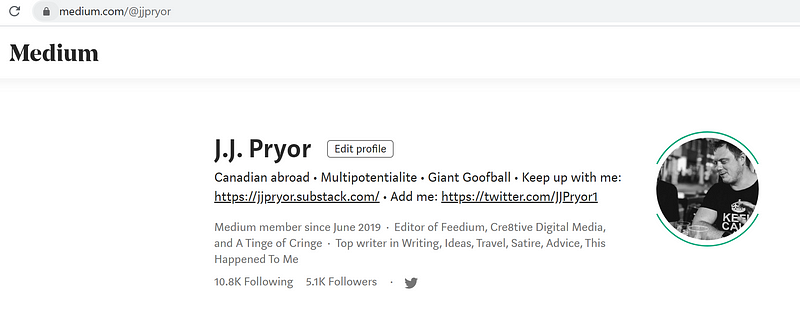
Then go up to the URL at the top:

And add in “/feed/” in between your username and medium.com.

It then takes you to the RSS feed on Medium:
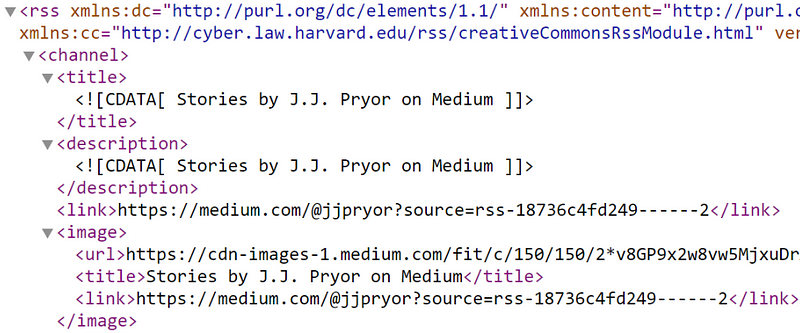
A massive page full of gibberish looking text. And even though you or I may not be able to read it, the computers can.
(And many of you smart geeks out there too.)
This ‘medium.com/feed/username’ is your RSS feed!
Be sure to bookmark it in case you want to use it around the web in the future.
RSS feeds for podcasts
Do you want your listeners to be instantly updated every time you release a new podcast episode?
Then using a podcast RSS feed might be a great addition to your toolbelt.
Firstly, you need to find a platform to host some of your podcast information, here are a few free examples:
It’s also typically pretty easy to set up your podcast RSS on these platforms:
- Create a podcast RSS feed account (like this service for example)
- Enter in your email address and other particulars
- Add your personal details that you want to be shared (Speaker/author bio, etc)
- Enter in all of the podcast’s information (title, description, feed URL)
The above services (and many more) will almost always have an easy guide to follow for setting up your podcast RSS feed when you’re ready to do so. J
ust Google the service/company name + “podcast RSS feed” and you’ll find what you’re looking for.
What are some RSS feed readers available?
For those of you that want to use an RSS feed for reading and finding great content — you’re in luck!
People used to love using Google Reader for this, but it was discontinued suddenly in 2013. People also used Digg Reader, but again, it was stopped in 2018.
But don’t fret, there are still many other great alternatives though!
- Feedly
- Newsblur
- Flowreader
- Bloglovin’ (also a very cool concept for getting backlinks!)
- Feeder
Best RSS feed list to follow:
Here are a bunch of very popular RSS feeds to follow if you’re looking for something to read.
(Note, these are based on popularity and aren’t necessarily ones I follow myself.)
- Code Switch by NPR
- Unlocking Us by Brene Brown1619 by New York Times
- Joe Rogan’s Podcast
- My Favorite Murder by Karen Kilgariff and Georgia Hardstark
- Reddit RSS feed
- Call Her Daddy by Barstool Sports
- Crime Junkie by Audiochuck
- Reuters RSS feed
- Dateline by NBC
- BBC RSS feed
- New York Times RSS feed
- Wall Street Journal RSS feed
- CNN RSS feed
- ESPN RSS feed
- LifeHacker RSS feed
- Drudge Report RSS feed
- Fox News RSS feed
- Twitter RSS feed (this is more for creating an RSS feed from Twitter accounts)
Other ways to use RSS feeds on Medium.com
Here’s a quick guide to finding RSS feeds for different things on Medium.
Medium users’ RSS feed:
In a URL, type in “/feed/” before where the username appears:
medium.com/feed/@usernameExample: https://medium.com/feed/@jjpryor
Medium publications
In the URL bar, type in “/feed/” before the publication name:
medium.com/feed/publication-nameExample: https://medium.com/feed/feedium
Custom domain Medium publication
Find the Medium publication with a custom domain, for example “https://towardsdatascience.com/”. Then add “/feed” to the end of the URL.
customdomain.com/feed
Example: https://towardsdatascience.com/feed
For more information on getting a custom domain on Medium.com, check out this useful article:
Tags in publications
If you want to see an RSS feed for a specific tag within a Medium publication, you need to add in a couple of lines.
- “/feed/” before the publication name in the URL.
- “/tagged” after the publication name in the URL
- “/XYZ” after the “/tagged” in the URL (XYZ = the tag you want to follow, for example, “politics” or “business”)
medium.com/feed/publication_name/tagged/tag_you_wantExample: https://medium.com/feed/feedium/tagged/writing
Specific topics on Medium
To find a feed of all the articles from a specific topic on Medium.com, you need to add “/feed/” in the URL after finding the topic page of your choosing.
medium.com/feed/topic/topic_you_choseExample: https://medium.com/feed/topic/comics
Wrapup
Thanks for reading! I hope I was able to cover the various aspects of RSS feeds. There’s much more to the subject, I merely wanted to give a bit of an introduction to bloggers on Medium and anyone else reading.
If you’re a subject matter expert on this and have anything to point out, please let me know in the comments!
Keep up with my guides, rants, deep dives, and crazy shenanigans with my free newsletter. Thanks and have a great day!


