
Designing ELT pipelines with dbt (Part 2)
This is the second part of a series about my data pipeline experience with dbt. Our focus in this article is on model structures and best practices we use to design pipelines while aligning with dbt’s framework.
Prerequisites
This article assumes you read part 1 of this series, and know what dbt models are. Part 3 covers pipeline optimisation for speed.
What are our requirements to make this migration a success?
To clarify again, dbt only takes care of the data transformation process. So when we chose this tool, it should help us achieve these goals:
Goal #1: Readable pipelines.
Scalability is a common buzzword in the tech scene. No doubt we want “scalable pipelines”, but what really matters is any analyst can take a look at our dbt models (where we write our transformation query) and go “Aha! I know what this genius is trying to do.”.
When analysts understand how data is transformed, it’s easier to break down complex queries into smaller pieces, reuse models that has several business use cases, etc. Given our international presence, building a new pipeline to ingest data from a new country should be as simple as updating a few parameters.
Goal #2: Data we can trust.
Quick background context: we currently adopt a self-serve analytics culture in our company. An executive should be able to build a chart to understand the insights themselves, rather than requesting an analyst to build one.
To support this culture, we need the right set of BI tools and clean, descriptive datasets so our data consumers won’t ping us on Slack with “Are you sure this data is accurate?” or “Where can I get metric X in this table?”. The data in these tables should be consistent and the column descriptions are readily available should they need further reading.
How we setup our dbt models?
Step 1: Structure pipelines in meaningful stages.
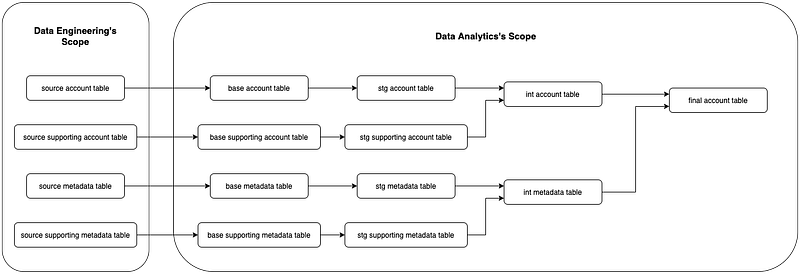
We introduced a series of stages how we want our pipeline to flow. As mentioned in our previous article, every model in each stage should have only one job to do.
Our stages are defined as follows:
- source. This is where our source data originates. The transformation process begins here, and is prepared by our data engineering folks.
- base. Data in this stage is copied from the source and deduplicated by a unique key. Its primary role is to ensure each row is unique, and only contains the most updated values.
- staging. This is where we perform core data cleaning such as applying fix to incorrect logic and adding important columns we need down the pipeline.
- intermediate. Business-related logic and metrics are introduced at this stage. An intermediate table often consists of data from multiple staging tables, so this is where the bulk of query complexity occurs.
- final. The final table is the dataset which stakeholders and analysts will use for operational dashboards and deep dive analysis. It contains all the necessary columns from intermediate tables or staging tables. Also, we only rename columns and recast values to the desired type here.

When we migrate our infamous accounts table to dbt, we studied all related transformation tasks (up to the correct source tables), and assign each part of the transformation logic to the correct stage. Here’s an illustration how the new accounts pipeline looks like:
Step 2: Standardise model naming convention.
Grouping models into stages helps us understand what a model does, but having a robust framework of naming models would save us plenty of time from scanning through a bajillion models, or infuriate our colleagues by asking the Nth time “what does this model do?” when we’re too lazy to open and read the query.

The result table shares the same name as the model file. Since we will be building so many models, it makes sense to provide a naming convention we wouldn’t be confuse ourselves over the tables we created in our warehouse.
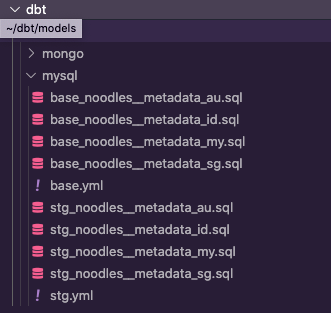
Here’s our table naming convention template:
<environment>.<db_type>_<stage>_<db_name>__<table_name>_<country>
…and the models directory looks like this:
We also specify the database schema in the model file config:
Note: you may noticed this is a macro file, and not the actual model. I shall go into detail about this in the next article.
When we run base_noodles__metadata_au model in dbt, it will build a table named test_mysql.base_noodles__metadata_au.
By reading the mysql folder in models, we know base_noodles__metadata_au contains a deduplicated copy (because it’s a base) of metadata from a MySQL database named “noodles”. Lastly, it contains data from Australia only.
How we make pipelines readable?
Step 3: Include documentation in every model.
Noticed the .yml files in mysql folder? That’s where we document our models and tests. Here’s a peek at one of our YAML files:
When we run dbt docs generate on the terminal, it compiles all relevant information about our dbt project so we can view the documented models and lineage graphs using dbt docs serve command later. Keeping our documentation in this format is a boon because:
- We can easily include a script to feed the column descriptions into any BI tool our stakeholders use.
- It serves as our single source of documented truth. No more referring to random Google sheets.
How do we ensure data quality in our pipelines?
Step 4: Specify critical tests at the top of the pipeline.

dbt allows you to test the results of your models. Adding tests in your pipeline ensures the data is transform as you would expect. Adding test early in your pipeline ensures you don’t add test needlessly.
Notice that we included not_null and unique tests for metadata table in the base stage? We specified id should be unique with no NULL values at the top so every model down the pipeline should follow the same atomicity, even when performing JOINs in intermediate or final stages.
This helps us avoid compensating poorly-defined transformation logic by enforcing test everywhere because we don’t know base_noodles__metadata is at user / event level. It would be a nightmare for someone to debug a pipeline that was transforming user level data at the source, to event level in intermediate stage (duplicated users), to something else.
Results: what was the overall impact?
After building the models, our final step is to create Airflow DAGs to trigger the pipelines.
The only quantifiable metric is time taken to complete the entire pipeline transformation. We ran the new account pipeline and compare the execution time to our old pipeline as a benchmark (2 hours). Surprisingly, the new pipeline takes an average 2 hours 30 minutes to complete!
While optimising our pipelines for speed is something we have to improve, the pipeline design shines in a few aspects:
Impact #1: Faster updates.
We able to include additional data points requested by our stakeholders while the migration is ongoing. Adding new transformation logic is much easier now since we could easily identify which part of the flow to introduce these updates on.
Such tasks would usually require days (reading the transformation task, adding and testing the fix), now can be completed within the morning.
Impact #2: We found more hidden errors.
One of our interns who helped us with the pipeline migration was able to raise several issues about how some table JOINs in the new pipeline don’t make sense.
This was interesting because we did not change the original logic from the old pipeline during migration, and we only onboarded him on dbt, not specifically on the pipeline. Yet he was able to read what we had documented and unearth potential errors, fully hidden in the old pipeline.
In detail, we renamed a column id AS old_id so we could retain id and old_id after the transformation, but we mistakenly perform a LEFT JOIN on the wrong id column somewhere in the subquery, resulting in fewer results than expected. The scary thing is we didn’t know until now.
Note: This is where we learned our lesson not to rename columns everywhere.

Conclusion
Overall, we definitely achieve the two goals we highlighted. Our migrated pipelines are now easier to read and understand, especially someone else’s. More complex metrics can be introduced directly in dbt models, so our stakeholders won’t need to download the data and apply their calculations on their excel.
The easier it is to consume data from our tables, the quicker they can generate insights, and they can make decisive actions sooner.

I’ll discuss on more lessons learned and how we optimise for speed in the next article. dbt had documented some best practices to apply when setting up your first project; I highly recommend you to check it out too.
❗️ Interested in what else we work on? Follow us (ShopBack Tech blog | ShopBack LinkedIn page) now to get further insights on what our tech teams do!
❗❗️ Or… interested in us? (definitely, we hope) Check out here how you might be able to fit into ShopBack — we’re excited to start our journey together!