
Designing ELT pipelines with dbt (Part 3 — Finale)
This article summarises the lessons learned when we migrated our old pipelines to dbt, and the methods we used to optimise its execution runtime.
Prerequisites
Feel free to check out the previous articles: (Part 1) why we chose dbt as our pipeline tool, and (Part 2) how we revamp our pipeline design.
The journey of moving our data transformation tasks to dbt while learning the ropes was not all sunshine and happiness. To put it simply, we started the migration in early April, with a goal to migrate at least 3 pipelines by May. However, we manage to only fully migrate one around mid-June.
As mentioned in my previous article, our new pipeline’s execution time was much longer compared to the old one. After looking under the hood, we found several low-hanging fruits in our dbt pipelines we could work on.
I’ll briefly share what we learned and did to reduce our pipelines’ execution runtime in the first part, and then close this series with lessons learned when we were exploring dbt.
What makes our pipeline execution slow?
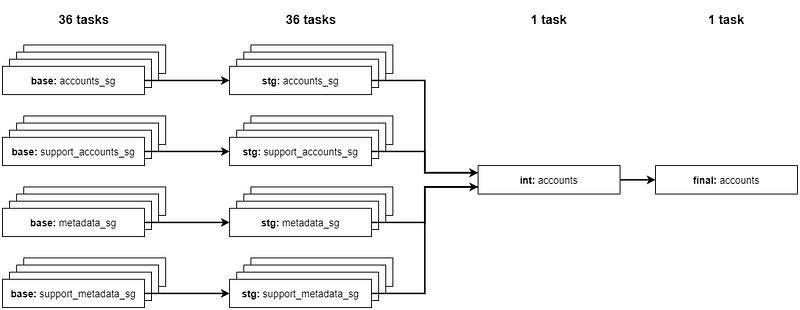
Remember that accounts pipeline requires four source tables to ingest per country. We’re ingesting tables for nine countries, and processing it into base and staging respectively. That totals up to 72 tasks in the DAG, with each Airflow task executing dbt run command on a specific model.
Here’s an illustration on how our Airflow DAG for accounts pipeline looks like:

In other words, it took 2.5 hours to complete about 74 dbt run invocations: 72 base and staging tables, plus an intermediate and final table. When we investigated the execution logs in Airflow, we learned that it took approximately 20 minutes to complete a single dbt run invocation, but the actual model was built in less than 2 minutes.
Ta-da! We’ve found one of our problems: it was slow (even with several tasks running concurrently) because it takes too long for dbt to initialise. When we execute dbt run on a model, dbt will read all files including models, macros, etc. and build a project manifest. Naturally, the more models you have in your project, the longer it takes to initialise.
Another note: I would like to mention that we were on dbt version 0.18.2 when we tested our first pipeline, so there are improvements added in newer versions that significantly reduces the initialisation duration.
How did we make our pipelines run faster?
Solution #1: Simplify our pipeline to run with lesser models.
We agreed within the team that 72 tasks just to process up to staging stage is rather extreme; our dbt project would be bloated with thousands of models by the time we migrate all our pipelines over.
That leads to our decision to make a minor tweak in our transformation playbook: combine base models for all countries into one, big staging model, instead of mapping 1 base to 1 staging table. This makes the execution on staging longer, but we should save up time from lesser dbt run invocations.
We went from this:
…to this:
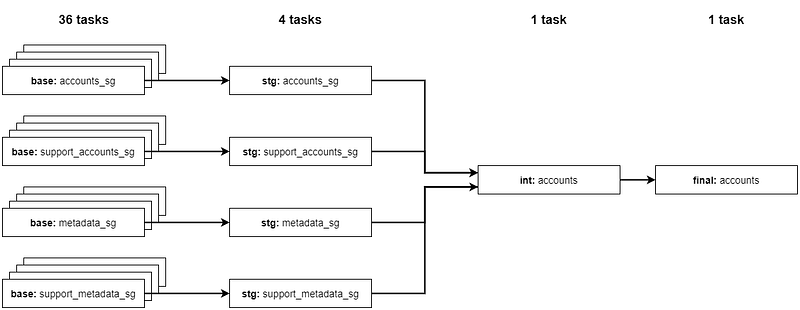
Our pipelines now run with 40% less dbt run, so it should trim down overall duration.
We didn’t combine all tables at base because that’s where we catch errors like the table schema changes that occurred on a country table because *cough*mongo*cough*. When an error in one of the base tables arises, we would have to rerun that task, and it doesn’t make sense to re-ingest all countries’ data when only one fails.
Solution #2: Enable partial / experimental parsing in dbt.
Every time we execute dbt run, it creates a manifest from all your files. When partial parsing is enabled in your project, it checks for any new files that have been changed in the project and parses only those, instead of the entire project.
This should save us a huge chunk of time on subsequent models — the first dbt run might take some time if we introduce new changes, but after that, each invocation should refer to an existing project manifest and get to processing the SQL query.
Indeed, when we monitor one of the task logs after enabling partial parsing, it took about 10 minutes to complete a model, rather than the usual 20 minutes.
As for experimental parsing, dbt Labs is trying new ways to parse models that use specific Jinja macros e.g. ref(), source(), and config(). It should be even faster, but it’s not guaranteed (and it’s only available at version 0.20.0). Still, we don’t see any harm in enabling it.
How fast are our pipelines now?
After implementing all of the above, our pipelines take between 1– 1.5 hours to complete, depending on how big the tables are.
In short, the total model files you have in your project affects total time needed to initialise, which affects the pipeline execution time. Keeping your model files at minimum is key, so it’s best not to create new models unnecessarily. Don’t forget to enable dbt partial parsing for shorter dbt run per model too.
Finally, we can have our morning coffee run in peace. ☕️
That’s cool! Is there anything else you can share with us about dbt?
Yes we do! There were alot of suggestions to further improve execution time that were not implemented, and lessons learnt while playing with dbt. I’ve compiled them in a list (and may update more in the future) so you can refer and consider applying it for your use case:
Use incremental updates on extremely big tables.
This is sort of a no-brainer because it would take forever to ingest or process the entire table. Here’s an example of creating a incremental model with macro:
Also, having incremental updates means smaller ingestions rather, which translates to faster execution time. This can be another way to optimise your pipelines too.
Utilise dbt tags for running a batch of models.
If you need to test many models but too lazy to invoke them individually, you can apply tags in your model config like:
I make a habit of adding a tag to a macro file that serves several models, and then run dbt run --m tag:batch_1. This would run all models with the tag=batch_1 concurrently, proving useful for batch testing.
You can also use tags to execute several models in your pipeline; it will initialise dbt once, and then process all models you’ve tagged. This also speeds up overall execution time, but we chose not to implement this in our pipeline as it is too risky (if a model in a batch fails, we couldn’t instruct dbt to rerun only the model that failed in that batch).
Final thoughts
As I continue to learn dbt, the more I realise the importance of having standardised, structured data pipelines as a robust foundation of a data-driven culture within the company. I used to tell my friends and colleagues that a company that has “clean data” is just a dream; now it is well within our grasp.
I hope you enjoy this series, and wish you all the best on your pipeline design journey.

❗️ Interested in what else we work on? Follow us (ShopBack Tech blog | ShopBack LinkedIn page) now to get further insights on what our tech teams do!
❗❗️ Or… interested in us? (definitely, we hope) Check out here how you might be able to fit into ShopBack — we’re excited to start our journey together!