avatarTeri Radichel

Free AI web copilot to create summaries, insights and extended knowledge, download it at here

4316

Abstract

<div id="d7d2" class="link-block"> <a href="https://docs.aws.amazon.com/organizations/latest/userguide/orgs_reference_limits.html?src=radichel"> <div> <div> <h2>Quotas for AWS Organizations</h2> <div><h3>Use AWS Organizations to create, organize, and manage your AWS accounts. Invite other accounts to join your…</h3></div> <div><p>docs.aws.amazon.com</p></div> </div> <div> <div style="background-image: url(https://miro.readmedium.com/v2/resize:fit:320/)"></div> </div> </div> </a> </div><h2 id="1b57">Files for creating accounts with the root-orgadmin user</h2><p id="73e4">First I can extract the parts of the above file that create a single account and put it in this file:</p><p id="38a3"><i>deploy/root-orgadmin/organizations_account.sh</i></p><figure id="cb1d"><img src="https://cdn-images-1.readmedium.com/v2/resize:fit:800/1*kRh0znh3-kSgEDhRs6PJGQ.png"><figcaption></figcaption></figure><p id="9d15">Note that when you specify an OU ID for CloudFormation, behind the scenes it appears to create the account first at the root and then moves it to the correct OU. That’s a problem for a service control policy that prevents deploying accounts at the root. I don’t even think my SCP was enforced last time I tried it. But I can prevent passing the root OU into the function that creates accounts:</p><figure id="f690"><img src="https://cdn-images-1.readmedium.com/v2/resize:fit:800/1*7_DaWAHJdWG55UPQh0ssng.png"><figcaption></figcaption></figure><p id="021f">I’ll need to make sure my deploy_account functions works with the new OU id lookup function I created a few posts back.</p><figure id="f673"><img src="https://cdn-images-1.readmedium.com/v2/resize:fit:800/1*g3WDiq0gFzcHpbKaN53H4w.png"><figcaption></figcaption></figure><p id="0b7f">Now I can test to make sure I can deploy a single account. I want to deploy my IAM account in my orgadmin-governance OU.</p><figure id="0c95"><img src="https://cdn-images-1.readmedium.com/v2/resize:fit:800/1*tCnOhhdvU4XVN1FGZa0yag.png"><figcaption></figcaption></figure><p id="a81c">I can use the gen_code functionality I wrote about earlier to create a deployment file for my iam account.</p><figure id="d703"><img src="https://cdn-images-1.readmedium.com/v2/resize:fit:800/1*xZnGp4dQnwd9xSYvfJO85Q.png"><figcaption></figcaption></figure><p id="2370">I skip creation of the functions and template file since I already have those.</p><p id="7897">The code assumes I’m calling the deploy function directly and is just a starting point, but all my header and footer and basic variables get added for me at this point.</p><figure id="863a"><img src="https://cdn-images-1.readmedium.com/v2/resize:fit:800/1*18l5231W29XLvlPQaHX2pg.png"><figcaption></figcaption></figure><p id="21cf">I can simplify this file to call the account creation script. Maybe I’ll adjust <i>gen_code</i> to handle that for me at some point, but here’s my file:</p><figure id="2d4d"><img src="https://cdn-images-1.readmedium.com/v2/resize:fit:800/1*k4UPQBfRx74ayZnZQCyOnw.png"><figcaption></figcaption></figure><p id="5a14">Next I can add my file to deploy all the accounts.</p><p id="e53e"><i>organizations_account_all.sh</i></p><p id="0ea8">For my initial test I deploy one account.</p><figure id="5836"><img src="https://cdn-images-1.readmedium.com/v2/resize:fit:800/1*T40ItjRbxC1pQSUtOUaNnQ.png"><figcaption></figcaption></figure><p id="aa64">I add my script to the list of choices that a user can deploy when testing locally (and I haven’t fully explained this script yet but I will at some point):</p><figure id="e7c5"><img src="https://cdn-images-1.readmedium.com/v2/resize:fit:800/1*YBPoUjjLUBOoM2G0Fk4Q9A.png"><figcaption></figcaption></figure><p id="f202">Now I can test deploying the account directly with the IAM account deployment job.</p><figure id="3101"><img src="https://cdn-images-1.readmedium.com/v2/resize:fit:800/1*ZxiTNZQ8Lj_10CGehtI_5A.png"><figcaption></figcaption></figure><p id="bd28">When I run my script I realize that I need to add permissions for the root-orgadmin user to access the SSM parameters in the management account with the organization information.</p><p id="f137">Here are the actions # Options for SSM:</p><div id="c0c4" class="link-block"> <a href="https://docs.aws.amazon.com/service-authorization/latest/reference/list_awssystemsmanager.html?src=radichel"> <div> <div> <h2>Actions, resources, and condition keys for AWS Systems Manager</h2> <div><h3>undefined</h3></div> <div><p>undefined</p></div> </div> <div> <div style="background-image: url(https://miro.readmedium.com/v2/resize:fit:320/)"></div> </div> </div> </a> </div><p id="a054">I update the role policy which is easy to find due to my naming convention:</p><p id="a489"><i>awsdeploy/resources/iam/rolepolicy/root-orgadminrolepolicy.yaml</i></p><figure id="d216"><img src="https://cdn-images-1.readmedium.com/v2/resize:fit:800/1*SpQGLo-V2qxsdyDc0K6x8A.png"><figcaption></figcaption></figure><p id="f0bb">I don’t intend to add secret information to SSM Parameter store or use it for the most part in this account so I grant full read access. I had to fix the SID above as they can’t have spaces, and if you add them you get a generic syntax error:</p><figure id="e2d2"><img src="https://cdn-images-1.readmedium.com/v2/resize:fit:800/1*y26gKz_q2t8jGUYvMiRFlQ.png"><figcaption></figcaption></figure><p id="d3f1">There is no way to add a resource policy to SSM parameters so that should be all that is needed.</p><p id="dc40">I run my local test script and select the root-admin user.</p><p id="f7bf">That displays the resources the root-admin user can deploy.</p><p id="df22">I select the policy I want to update.</p><figure id="6254"><img src="https://cdn-images-1.readmedium.com/v2/resize:fit:800/1*gpuiN4IbrlY60xtwAZPMJA.png"><figcaption></figcaption></figure><figure id="69c6"><img src="https://cdn-images-1.readmedium.com/v2/resize:fit:800/1*hZlcyU24RZty9sYTy0zKKQ.png"><figcaption></figcaption></figure><p id="a422">The root-orgadmin cannot update their own credentials because its own policy does not allow it.</p><p id="ae51">That user also wouldn’t be able to provide the root-admin MFA, so only the rootadmin can update the policy.</p><figure id="4df4"><img src="https://cdn-images-1.readmedium.com/v2/resize:fit:800/1*lG8cuPAszLUGo5UhLetUfQ.png"><figcaption></figcaption></figure><p id="c668">After making that change I attempt to run my IAM account creation script again and it works.</p><figure id="fc51"><img src="https://cdn-images-1.readmedium.com/v2/resize:fit:800/1*GBtQc1L8PIA-kjdNgllh4g.png"><figcaption></figcaption></figure><p id="84f2">Now I can test creating an <i>all-accounts</i> script to deploy multiple accounts simultaneously.</p><p id="337a">Follow for updates.</p><p id="4a3a">Teri Radichel | <i>© <a href="https://2ndsightlab.com/?source=post_page---------------------------">2nd Sight Lab</a> 2023</i></p><div id="8b5f"><pre><span class="hljs-section">About Teri Radichel: ~~~~~~~~~~~~~~~~~~~~</span> ⭐️ Author: Cybersecurity Books ⭐️ Presentations: Presentations by Teri Radichel ⭐️ Recognition: SANS Award, AWS Security Hero, IANS Faculty ⭐️ Certifications: SANS ~ GSE 240 ⭐️ Education: BA Business, Master of Software Engineering, Master of Infosec ⭐️ Company: Penetration Tests, Assessments, Phone Consulting ~ 2nd Sight Lab</pre></div><div id="caae"><pre><span class="hljs-section">Need Help With Cybersecurity, Cloud, or Application Security? ~~~~~~~~~~~~~~~~~~~~~~~~~~~~~~~~~~~~~~~~~~~~~~~~~~~~~~~~~~~~~</span> 🔒 Request a penetration test or security assessment 🔒 Schedule a consulting call 🔒 Cybersecurity Speaker for Presentation</pre></div><div id="1e17"><pre>Follow <span class="hljs-keyword">for</span> more stories like <span class="hljs-keyword">this</span>: ~~~~~~~~~~~~~~~~~~~~~~~~~~~~~~~~~~~~~~~~~~~~~~~~~~~~~~~~~~~~~ ❤️ Sign Up my Medium Email List ❤️ Twitter: <span class="hljs-meta">@teriradichel</span> ❤️ LinkedIn: https:<span class="hljs-comment">//www.linkedin.com/in/teriradichel</span> ❤️ Mastodon: <span class="hljs-meta">@teriradichel</span><span class="hljs-meta">@infosec</span>.exchange ❤️ Facebook: 2nd Sight Lab ❤️ YouTube: @2ndsightlab</pre></div><figure id="843d"><img src="https://cdn-images-1.readmedium.com/v2/resize:fit:800/0*H9Ew1KCl-29nZiPR.jpeg"><figcaption></figcaption></figure></article></body>

Deploying an AWS Account Using a Deployment Container

ACM.413 Migrating my code from my POC to my container that requires MFA to run a deployment job

~~~~~~~~~~~~~~~~~~~~~~~~~~~~~~~~~~~~~~~~~~~~~~~~~~~~~~~

⚙️ Check out my series on Automating Cybersecurity Metrics | Code.

🔒 Related Stories: AWS Organizations | IAM | Deploying a Static Website

💻 Free Content on Jobs in Cybersecurity | ✉️ Sign up for the Email List

~~~~~~~~~~~~~~~~~~~~~~~~~~~~~~~~~~~~~~~~~~~~~~~~~~~~~~~

In the last post, I looked at what happens when you delete a resource behind an AWS CloudFormation stack and AWS Drift Detection.

I had to fix some issues with my Organizational Units before proceeding with this post. I originally showed you how I deployed Organizational Units for an organization in parallel here:

I can do something similar to deploy accounts. First, I need to get an AWS account to deploy using my deployment container so I need to migrate over my proof of concept (POC) code.

Existing script to deploy an account

I already have a template to deploy an account because I deployed my root-org account with it.

deploy/rootadminrole/organizations_account_org.sh

I’ll copy that over to my root-orgadmin folder and use that as a basis for creating my new files to deploy accounts in my organization practically simultaneously (within the limits of the AWS quota — 5 accounts at a time):

Files for creating accounts with the root-orgadmin user

First I can extract the parts of the above file that create a single account and put it in this file:

deploy/root-orgadmin/organizations_account.sh
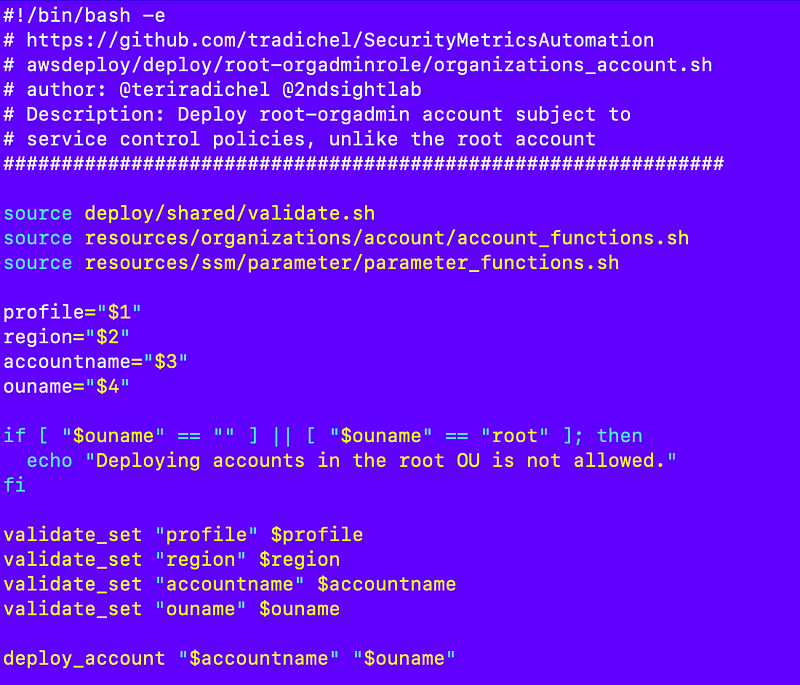
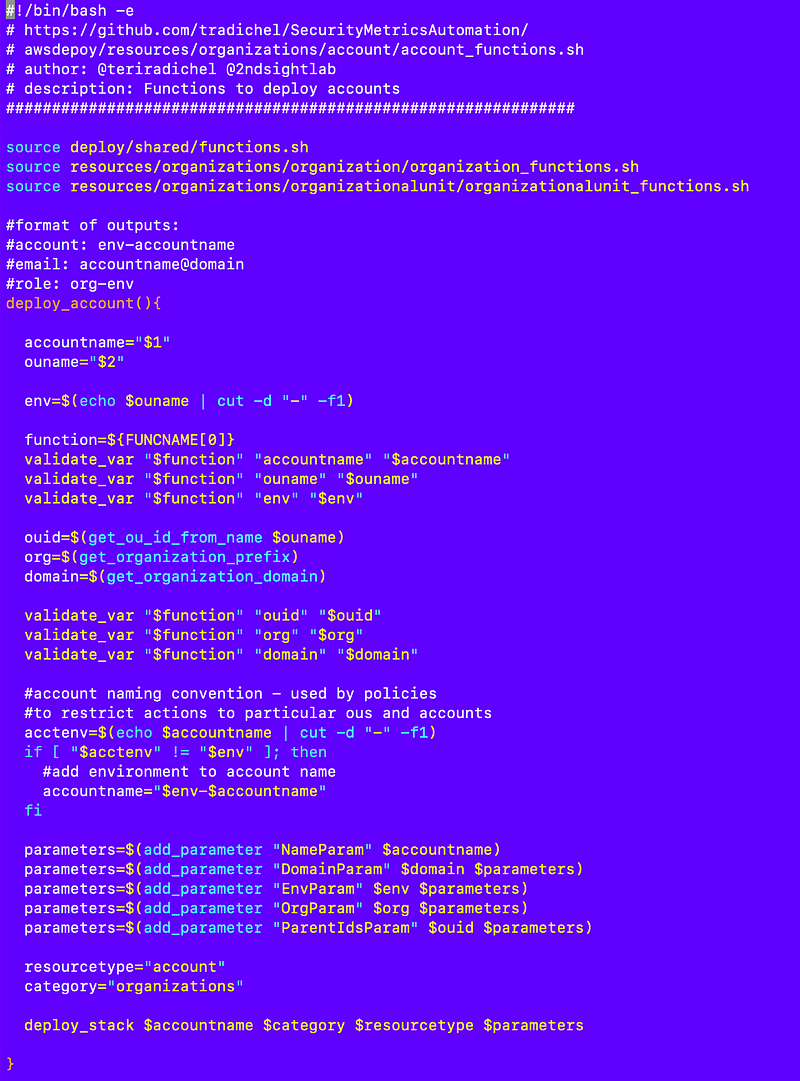
Note that when you specify an OU ID for CloudFormation, behind the scenes it appears to create the account first at the root and then moves it to the correct OU. That’s a problem for a service control policy that prevents deploying accounts at the root. I don’t even think my SCP was enforced last time I tried it. But I can prevent passing the root OU into the function that creates accounts:

I’ll need to make sure my deploy_account functions works with the new OU id lookup function I created a few posts back.
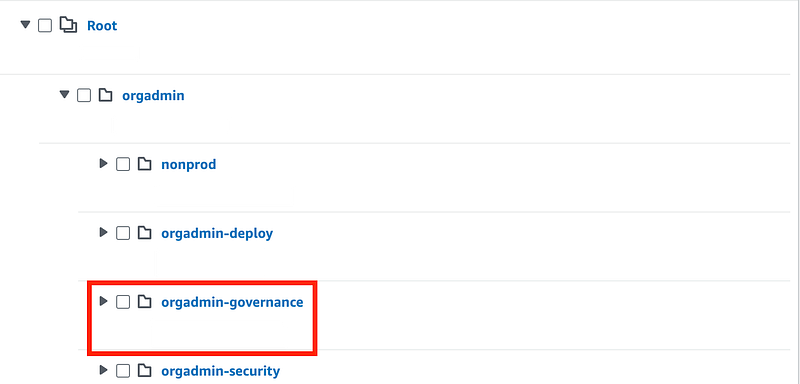
Now I can test to make sure I can deploy a single account. I want to deploy my IAM account in my orgadmin-governance OU.
I can use the gen_code functionality I wrote about earlier to create a deployment file for my iam account.
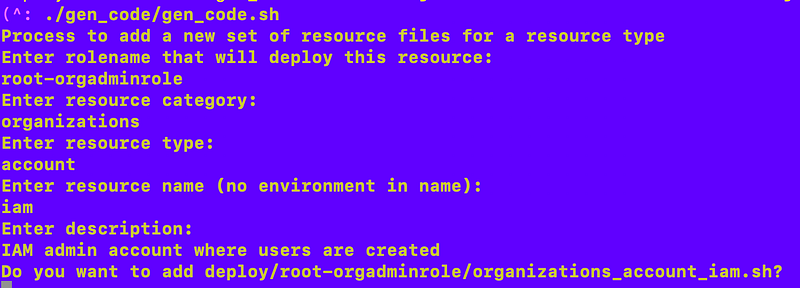
I skip creation of the functions and template file since I already have those.

The code assumes I’m calling the deploy function directly and is just a starting point, but all my header and footer and basic variables get added for me at this point.
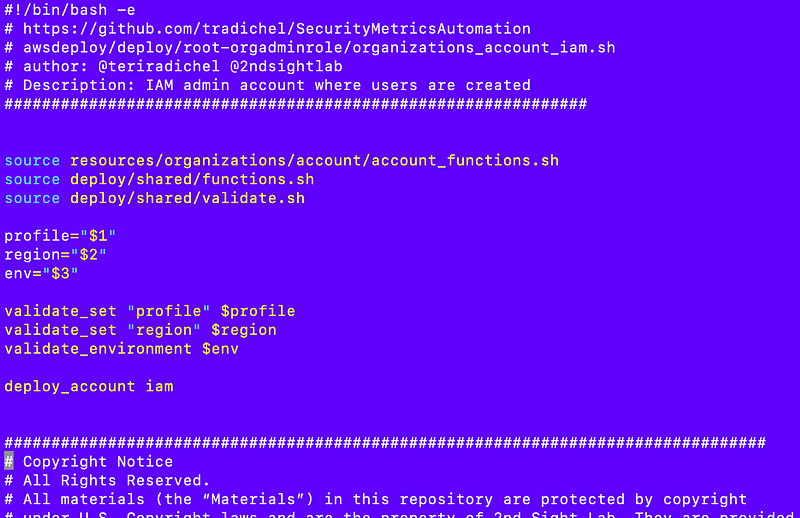
I can simplify this file to call the account creation script. Maybe I’ll adjust gen_code to handle that for me at some point, but here’s my file:
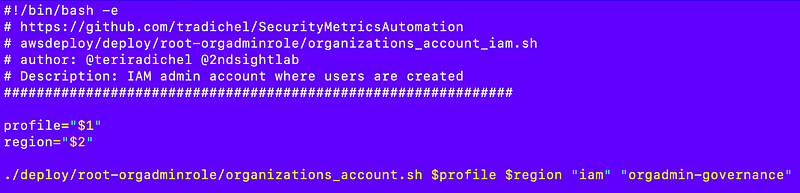
Next I can add my file to deploy all the accounts.

organizations_account_all.sh

For my initial test I deploy one account.
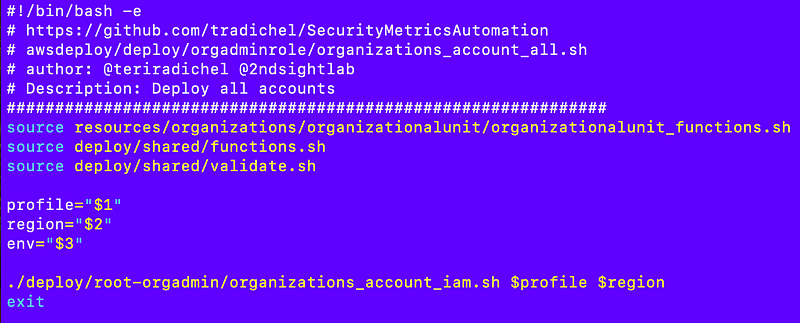
I add my script to the list of choices that a user can deploy when testing locally (and I haven’t fully explained this script yet but I will at some point):
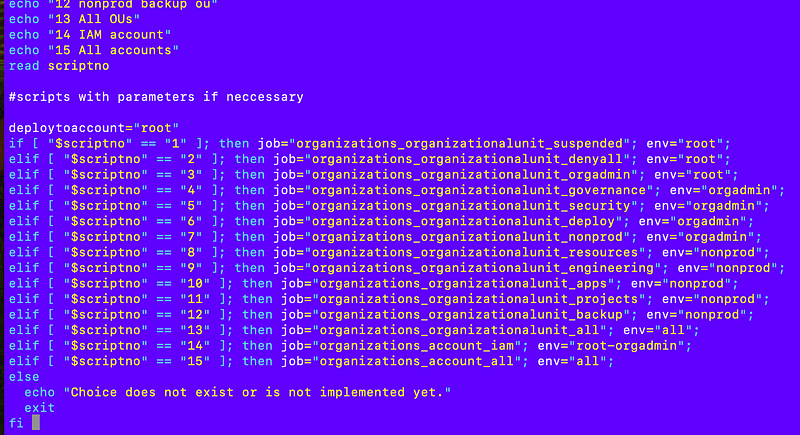
Now I can test deploying the account directly with the IAM account deployment job.
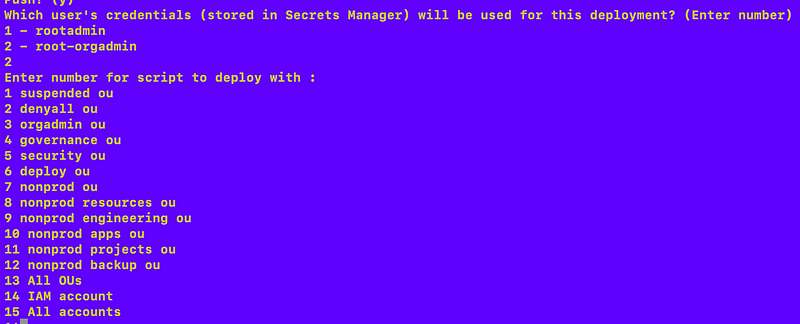
When I run my script I realize that I need to add permissions for the root-orgadmin user to access the SSM parameters in the management account with the organization information.

Here are the actions for SSM:

I update the role policy which is easy to find due to my naming convention:

awsdeploy/resources/iam/rolepolicy/root-orgadminrolepolicy.yaml
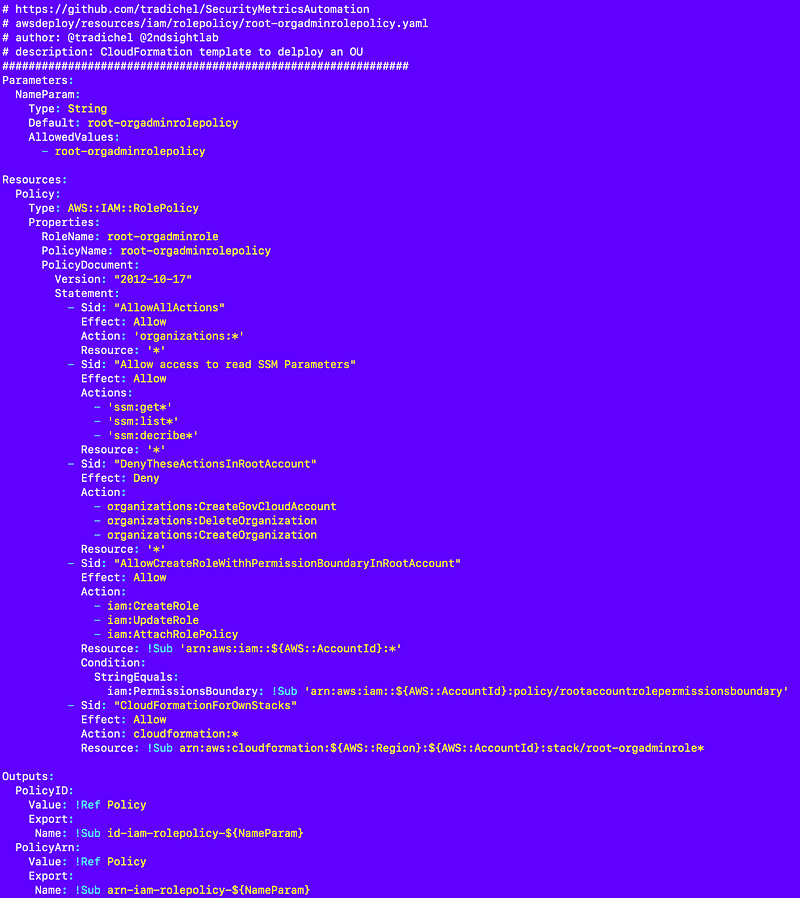
I don’t intend to add secret information to SSM Parameter store or use it for the most part in this account so I grant full read access. I had to fix the SID above as they can’t have spaces, and if you add them you get a generic syntax error:
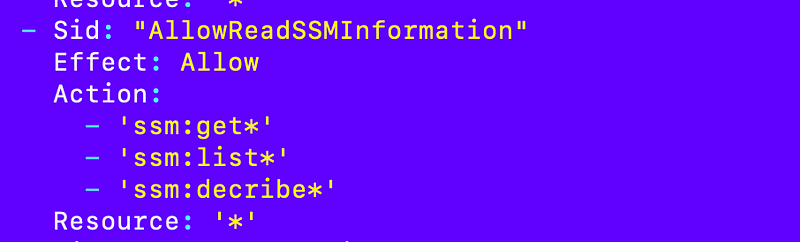
There is no way to add a resource policy to SSM parameters so that should be all that is needed.

I run my local test script and select the root-admin user.

That displays the resources the root-admin user can deploy.

I select the policy I want to update.
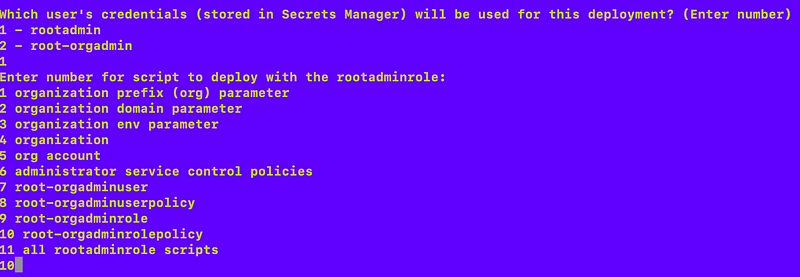
The root-orgadmin cannot update their own credentials because its own policy does not allow it.

That user also wouldn’t be able to provide the root-admin MFA, so only the rootadmin can update the policy.

After making that change I attempt to run my IAM account creation script again and it works.
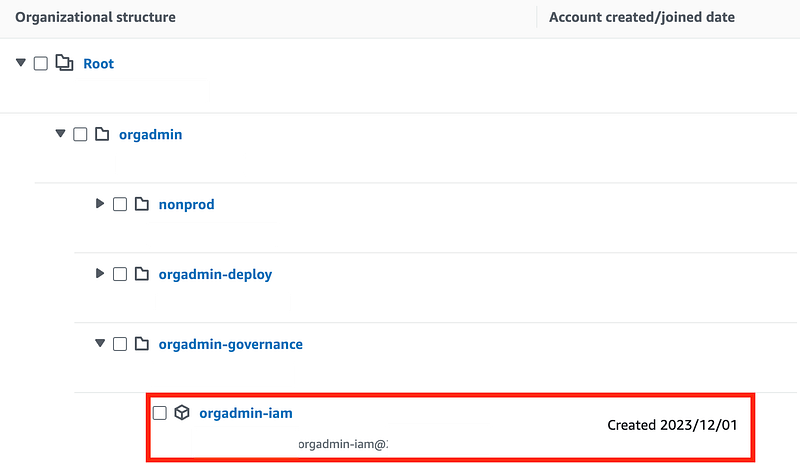
Now I can test creating an all-accounts script to deploy multiple accounts simultaneously.

Follow for updates.

Teri Radichel | © 2nd Sight Lab 2023

About Teri Radichel:
~~~~~~~~~~~~~~~~~~~~
⭐️ Author: Cybersecurity Books
⭐️ Presentations: Presentations by Teri Radichel
⭐️ Recognition: SANS Award, AWS Security Hero, IANS Faculty
⭐️ Certifications: SANS ~ GSE 240
⭐️ Education: BA Business, Master of Software Engineering, Master of Infosec
⭐️ Company: Penetration Tests, Assessments, Phone Consulting ~ 2nd Sight Lab
Need Help With Cybersecurity, Cloud, or Application Security?
~~~~~~~~~~~~~~~~~~~~~~~~~~~~~~~~~~~~~~~~~~~~~~~~~~~~~~~~~~~~~
🔒 Request a penetration test or security assessment
🔒 Schedule a consulting call
🔒 Cybersecurity Speaker for Presentation
Follow for more stories like this:
~~~~~~~~~~~~~~~~~~~~~~~~~~~~~~~~~~~~~~~~~~~~~~~~~~~~~~~~~~~~~ 
❤️ Sign Up my Medium Email List
❤️ Twitter: @teriradichel
❤️ LinkedIn: https://www.linkedin.com/in/teriradichel
❤️ Mastodon: @teriradichel@infosec.exchange
❤️ Facebook: 2nd Sight Lab
❤️ YouTube: @2ndsightlab

Deploy
AWS
Account
Container
Organizations
Recommended from ReadMedium
