avatarTeri Radichel

Free AI web copilot to create summaries, insights and extended knowledge, download it at here

11513

Abstract

mages-1.readmedium.com/v2/resize:fit:800/1*-GxRRS2nOXn80y3S6dbARQ.png"><figcaption></figcaption></figure><p id="13a2">The policy allows you to preserve or sometimes backup a resource when the stack is deleted. If no DeletionPolicy is provided the default is to delete the resource, with a few exceptions noted in the documentation.</p><div id="f5ff" class="link-block"> <a href="https://docs.aws.amazon.com/AWSCloudFormation/latest/UserGuide/aws-attribute-deletionpolicy.html?src=radichel"> <div> <div> <h2>DeletionPolicy attribute</h2> <div><h3>Specify how to handle resource deletion in AWS CloudFormation with the DeletionPolicy attribute.</h3></div> <div><p>docs.aws.amazon.com</p></div> </div> <div> <div style="background-image: url(https://miro.readmedium.com/v2/resize:fit:320/)"></div> </div> </div> </a> </div><p id="1221">Options are:</p><ul><li><b><i>Delete</i></b></li><li><b><i>Retain</i></b></li><li><b><i>RetainExceptOnCreate</i></b> — if the stack is rolled back on create the resource is deleted. All other operations such as deleting the stack will retain the resource.</li><li><b><i>Snapshot</i></b> (for resources that support it)</li></ul><p id="596f">I’ll just go with the example and set the DeletionPolicy to Retain.</p><p id="c78f">If I delete the stack and redeploy it, I get the same error.</p><p id="da6d">When the stack is in a failed state, I don’t have the option to import it.</p><p id="13a9">What if I can deploy a template with no resources? Others have gone down this path before:</p><div id="37d8" class="link-block"> <a href="https://stackoverflow.com/questions/62990653/create-cloudformation-stack-without-resources"> <div> <div> <h2>Create CloudFormation stack without resources</h2> <div><h3>I am using Terraform for most of my infrastructure, but at the same time I'm using the serverless framework to define…</h3></div> <div><p>stackoverflow.com</p></div> </div> <div> <div style="background-image: url(https://miro.readmedium.com/v2/resize:fit:320/0*9YQUpnY0iorRRWIR)"></div> </div> </div> </a> </div><p id="c0ed">I don’t like the wait condition option with a resource hanging around I don’t need. The second option, though more complex, is better in my opinion.</p><p id="e229">Obviously, I’d rather be able to create an empty stack (#awswishlist) but this will have to do. I create a new <b><i>organizationexists.yaml </i></b>template and add the following:</p><figure id="3505"><img src="https://cdn-images-1.readmedium.com/v2/resize:fit:800/1*bfvIS5HIZBAYoV_VOLSUAg.png"><figcaption></figcaption></figure><p id="b98e">I change my deploy.sh file to determine which template to use based on whether an organization id exists:</p><figure id="fc42"><img src="https://cdn-images-1.readmedium.com/v2/resize:fit:800/1*QZnfak675JyFY6-Lqp4GNg.png"><figcaption></figcaption></figure><p id="e626">I run <b><i>deploy.sh</i></b>. Now I have a stack:</p><figure id="bc1c"><img src="https://cdn-images-1.readmedium.com/v2/resize:fit:800/1*F6pVk0i3lJMUWMqjq0arOg.png"><figcaption></figcaption></figure><p id="bdab">With no resources:</p><figure id="f9a3"><img src="https://cdn-images-1.readmedium.com/v2/resize:fit:800/1*7tiCTVLufq-lcRBamVga2Q.png"><figcaption></figcaption></figure><p id="b2cf">Now I want to add the code to import the existing organization resource.</p><p id="140d">The documentation above is using the <b><i>create-change-set</i></b> command with the <b><i>IMPORT</i></b> option.</p><div id="a5c1" class="link-block"> <a href="https://awscli.amazonaws.com/v2/documentation/api/latest/reference/cloudformation/create-change-set.html?src=radichel"> <div> <div> <h2>create-change-set - AWS CLI 2.13.33 Command Reference</h2> <div><h3>undefined</h3></div> <div><p>undefined</p></div> </div> <div> <div style="background-image: url(https://miro.readmedium.com/v2/resize:fit:320/)"></div> </div> </div> </a> </div><p id="84fe">The command documentation says you can provide a template url or template body. So the import documentation makes it sound like you have to use template-url and that template-body must be the inline yaml that’s not allowed.</p><p id="7370">A template-url requires an S3 bucket or SSM document. I’ve mentioned before that it’s painful to have to deploy a proper S3 bucket to use CloudFormation constructs like nested stacks and stack sets and that’s why I don’t use them. Configuring an SSM document securely is not that much more appealing. As mentioned before a misconfigured SSM environment can lead to use as a C2 channel if an attacker gets a handle on it. I’d rather not deal with either of these but is this our only option?</p><figure id="be28"><img src="https://cdn-images-1.readmedium.com/v2/resize:fit:800/1*94v1HmqsqPWah_4rXl9JaQ.png"><figcaption></figcaption></figure><p id="dc44">Well the command documentation makes it look like you can use a file with the template-body option. Hallelujah for sample code.</p><figure id="bbce"><img src="https://cdn-images-1.readmedium.com/v2/resize:fit:800/1*U_1gcpc0kbHy-9KbqbTZ2Q.png"><figcaption></figcaption></figure><p id="895a">When I crafted my resource to import configuration I initially created it like this:</p><div id="e06a"><pre><span class="hljs-keyword">import</span>=”[{\”<span class="hljs-title class_">ResourceType</span>\”<span class="hljs-symbol">:</span>\”<span class="hljs-title class_">AWS</span>::<span class="hljs-title class_">Organizations</span>::<span class="hljs-title class_">Organization</span>\”,\”<span class="hljs-title class_">LogicalResourceId</span>\”<span class="hljs-symbol">:</span>\”<span class="hljs-title class_">Organization</span>\”,\”<span class="hljs-title class_">ResourceIdentifier</span>\”<span class="hljs-symbol">:</span>{\”<span class="hljs-title class_">OrganizationId</span>\”<span class="hljs-symbol">:</span>\”<span class="hljs-variable">$orgid</span>\”}}]”</pre></div><p id="5c09">The logical ID is the ID of the resource in the template we are using with the ChangeSet. In my organization.yaml template, I gave my organization resource that we’re creating the logical ID of …Organization.</p><figure id="cd81"><img src="https://cdn-images-1.readmedium.com/v2/resize:fit:800/1*s9XrO4FM8kc-LbcGxFSBpQ.png"><figcaption></figcaption></figure><p id="51e3">I didn’t know what to use for <b><i>ResourceIdentifier </i></b>so I just guessed and ran the create-change-set command.</p><p id="c633">Then I got this error which tells me the value I want is Id. I’m going to pass in the organization id which I looked up using an AWS CLI command above when checking if the organization exists or not.</p><blockquote id="20ff"><p>An error occurred (ValidationError) when calling the CreateChangeSet operation: Invalid resource identifier for resource type AWS::Organizations::Organization. <b>Expected [Id]</b></p></blockquote><figure id="6e40"><img src="https://cdn-images-1.readmedium.com/v2/resize:fit:800/1*u4YoeFvfOS8E9jwWyWmECw.png"><figcaption></figcaption></figure><p id="dc3c">Next I got this unfortunate error:</p><blockquote id="d26d"><p>An error occurred (ValidationError) when calling the CreateChangeSet operation: As part of the import operation, you cannot modify or add [Outputs]</p></blockquote><p id="4ea4">I created a standalone resource template called <b><i>organizationimport.yaml</i></b>.</p><figure id="2fd2"><img src="https://cdn-images-1.readmedium.com/v2/resize:fit:800/1*s3kxYZFgLXIEhvf7t85QLQ.png"><figcaption></figcaption></figure><p id="c925">I ran my create-change-set command again with this template.</p><figure id="7ab6"><img src="https://cdn-images-1.readmedium.com/v2/resize:fit:800/1*lxhOw2_EVHCFCf55vP09uA.png"><figcaption></figcaption></figure><p id="8e40">That worked. I navigated to my stack created above and clicked on <b>Change sets</b>. I can see the change set was created.</p><figure id="70ef"><img src="https://cdn-images-1.readmedium.com/v2/resize:fit:800/1*MKss3vPt0Tvuqya3WO-1TA.png"><figcaption></figcaption></figure><p id="f9a0">Next I need to execute the change set:</p><figure id="084e"><img src="https://cdn-images-1.readmedium.com/v2/resize:fit:800/1*QW2g75POq23AY08sHf-UPQ.png"><figcaption></figcaption></figure><p id="f663">That worked too. Now I can see the organization under the resources tab.</p><figure id="b898"><img src="https://cdn-images-1.readmedium.com/v2/resize:fit:800/1*20uv4UNViLMsL5Bf8LWvTg.png"><figcaption></figcaption></figure><p id="ecb6">My empty stack template has been replaced:</p><figure id="0985"><img src="https://cdn-images-1.readmedium.com/v2/resize:fit:800/1*gG2TvXOoBsUj74Fz703L3w.png"><figcaption></figcaption></figure><p id="0dc0">Seeing this, I’m going to rename my initial template emptystack.yaml and remove the parameter.</p><p id="74c6">emptystack.yaml now looks like this:</p><figure id="0e32"><img src="https://cdn-images-1.readmedium.com/v2/resize:fit:800/1*gZ4LEjzNkMDus9YWAeBT6A.png"><figcaption></figcaption></figure><p id="75e8">I can deploy an empty stack with whatever name I want like this:</p><figure id="4221"><img src="https://cdn-images-1.readmedium.com/v2/resize:fit:800/1*0_aDAYj_ciEBvXcDQWIHJA.png"><figcaption></figcaption></figure><p id="38a4">Now one last thing. Can I redeploy my organization.yaml template with this stack now?</p><p id="9ddb">Well, first of all I figured out that if I wasn’t running the script line by line it failed because one command has to wait until another completes.</p><p id="95ac">I added a wait after create change set:</p><figure id="9efc"><img src="https://cdn-images-1.readmedium.com/v2/resize:fit:800/1*jFQ6unnIre-E1Kr_0ZqUqw.png"><figcaption></figcaption></figure><p id="fcd1">I also added a wait after the execution of the change set to import the organization template.</p><figure id="5a3e"><img src="https://cdn-images-1.readmedium.com/v2/resize:fit:800/1*-qN1FV26flTHVxbL_yaCNw.png"><figcaption></figcaption></figure><p id="61ad">Next I check to see if the stack exists with the organization id output.</p><p id="ab6c">I add an or echo empty string at the end because if I get an error then the empty string action will fire and the value of exists will end up being an empty string. Then I can check to see if the value is an empty string or None which got returned at some point while testing.</p><figure id="92f2"><img src="https://cdn-images-1.readmedium.com/v2/resize:fit:800/1*JiMvYaw1atTnL5YgAQQHMA.png"><figcaption></figcaption></figure><p id="833e">If the stack with output parameters doesn’t exist, then run all that code to import the new template.</p><p id="8f55">Then, whether it did or did not exist, I run the deploy action with the organization.yaml template which either deploys an organization from scratch if it didn’t exist in the first place or it updates the existing stack with the the output parameters.</p><p id="441f">And it worked! In either case I have the same stack in the end with the proper template, resources, and outputs.</p><p id="9ba4">Here’s the relevant portion of the deploy script.</p><figure id="7a9c"><img src="https://cdn-images

Options

-1.readmedium.com/v2/resize:fit:800/1*VNUPDJvxLhBs57CnhkuHCQ.png"><figcaption></figcaption></figure><div id="e8da"><pre><span class="hljs-comment">#!/bin/bash -e</span>

<span class="hljs-string">env</span>=<span class="hljs-string">"root"</span>

<span class="hljs-string">p</span>=$(<span class="hljs-string">aws</span> <span class="hljs-string">ssm</span> <span class="hljs-string">describe-parameters</span> <span class="hljs-built_in">--filters</span> <span class="hljs-string">Key</span>=<span class="hljs-string">Name</span>,<span class="hljs-string">Values</span>=<span class="hljs-string">'org'</span> <span class="hljs-built_in">--query</span> <span class="hljs-string">Parameters</span>[*].<span class="hljs-string">Name</span> <span class="hljs-built_in">--output</span> <span class="hljs-string">text</span>)

<span class="hljs-string">if</span> [ <span class="hljs-string">"$p"</span> == <span class="hljs-string">""</span> ]; <span class="hljs-string">then</span> <span class="hljs-string">echo</span> <span class="hljs-string">"Enter organization prefix (an ID attached to organizational resource names):"</span> <span class="hljs-string">read</span> <span class="hljs-string">org</span>

<span class="hljs-string">aws</span> <span class="hljs-string">cloudformation</span> <span class="hljs-string">deploy</span> <span class="hljs-built_in">--template-file</span> <span class="hljs-string">parameter</span>.<span class="hljs-string">yaml</span> <span class="hljs-built_in">--stack-name</span> <span class="hljs-string">root-ssm-parameter-org</span>
<span class="hljs-built_in">--parameter-overrides</span> <span class="hljs-string">NameParam</span>=<span class="hljs-string">"org"</span> <span class="hljs-string">ValueParam</span>=<span class="hljs-string">"org"</span> <span class="hljs-built_in">--capabilities</span> <span class="hljs-string">CAPABILITY_NAMED_IAM</span> <span class="hljs-string">else</span> <span class="hljs-string">org</span>=(<span class="hljs-string">aws</span> <span class="hljs-string">ssm</span> <span class="hljs-built_in">get-parameter</span> <span class="hljs-built_in">--name="org"</span> <span class="hljs-built_in">--query</span> <span class="hljs-string">Parameter</span>.<span class="hljs-string">Value</span> <span class="hljs-built_in">--output</span> <span class="hljs-string">text</span>) <span class="hljs-string">echo</span> <span class="hljs-string">"Organization: $org"</span> <span class="hljs-string">fi</span>

<span class="hljs-string">p</span>=$(<span class="hljs-string">aws</span> <span class="hljs-string">ssm</span> <span class="hljs-string">describe-parameters</span> <span class="hljs-built_in">--filters</span> <span class="hljs-string">Key</span>=<span class="hljs-string">Name</span>,<span class="hljs-string">Values</span>=<span class="hljs-string">'env'</span> <span class="hljs-built_in">--query</span> <span class="hljs-string">Parameters</span>[*].<span class="hljs-string">Name</span> <span class="hljs-built_in">--output</span> <span class="hljs-string">text</span>)

<span class="hljs-string">if</span> [ <span class="hljs-string">"p"</span> == <span class="hljs-string">""</span> ]; <span class="hljs-string">then</span> <span class="hljs-string">aws</span> <span class="hljs-string">cloudformation</span> <span class="hljs-string">deploy</span> <span class="hljs-built_in">--template-file</span> <span class="hljs-string">parameter</span>.<span class="hljs-string">yaml</span> <span class="hljs-built_in">--stack-name</span> <span class="hljs-string">root-ssm-parameter-env</span> \ <span class="hljs-built_in">--parameter-overrides</span> <span class="hljs-string">NameParam</span>=<span class="hljs-string">"env"</span> <span class="hljs-string">ValueParam</span>=<span class="hljs-string">"env"</span> <span class="hljs-built_in">--capabilities</span> <span class="hljs-string">CAPABILITY_NAMED_IAM</span> <span class="hljs-string">else</span> <span class="hljs-string">env</span>=$(<span class="hljs-string">aws</span> <span class="hljs-string">ssm</span> <span class="hljs-built_in">get-parameter</span> <span class="hljs-built_in">--name="env"</span> <span class="hljs-built_in">--query</span> <span class="hljs-string">Parameter</span>.<span class="hljs-string">Value</span> <span class="hljs-built_in">--output</span> <span class="hljs-string">text</span>) <span class="hljs-string">fi</span>

<span class="hljs-string">echo</span> <span class="hljs-string">"Environment: $env"</span>

<span class="hljs-string">stackname</span>=<span class="hljs-string">"root-organizations-organization-org"</span> <span class="hljs-string">orgid</span>=(<span class="hljs-string">aws</span> <span class="hljs-string">organizations</span> <span class="hljs-string">describe-organization</span> <span class="hljs-built_in">--query</span> <span class="hljs-string">Organization</span>.<span class="hljs-string">Id</span> <span class="hljs-built_in">--output</span> <span class="hljs-string">text</span>)

<span class="hljs-string">exists</span>=(<span class="hljs-string">aws</span> <span class="hljs-string">cloudformation</span> <span class="hljs-string">describe-stacks</span> <span class="hljs-built_in">--stack-name</span> <span class="hljs-string">stackname</span> <span class="hljs-built_in">--query</span> <span class="hljs-string">'Stacks[0].Outputs[?ExportName=='</span>$<span class="hljs-string">org</span><span class="hljs-string">'].OutputValue'</span> <span class="hljs-built_in">--output</span> <span class="hljs-string">text</span> || <span class="hljs-string">echo</span> <span class="hljs-string">""</span>)

<span class="hljs-string">if</span> [ <span class="hljs-string">"exists"</span> = <span class="hljs-string">""</span> ] || [ <span class="hljs-string">"exists"</span> == <span class="hljs-string">"None"</span> ]; <span class="hljs-string">then</span>

<span class="hljs-string">import</span>=<span class="hljs-string">"[{"</span><span class="hljs-string">ResourceType</span><span class="hljs-string">":"</span><span class="hljs-string">AWS</span>::<span class="hljs-string">Organizations</span>::<span class="hljs-string">Organization</span><span class="hljs-string">","</span><span class="hljs-string">LogicalResourceId</span><span class="hljs-string">":"</span><span class="hljs-string">Organization</span><span class="hljs-string">","</span><span class="hljs-string">ResourceIdentifier</span><span class="hljs-string">":{"</span><span class="hljs-string">Id</span><span class="hljs-string">":"</span>$<span class="hljs-string">orgid</span><span class="hljs-string">"}}]"</span> <span class="hljs-string">changesetname</span>=<span class="hljs-string">"import-organization-changeset"</span>

<span class="hljs-string">aws</span> <span class="hljs-string">cloudformation</span> <span class="hljs-string">deploy</span> <span class="hljs-built_in">--template-file</span> <span class="hljs-string">emptystack</span>.<span class="hljs-string">yaml</span> <span class="hljs-built_in">--stack-name</span> $<span class="hljs-string">stackname</span>

<span class="hljs-comment">#import changeset</span> <span class="hljs-string">aws</span> <span class="hljs-string">cloudformation</span> <span class="hljs-built_in">create-change-set</span> <span class="hljs-built_in">--stack-name</span> <span class="hljs-string">stackname</span> <span class="hljs-built_in">--change-set-name</span> <span class="hljs-string">changesetname</span> <span class="hljs-built_in">--change-set-type</span> <span class="hljs-string">IMPORT</span>
<span class="hljs-built_in">--resources-to-import</span> $<span class="hljs-string">import</span> <span class="hljs-built_in">--template-body</span> <span class="hljs-string">file</span>://<span class="hljs-string">organizationimport</span>.<span class="hljs-string">yaml</span>

<span class="hljs-comment">#wait for the changeset to complete</span> <span class="hljs-string">aws</span> <span class="hljs-string">cloudformation</span> <span class="hljs-string">wait</span> <span class="hljs-string">change-set-create-complete</span>
<span class="hljs-built_in">--stack-name</span> <span class="hljs-string">stackname</span> \ <span class="hljs-built_in">--change-set-name</span> <span class="hljs-string">changesetname</span>

<span class="hljs-comment">#execute change set</span> <span class="hljs-string">aws</span> <span class="hljs-string">cloudformation</span> <span class="hljs-string">execute-change-set</span> <span class="hljs-built_in">--change-set-name</span> <span class="hljs-string">changesetname</span> <span class="hljs-built_in">--stack-name</span> <span class="hljs-string">stackname</span>

<span class="hljs-comment">#wait until import is complete</span> <span class="hljs-string">aws</span> <span class="hljs-string">cloudformation</span> <span class="hljs-string">wait</span> <span class="hljs-string">stack-import-complete</span>
<span class="hljs-built_in">--stack-name</span> $<span class="hljs-string">stackname</span> <span class="hljs-string">fi</span>

<span class="hljs-comment">#deploy the new organization or the updated template with outputs if the organization was imported</span> <span class="hljs-string">aws</span> <span class="hljs-string">cloudformation</span> <span class="hljs-string">deploy</span> <span class="hljs-built_in">--template-file</span> <span class="hljs-string">organization</span>.<span class="hljs-string">yaml</span> <span class="hljs-built_in">--stack-name</span> <span class="hljs-string">root-organizations-organization</span>-<span class="hljs-string">org</span> <span class="hljs-built_in">--parameter-overrides</span> \ <span class="hljs-string">NameParam</span>=<span class="hljs-string">"org"</span></pre></div><p id="e6f8">Now that I have an organization ID I can work with I can use it in policies.</p><p id="186d">Follow for updates.</p><p id="4a3a">Teri Radichel | <i>© <a href="https://2ndsightlab.com/?source=post_page---------------------------">2nd Sight Lab</a> 2023</i></p><div id="8b5f"><pre><span class="hljs-section">About Teri Radichel:

⭐️ Author: Cybersecurity Books
⭐️ Presentations: Presentations by Teri Radichel
⭐️ Recognition: SANS Award, AWS Security Hero, IANS Faculty
⭐️ Certifications: SANS ~ GSE 240
⭐️ Education: BA Business, Master of Software Engineering, Master of Infosec
⭐️ Company: Penetration Tests, Assessments, Phone Consulting ~ 2nd Sight Lab</pre></div><div id="caae"><pre><span class="hljs-section">Need Help With Cybersecurity, Cloud, or Application Security?
~~~~~~~~~~~~~~~~~~~~~~~~~~~~~~~~~~~~~~~~~~~~~~~~~~~~~~~~~~~~~</span>
🔒 Request a penetration test or security assessment
🔒 Schedule a consulting call
🔒 Cybersecurity Speaker for Presentation</pre></div><div id="5a42"><pre>Follow <span class="hljs-keyword">for</span> more stories like <span class="hljs-keyword">this</span>:

❤️ Sign Up my Medium Email List ❤️ Twitter: <span class="hljs-meta">@teriradichel</span> ❤️ LinkedIn: https:<span class="hljs-comment">//www.linkedin.com/in/teriradichel</span> ❤️ Mastodon: <span class="hljs-meta">@teriradichel</span><span class="hljs-meta">@infosec</span>.exchange ❤️ Facebook: 2nd Sight Lab ❤️ YouTube: @2ndsightlab</pre></div><figure id="faf5"><img src="https://cdn-images-1.readmedium.com/v2/resize:fit:800/0*H9Ew1KCl-29nZiPR.jpeg"><figcaption></figcaption></figure></article></body>

Deploy an Organization With CloudFormation

ACM.375 Deploy a CloudFormation stack for a new or existing organization

~~~~~~~~~~~~~~~~~~~~~~~~~~~~~~~~~~~~~~~~~~~~~~~~~~~~~~~~~~~

⚙️ Part of my series on Automating Cybersecurity Metrics. The Code.

🔒 Related Stories: AWS Security | IAM | AWS Organizations

💻 Free Content on Jobs in Cybersecurity | ✉️ Sign up for the Email List

~~~~~~~~~~~~~~~~~~~~~~~~~~~~~~~~~~~~~~~~~~~~~~~~~~~~~~~~~~~

In the last post, I redeployed the initial user in our organization, but with some additional restrictions instead of just leveraging the built in AWS administrator role.

While working on some changes to the rootadmin permissions (see my next post) I realized I wanted to add some organizational conditions to my policies. However, we can’t do that without an organization.

There are three things I am going to deploy in this post:

  • The SSM Parameter with the organization prefix I’ve been using in resource names which I’m going to name org.
  • The SSM Parameter with the environment which I’m going to name env and in this case is root.
  • The AWS Organization with the name of the org in the SSM Parameter for the output that turns the organization ID from the CloudFormation stack.

By deploying these as root we can prevent the rootadmin or others from modifying or deleting these resource stacks because the stack prefix will start with root-.

Deploy the SSM Parameters

I already have an SSM Parameter template so I’m going to move that over to this location:

resource/ssm/parameter/parameter.yaml
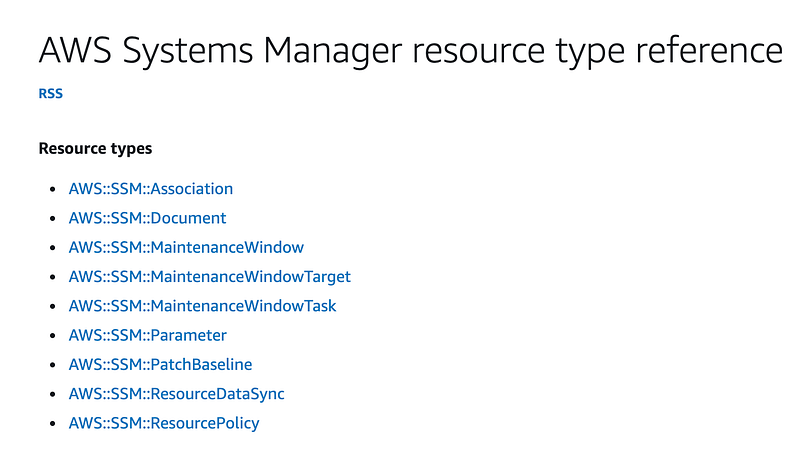
As explained my directories were generated from the AWS documentation but creating the resource type directories was a bit too complicated so I’m just creating those manually.

Hopefully AWS will come up with a better API to list resource categories and types. #awswishlist

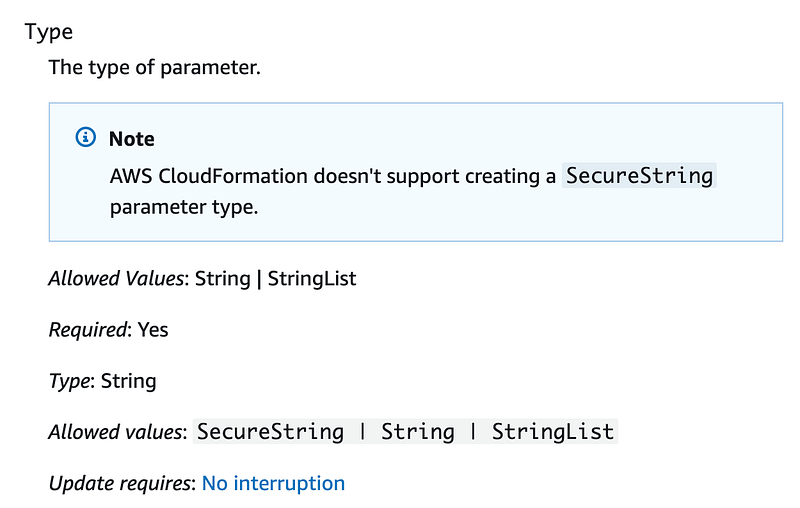
I am just going to reiterate here that is very confusing that AWS still does not support a SecureString parameter type and yet SecureString is one of the allowed values here:
It is at this point I decide I want type categories in my CloudFormation stacknames. I don’t remember if I wrote that before and I forgot but it makes things more consistent. So my stacks now have the following:

[role/user — category-type-name]
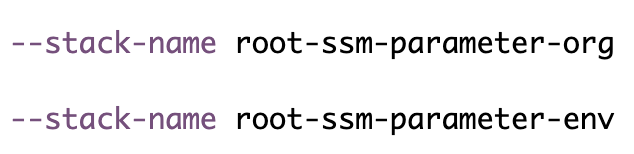
That means I need to delete my existing CloudFormation stacks and start over.

I add the code in my deploy script to request the org prefix from the user (same as I did in my prior organization creation script], set the environment name, and deploy the two required parameters.

I realized at this point, my SSM Parameter script was incomplete and untested as I decided not to use that previously. I commented some things out that are not working and cleaned it up.

By default parameters accept all lowercase alphanumeric values (no special characters) as I primarily expect to use them for naming things according to our naming convention, but that can be overridden.

The two parameters are successfully deployed:

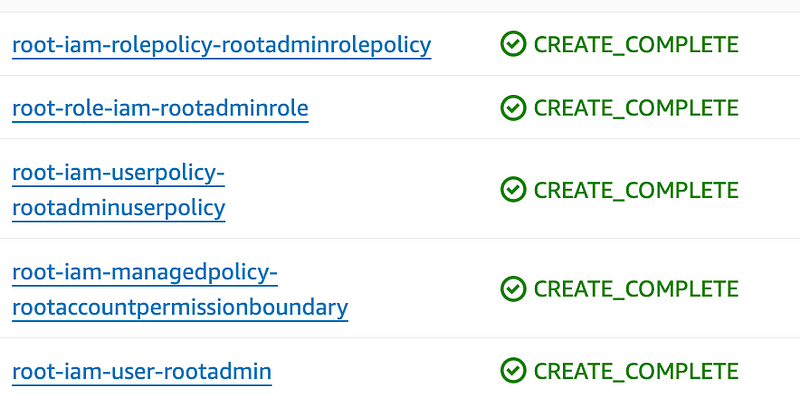
So are the rest of the stacks with the new and improved naming convention.
Deploy the organization

AWS now offers a CloudFormation resource for an AWS Organization. That option didn’t exist when I started this series.

Initially I’m going to test deploying this in a brand new AWS account with no existing organization.

I went ahead and created folders for all the resources below as I expect to use them eventually.
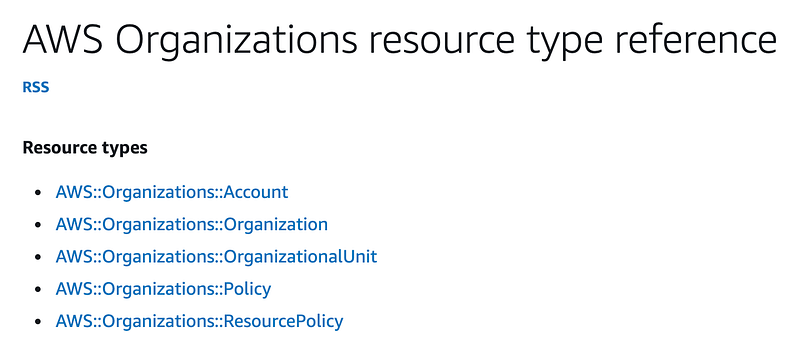
Related directories created here:
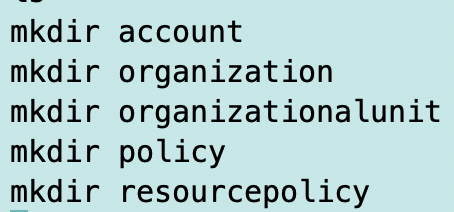
I’m going to create my template here:

resources/organizations/organization/organization.yaml

The template is pretty simple:
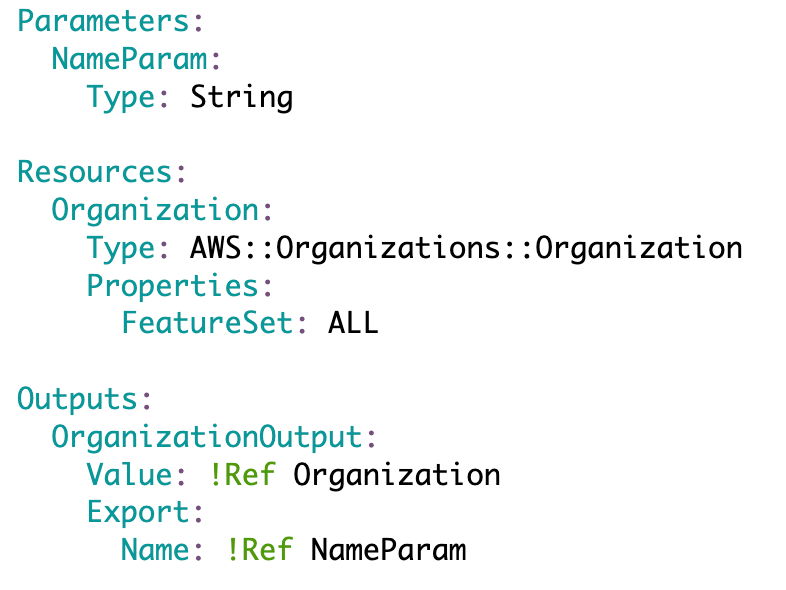
As explained earlier, I am just setting the full featureset which I realized I needed. There’s not a lot of variance for what you can currently configure for an organization. I set the output name to the same name as the org parameter so we can use it later to look up the organization ID.

Retrieving and existing parameter value

I changed my deployment script to make sure the name passed into the template always matches the org SSM parameter:
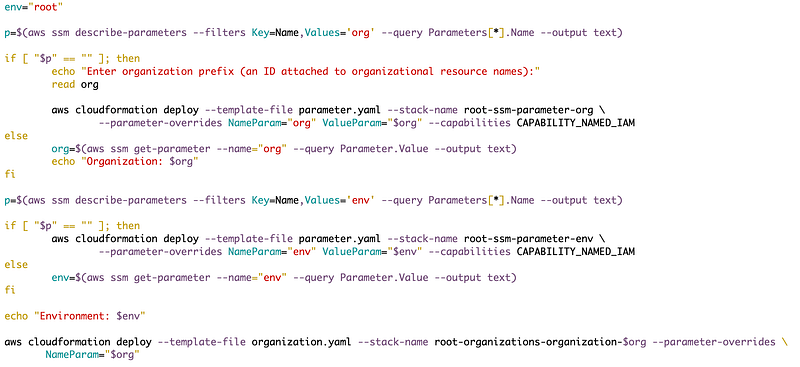
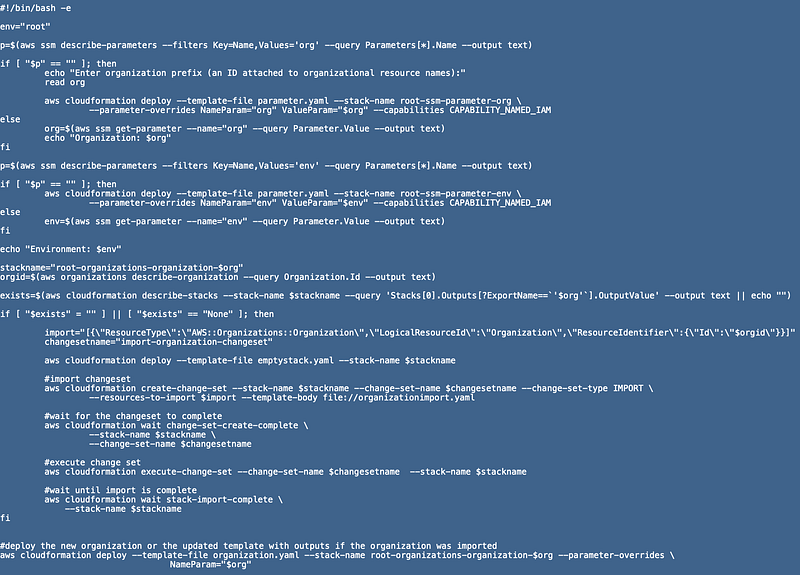
In other words, I check to see if SSM parameters exist named org and env. If they do, I use the values, otherwise I set the values. Either way I end up with values in the org and env variables that are used in the rest of the script.

Here’s the whole deployment script so far:
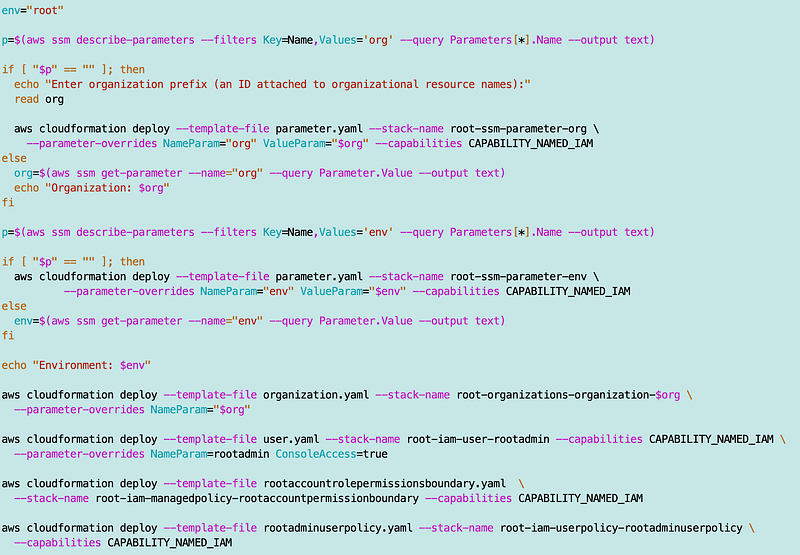
I run the deployment script and successfully create an organization in an account with no existing organization.

Organization output values

I forgot to add a few other outputs we might need so let’s add them:
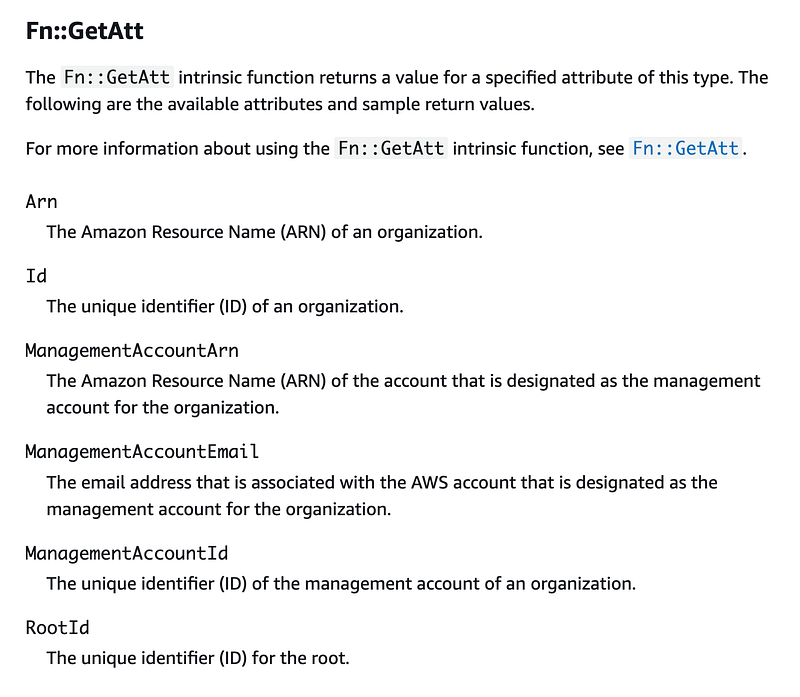
I add the outputs I want to capture to the template:
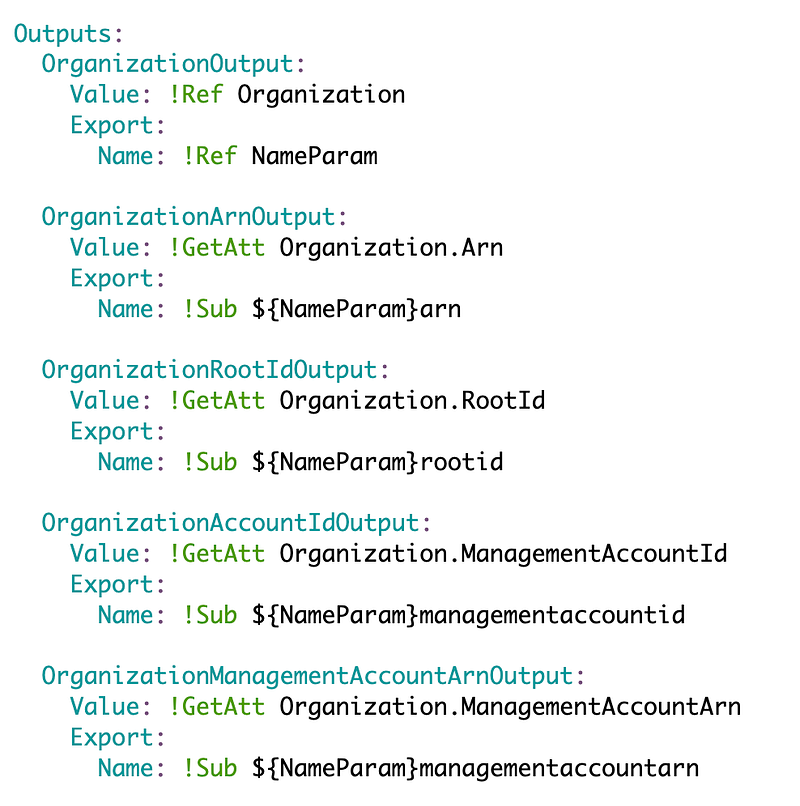
That adds the outputs to the CloudFormation template if we need to reference them. Getting the root id is sometimes a pain so this might be easier to reference now that we have this option.
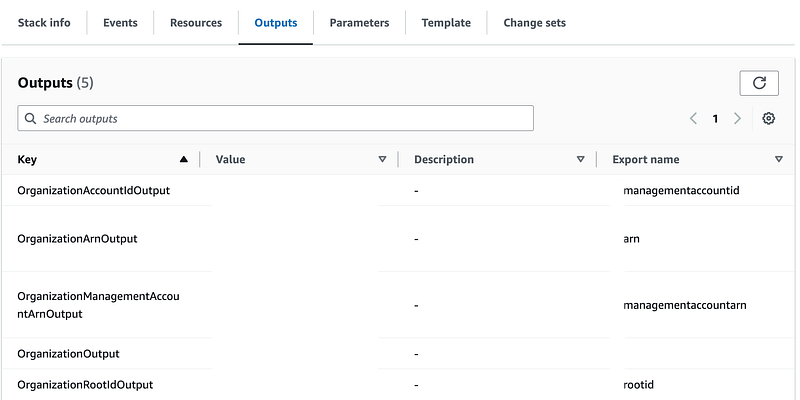
Deploying the template to an account with an Organization

Can we deploy the template as is to an account with an organization? No.
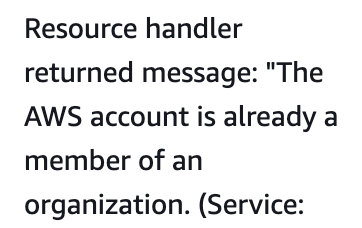
Importing the organization into a stack

Can we import the organization into a stack? AWS describes a mechanism for importing resources here:

Note:

Each resource to import must have a DeletionPolicy attribute in your template.

What’s a DeletionPolicy?

You can add a DeletionPolicy Property to any CloudFormation resource.
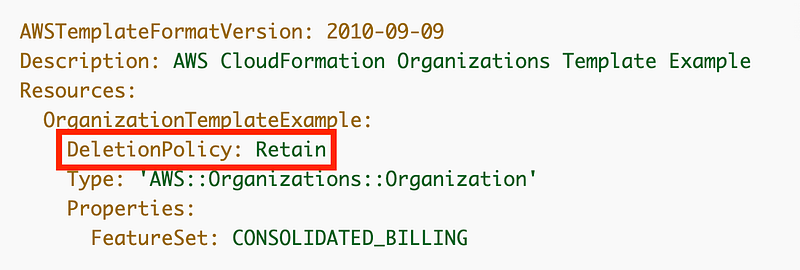
The policy allows you to preserve or sometimes backup a resource when the stack is deleted. If no DeletionPolicy is provided the default is to delete the resource, with a few exceptions noted in the documentation.

Options are:

  • Delete
  • Retain
  • RetainExceptOnCreate — if the stack is rolled back on create the resource is deleted. All other operations such as deleting the stack will retain the resource.
  • Snapshot (for resources that support it)

I’ll just go with the example and set the DeletionPolicy to Retain.

If I delete the stack and redeploy it, I get the same error.

When the stack is in a failed state, I don’t have the option to import it.

What if I can deploy a template with no resources? Others have gone down this path before:

I don’t like the wait condition option with a resource hanging around I don’t need. The second option, though more complex, is better in my opinion.

Obviously, I’d rather be able to create an empty stack (#awswishlist) but this will have to do. I create a new organizationexists.yaml template and add the following:
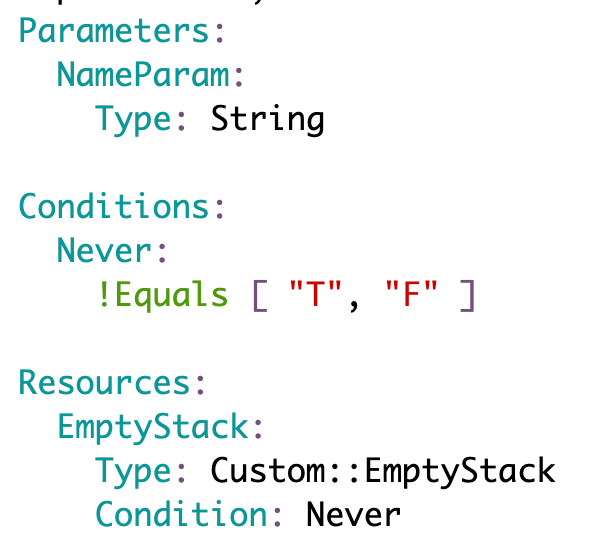
I change my deploy.sh file to determine which template to use based on whether an organization id exists:

I run deploy.sh. Now I have a stack:

With no resources:
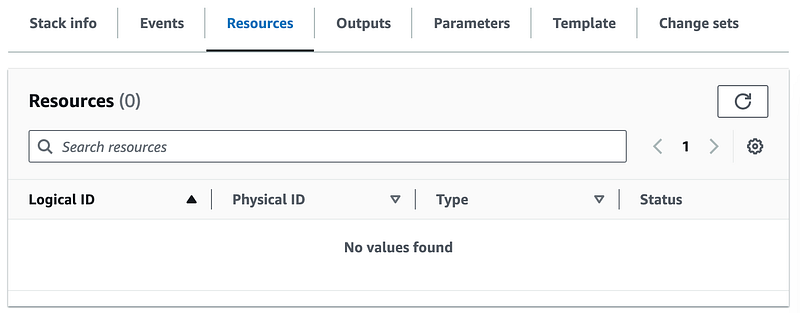
Now I want to add the code to import the existing organization resource.

The documentation above is using the create-change-set command with the IMPORT option.

The command documentation says you can provide a template url or template body. So the import documentation makes it sound like you have to use template-url and that template-body must be the inline yaml that’s not allowed.

A template-url requires an S3 bucket or SSM document. I’ve mentioned before that it’s painful to have to deploy a proper S3 bucket to use CloudFormation constructs like nested stacks and stack sets and that’s why I don’t use them. Configuring an SSM document securely is not that much more appealing. As mentioned before a misconfigured SSM environment can lead to use as a C2 channel if an attacker gets a handle on it. I’d rather not deal with either of these but is this our only option?
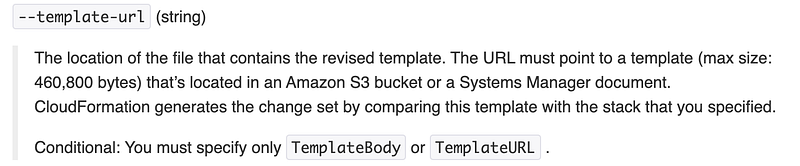
Well the command documentation makes it look like you can use a file with the template-body option. Hallelujah for sample code.

When I crafted my resource to import configuration I initially created it like this:

import=”[{\”ResourceType\”:\”AWS::Organizations::Organization\”,\”LogicalResourceId\”:\”Organization\”,\”ResourceIdentifier\”:{\”OrganizationId\”:\”$orgid\”}}]”

The logical ID is the ID of the resource in the template we are using with the ChangeSet. In my organization.yaml template, I gave my organization resource that we’re creating the logical ID of …Organization.
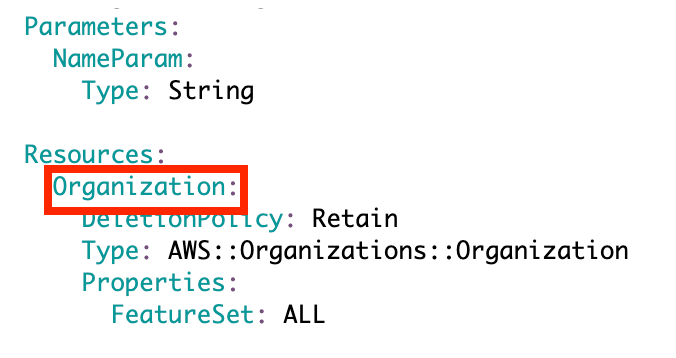
I didn’t know what to use for ResourceIdentifier so I just guessed and ran the create-change-set command.

Then I got this error which tells me the value I want is Id. I’m going to pass in the organization id which I looked up using an AWS CLI command above when checking if the organization exists or not.

An error occurred (ValidationError) when calling the CreateChangeSet operation: Invalid resource identifier for resource type AWS::Organizations::Organization. Expected [Id]

Next I got this unfortunate error:

An error occurred (ValidationError) when calling the CreateChangeSet operation: As part of the import operation, you cannot modify or add [Outputs]

I created a standalone resource template called organizationimport.yaml.
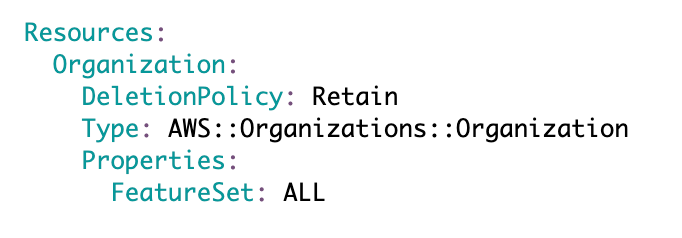
I ran my create-change-set command again with this template.

That worked. I navigated to my stack created above and clicked on Change sets. I can see the change set was created.
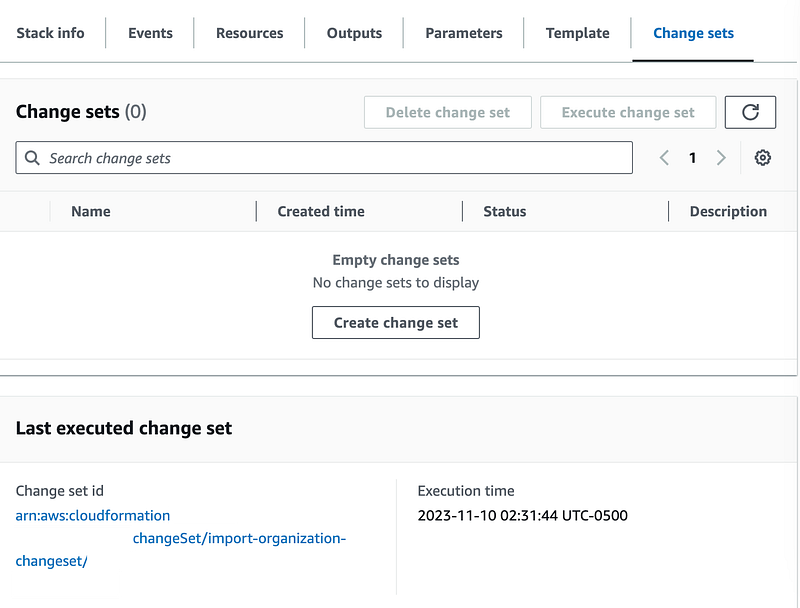
Next I need to execute the change set:

That worked too. Now I can see the organization under the resources tab.
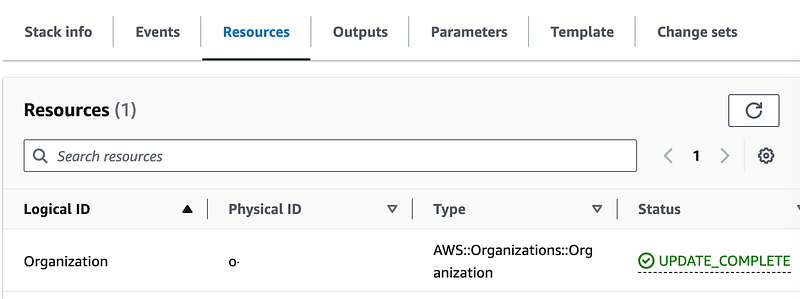
My empty stack template has been replaced:
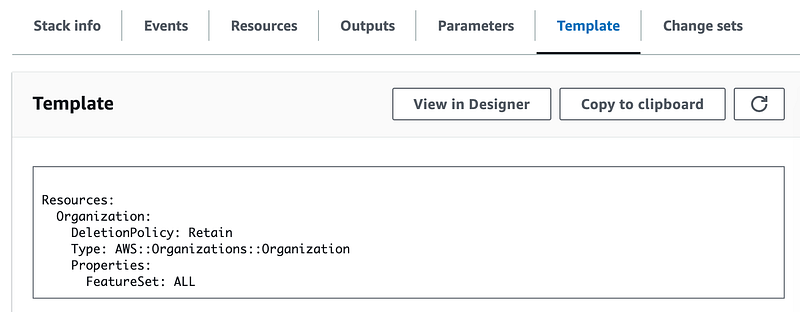
Seeing this, I’m going to rename my initial template emptystack.yaml and remove the parameter.

emptystack.yaml now looks like this:
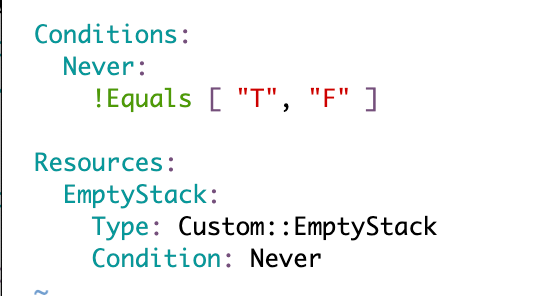
I can deploy an empty stack with whatever name I want like this:

Now one last thing. Can I redeploy my organization.yaml template with this stack now?

Well, first of all I figured out that if I wasn’t running the script line by line it failed because one command has to wait until another completes.

I added a wait after create change set:
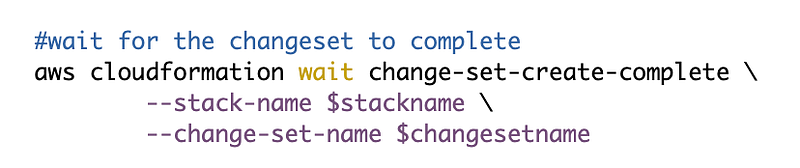
I also added a wait after the execution of the change set to import the organization template.

Next I check to see if the stack exists with the organization id output.

I add an or echo empty string at the end because if I get an error then the empty string action will fire and the value of exists will end up being an empty string. Then I can check to see if the value is an empty string or None which got returned at some point while testing.

If the stack with output parameters doesn’t exist, then run all that code to import the new template.

Then, whether it did or did not exist, I run the deploy action with the organization.yaml template which either deploys an organization from scratch if it didn’t exist in the first place or it updates the existing stack with the the output parameters.

And it worked! In either case I have the same stack in the end with the proper template, resources, and outputs.

Here’s the relevant portion of the deploy script.
#!/bin/bash -e

env="root"

p=$(aws ssm describe-parameters --filters Key=Name,Values='org' --query Parameters[*].Name --output text)

if [ "$p" == "" ]; then
 echo "Enter organization prefix (an ID attached to organizational resource names):"
 read org

 aws cloudformation deploy --template-file parameter.yaml --stack-name root-ssm-parameter-org \
  --parameter-overrides NameParam="org" ValueParam="$org" --capabilities CAPABILITY_NAMED_IAM
else
 org=$(aws ssm get-parameter --name="org" --query Parameter.Value --output text)
 echo "Organization: $org"
fi

p=$(aws ssm describe-parameters --filters Key=Name,Values='env' --query Parameters[*].Name --output text)

if [ "$p" == "" ]; then
 aws cloudformation deploy --template-file parameter.yaml --stack-name root-ssm-parameter-env \
         --parameter-overrides NameParam="env" ValueParam="$env" --capabilities CAPABILITY_NAMED_IAM
else
 env=$(aws ssm get-parameter --name="env" --query Parameter.Value --output text)
fi

echo "Environment: $env"

stackname="root-organizations-organization-$org"
orgid=$(aws organizations describe-organization --query Organization.Id --output text)

exists=$(aws cloudformation describe-stacks --stack-name $stackname --query 'Stacks[0].Outputs[?ExportName==`'$org'`].OutputValue' --output text || echo "")

if [ "$exists" = "" ] || [ "$exists" == "None" ]; then

 import="[{\"ResourceType\":\"AWS::Organizations::Organization\",\"LogicalResourceId\":\"Organization\",\"ResourceIdentifier\":{\"Id\":\"$orgid\"}}]"
 changesetname="import-organization-changeset"
 
 aws cloudformation deploy --template-file emptystack.yaml --stack-name $stackname

 #import changeset
 aws cloudformation create-change-set --stack-name $stackname --change-set-name $changesetname --change-set-type IMPORT \
  --resources-to-import $import --template-body file://organizationimport.yaml

 #wait for the changeset to complete
 aws cloudformation wait change-set-create-complete \
  --stack-name $stackname \
  --change-set-name $changesetname

 #execute change set
 aws cloudformation execute-change-set --change-set-name $changesetname  --stack-name $stackname

 #wait until import is complete
 aws cloudformation wait stack-import-complete \
     --stack-name $stackname
fi

#deploy the new organization or the updated template with outputs if the organization was imported
aws cloudformation deploy --template-file organization.yaml --stack-name root-organizations-organization-$org --parameter-overrides \
                  NameParam="$org"

Now that I have an organization ID I can work with I can use it in policies.

Follow for updates.

Teri Radichel | © 2nd Sight Lab 2023

About Teri Radichel:
~~~~~~~~~~~~~~~~~~~~
⭐️ Author: Cybersecurity Books
⭐️ Presentations: Presentations by Teri Radichel
⭐️ Recognition: SANS Award, AWS Security Hero, IANS Faculty
⭐️ Certifications: SANS ~ GSE 240
⭐️ Education: BA Business, Master of Software Engineering, Master of Infosec
⭐️ Company: Penetration Tests, Assessments, Phone Consulting ~ 2nd Sight Lab
Need Help With Cybersecurity, Cloud, or Application Security?
~~~~~~~~~~~~~~~~~~~~~~~~~~~~~~~~~~~~~~~~~~~~~~~~~~~~~~~~~~~~~
🔒 Request a penetration test or security assessment
🔒 Schedule a consulting call
🔒 Cybersecurity Speaker for Presentation
Follow for more stories like this:
~~~~~~~~~~~~~~~~~~~~~~~~~~~~~~~~~~~~~~~~~~~~~~~~~~~~~~~~~~~~~ 
❤️ Sign Up my Medium Email List
❤️ Twitter: @teriradichel
❤️ LinkedIn: https://www.linkedin.com/in/teriradichel
❤️ Mastodon: @teriradichel@infosec.exchange
❤️ Facebook: 2nd Sight Lab
❤️ YouTube: @2ndsightlab

Organization
Cloudformation
AWS
New
Existing
Recommended from ReadMedium