
Learning Android Development
Demystify Maven Ecosystem for Beginner Android Developers
Understanding where we get our library from and how we share

When we first learn to develop in Android, we just follow the tutorial steps and code accordingly. A few of the parts we don’t even understand especially the code in Gradle.
If you like to learn basic about Gradle for Android development, check this out.
We probably have seen code as below
repositories {
    google()
    mavenCentral()
    jcenter()
    mavenLocal()
}
I know these are places storing all libraries, but that’s it, and not knowing what it means.
And lately, you probably heard the JCenter is retiring on Feb 1, 2022. Many are asked to move to MavenCentral instead. So I check out a little detail, and came across terms like Sonatype, Nexus, JFrog, Bintray, OSSRH… what are they? How are they related?
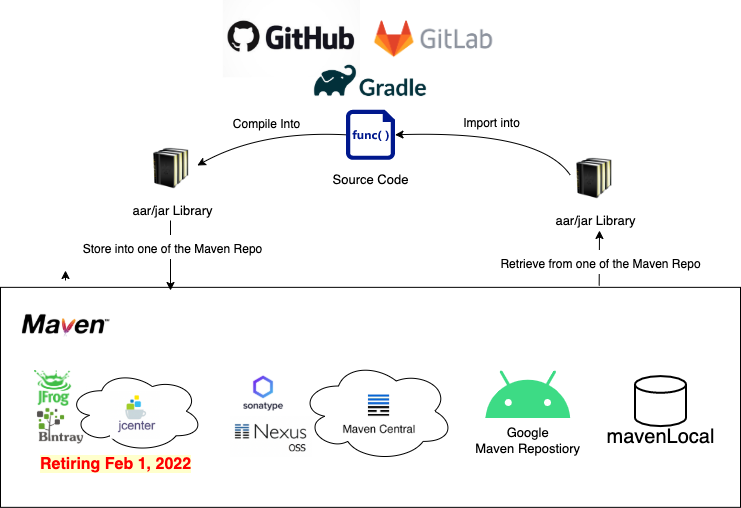
So I did a simple quest and clear it out for myself and draw the below diagram. I was hoping to find such a diagram to clear my confusion, since I didn’t have one, I made one and hope it benefits others.
What is Jcenter?
Actually, I do have a library hosted in Jcenter, i.e. ViewLoaderLibrary. Anyone can download it if they have jcenter() listed as one of the repositories to search by Gradle.
To upload there, we have to create an account in Bintray, which is managed by a company named JFrog.
Knowing that Jcenter is retiring, I just log on to Bintray to check my library, seeing what should I do to migrate to MavenCentral. In my Bintray account, I can see a Maven word there.
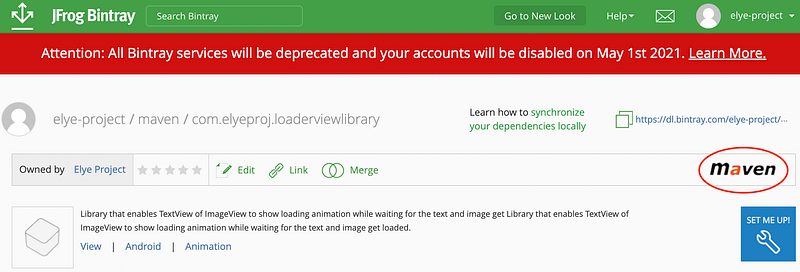
I’m puzzled. Does that mean it is already in MavenCentral as well, and I don’t need to worry about it?
Furthermore, if I add the below maven to a project, I can get rid of Jcenter() in my Gradle file and still manage to upload my library
repositories {
    google()
    maven {
        url  "https://dl.bintray.com/elye-project/maven"
    }
}
Does that mean it is already in MavenCentral? The answer is NO!! Both Jcenter and Bintray are retiring… Therefore https://dl.bintray.com might be gone too.
What is Maven?
In this case, what is Maven then?
It is actually a Software Project Management and Comprehension Tool to better manage Java libraries for projects to work together.
So it is not a system or repository.
JFrog’s Bintray using Maven and create a Maven Repository, named JCenter. They have served the Java and Android communities for a long time. Unfortunately, they are going… So let’s move on.
What is MavenCentral?
Obviously, this is another Maven Repository.
There’re great articles shared on how we can upload our library to MavenCentral
- Guide to upload library to MavenCentral
- Move from JCenter to MaveCentral
- Making Android library from scratch and publish to MavenCentral
As I check through the articles, much mentioned about Sonatype, Nexus, OSSRH, GPG… which confuses me a lot!!
After some reading, here is what they are.
Sonatype is the company that made a repository management tool named Nexus Repository, which works well with Maven. It is also called Nexus Repository OSS, whereby OSS stands for Operations Support System.
OSSRH is OSS Repository Hosting, a generic term for a system that supports operation for repository hosting. The OSSRH for Sonatype is Nexus Repository Manager.
Any organization can purchase the Pro version of Nexus Repository to host its own Maven Repository.
You have not answered what is MavenCentral then?
Okay, okay… Sonatype uses Nexus Repository to help manage a public maven repository named MavenCentral.
That’s the reason for one to put your library into MavenCentral, you need to
- Create a Sonatype JIRA Account
- Central OSSRH admin will respond to you in the JIRA, as you can see in my JIRA ticket here.
- After uploading your library (to Nexus Repository stagging), you’ll need to access Nexus Repository Manager to release your library
- Then finally it will be published in MavenCentral.
Hope this links to how these terms are related.
What about Google Maven Repository
In 2017 Google IO, Google finally announced its own Google Maven Repository. Here it stores all the Android support libraries and Android development tools.
It means a lot to the Android community, as this shows Google is more serious investing more into the Android development.
This Maven Repository is only uploadable by the Google Android development team.
What about mavenLocal?
Imagine if we have a library, and we want to test how it works. The easiest way is to have them in the same project.
However, if our project is separated, and retrieves our library from a maven repository (perhaps a company-owned Nexus Repository), this means every time we want to do a test, we need to upload it to Nexus Repository. Such a pain!
To solve that, the maven tool allows one to upload the library to a local maven repository called mavenLocal(). Physically they are located at
- Unix/Mac OS X —
~/.m2/repository - Windows —
C:\Users\{your-username}\.m2\repository
This will make local cross-project development much more seamless.
I hope this helps and helps provide some insight into Maven Ecosystem for Android development. I was confused myself and hopes this make it clear to others.
If you are interested in the detail to upload to MavenCentral, check out