avatarTeri Radichel

Free AI web copilot to create summaries, insights and extended knowledge, download it at here

6768

Abstract

tle">create</span> <span class="hljs-title">that</span> <span class="hljs-title">functionality</span> <span class="hljs-title">yourself</span>. <span class="hljs-title">I</span> <span class="hljs-title">hope</span> <span class="hljs-title">that</span> <span class="hljs-title">functionality</span> <span class="hljs-title">comes</span> <span class="hljs-title">to</span> <span class="hljs-title">AWS</span> <span class="hljs-title">someday</span>: <span class="hljs-keyword">https</span>://docs.microsoft.com/en-us/azure/defender-<span class="hljs-keyword">for</span>-cloud/just-<span class="hljs-keyword">in</span>-<span class="hljs-built_in">time</span>-access-overview?tabs=defender-<span class="hljs-keyword">for</span>-container-arch-aks</pre></div><div id="8764"><pre>In fact, I wrote <span class="hljs-keyword">a</span> blog <span class="hljs-built_in">post</span> about <span class="hljs-keyword">the</span> concept <span class="hljs-keyword">for</span> AWS <span class="hljs-keyword">before</span> <span class="hljs-keyword">the</span> Azure feature was available <span class="hljs-keyword">with</span> <span class="hljs-keyword">an</span> IOT button <span class="hljs-built_in">to</span> allow access <span class="hljs-built_in">to</span> connect <span class="hljs-built_in">to</span> <span class="hljs-keyword">a</span> VPN. Same concept, different application. <span class="hljs-keyword">https</span>://aws.amazon.com/blogs/aws/just-<span class="hljs-keyword">in</span>-<span class="hljs-built_in">time</span>-vpn-access-<span class="hljs-keyword">with</span>-<span class="hljs-keyword">an</span>-aws-iot-button/</pre></div><p id="23a9">When I tested earlier it did not appear that IAM Access Analyzer showed cross-account actions. I need to further explore this concept now that it is clear that this feature only works for certain services because I believe I was testing KMS at the time. In fact, I could not find the cross-account logs at all. This page states that actions should be present in both accounts. We’ll revisit that if I get back around to setting up cross-account KMS key management.</p><div id="8e80" class="link-block"> <a href="https://docs.aws.amazon.com/kms/latest/developerguide/security-logging-monitoring.html"> <div> <div> <h2>Logging and monitoring in AWS Key Management Service</h2> <div><h3>Monitoring is an important part of understanding the availability, state, and usage of your AWS KMS keys in AWS KMS…</h3></div> <div><p>docs.aws.amazon.com</p></div> </div> <div> <div style="background-image: url(https://miro.readmedium.com/v2/resize:fit:320/)"></div> </div> </div> </a> </div><p id="ffee">What would be great is if this IAM policy generator UI would allow you to select a user or role and then it would only include the actions taken by that user or role, and any resources it accessed. Then it would let you select from that subset as it does below to include which items you want in your policy. Then it would output a policy in either JSON or YAML (there should be an easy conversion library to do that) which you could use in a CloudFormation template.</p><figure id="a7f2"><img src="https://cdn-images-1.readmedium.com/v2/resize:fit:800/1*pb9jimSl95sbBlSf1cnI0Q.png"><figcaption>Access this Screen by clicking Policies on the IAM dashboard and then Create Policy.</figcaption></figure><div id="bbe2"><pre>SSO (I know <span class="hljs-keyword">it</span> has a new <span class="hljs-built_in">name</span>, <span class="hljs-keyword">but</span> <span class="hljs-keyword">it</span>’s still SSO) seems <span class="hljs-keyword">to</span> be off <span class="hljs-keyword">on</span> <span class="hljs-keyword">it</span>’s own island <span class="hljs-keyword">and</span> lacking <span class="hljs-keyword">some</span> <span class="hljs-keyword">of</span> <span class="hljs-keyword">the</span> functionality <span class="hljs-keyword">in</span> this post — <span class="hljs-keyword">and</span> all <span class="hljs-keyword">my</span> posts really. I hope these useful features are <span class="hljs-keyword">not</span> lost <span class="hljs-keyword">in</span> <span class="hljs-keyword">the</span> push <span class="hljs-keyword">for</span> integration.</pre></div><p id="7ee9"><b>Access Advisor Policy Generator</b></p><p id="4d50">As of yet, I have not been able to get the IAM Access Advisor Policy Generator to work. It seems to me that is possibly related to the above issue where IAM Access Advisor does not show you all the actions taken by an IAM role. I presume I was using services that the policy generator did not support but the error message after it ran did not tell me that.</p><div id="f2f1" class="link-block"> <a href="https://readmedium.com/thoughtful-error-handling-ca1064cda8da"> <div> <div> <h2>Thoughtful Error Handling</h2> <div><h3>Your error handler is one of your most important security defenses</h3></div> <div><p>medium.com</p></div> </div> <div> <div style="background-image: url(https://miro.readmedium.com/v2/resize:fit:320/1*hWOdEC85WwPVAPmT9JlrBA.png)"></div> </div> </div> </a> </div><p id="39aa">However, if you are only using the services shown on the above screen shot, this may work for you.</p><p id="17e8">Click on any user or role and scroll to the bottom of the page. Click the Generate policy button and follow the instructions on the screen.</p><figure id="2e85"><img src="https://cdn-images-1.readmedium.com/v2/resize:fit:800/1*bBJKvot1LLZWq43mBO8fmw.png"><figcaption></figcaption></figure><p id="cace">This is a really great feature. However I’d like to be able to choose which of the actions a user took that I want to include in my policy when generated, as well as detailed resources I want to allow the user to access. It also needs to work with cross-account roles.</p><p id="c2d3"><b>CloudTrail</b></p><p id="13fb">One way to a zero-trust policy we’re going to review actions taken in CloudTrail logs with AWS Athena. In order to make sure you can use Athena at the end of this post, make sure you have CloudTrail enabled with an S3 bucket. If you don’t have a trail or a bucket follow this tutorial to set that up:</p><div id="67e3" class="link-block"> <a href="https://docs.aws.amazon.com/awscloudtrail/latest/userguide/cloudtrail-tutorial.html"> <div> <div> <h2>Getting started with AWS CloudTrail tutorial</h2> <div><h3>Getting started wi

Options

th AWS CloudTrail tutorial — AWS CloudTrail If you’re new to AWS CloudTrail, this tutorial helps you…</h3></div> <div><p>docs.aws.amazon.com</p></div> </div> <div> <div style="background-image: url(https://miro.readmedium.com/v2/resize:fit:320/)"></div> </div> </div> </a> </div><p id="c3df">CloudTrail logs may take 5 minutes or so to appear, depending on how you have it configured. You can find the details of the timing of log entries in the CloudTrail documentation.</p><p id="f7c9">Let’s check CloudTrail for the actions take by our role. Copy the name of the role.</p><p id="8148">Navigate to CloudTrail. Click View Full Event History at the bottom of the history list. Click Create Athena Table.</p><figure id="bf0c"><img src="https://cdn-images-1.readmedium.com/v2/resize:fit:800/1*4PR1l6pZis4tf5b1Lc5jsQ.png"><figcaption></figcaption></figure><p id="09c7">Choose the bucket that contains your CloudTrail logs.</p><p id="194a">Click Create Table.</p><figure id="c4a1"><img src="https://cdn-images-1.readmedium.com/v2/resize:fit:800/1*A2Nqf-gwRCOkfKC-Ghpa2w.png"><figcaption></figcaption></figure><p id="0686">Click the link at the top to go to the Athena table.</p><figure id="310d"><img src="https://cdn-images-1.readmedium.com/v2/resize:fit:800/1*Jp6IyjQiexGNLf83TOsKFg.png"><figcaption></figcaption></figure><p id="42c9">Here’s where I hit an error and stopped for a while. I submitted the request to Amazon via the #<a href="https://awswishlist.com/">awswishlist</a> to help resolve this issue.</p><div id="fa27" class="link-block"> <a href="https://readmedium.com/no-output-location-provided-87fcacecda7e"> <div> <div> <h2>No output location provided. An output location is required either through the Workgroup result…</h2> <div><h3>Athena + CloudTrail. What happened?</h3></div> <div><p>medium.com</p></div> </div> <div> <div style="background-image: url(https://miro.readmedium.com/v2/resize:fit:320/1*4oxP4LXk8l8c3mpRvO7ejg.png)"></div> </div> </div> </a> </div><p id="8491">I ended up getting covid in between and hadn’t heard back so I went ahead and took another crack at solving this problem but hit the following road blocks:</p><div id="0cfb" class="link-block"> <a href="https://readmedium.com/permission-denied-on-s3-path-s3-aws-controltower-logs-xxxxxxxx-json-gz-ef042fd20a1a"> <div> <div> <h2>Permission denied on S3 path: s3://aws-controltower-logs-xxxxxxxx.json.gz.</h2> <div><h3>AWS Control Tower with CloudTrail Logs and Athena Not Working</h3></div> <div><p>medium.com</p></div> </div> <div> <div style="background-image: url(https://miro.readmedium.com/v2/resize:fit:320/1*4oxP4LXk8l8c3mpRvO7ejg.png)"></div> </div> </div> </a> </div><p id="9013">I’ve used Athena in the past and it was part of my <a href="https://2ndsightlab.com/cloud-security-training.html">cloud security class</a>. But at this point, I’ve spent so much time on this and I’m not trying to write a blog post on any of that I’m just trying to query cloud trail to fix my policy. This post is already quite long so I’ll continue it in the next where I try out CloudTrailLake instead.</p><div id="e237" class="link-block"> <a href="https://aws.amazon.com/blogs/mt/announcing-aws-cloudtrail-lake-a-managed-audit-and-security-lake/"> <div> <div> <h2>Announcing AWS CloudTrail Lake - a managed audit and security Lake | Amazon Web Services</h2> <div><h3>Organizations managing cloud infrastructure in AWS need effective mechanisms to audit operations in their AWS accounts…</h3></div> <div><p>aws.amazon.com</p></div> </div> <div> <div style="background-image: url(https://miro.readmedium.com/v2/resize:fit:320/0*r-M2oKN6bp2zfV9n)"></div> </div> </div> </a> </div><p id="da7a">You can read the next post where I used CloudTrail Lake to create my zero trust policy instead. You generally have options on AWS and where there’s a will there’s a way. :)</p><div id="24ee" class="link-block"> <a href="https://readmedium.com/querying-cloudtrail-with-cloudtraillake-caf2e9e0561f"> <div> <div> <h2>Querying CloudTrail with CloudTrailLake</h2> <div><h3>ACM.37: Using CloudTrail Lake to query the actions needed to create zero-trust policies (Zero Trust Policies ~ Part 2)</h3></div> <div><p>medium.com</p></div> </div> <div> <div style="background-image: url(https://miro.readmedium.com/v2/resize:fit:320/1*Aznea7iQfPZaSJDnF45lvQ.png)"></div> </div> </div> </a> </div><p id="067c">Follow for updates.</p><p id="4a3a">Teri Radichel | <i>© <a href="https://2ndsightlab.com/?source=post_page---------------------------">2nd Sight Lab</a> 2022</i></p><div id="8b5f"><pre><span class="hljs-section">About Teri Radichel:

⭐️ Author: Cybersecurity Books
⭐️ Presentations: Presentations by Teri Radichel
⭐️ Recognition: SANS Award, AWS Security Hero, IANS Faculty
⭐️ Certifications: SANS ~ GSE 240
⭐️ Education: BA Business, Master of Software Engineering, Master of Infosec
⭐️ Company: Penetration Tests, Assessments, Phone Consulting ~ 2nd Sight Lab</pre></div><div id="caae"><pre><span class="hljs-section">Need Help With Cybersecurity, Cloud, or Application Security?
~~~~~~~~~~~~~~~~~~~~~~~~~~~~~~~~~~~~~~~~~~~~~~~~~~~~~~~~~~~~~</span>
🔒 Request a penetration test or security assessment
🔒 Schedule a consulting call
🔒 Cybersecurity Speaker for Presentation</pre></div><div id="5a42"><pre>Follow <span class="hljs-keyword">for</span> more stories like <span class="hljs-keyword">this</span>:

❤️ Sign Up my Medium Email List ❤️ Twitter: <span class="hljs-meta">@teriradichel</span> ❤️ LinkedIn: https:<span class="hljs-comment">//www.linkedin.com/in/teriradichel</span> ❤️ Mastodon: <span class="hljs-meta">@teriradichel</span><span class="hljs-meta">@infosec</span>.exchange ❤️ Facebook: 2nd Sight Lab ❤️ YouTube: @2ndsightlab</pre></div><figure id="faf5"><img src="https://cdn-images-1.readmedium.com/v2/resize:fit:800/0*H9Ew1KCl-29nZiPR.jpeg"><figcaption></figcaption></figure></article></body>

Creating Zero Trust AWS Policies

ACM.36: Tools and techniques to create zero trust resource, IAM, and Trust policies on AWS (Zero Trust Policies ~ Part 1)

~~~~~~~~~~~~~~~~~~~~~~~~~~~~~~~~~~~~~~~~~~~~~~~~~~~~~~~~~

⚙️ Check out my series on Automating Cybersecurity Metrics. The Code.

🔒 Related Stories: AWS Security | Cloud Security Architecture | IAM

💻 Free Content on Jobs in Cybersecurity | ✉️ Sign up for the Email List

~~~~~~~~~~~~~~~~~~~~~~~~~~~~~~~~~~~~~~~~~~~~~~~~~~~~~~~~~

In the last post we looked at creating credentials for automation without exposing them to users:

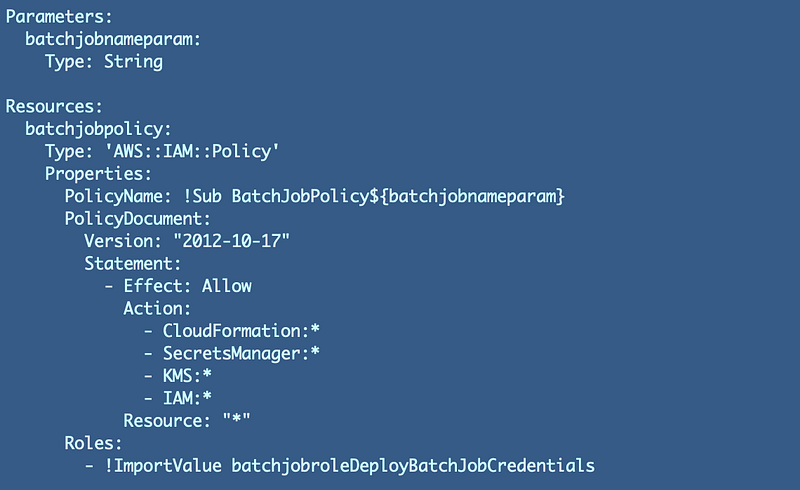
In that post we created a IAM role policy with permissions that were much too broad. Now we want to restrict the IAM role policy to only what the role requires to perform the actions the role just did when we created our new Access Key.

It looks like this with very broad access and no resource restrictions:
In order to see what actions the role took and create a policy we have a few options, some of which don’t currently work for all use cases.

  1. AWS Access Advisor — which should give us a list of actions the user took in CoudTrail logs.
  2. AWS Access Advisor Policy Generator — which should use the above information to generate a policy.
  3. CloudTrail Logs — when all else fails, we should be able to query CloudTrail logs to see what actions the user took.
  4. Trial and Error — Give the user or role no permissions and then try to take the actions you want to perform. Fix each error message by adding permissions as it occurs. Unfortunately, if you get error message that don’t tell you what service or resource the user couldn’t access, this will be difficult.

IAM Access Analyzer

This is interesting. I wrote about IAM Access Analyzer in a separate blog post (not part of this series) and it looks like we have a new message on the screen now that explains that this feature only works with certain AWS services.
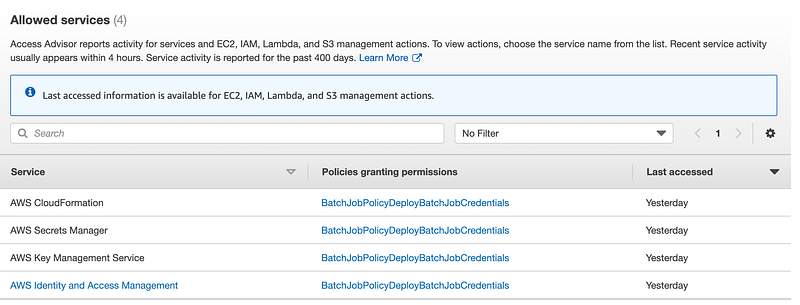
Although the message on the screen says otherwise, access analyzer lists all the services our role used. However, it only shows the actions for the services listed: EC2, IAM, Lambda, and S3. So of the services used we can only get the specific actions taken for IAM. Let’s look at what it provides for IAM.

Click the link for IAM. Here we can see the IAM actions the role took.
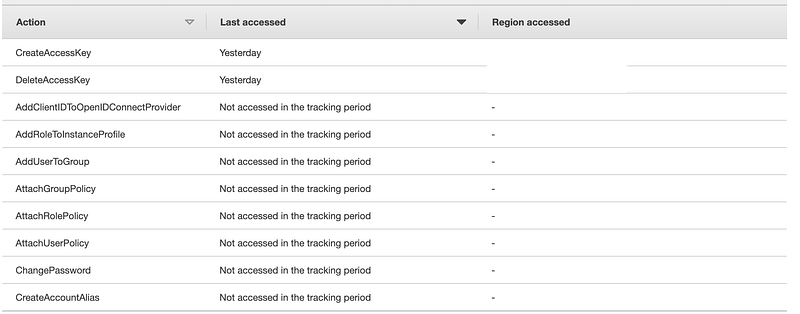
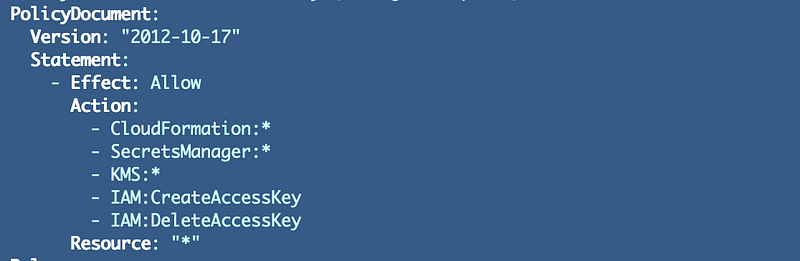
Only two actions in the above list were used by our role to create the credentials. We can replace iam.* with only those two actions. Now our policy looks like this:
Warning on granting full administrative permissions:
If you see iam.* in a policy that is similar to domain admin in a Windows Active Directory environment. Understand who has these permissions and why. Limit their use if possible to only activated when needed, requiring MFA, or other restrictions to limit their potential abuse. What I'm showing you here is a better alternative. Create jobs for specific actions and use those jobs with specific roles and policies instead of giving full IAM access.
Also, just because a user has to "switch" to an IAM role doesn't mean much. If an attacker has access to their active session or user credentials, they too can "switch" to the IAM role. This is why, although SSO is handy, it is also risky when you give a user access to a lot of powerful roles across the enterprise.
An Azure you can use a feature called Just-In-Time access which you can set up to require a second party to authorize permissions before performing some administrative actions. You can do the same thing on AWS, you just need to create that functionality yourself. I hope that functionality comes to AWS someday:
https://docs.microsoft.com/en-us/azure/defender-for-cloud/just-in-time-access-overview?tabs=defender-for-container-arch-aks
In fact, I wrote a blog post about the concept for AWS before the Azure feature was available with an IOT button to allow access to connect to a VPN. Same concept, different application.
https://aws.amazon.com/blogs/aws/just-in-time-vpn-access-with-an-aws-iot-button/

When I tested earlier it did not appear that IAM Access Analyzer showed cross-account actions. I need to further explore this concept now that it is clear that this feature only works for certain services because I believe I was testing KMS at the time. In fact, I could not find the cross-account logs at all. This page states that actions should be present in both accounts. We’ll revisit that if I get back around to setting up cross-account KMS key management.

What would be great is if this IAM policy generator UI would allow you to select a user or role and then it would only include the actions taken by that user or role, and any resources it accessed. Then it would let you select from that subset as it does below to include which items you want in your policy. Then it would output a policy **in either JSON or YAML** (there should be an easy conversion library to do that) which you could use in a CloudFormation template.
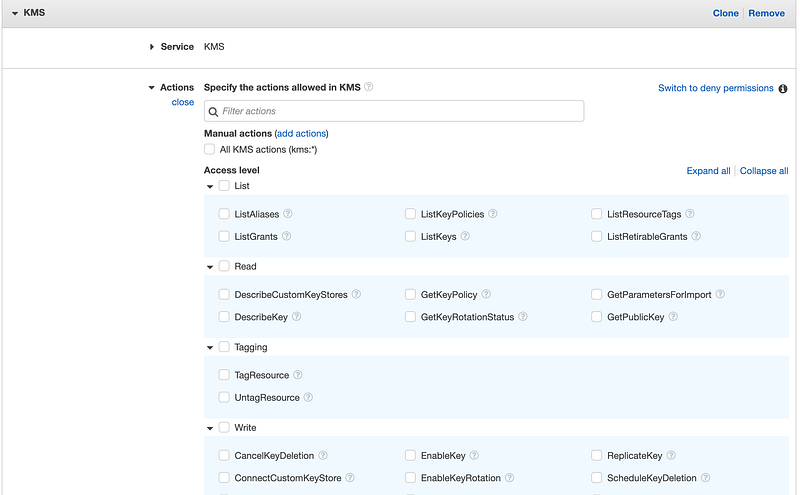
Access this Screen by clicking Policies on the IAM dashboard and then Create Policy.
SSO (I know it has a new name, but it’s still SSO) seems to be off on it’s own island and lacking some of the functionality in this post — and all my posts really. I hope these useful features are not lost in the push for integration.

Access Advisor Policy Generator

As of yet, I have not been able to get the IAM Access Advisor Policy Generator to work. It seems to me that is possibly related to the above issue where IAM Access Advisor does not show you all the actions taken by an IAM role. I presume I was using services that the policy generator did not support but the error message after it ran did not tell me that.

However, if you are only using the services shown on the above screen shot, this may work for you.

Click on any user or role and scroll to the bottom of the page. Click the Generate policy button and follow the instructions on the screen.
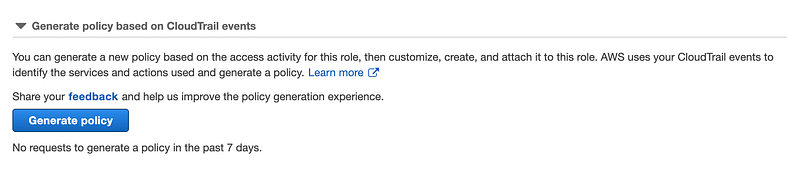
This is a really great feature. However I’d like to be able to choose which of the actions a user took that I want to include in my policy when generated, as well as detailed resources I want to allow the user to access. It also needs to work with cross-account roles.

CloudTrail

One way to a zero-trust policy we’re going to review actions taken in CloudTrail logs with AWS Athena. In order to make sure you can use Athena at the end of this post, make sure you have CloudTrail enabled with an S3 bucket. If you don’t have a trail or a bucket follow this tutorial to set that up:

CloudTrail logs may take 5 minutes or so to appear, depending on how you have it configured. You can find the details of the timing of log entries in the CloudTrail documentation.

Let’s check CloudTrail for the actions take by our role. Copy the name of the role.

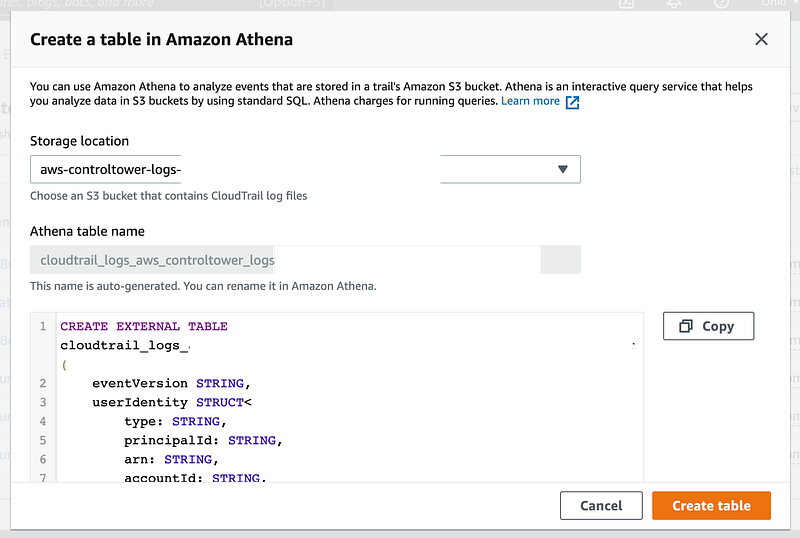
Navigate to CloudTrail. Click View Full Event History at the bottom of the history list. Click Create Athena Table.

Choose the bucket that contains your CloudTrail logs.

Click Create Table.
Click the link at the top to go to the Athena table.

Here’s where I hit an error and stopped for a while. I submitted the request to Amazon via the #awswishlist to help resolve this issue.

I ended up getting covid in between and hadn’t heard back so I went ahead and took another crack at solving this problem but hit the following road blocks:

I’ve used Athena in the past and it was part of my cloud security class. But at this point, I’ve spent so much time on this and I’m not trying to write a blog post on any of that I’m just trying to query cloud trail to fix my policy. This post is already quite long so I’ll continue it in the next where I try out CloudTrailLake instead.

You can read the next post where I used CloudTrail Lake to create my zero trust policy instead. You generally have options on AWS and where there’s a will there’s a way. :)

Follow for updates.

Teri Radichel | © 2nd Sight Lab 2022

About Teri Radichel:
~~~~~~~~~~~~~~~~~~~~
⭐️ Author: Cybersecurity Books
⭐️ Presentations: Presentations by Teri Radichel
⭐️ Recognition: SANS Award, AWS Security Hero, IANS Faculty
⭐️ Certifications: SANS ~ GSE 240
⭐️ Education: BA Business, Master of Software Engineering, Master of Infosec
⭐️ Company: Penetration Tests, Assessments, Phone Consulting ~ 2nd Sight Lab
Need Help With Cybersecurity, Cloud, or Application Security?
~~~~~~~~~~~~~~~~~~~~~~~~~~~~~~~~~~~~~~~~~~~~~~~~~~~~~~~~~~~~~
🔒 Request a penetration test or security assessment
🔒 Schedule a consulting call
🔒 Cybersecurity Speaker for Presentation
Follow for more stories like this:
~~~~~~~~~~~~~~~~~~~~~~~~~~~~~~~~~~~~~~~~~~~~~~~~~~~~~~~~~~~~~ 
❤️ Sign Up my Medium Email List
❤️ Twitter: @teriradichel
❤️ LinkedIn: https://www.linkedin.com/in/teriradichel
❤️ Mastodon: @teriradichel@infosec.exchange
❤️ Facebook: 2nd Sight Lab
❤️ YouTube: @2ndsightlab

Zero Trust
AWS
Iam
Access Advisor
Policy
Recommended from ReadMedium